
1. Introduction
Thank you for choosing the Scangrip Miniform 03.6207 LED Work Light. This compact, durable, and versatile work light is designed for professional use in demanding environments. This manual provides essential information for the safe and effective operation, maintenance, and troubleshooting of your device. Please read it thoroughly before use and keep it for future reference.
2. Safety Instructions
- Always ensure the work light is fully charged before initial use.
- Do not look directly into the LED light source when it is active, as it may cause eye strain or temporary vision impairment.
- Do not attempt to open or modify the device. This will void the warranty and may cause damage or injury.
- Keep the device away from extreme temperatures, direct sunlight, and corrosive liquids.
- Use only the provided or certified USB-C charging cable and a compatible power adapter.
- If the device shows signs of damage, discontinue use immediately and contact customer support.
- Dispose of the battery and device according to local regulations. Do not dispose of in household waste.
3. Product Features
The Scangrip Miniform 03.6207 is engineered for optimal performance and durability:
- Dual Light Sources: Powerful main light (up to 200 lumens) and a focused top spot light (120 lumens) for detailed inspections.
- OPTILight Function: Adjusts light intensity for optimal illumination and extended battery life.
- Rechargeable Battery: Integrated Li-ion battery with USB-C charging.
- Battery Indicator: Visual display of remaining battery level.
- Durable Construction: IP65 dust and water resistant, IK07 impact resistant, and 2-meter drop resistant.
- Versatile Mounting: Integrated magnet, retractable hanging hook, and belt clip for hands-free operation.
- Ergonomic Design: Compact size and user-friendly shape for comfortable grip and portability.

Image 1: The Scangrip Miniform highlighting its compact dimensions (126mm length, 60mm width, 23.5mm thickness) and lightweight design (106g), emphasizing its ergonomic grip and portability.
4. Setup and Charging
4.1 Initial Charge
Before first use, fully charge your Scangrip Miniform work light. This ensures optimal battery performance and longevity.
- Locate the USB-C charging port on the device.
- Connect the provided USB-C cable to the work light and the other end to a compatible USB power adapter (not included) or a powered USB port.
- The battery indicator LEDs will illuminate to show the charging progress. All LEDs will be solid green when fully charged.
- A full charge typically takes approximately 3 hours.
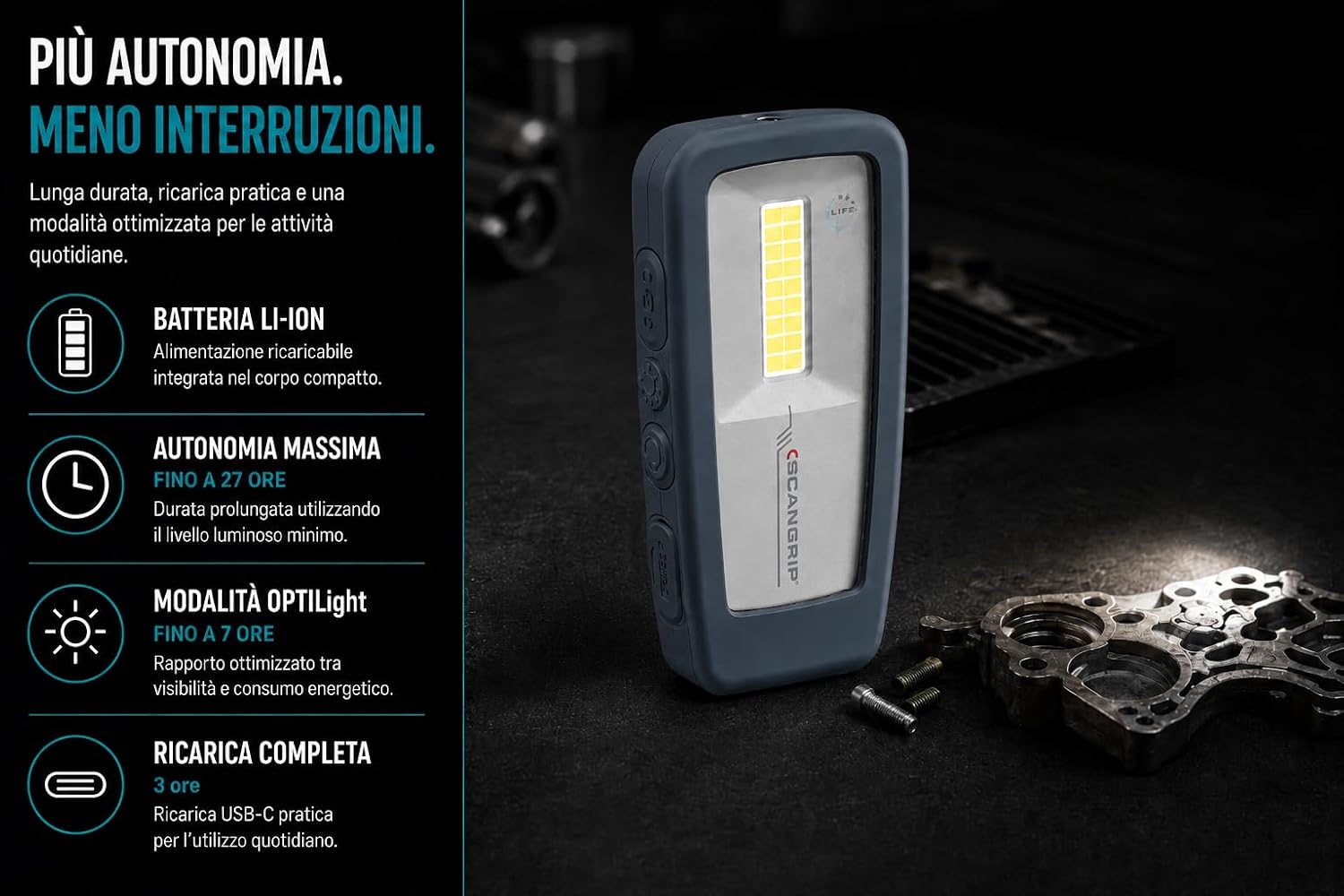
Image 2: Visual representation of the Scangrip Miniform's power features, including its integrated Li-ion battery, maximum runtime of up to 27 hours, OPTILight mode for up to 7 hours, and a full USB-C charging time of 3 hours.
5. Operating Instructions
5.1 Power On/Off and Main Light Operation
The Scangrip Miniform features separate buttons for power and brightness control.
- Press the Power Button once to turn on the main light at its lowest setting.
- Press the Brightness Button repeatedly to cycle through the three main light intensity levels (low, medium, high).
- Press the Power Button again to turn off the main light.
5.2 Top Spot Light Operation
The focused top spot light is ideal for inspections and illuminating tight spaces.
- With the main light off, press the Power Button twice quickly to activate the top spot light.
- Press the Power Button once to turn off the spot light.
5.3 OPTILight Function
The OPTILight feature optimizes light output for the task at hand, balancing brightness and runtime.
- While the main light is on, press and hold the Brightness Button for 2 seconds to activate OPTILight mode. The light will adjust to an optimized setting.
- To exit OPTILight mode, press the Brightness Button again.
5.4 Battery Indicator
The battery indicator LEDs on the back of the device provide a quick overview of the remaining battery life.
- Green LEDs: Indicate sufficient charge.
- Red LED: Indicates low battery, requiring recharge soon.

Image 3: The rear view of the Scangrip Miniform, showcasing the OPTILight logo, the battery level indicator LEDs, and the integrated magnet at the base.

Image 4: The Scangrip Miniform demonstrating its dual illumination capabilities: the wide main light providing up to 200 lumens with 115° coverage, and the focused top spot light offering 120 lumens for precise inspection.
6. Mounting Options
The Scangrip Miniform offers multiple ways to position the light for hands-free operation:
- Integrated Magnet: The powerful magnet at the base allows for secure attachment to metallic surfaces, such as vehicle hoods, toolboxes, or metal shelving.
- Retractable Hanging Hook: Pull out the integrated hook from the top of the device to hang the light from pipes, wires, or other suitable fixtures.
- Belt Clip: Use the sturdy clip on the back to attach the light to your belt, pocket, or work gear for easy access and portability.

Image 5: Demonstrates the versatile mounting options of the Scangrip Miniform, including its integrated magnet for metal surfaces, a retractable hanging hook for suspension, and a rear clip for attaching to belts or pockets, enabling hands-free work.
7. Maintenance
- Cleaning: Wipe the device with a soft, damp cloth. Do not use abrasive cleaners or solvents.
- Storage: Store the work light in a cool, dry place away from direct sunlight when not in use. For long-term storage, ensure the battery is partially charged (around 50%) to maintain battery health.
- Battery Care: To prolong battery life, avoid fully discharging the battery regularly. Recharge when the low battery indicator appears.
8. Troubleshooting
| Problem | Possible Cause | Solution |
|---|---|---|
| Light does not turn on. | Battery is depleted. | Charge the device fully using the USB-C cable. |
| Light output is dim. | Low battery or incorrect brightness setting. | Recharge the battery. Cycle through brightness levels using the brightness button. |
| Device not charging. | Faulty cable, adapter, or port. | Try a different USB-C cable or power adapter. Ensure the charging port is clean and free of debris. |
9. Specifications
| Model Number: | 03.6207 |
| Light Source: | 20 high-efficiency multi-LEDs (main), 1 LED (spot) |
| Main Light Output: | Up to 200 lumens (3 levels) |
| Spot Light Output: | 120 lumens |
| Color Temperature: | 5700K |
| Color Rendering Index (CRI): | >80 |
| Battery: | Integrated Li-ion |
| Charging Time: | Approx. 3 hours (USB-C) |
| Max Runtime: | Up to 27 hours (lowest setting) |
| OPTILight Runtime: | Up to 7 hours |
| Protection Rating: | IP65 (Dust and water resistant) |
| Impact Resistance: | IK07 |
| Drop Resistance: | 2 meters |
| Operating Temperature: | -10°C to +40°C |
| Dimensions: | 12.6 x 6 x 2.35 cm |
| Weight: | 110 g |

Image 6: Illustrates the robust construction of the Scangrip Miniform, highlighting its IP65 protection against dust and water jets, IK07 impact resistance, 2-meter drop resistance, and an operational temperature range of -10°C to +40°C.
10. Warranty and Support
The Scangrip Miniform 03.6207 LED Work Light comes with a 5-year warranty from the date of purchase, covering manufacturing defects. Please retain your proof of purchase for warranty claims.
For technical support, warranty inquiries, or service, please visit the official Scangrip website or contact your local dealer. Do not attempt to repair the device yourself.
Scangrip is a registered trademark. All rights reserved.