1. Introduction
The IHSENO ZigBee Smart Knob Switch is a versatile wireless device designed for smart home automation. It functions as both a scene button and a rotatable dimmer, allowing control over ZigBee-compatible lights and smart devices. This device requires a ZigBee hub, such as a Tuya Gateway, to operate and integrate with smart home ecosystems like Alexa and Google Home.
The knob offers multiple control methods including single press, double press, rotation for dimming, and press-and-rotate for color temperature adjustments. It enables the creation of smart scenes for convenient control of various electronic devices.

Image 1.1: IHSENO ZigBee Smart Knob Switch with a smartphone displaying its remote dimmer interface.
2. What's in the Box
- Smart knob dimmer (1)
- User Manual (1)
- Sticker (1)
3. Setup and Installation
3.1 Requirements
- A ZigBee Hub (e.g., Tuya Gateway) is required for functionality.
- A smartphone with the Tuya Smart App installed.
3.2 Pairing with a ZigBee Hub
- Ensure your ZigBee hub is powered on and connected to your network.
- Open the Tuya Smart App on your smartphone.
- Follow the app's instructions to add a new device.
- Place the Smart Knob Switch in pairing mode (refer to the device's specific pairing instructions, usually involving a long press of the button).
- Once detected, add the Smart Knob Switch to your ZigBee gateway within the app.

Image 3.1: Diagram illustrating the connection of the Smart Knob Scene Switch to a Tuya Zigbee hub, which then connects to a router and a smartphone.
3.3 Mounting the Switch
The switch can be mounted using the provided adhesive sticker. Ensure the surface is clean and dry before applying the sticker for optimal adhesion.
4. Operating Instructions
The Smart Knob Switch offers various operations to control your smart devices and scenes.
4.1 Remote Mode Operations (for ZigBee dimming lamps)
- Single Press: Turns the connected ZigBee bulb ON/OFF.
- Rotate: Adjusts the brightness (dimmer function) of the connected ZigBee bulb.
- Press and Rotate: Sets the color temperature of the connected ZigBee bulb.
- Long Press (more than 3 seconds): Sets the color of the connected ZigBee bulb.
4.2 Scene Mode Operations (for smart scenes)
In scene mode, the knob acts as a trigger for pre-configured smart scenes in your Tuya Smart App.
- Single Click: Activates a designated 'Home Mode' scene, turning on lights, air conditioners, fans, and other electronic devices as configured.

Image 4.1: A hand pressing the Smart Knob Switch, illustrating its use for activating 'Home Mode' to turn on various smart devices.
- Double Click: Activates a designated 'Away Mode' scene, turning off lights, air conditioners, fans, and other electronic devices before leaving.

Image 4.2: A hand double-pressing the Smart Knob Switch, illustrating its use for activating 'Away Mode' to turn off various smart devices.
4.3 Creating Smart Scenes
You can create and customize multiple intelligent scenes within the Tuya Smart App to automate your smart devices. This allows you to define specific actions for single or double clicks of the knob switch.

Image 4.3: Screenshot of the Tuya Smart App interface showing the process of adding intelligence or creating smart scenes for the knob switch.
5. Maintenance
5.1 Battery Replacement
The Smart Knob Switch is powered by a CR2450 lithium-ion battery. When the battery level is low, the device's performance may be affected. To replace the battery:
- Locate the small screw on the back plate of the device.
- Carefully unscrew it to remove the back plate. Be cautious not to lose the screw.
- Remove the old CR2450 battery.
- Insert a new CR2450 battery, ensuring correct polarity.
- Replace the back plate and secure it with the screw.
Note: Battery life can vary depending on usage and environmental factors. Frequent use or poor signal strength may lead to faster battery depletion.
5.2 Cleaning
Wipe the device with a soft, dry cloth. Avoid using abrasive cleaners or solvents that could damage the surface.
6. Troubleshooting
- Device Not Responding:
- Check the battery level and replace if necessary.
- Ensure the device is within range of your ZigBee hub.
- Verify that the ZigBee hub is powered on and connected to your network. - Short Wireless Range:
- The effective range of ZigBee devices can be affected by obstacles and interference. Consider adding a ZigBee repeater or repositioning your hub for better signal coverage.
- Ensure there are no large metal objects or other wireless devices directly interfering with the signal path. - Rapid Battery Drain:
- If the battery drains quickly (e.g., within days), this may indicate a faulty battery or a device constantly struggling to maintain a connection. Ensure the device has a strong ZigBee signal.
- Replace the battery with a fresh, high-quality CR2450 battery. - Difficulty with Home Assistant Integration (Specific Functions):
- Some users have reported that specific functions like double-press or single-press events may not register correctly with Home Assistant without custom configuration. This may require advanced setup or custom 'quirks' within Home Assistant to fully utilize all knob functions.
- Refer to Home Assistant community forums or documentation for device-specific integration tips. - Stiff Rotation / Knob Movement:
- The knob's rotation mechanism is designed to be firm. If placed on an unstable surface, it may be difficult to rotate without pressing the button. For optimal use, mount the switch using the provided adhesive or place it on a stable, non-slip surface.
7. Specifications
| Parameter | Value |
|---|---|
| Product Name | Smart Knob Dimmer |
| Model Number | zigbee smart knob |
| Dimensions | 50 x 50 x 24.5 mm (2 x 2 x 1 inches) |
| Built-in Battery | CR2450 (included) |
| Operating Voltage | DC 3V |
| Working Current | Standby current <8uA |
| Wireless Protocol | ZigBee (requires ZigBee gateway) |
| Wireless Transmission Distance | Open range ≥30 meters |
| Operating Environment Temperature | -5 °C to 55 °C (23 °F to 131 °F) |
| Operating Environment Humidity | ≤95% (no condensation) |
| Material | ABS |
| Operation Mode | ON-OFF |
| Current Rating | 0.04 Amps |
| Contact Type | Normally Closed |

Image 7.1: Visual representation of the product dimensions and a table summarizing key product parameters.
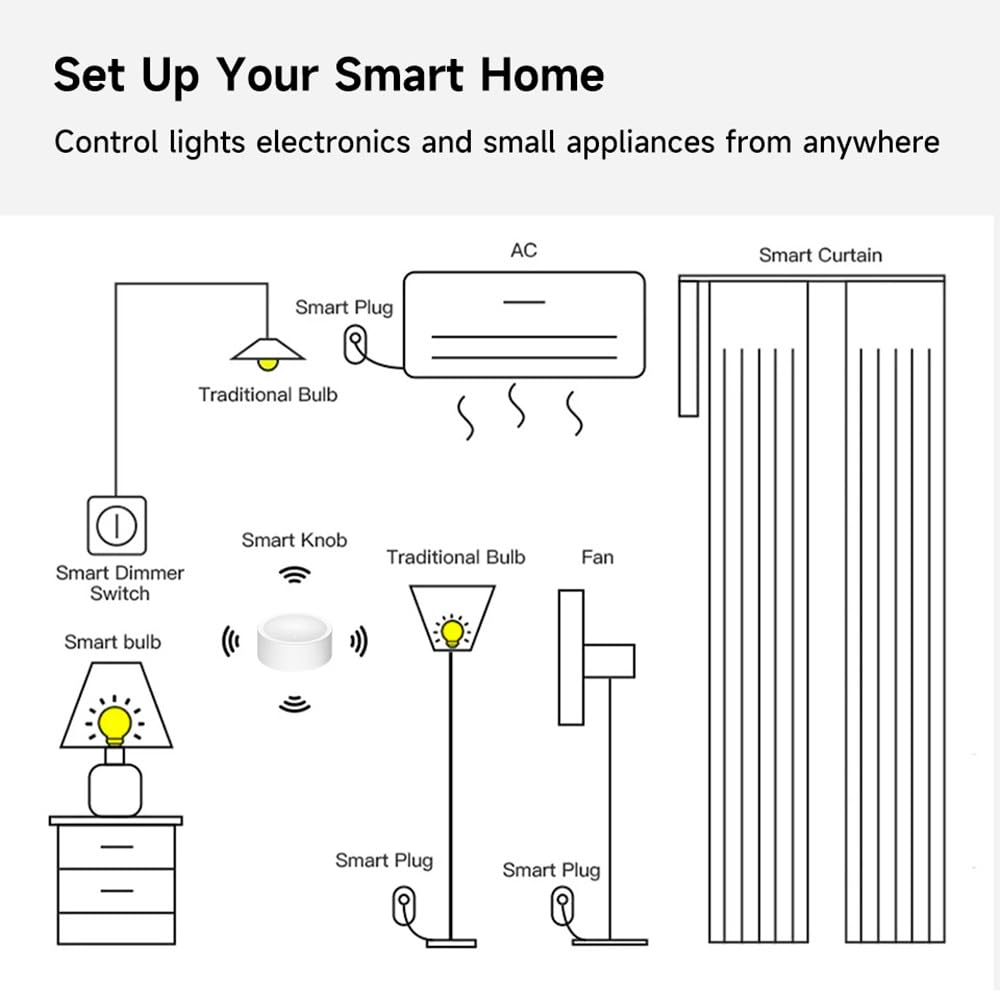
Image 7.2: Diagram illustrating how the Smart Knob Switch can integrate into a smart home setup to control various devices like smart bulbs, smart plugs, and smart curtains.
8. Warranty and Support
Specific warranty information for this product is not provided in the available documentation. For support or warranty inquiries, please contact the retailer or manufacturer directly.


