
Introduction
This manual provides detailed instructions for the safe and effective use of your Kymate PMLN7089 Vehicular Travel Charger. This charger kit is designed to provide power and charge compatible Motorola two-way radios and their batteries directly from a vehicle's cigarette lighter adapter. It allows for continuous radio operation while charging.
Safety Information
WARNING:
- Use only with specified Motorola radio models and battery part numbers as listed in this manual.
- Do not expose the charger to moisture or extreme temperatures.
- Ensure the vehicle's power outlet is clean and free of debris before inserting the charger.
- Do not attempt to disassemble or modify the charger. Refer all servicing to qualified personnel.
- Always ensure the radio is securely seated in the charger base to prevent accidental dislodgement during vehicle movement.

Image: Close-up view of the charger base, highlighting the warning label regarding battery compatibility and proper charging procedures.
Package Contents
Verify that all items listed below are included in your package:
- 1x Voltage regulated vehicular charger adapter
- 1x Custom charger base
- 1x Mounting bracket
- 1x Coil Cord
- Mounting screws (typically 4)
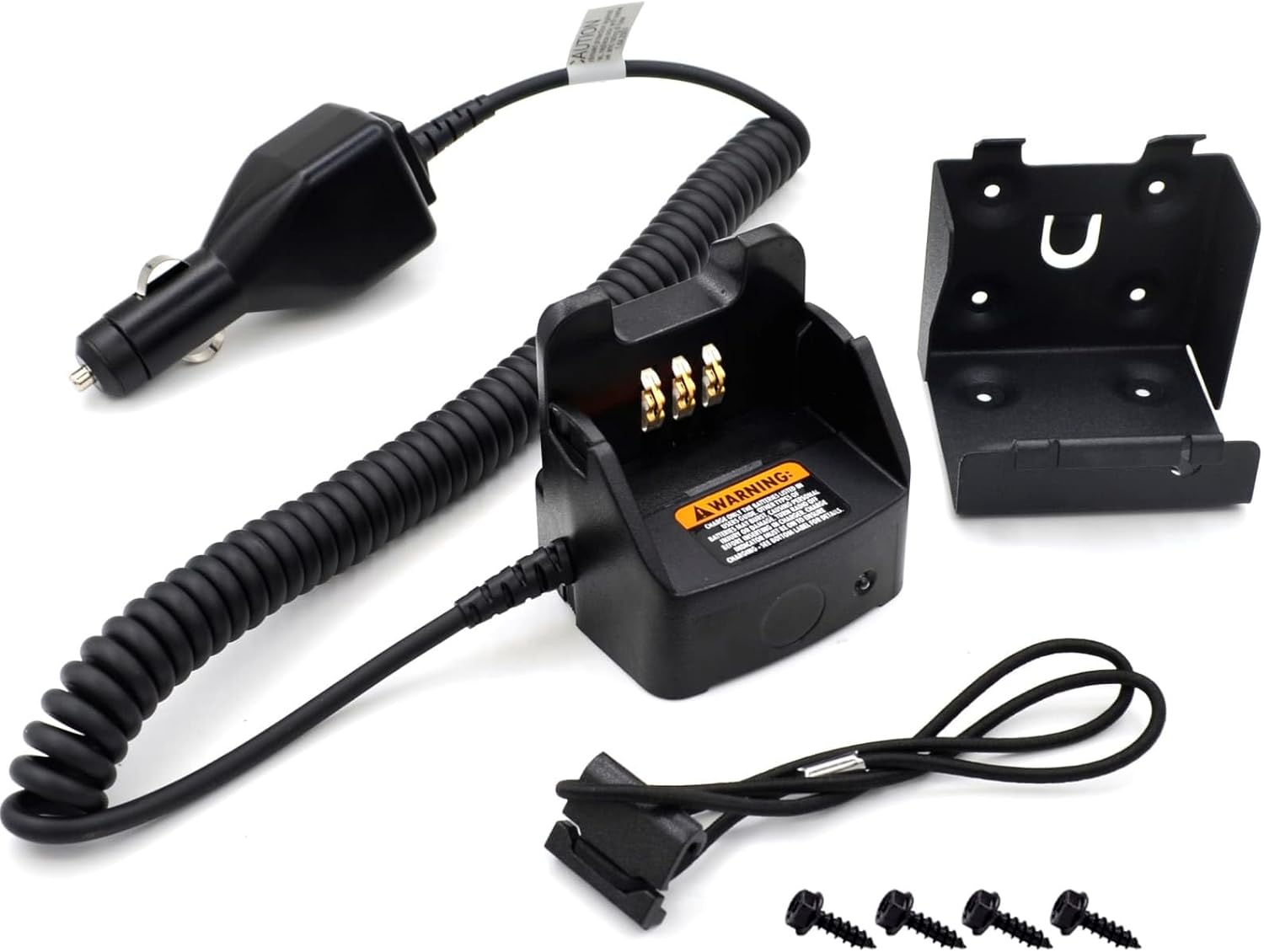
Image: An overhead view displaying all components included in the charger kit: the charger adapter with coil cord, the charger base, the mounting bracket, and four mounting screws.
Setup
- Mounting the Charger Base:
Select a suitable, stable location within your vehicle for the charger base. Ensure the location allows for easy access to the radio and does not obstruct driving. Use the provided mounting bracket and screws to securely attach the charger base to the chosen surface.

Image: The charger base and its metal mounting bracket, shown separately, illustrating how they connect for installation.
- Connecting to Power:
Insert the vehicular charger adapter's plug into your vehicle's 12V-24V cigarette lighter or accessory power outlet. Ensure a firm connection. The coil cord provides flexibility for placement.

Image: A detailed view of the cigarette lighter adapter, which connects the charger to the vehicle's power source.
- Securing the Radio:
The unit includes a nylon strap to help keep the radio in place within the charger base, especially during vehicle movement. Thread the strap through the designated slots on the charger base and around your radio for added security.
Operating Instructions
- Placing the Radio:
Carefully insert your compatible Motorola two-way radio into the charger base. Ensure the radio's battery contacts align correctly with the charging pins in the base. The radio should sit firmly in the base.

Image: A close-up view of the charging pins located inside the charger base, where the radio's battery contacts will connect.
- Charging Indication:
The charger base may have an indicator light (if present) to show charging status. Refer to your radio's manual for specific charging indications. The charger is designed to charge all Ni-CD, Ni-MH, and Li-ion batteries compatible with the listed radio models.
- Using the Radio While Charging:
The design of this vehicular charger allows the radio to be used for transmission and reception while it is seated in the charger base. This is particularly useful when paired with a Remote Speaker Microphone (RSM).
Compatible Radio Models:
- CP040, CP140, CP150, CP160, CP180, CP250, CP180
- CP2000, CP200XLS, EP450, DEP450, DP1400, GP3188, GP3388, GP3688, PR400
- XIR P3688, DP1400, CP200D, R2 Portable Walkie Talkie
Compatible Battery Part Numbers:
- NNTN4497, NNTN4497A, NNTN4497B, NNTN4497C, NNTN4497AR, NNTN4497BR, NNTN4497CR, NNTN4497DR
- NNTN4496, NNTN4496A, NNTN4496AR
- NNTN4970, NNTN4970A, NNTN4970AR
- NNTN4851, NNTN4851A, NNTN4851R, NNTN4851AR
- PMNN4253, PMNN4254, PMNN4254BR, PMNN4259, PMNN4598
Maintenance
- Cleaning: Disconnect the charger from the vehicle's power outlet before cleaning. Use a soft, dry cloth to wipe down the charger base and adapter. Do not use abrasive cleaners or solvents.
- Storage: When not in use, store the charger in a cool, dry place, away from direct sunlight and extreme temperatures.
- Cable Care: Avoid sharp bends or kinks in the coil cord. Do not pull the cord to disconnect the adapter from the power outlet.
Troubleshooting
| Problem | Possible Cause | Solution |
|---|---|---|
| Radio not charging. |
|
|
| Charger feels hot. |
|
|
Notice: If you are unsure whether this charger is compatible with your radio, please provide your radio model and battery model for assistance.
Specifications
- Model Number: PMLN7089A
- Input Voltage: DC 12-24V
- Output Voltage: DC 12V 1A
- Product Dimensions: 8.07"D x 3.34"W x 3.74"H (20.5 x 8.5 x 9.5 cm)
- Item Weight: 12.2 ounces (345.86 grams)
- Color: Black
- Compatibility: Ni-CD, Ni-MH, and Li-ion Batteries
Warranty and Support
This product is manufactured by Kymate. For any inquiries regarding product functionality, compatibility, or troubleshooting not covered in this manual, please contact Kymate customer support. Specific warranty details may vary; please refer to your purchase documentation or the manufacturer's official website for comprehensive warranty information.
Manufacturer: Kymate