
WHATOOK W02-Black-1
WHATOOK Compressed Air Duster User Manual
Model: W02-Black-1
Brand: WHATOOK
1. Introduction
Thank you for choosing the WHATOOK Compressed Air Duster. This electric air duster is designed for efficient and powerful cleaning of various items, including keyboards, computers, car interiors, and household surfaces. Featuring a high-speed brushless motor and stepless speed regulation, it offers a versatile and eco-friendly alternative to traditional canned air. Please read this manual thoroughly before use to ensure safe and optimal performance.
2. Safety Information
- Keep the device away from water and other liquids. Do not operate with wet hands.
- Do not point the air duster directly at people or animals.
- Ensure the charging cable and adapter are in good condition. Do not use if damaged.
- Do not block the air intake or outlet during operation.
- Store the device in a cool, dry place, away from direct sunlight and high temperatures.
- Keep out of reach of children.
- The device is equipped with overheating protection. If it reaches 70°C, it will automatically stop working to prevent damage.
3. Product Overview and Components
The WHATOOK Compressed Air Duster comes with several components designed for various cleaning tasks.
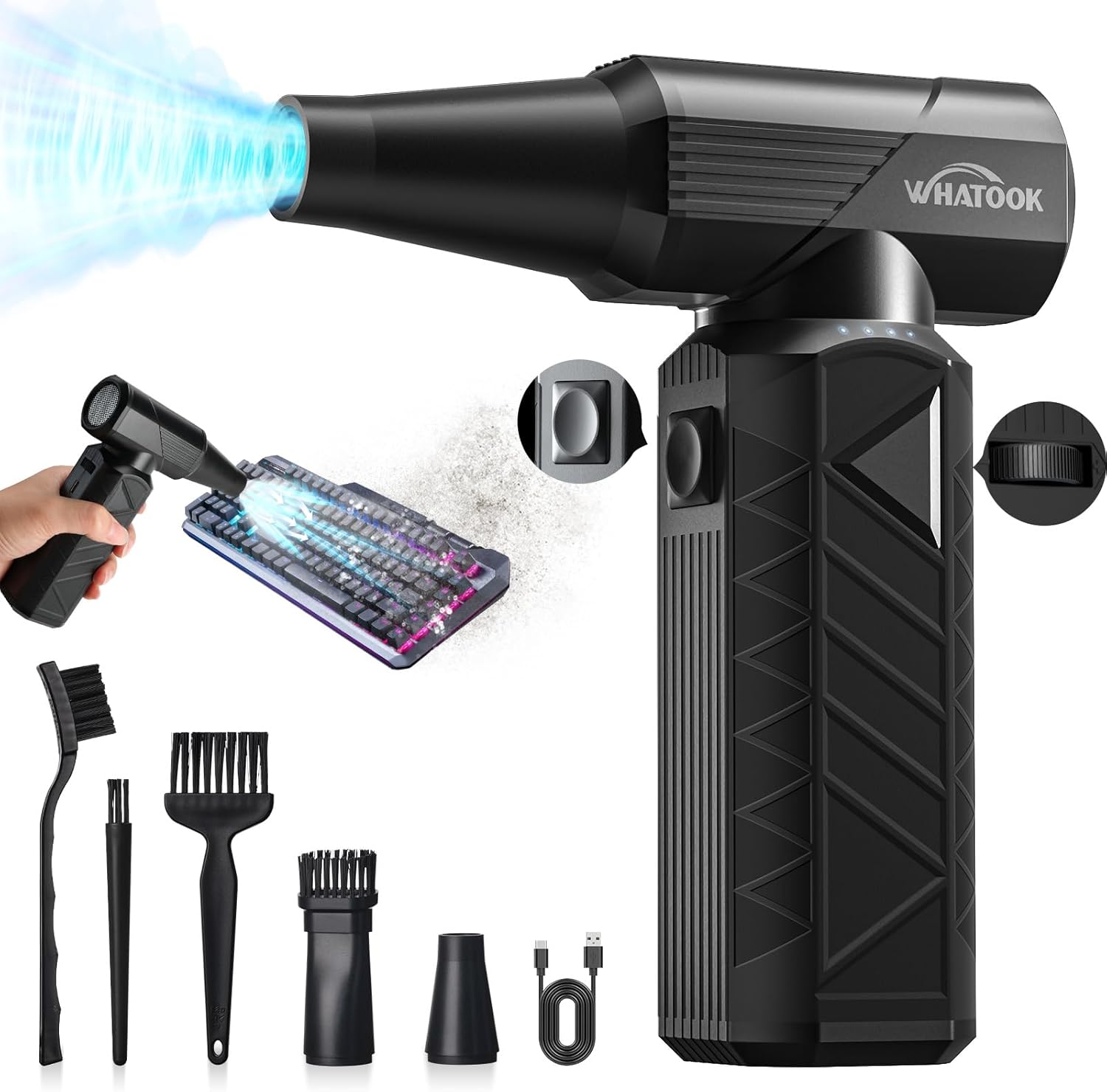
Figure 3.1: Main unit and accessories including various brushes and nozzles, and a USB-C charging cable.
What's in the Box:
- Electric Air Duster (Main Unit)
- Type-C Charging Cable
- Cleaning Kit (various brushes)
- Storage Bag
- User Manual (this document)

Figure 3.2: Visual representation of the items included in the product packaging.
Nozzles:
The device includes two primary nozzles for different applications:

Figure 3.3: Round Nozzle. Suitable for general purpose cleaning, barbecue fire starting, pet drying, sofa seats, and lockers.

Figure 3.4: Brush Nozzle. Ideal for cleaning cars, computers, keyboards, window sill gaps, and sofas, providing both blowing and brushing action.
4. Setup
4.1 Initial Charging
Before first use, fully charge the air duster. Connect the provided Type-C charging cable to the device and a compatible 10W power adapter (not included). The device features a 10000mAh battery and supports fast charging, reaching full charge in approximately 3 hours.

Figure 4.1: The air duster connected to a charger, illustrating its 10W fast charging capability and built-in overheating protection.
4.2 Attaching Nozzles
Select the appropriate nozzle for your cleaning task. Align the nozzle with the air outlet on the main unit and push it firmly until it clicks into place. Ensure it is securely attached before operation.
5. Operating Instructions
The WHATOOK Compressed Air Duster offers two primary operating modes for precise control over airflow.

Figure 5.1: Close-up of the control buttons and metal grid design, showing the keystroke and slide wind speed modes.
5.1 Keystroke Mode (3-Gear Adjustment)
This mode provides fixed speed settings for quick and easy operation.
- Press the power button once: Activates 1st gear (approx. 50,000 RPM) - suitable for low airflow tasks like pet hair or delicate items.
- Press the power button twice: Activates 2nd gear (approx. 100,000 RPM) - medium wind for computers, keyboards, and general digital products.
- Press the power button three times: Activates 3rd gear (approx. 180,000 RPM) - high-end wind for sofas and other hard-to-damage items.
- Press the power button four times: Turns the device off.
5.2 Slide Wind Speed Mode (Stepless Regulation)
This mode allows for precise, continuous adjustment of airflow from 1 to 100 gears.
- Press and hold the power button for 3 seconds to activate this mode. The indicator light will blink 3 times.
- Use the slide control (dial) to adjust the wind power to your desired level.
- Press the on/off button briefly to turn the device off.
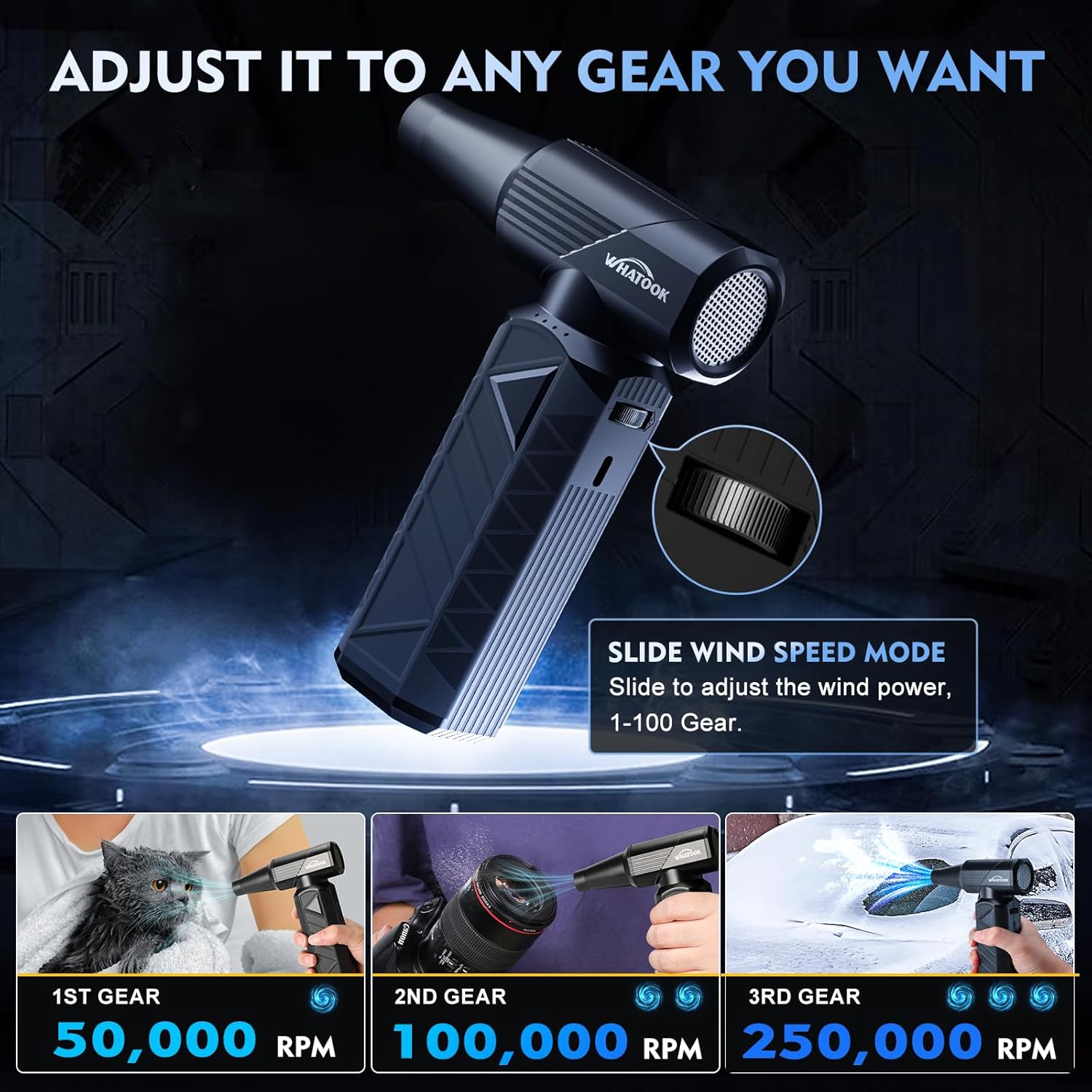
Figure 5.2: The air duster demonstrating its adjustable speed settings and suitability for diverse tasks such as pet drying, camera cleaning, and car detailing.
5.3 Multi-Purpose Applications
The air duster is versatile and can be used for a wide range of cleaning and inflation tasks:
- Electronics: Keyboards, PCs, cameras, and other sensitive electronic devices.
- Automotive: Car interiors, vents, hard-to-reach crevices.
- Household: Dusting furniture, window sills, pet hair removal.
- Inflation: Use the first speed for inflating items like swimming rings (ensure safety and proper nozzle).
- Outdoor: Efficient for making fires (e.g., barbecue), blowing leaves.

Figure 5.3: Examples of the air duster's multi-role capabilities, including cleaning windows, assisting with barbecues, inflating swimming rings, cleaning keyboards, blowing leaves, and detailing car interiors.
6. Maintenance
6.1 Cleaning the Device
Wipe the exterior of the air duster with a soft, dry cloth. Do not use harsh chemicals or abrasive cleaners. The upgraded design ensures easy cleaning of all corners.
6.2 Storage
When not in use, store the air duster in its provided storage bag in a cool, dry place. Ensure it is fully charged before long-term storage to maintain battery health.
6.3 Battery Care
The 10000mAh battery is designed for long life. To maximize battery lifespan, avoid completely draining the battery frequently. Recharge when the battery indicator shows low power. The device has advanced safety features including temperature, current, and short-circuit protection.
7. Troubleshooting
| Problem | Possible Cause | Solution |
|---|---|---|
| Device does not turn on. | Low battery. | Charge the device fully using the provided Type-C cable. |
| Weak airflow. | Incorrect speed setting or low battery. | Adjust to a higher gear or use slide mode. Ensure battery is charged. |
| Device stops unexpectedly. | Overheating protection activated. | Allow the device to cool down. Avoid prolonged continuous use at maximum power. |
| Nozzle detaches easily. | Nozzle not fully secured. | Ensure the nozzle is pushed firmly onto the air outlet until it clicks into place. |
8. Specifications
| Feature | Detail |
|---|---|
| Model | W02-Black-1 |
| Motor Speed | Up to 180,000 RPM (Brushless Motor) |
| Wind Pressure | 300 G |
| Wind Speed | Up to 120 m/s |
| Battery Capacity | 10000mAh |
| Charging Time | Approx. 3 hours (with 10W fast charging) |
| Dimensions | 1.7 x 5.1 x 6.2 inches (approx.) |
| Weight | 0.64 lbs (approx.) |
| Color | Black |
| Manufacturer | Lixin industrial(Shenzhen) Co.,Ltd. |

Figure 8.1: Detailed comparison of the WHATOOK Electric Air Duster's performance metrics against other types of air dusters.
9. Warranty and Support
The WHATOOK Compressed Air Duster is covered by a standard manufacturer's warranty. For specific warranty details, technical support, or any inquiries not covered in this manual, please refer to the official WHATOOK website or contact their customer service directly. Keep your purchase receipt for warranty claims.
For more information, visit the WHATOOK Store on Amazon.
Ask a question about this manual
Ask about setup, troubleshooting, compatibility, parts, safety, or missing instructions. Manuals+ will review the question and use this page’s manual context to help answer it.