
Effireli RC802N YU14 Replacement Remote Control User Manual
Model: RC802N YU14
Introduction
This manual provides instructions for the Effireli RC802N YU14 Replacement Remote Control, designed for use with various TCL Smart TV models. This remote offers direct functionality without the need for programming or complex setup. Please read this manual carefully to ensure proper use and longevity of your remote control.
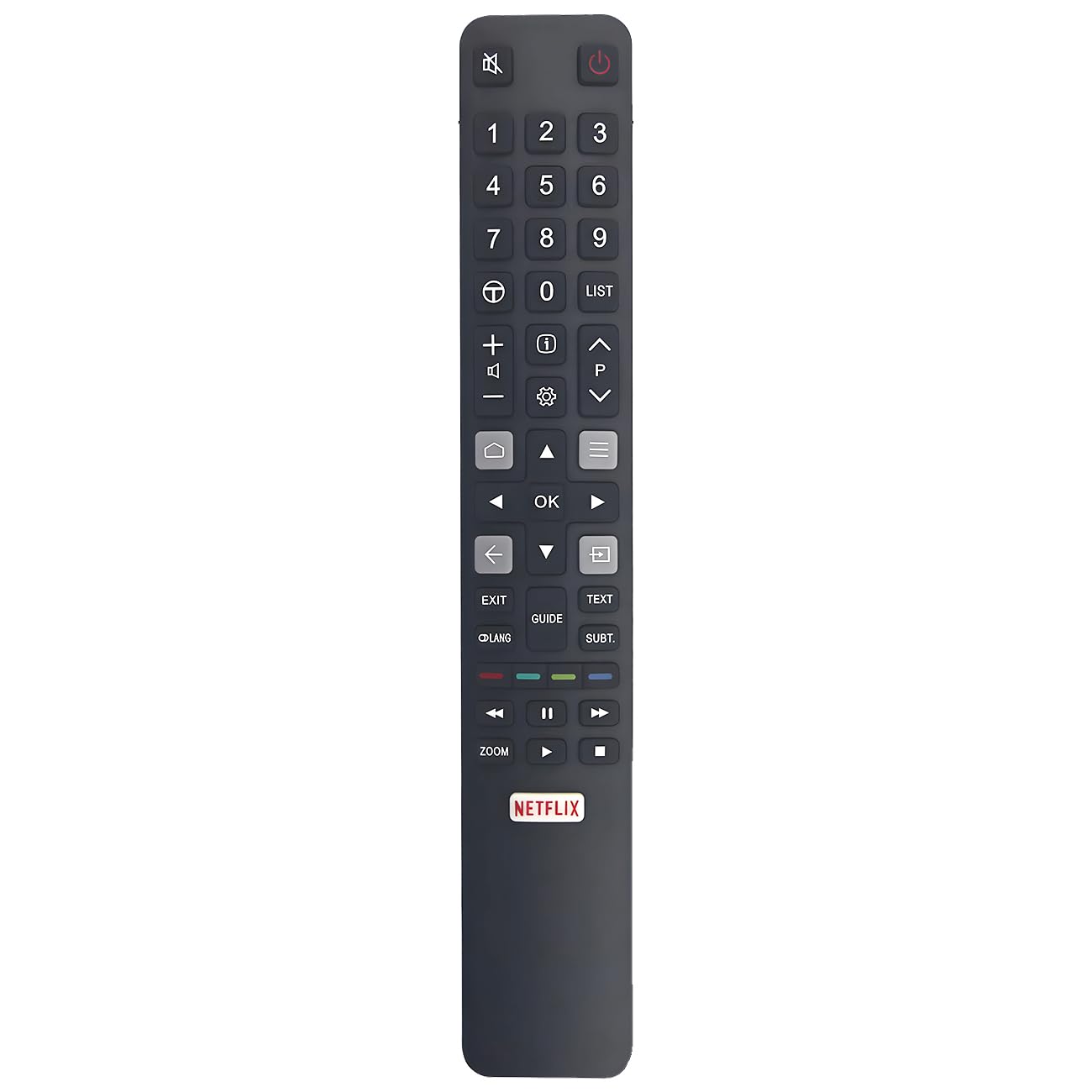
An image showing the Effireli RC802N YU14 replacement remote control. The remote is black, rectangular, and features standard TV remote buttons such as power, volume, channel, navigation, and number keys.
Setup
The Effireli RC802N YU14 remote control requires no programming. Simply insert batteries to begin operation.
- Open the Battery Compartment: Locate the battery compartment cover on the back of the remote control. Slide or press the latch to open it.
- Insert Batteries: Insert two AAA batteries (not included) into the compartment, ensuring the positive (+) and negative (-) terminals align correctly with the indicators inside the compartment.
- Close the Battery Compartment: Replace the battery compartment cover, ensuring it clicks securely into place.
- Test Operation: Point the remote control towards your TCL Smart TV and press the power button to verify functionality.
Operating Instructions
This remote functions identically to your original TCL Smart TV remote. All buttons are pre-configured for their standard functions.
- Power Button: Turns the TV on or off.
- Number Buttons (0-9): Directly select channels.
- Volume Up/Down: Adjusts the TV's volume.
- Channel Up/Down: Changes the TV channel.
- Navigation Buttons (Up, Down, Left, Right, OK): Navigate through menus and confirm selections.
- Input/Source Button: Cycles through available input sources (HDMI, AV, etc.).
- Menu/Home Button: Accesses the TV's main menu or smart TV home screen.
- Mute Button: Mutes or unmutes the TV's audio.
- Back/Exit Button: Returns to the previous screen or exits a menu.
For specific functions related to your TCL Smart TV's operating system, refer to your television's user manual.
Compatible Models
This replacement remote control is compatible with the following TCL Smart TV models:
- 65P20US
- 65C2US
- 75C2US
- 55X2US
- 65X2US
- 43P20US
- 49P32CFSA
- 49C2US
- 55C2US
- 50P20US
- 55P20US
- 60P20US
- 32S6000S
- 40S6000FS
- 43S6000
- U65S9906
- U43P6006
- 50DP648
- 9C2US
Note: If your specific TV model is not listed above or if your original remote control has a significantly different appearance, please contact customer support to confirm compatibility before use.
Maintenance
To ensure the longevity and optimal performance of your remote control, follow these maintenance guidelines:
- Cleaning: Use a soft, dry cloth to clean the remote's surface. Avoid using liquid cleaners, aerosols, or abrasive materials, as these can damage the remote.
- Battery Replacement: Replace batteries when the remote's response becomes sluggish or stops working. Always replace both batteries at the same time with new ones of the same type (AAA).
- Storage: Store the remote in a cool, dry place away from direct sunlight and extreme temperatures.
- Avoid Drops: Protect the remote from drops and impacts, which can damage internal components.
- Liquid Exposure: Keep the remote away from water and other liquids to prevent damage.
Troubleshooting
If you encounter issues with your remote control, try the following troubleshooting steps:
- Remote Not Responding:
- Ensure the batteries are inserted correctly with the correct polarity (+/-).
- Replace old batteries with new AAA batteries.
- Ensure there are no obstructions between the remote and the TV's infrared sensor.
- Make sure you are within the effective range of the TV's IR receiver.
- Buttons Not Working:
- Check for any physical damage or debris stuck under the buttons.
- Try replacing the batteries, as low power can sometimes cause intermittent button functionality.
- Intermittent Operation:
- This often indicates low battery power. Replace the batteries.
- Ensure no strong light sources (like direct sunlight or bright fluorescent lights) are interfering with the IR signal.
If these steps do not resolve the issue, please refer to the Warranty and Support section for further assistance.
Specifications
| Feature | Detail |
|---|---|
| Model Number | RC802N YU14 (YK-RC802N YU14) |
| Brand | Effireli |
| Connectivity Technology | Infrared (IR) |
| Compatible Devices | TCL Smart Televisions |
| Special Feature | No Programming Required |
| Max Number of Supported Devices | 1 |
| Power Source | 2 x AAA Batteries (not included) |
| Item Weight | 2.78 ounces (approximately 78.8 grams) |
| Package Dimensions | 8.98 x 2.2 x 0.71 inches (approximately 22.8 x 5.6 x 1.8 cm) |
Warranty and Support
Effireli provides the following support for your RC802N YU14 Replacement Remote Control:
- Money-Back Guarantee: Enjoy a 30-day money-back guarantee from the date of purchase.
- Warranty: A 12-month warranty covers manufacturing defects.
- Returns and Exchanges: Returns and exchanges are accepted within the warranty period for manufacturing defects.
For warranty claims, technical assistance, or to confirm compatibility for unlisted models, please contact Effireli customer support directly. Refer to your purchase documentation for specific contact information.