
ANNKE AU-N48WHR0-V3-58CN-V1-OP
Contents
ANNKE 10-Channel 5MP Wireless Security Camera System User Manual
Model: AU-N48WHR0-V3-58CN-V1-OP
1. Introduction
This user manual provides comprehensive instructions for the installation, operation, and maintenance of your ANNKE 10-Channel 5MP Wireless Security Camera System. This system is designed to provide reliable and high-quality surveillance for your home or business, featuring 5MP video resolution, smart human detection, two-way audio, and weatherproof cameras.

Figure 1.1: ANNKE 10-Channel 5MP Wireless Security Camera System components.
2. What's in the Box
Please verify that all items listed below are included in your package. If any items are missing or damaged, please contact ANNKE customer support.
- 1x 10CH 5MP NVR (Network Video Recorder)
- 8x 5MP Wireless Security Cameras
- 9x Power Adapters (one for NVR, eight for cameras)
- 1x 3m Antenna Extension Cable
- 1x USB Mouse
3. Product Overview
3.1 Key Features
- 5MP High-Resolution Video: Equipped with a 1/2.8-inch progressive scan CMOS sensor, delivering sharper videos with enhanced colors and details for a superior visual experience.
- Smart Human Detection: Advanced AI motion detection identifies human movement, reducing false alarms. Instant app and email notifications with screenshots are sent upon detection.
- IP67 Weatherproof Cameras: Cameras are rated IP67, ensuring reliable operation in various weather conditions, including heavy rain, high winds, and extreme temperatures.
- Real-time Two-Way Audio: Built-in microphone and speaker allow for listening and communication with individuals near the camera, enabling warnings to suspicious strangers.
- Flexible Storage Options: Supports local hard drive storage (up to 10TB, HDD not included) and cloud storage, providing continuous recording without concerns about storage limits.
3.2 Visual Clarity: Day and Night
The 5MP cameras provide clear and detailed images both during the day and at night, ensuring comprehensive surveillance around the clock.
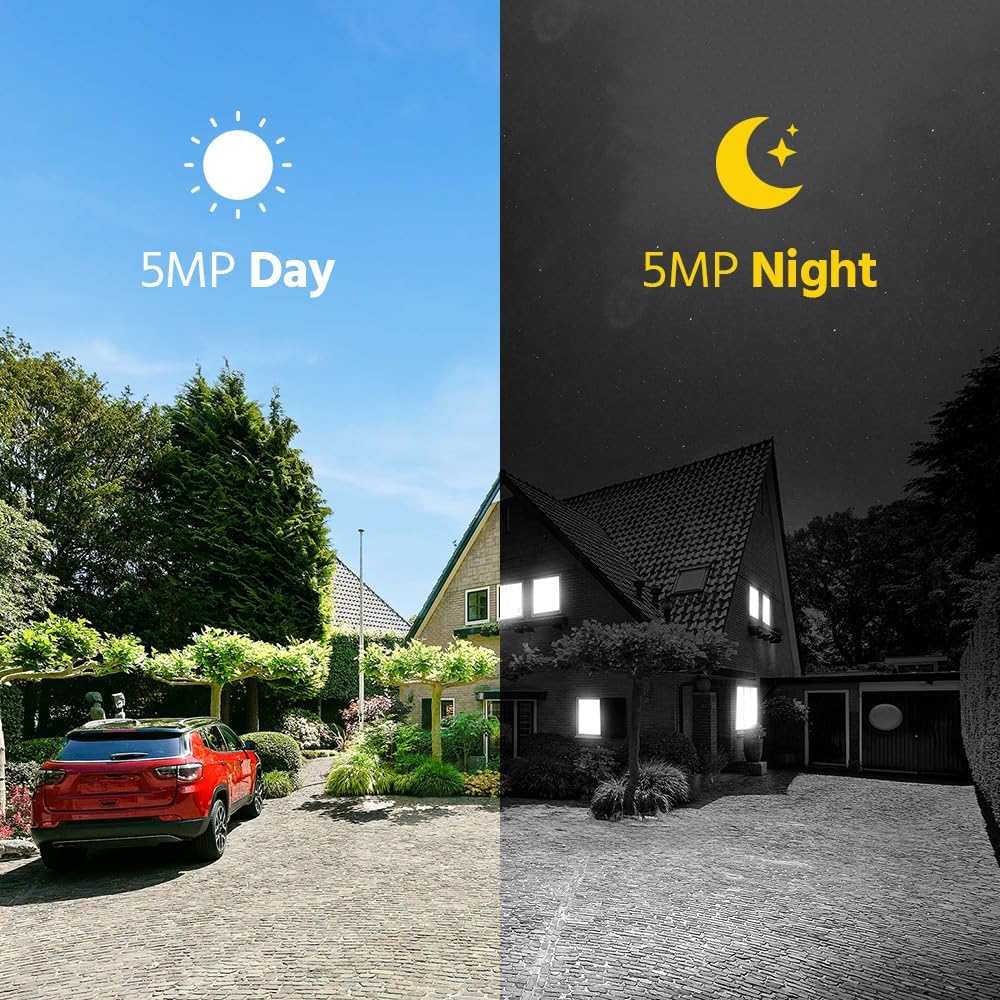
Figure 3.1: Visual comparison of 5MP clarity during day and night conditions.
3.3 Two-Way Audio Communication
Engage in real-time conversations through the camera. This feature is useful for communicating with visitors or deterring unwanted individuals.

Figure 3.2: Example of two-way audio communication via the ANNKE Sight app.
Video 3.1: Demonstration of the ANNKE 10-Channel 5MP Security Camera System's features, including two-way audio and smart detection.
3.4 Weatherproof Design
The IP67 rating ensures the cameras are robust and can withstand harsh outdoor environments, providing continuous protection regardless of weather conditions.

Figure 3.3: ANNKE camera demonstrating its IP67 weatherproof capability during rainfall.
4. Setup
The ANNKE wireless security system is designed for easy plug-and-play installation. Follow these steps to set up your system.
4.1 Initial Connection
The cameras and NVR are pre-paired for convenience. Simply power on the devices to begin.

Figure 4.1: True Plug and Play Installation methods.
- Way 1 (App Setup):
- Plug the power adapters into the cameras and the NVR, then connect them to an electrical outlet.
- Download the ANNKE Sight App on your smartphone.
- Add the system to the app to view the live stream.
- Way 2 (Monitor Setup):
- Plug the power adapters into the cameras and the NVR, then connect them to an electrical outlet.
- Link the NVR to a TV or monitor using an HDMI or VGA cable (not included).
- Watch the live view directly on the monitor.
4.2 Wireless Connectivity and Auto Pairing
The system utilizes a robust wireless connection, and cameras automatically pair with the NVR upon power-up, simplifying the setup process.

Figure 4.2: Cascading connection and auto-pairing for extended wireless range.
For optimal signal strength, ensure cameras are placed within range of the NVR. The system supports cascading connections, where cameras can relay signals to extend the overall wireless coverage.
5. Operating the System
5.1 Smart Human Detection and Alerts
The system's AI-powered human detection minimizes false alarms by accurately identifying human figures. When motion is detected, you will receive instant notifications.

Figure 5.1: Smart human detection in action, triggering notifications.
- Instant App Notifications: Receive real-time alerts on your smartphone via the ANNKE Sight app.
- Email Notifications: Get email alerts with attached screenshots of the detected event.
5.2 Customizable Motion Detection Area & Privacy Masking
Define specific areas for motion detection to focus on critical zones and avoid unnecessary alerts. You can also set privacy masks to block out areas that are not relevant for surveillance.

Figure 5.2: Customizing the motion detection area.

Figure 5.3: Customized surveillance area with privacy masking applied to windows.
5.3 Remote Access and Control
Monitor your property from anywhere using the ANNKE Sight app on your smartphone, tablet, or computer. Access live views, playback recordings, and manage settings remotely.

Figure 5.4: Limitless remote control and viewing capabilities across multiple devices.

Figure 5.5: App interface for playback and managing multiple devices.
6. Maintenance
Regular maintenance ensures the longevity and optimal performance of your ANNKE security system.
- Camera Lens Cleaning: Periodically clean the camera lenses with a soft, lint-free cloth to ensure clear image quality. Avoid abrasive cleaners.
- Firmware Updates: Check for and install firmware updates for the NVR and cameras through the ANNKE Sight app or official website. Updates often include performance improvements and security enhancements.
- Cable Inspection: Regularly inspect power cables and antenna connections for any signs of wear or damage.
- Storage Management: If using a local hard drive, ensure there is sufficient space. Configure recording modes (e.g., continuous, motion-triggered) to optimize storage usage.
- Environmental Considerations: While cameras are weatherproof, avoid directing high-pressure water jets directly at them during cleaning. Ensure proper ventilation for the NVR.
7. Troubleshooting
This section addresses common issues you might encounter and provides solutions.
| Problem | Possible Cause | Solution |
|---|---|---|
| No video display on monitor/app. | Power issue, NVR/camera not connected, network problem. |
|
| Poor image quality. | Dirty lens, low light, camera resolution settings. |
|
| No motion detection alerts. | Detection settings, network connectivity, notification settings. |
|
| Two-way audio not working. | Microphone/speaker settings, volume levels. |
|
8. Specifications
| Feature | Detail |
|---|---|
| Brand | ANNKE |
| Connectivity Technology | Wireless |
| Video Capture Resolution | 5MP |
| Special Features | Privacy Masking, App Control, Weatherproof (IP67), Human Detection, Two-Way Audio |
| Number of Channels | 10 |
| Color | 8pcs Cameras (White) |
| Power Source | Corded Electric |
| Item Dimensions (L x W x H) | 12.58 x 7 x 10.63 inches |
| Recommended Uses | Office security, outdoors/indoors surveillance, home security, factory security, warehouse security |
| Compatible Devices | Smartphones, Personal Computers, TV, Tablets, Laptops |
| Signal Format | Digital |
| Low Light Technology | Night Vision |
| Night Vision Range | 30 Meters (approx. 100ft) |
| Antenna Type | Fixed |
| Recording Mode | Schedule, Manual |
| Optical Sensor Technology | CMOS |
| Hardware Interface | USB 2.0, 802.11 b/g/n |
| Lens Type | Fixed |
| Video Input | RJ45 (for NVR) |
| Viewing Angle | 70 Degrees |
| Model Number | AU-N48WHR0-V3-58CN-V1-OP |
| Date First Available | November 8, 2024 |
| Country of Origin | China |
9. Warranty & Support
ANNKE provides customer support and warranty services for its products. For specific warranty terms and conditions, please refer to the warranty card included with your product or visit the official ANNKE website.
- Technical Support: For technical assistance, troubleshooting, or setup guidance, please contact ANNKE customer support.
- Online Resources: Visit the ANNKE official website for FAQs, video tutorials, and software downloads.
- Product Registration: Register your product online to receive updates and streamline warranty claims.
Note: Warranty terms may vary by region and product. Please retain your proof of purchase for warranty claims.
Ask a question about this manual
Ask about setup, troubleshooting, compatibility, parts, safety, or missing instructions. Manuals+ will review the question and use this page’s manual context to help answer it.