1. Introduction
This manual provides essential information for the safe and effective use of your LEXiBOOK Harry Potter Hedwige Nightlight, model NLJ01HP1. Please read these instructions carefully before use and retain them for future reference.

Image 1.1: Front view of the Hedwige Nightlight. This image displays the white owl-shaped nightlight with yellow eyes and a small letter with a red seal on its chest.
2. Safety Information
- Battery Safety: This product requires 3 x LR44 batteries. Ensure correct polarity when inserting batteries. Do not mix old and new batteries, or different types of batteries. Remove exhausted batteries promptly. Do not dispose of batteries in fire.
- Choking Hazard: This product contains small parts (batteries). Keep out of reach of very young children.
- Material: The nightlight is made from shockproof plastic, designed for durability.
- Indoor Use Only: This product is intended for indoor use only. Do not expose to water or excessive moisture.
- Cleaning: Clean only with a dry, soft cloth. Do not use abrasive cleaners or solvents.
3. Package Contents
The package should contain the following items:
- 1 x LEXiBOOK Harry Potter Hedwige Nightlight (Model NLJ01HP1)
- 1 x Instruction Manual (this document)
4. Setup
4.1. Battery Installation
The nightlight requires 3 x LR44 batteries (not included). To install them:
- Locate the battery compartment on the bottom of the nightlight.
- Using a small screwdriver, carefully open the battery compartment cover.
- Insert 3 x LR44 batteries, ensuring the correct polarity (+/-) as indicated inside the compartment.
- Replace the battery compartment cover and secure it with the screw.
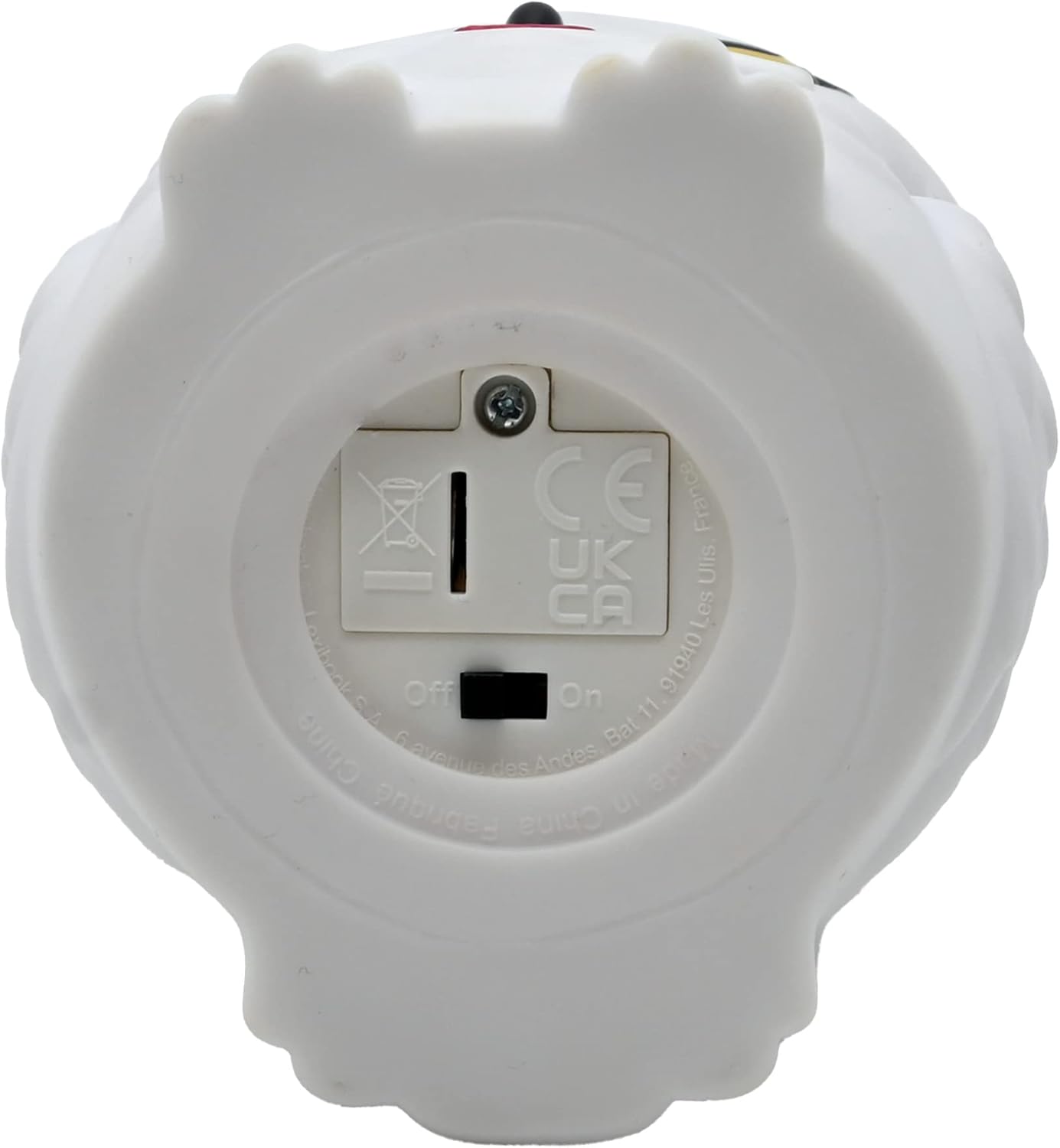
Image 4.1: Bottom view of the nightlight, illustrating the battery compartment and the On/Off switch.
4.2. Initial Placement
Place the nightlight on a stable, flat surface in the desired location. Ensure it is away from direct heat sources or moisture.
5. Operating Instructions
5.1. Power On/Off
To turn the nightlight on or off, gently press down on the top of the Hedwige figure.
5.2. Light Modes
The nightlight offers two operating modes:
- Continuous Light: The nightlight will remain illuminated until manually turned off.
- 15-Minute Auto-Off Timer: The nightlight will automatically turn off after approximately 15 minutes to conserve battery life.
To switch between these modes, press the top of the nightlight. Each press cycles through the available modes.

Image 5.1: A child observing the Hedwige nightlight providing a soft glow in a dimly lit room.
6. Maintenance
6.1. Cleaning
Wipe the nightlight with a soft, dry cloth. Do not use liquid cleaners, sprays, or abrasive materials, as these can damage the product's finish or internal components.
6.2. Battery Replacement
When the light dims or stops functioning, it is time to replace the batteries. Follow the steps in Section 4.1 for battery installation. Always replace all three LR44 batteries at the same time.
7. Troubleshooting
| Problem | Possible Cause | Solution |
|---|---|---|
| Nightlight does not turn on. |
|
|
| Light is dim. | Batteries are low. | Replace with new LR44 batteries. |
| Nightlight turns off unexpectedly. |
|
|
8. Specifications
| Model: | NLJ01HP1 |
| Brand: | LEXiBOOK |
| Dimensions (H x W x D): | Approximately 10.8 x 7.8 x 7.7 cm (4.3 x 3.1 x 3.0 inches) |
| Material: | Plastic |
| Light Source: | LED |
| Power Supply: | 3 x LR44 batteries (not included) |
| Battery Life: | Approximately 50 hours |
| Operating Modes: | Continuous light, 15-minute auto-off timer |
| Switch Type: | Push Button (on top) |
| Indoor/Outdoor Use: | Indoor only |
9. Warranty and Support
9.1. Warranty Information
This product comes with a 3-month warranty from the date of purchase. This warranty covers manufacturing defects under normal use. It does not cover damage caused by misuse, accidents, unauthorized modifications, or normal wear and tear. Please retain your proof of purchase for warranty claims.
9.2. Customer Support
For technical assistance, troubleshooting, or warranty inquiries, please contact LEXiBOOK customer support. Refer to the product packaging or the official LEXiBOOK website for the most current contact information.
Visit the LEXiBOOK Store on Amazon for more information.


