
1. Introduction
The Ousmile YS-LSTM Wireless Laser Sprint Timer System is designed for accurate timing of sprints and speed training. It utilizes laser technology to detect start and finish lines, providing precise measurements for athletes and coaches. This system is suitable for various training environments, including track and field, 40-yard dashes, and 60-yard dashes.
Package Contents
Please verify that all components are present in your package:
- 1 x Digital Display Unit
- 1 x Laser Emitter Unit
- 2 x Laser Receiver Units
- 4 x Tripod Stands (High Stand)
- 1 x Aluminum Carrying Case
- 1 x Charging Cable
- 1 x User Manual

Image 1.1: All components included in the Ousmile YS-LSTM Wireless Laser Sprint Timer System package, neatly arranged.
2. Safety Information
Please read and understand the following safety precautions before operating the device:
- Laser Safety: The system uses a low-power laser. Avoid direct eye exposure to the laser beam. Do not point the laser at people or animals.
- Battery Safety: Use only the provided charging cable. Do not attempt to open or modify the battery compartments. Avoid exposing batteries to extreme temperatures or direct sunlight.
- Environmental Conditions: Operate the system within recommended temperature and humidity ranges. Avoid using in heavy rain or extreme dust conditions.
- Stability: Ensure all tripod stands are securely placed on a stable, level surface to prevent tipping.
3. Setup Guide
Follow these steps to set up your Ousmile Wireless Laser Sprint Timer System:
3.1 Charging the Units
Before first use, fully charge the Digital Display Unit, Laser Emitter Unit, and Laser Receiver Units. Connect the charging cable to the charging port on each unit and to a suitable USB power source. A full charge typically takes approximately 4 hours and provides up to 10 hours of operation.

Image 3.1: Illustration of the rechargeable battery feature and the charging port location on the timer units.
3.2 Assembling the Tripods and Units
- Extend the legs of each tripod stand to a stable position.
- Mount the Digital Display Unit onto one tripod stand.
- Mount the Laser Emitter Unit onto a second tripod stand.
- Mount the two Laser Receiver Units onto the remaining two tripod stands.
3.3 Positioning the System
For a standard sprint timing setup, position the units as follows:
- Start Line: Place one Laser Emitter Unit and one Laser Receiver Unit opposite each other at the starting line. Ensure the laser beam is aligned horizontally and passes through the center of the receiver's detection area.
- Finish Line: Place the second Laser Receiver Unit and the Digital Display Unit opposite each other at the finish line. The laser beam from the Emitter Unit at the start line should pass through the detection area of the Receiver Unit at the finish line.
- Alignment: Adjust the height and angle of the units on their tripods to ensure the laser beams are perfectly aligned and unbroken between the emitter and receivers. The system is designed to reject interference from visible light, allowing for reliable operation even in sunlight.

Image 3.2: Overview of the Ousmile YS-LSTM system setup, illustrating the placement of the display, emitter, and receiver units with laser beams.

Image 3.3: Two common setup configurations for the timer, showing how units are positioned at the start and finish lines.
4. Operating Instructions
Once the system is set up and charged, follow these steps to begin timing:
4.1 Powering On
- Locate the power switch on each unit (Digital Display, Laser Emitter, Laser Receivers).
- Turn on all units. The Digital Display Unit will illuminate, showing a default time or '00.00'.
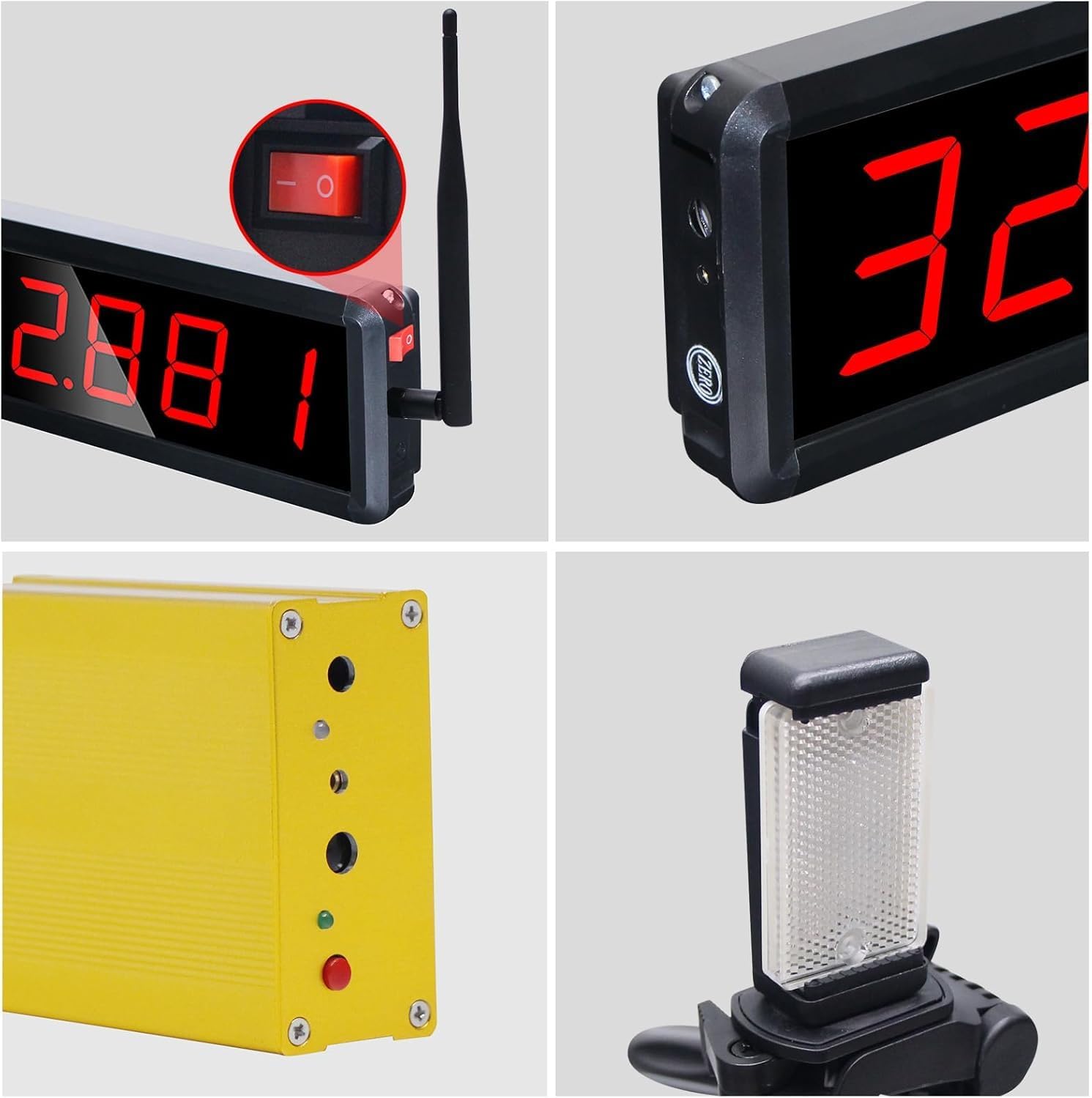
Image 4.1: Detailed view of the digital display, power switch, and laser unit components.
4.2 Starting and Stopping the Timer
- The timer automatically starts when the laser beam at the start line is broken (e.g., by an athlete passing through it).
- The timer automatically stops when the laser beam at the finish line is broken.
- The elapsed time will be displayed on the Digital Display Unit.
4.3 Reading the Display
The LED digital tube display is designed for clear visibility in various lighting conditions, including indoors, outdoors, day, or night, with no strobe effect.

Image 4.2: The clear and bright LED display is visible in diverse lighting environments.
4.4 Resetting the Timer
Refer to the specific instructions in the included quick start guide for details on resetting the timer for subsequent runs. Typically, the system will automatically reset or have a manual reset button on the display unit.

Image 4.3: An athlete being timed during a sprint using the Ousmile laser timer system.
5. Maintenance
Proper maintenance ensures the longevity and accuracy of your timer system:
- Cleaning: Use a soft, dry cloth to clean the display and unit surfaces. For stubborn dirt, a slightly damp cloth can be used. Avoid abrasive cleaners or solvents.
- Battery Care: Recharge the units regularly, especially if they will be stored for an extended period. Do not allow batteries to fully discharge for long durations.
- Storage: When not in use, store all components in the provided aluminum carrying case. Store in a cool, dry place away from direct sunlight and extreme temperatures.
- Laser Lens: Keep the laser emitter and receiver lenses clean and free of dust or smudges to ensure accurate beam detection.
6. Troubleshooting
If you encounter issues with your Ousmile timer system, refer to the following common problems and solutions:
| Problem | Possible Cause | Solution |
|---|---|---|
| Timer not starting/stopping | Misaligned laser beam; low battery; obstruction in beam path. | Check laser alignment and adjust tripods. Ensure units are charged. Clear any obstructions. |
| Display not illuminating | Unit not powered on; low battery; faulty unit. | Ensure power switch is ON. Charge the unit. If problem persists, contact support. |
| Inaccurate timing | Improper setup; external interference. | Review setup instructions for correct unit placement and alignment. Ensure no other devices are causing interference. |
| Units not communicating | Distance too great; signal interference; low battery. | Ensure units are within operational range. Minimize potential signal interference. Charge units. |
If you cannot resolve the issue using the above table, please contact Ousmile customer support.
7. Specifications
| Feature | Specification |
|---|---|
| Model Name | YS-LSTM |
| Brand | Ousmile |
| Material | Aluminum |
| Product Dimensions (Display) | 3"D x 10"W x 8"H (approximate, based on general product dimensions) |
| Battery Life | Up to 10 hours |
| Charging Time | Approx. 4 hours |
| Display Type | Bright LED Digital Tube |
| Signal Stability | Rejects visible light interference, works in sunlight |
| Style | 1 timer, 1 laser (high stand) |
| Package Weight | 3.1 Kilograms |

Image 7.1: Detailed dimensions of the system components, including the display, laser unit, carrying case, and adjustable tripod heights.
8. Warranty and Support
8.1 Warranty Information
The Ousmile YS-LSTM Wireless Laser Sprint Timer System comes with a 1-year warranty from the date of purchase. This warranty covers manufacturing defects and malfunctions under normal use. It does not cover damage caused by misuse, accidents, unauthorized modifications, or improper maintenance.
8.2 Customer Support
For technical assistance, warranty claims, or any questions regarding your Ousmile product, please contact our customer support team. Refer to the contact information provided with your purchase or visit the official Ousmile website.