
1. Introduction
Thank you for purchasing the Herdio 4 Inches 200 Watts Outdoor Bluetooth Speakers. This manual provides essential information for the proper setup, operation, and maintenance of your new speakers. Please read this manual thoroughly before use and retain it for future reference.

Figure 1.1: Herdio outdoor speakers integrated into different outdoor settings.
2. Safety Information
- Power Source: Use only the provided power adapter. Ensure the power outlet voltage matches the adapter's requirements.
- Water Resistance: These speakers are IP44-rated for water resistance, meaning they are protected against splashing water from any direction. They are not designed for submersion. Do not expose to direct high-pressure water jets.
- Placement: Ensure speakers are securely mounted to prevent falling. Avoid placing near heat sources or in direct sunlight for prolonged periods.
- Cleaning: Disconnect power before cleaning. Use a soft, damp cloth. Do not use harsh chemicals or abrasive cleaners.
- Servicing: Do not attempt to repair the speakers yourself. Refer all servicing to qualified personnel.

Figure 2.1: The IP44 water-resistant design of the speakers, suitable for outdoor use.
3. Package Contents
Verify that all items listed below are included in your package:
- Outdoor Speakers (Active + Passive) x 2
- 12V5A Power Adapter x 1
- Speaker Cables (16FT/5M) x 1
- Owner's Manual x 1

Figure 3.1: All components included in the product package.
4. Product Overview
The Herdio Outdoor Bluetooth Speakers are designed to deliver high-quality audio in various indoor and outdoor environments. Key features include:
- Advanced Bluetooth 5.3: Provides a stable wireless connection up to 65 feet.
- Exceptional Sound Quality: Features dual 100W drivers with 4-inch injection-molded PP cone woofers and 1-inch PET dome tweeters for clear audio.
- IP44 Water-Resistant Design: Built to withstand splashes and dust, suitable for outdoor use.
- TWS Stereo Pairing: Allows two speakers to connect wirelessly for true stereo sound.
- Versatile Mounting: Equipped with 180-degree adjustable swivel brackets for flexible installation.

Figure 4.1: Internal speaker components and power output details.

Figure 4.2: Bluetooth connectivity and wireless range capabilities.
5. Setup
5.1 Speaker Installation
The speakers come with adjustable swivel brackets for easy wall mounting. You can adjust the angle of the speakers to direct sound where needed.
- Attach the mounting brackets to the speakers using the provided screws.
- Securely mount the speakers to a wall or desired surface using appropriate hardware (not included, depending on surface type).
- Adjust the speaker angle using the swivel mechanism on the brackets.

Figure 5.1: Adjustable swivel brackets for flexible speaker positioning.
5.2 Connecting the Speakers
Follow these steps to connect your Herdio speakers:
- Connect the speaker cable from the active speaker (the one with the power input) to the passive speaker. Ensure correct polarity: red to positive (+), black to negative (-).
- Plug the 12V5A power adapter into the DC 12V IN port on the active speaker.
- Plug the power adapter into a suitable electrical outlet.

Figure 5.2: Connection diagram for the active and passive speakers, and power input.

Figure 5.3: Close-up of speaker terminals and power input.
6. Operating Instructions
6.1 Power On/Off
Once connected to power, the speakers will automatically enter Bluetooth pairing mode. There is no separate power button.
6.2 Bluetooth Pairing
- Ensure the speakers are powered on. The LED indicator will flash, indicating pairing mode.
- On your Bluetooth-enabled device (smartphone, tablet, etc.), go to the Bluetooth settings.
- Search for available devices and select "Herdio Speaker" (or similar name).
- Once connected, the LED indicator will turn solid, and you will hear a confirmation tone.
7. TWS Stereo Pairing
The True Wireless Stereo (TWS) function allows two Herdio speakers to connect wirelessly to create a stereo sound experience. This requires two Herdio speakers.
- Ensure both speakers are powered on and not connected to any Bluetooth device.
- On one speaker, short press the "TWS/Reset" button. The speaker will enter TWS pairing mode.
- The two speakers will automatically search for and connect to each other. Once connected, you will hear a confirmation tone, and the LED indicators will synchronize.
- Now, connect your Bluetooth device to one of the paired speakers as described in Section 6.2. Both speakers will play audio in stereo.

Figure 7.1: TWS pairing process for two speakers.
Video 7.1: Official Herdio video demonstrating the TWS function and waterproof capabilities of the outdoor speakers.
8. Maintenance
- Cleaning: Use a soft, dry cloth to wipe the speaker surfaces. For stubborn dirt, a slightly damp cloth can be used. Ensure no water enters the ports.
- Storage: If storing for an extended period, disconnect from power and store in a cool, dry place away from direct sunlight.
- Grille Care: The speaker grilles are removable for cleaning. Handle with care to avoid damage.
Video 8.1: Official Herdio video demonstrating the waterproof capabilities of the outdoor speakers, relevant for maintenance and care.
9. Troubleshooting
| Problem | Possible Cause | Solution |
|---|---|---|
| No power | Power adapter not connected or faulty. | Ensure power adapter is securely plugged into the speaker and a working outlet. Try a different outlet. |
| No sound | Volume too low; incorrect input; Bluetooth not connected. | Increase volume on both the speaker and your device. Re-pair Bluetooth. Check speaker cable connection between active and passive speakers. |
| Bluetooth connection unstable | Device too far; interference; low battery on device. | Move device closer to the speaker. Avoid obstacles. Charge your device. Reset Bluetooth connection. |
| TWS pairing fails | Speakers already connected to another device; TWS reset needed. | Ensure both speakers are disconnected from any Bluetooth devices. Long press the "TWS/Reset" button for 3 seconds to reset, then attempt TWS pairing again. |
10. Specifications
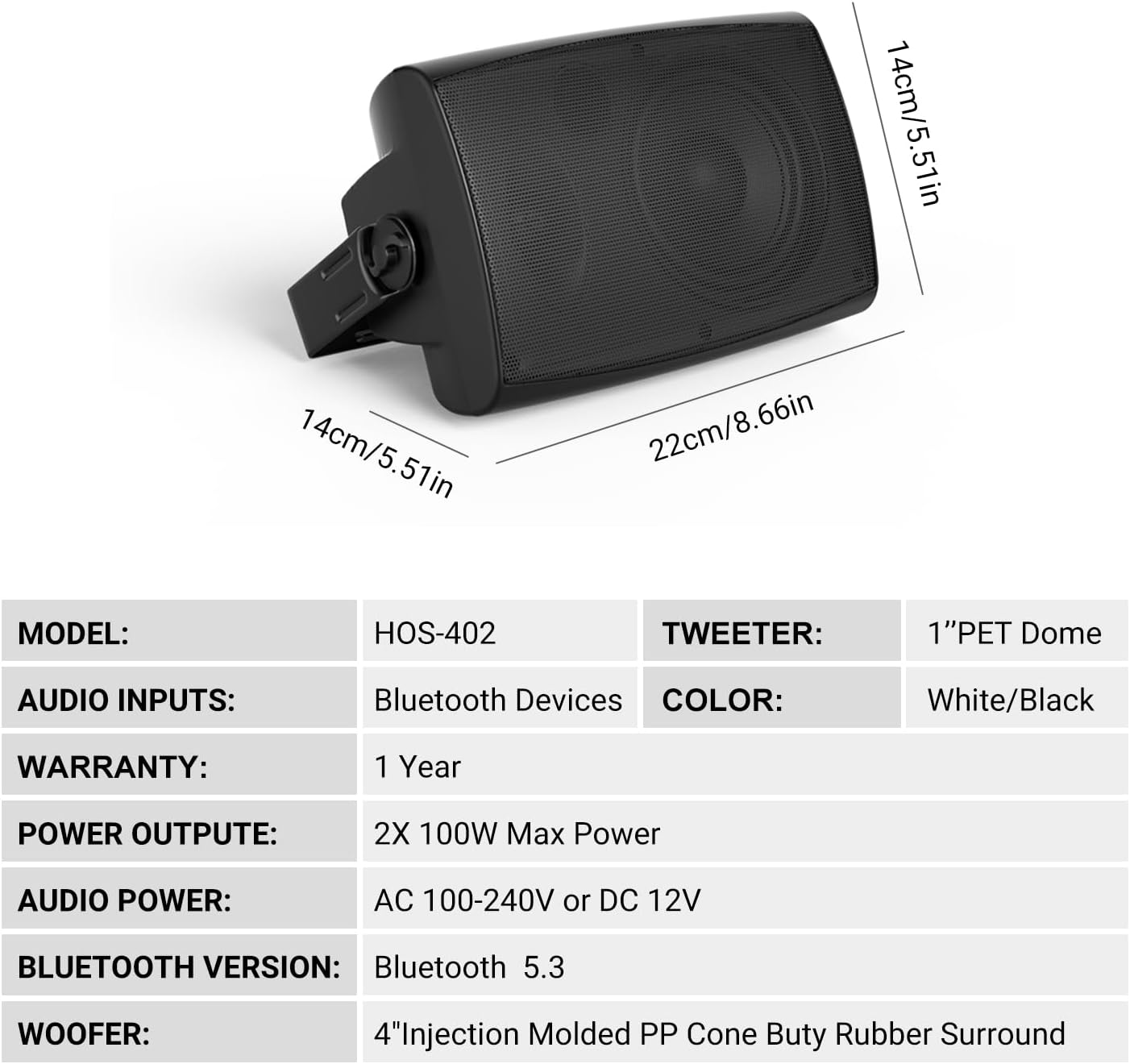
Figure 10.1: Key specifications of the Herdio speakers.
| Feature | Detail |
|---|---|
| Model Name | HE-HOS-402BTB-US |
| Speaker Type | Outdoor |
| Connectivity Technology | Bluetooth 5.3 |
| Speaker Size | 4 Inches |
| Speaker Maximum Output Power | 200 Watts (100W per speaker) |
| Woofer Diameter | 4 Inches (Injection Molded PP Cone Buty Rubber Surround) |
| Tweeter | 1 Inch PET Dome |
| Frequency Response | 50 KHz |
| Signal-to-Noise Ratio | 89 dB |
| Impedance | 4 Ohms |
| Input Voltage | 12 Volts |
| Power Source | Corded Electric |
| Water Resistance Level | IP44 (Waterproof) |
| Maximum Bluetooth Range | 65 Feet |
| Product Dimensions (D x W x H) | 6.47" x 7.28" x 9.57" (16.43cm x 18.49cm x 24.31cm) |
| Item Weight | 7.78 pounds |
| Material | Acrylonitrile Butadiene Styrene (ABS) |
| Included Components | Outdoor Speakers (Active + Passive) x 2, 12V5A Power adapter x 1, Owner's manual x 1, Speakers Cables x 1 |

Figure 10.2: Speaker dimensions.
11. Warranty and Support
Your Herdio speakers come with a Limited Warranty. For specific warranty details and duration, please refer to the warranty card included in your package or contact Herdio customer support.
For technical support, troubleshooting assistance, or warranty claims, please contact Herdio Direct through their official channels. You can often find contact information on the manufacturer's website or through your purchase platform.


