
1. Introduction
This manual provides detailed instructions for the installation, operation, and maintenance of the SODOLA 10Gb Ethernet Media Converter, model SL-10GE-XS. This device is designed to convert 10GBase-T RJ45 Ethernet signals to SFP+ fiber signals, enabling long-distance network extensions for data centers, campus networks, and remote sites.
1.1 Package Contents
- 1 x SODOLA 10Gb Ethernet Media Converter (SL-10GE-XS)
- 1 x Power Adapter (DC input 5.5x2.1mm)
Note: Optical/electrical SFP+ modules are not included and must be purchased separately.
2. Safety Information
- Ensure the power adapter voltage matches the device requirements.
- Do not expose the device to water or excessive humidity.
- Avoid blocking ventilation openings to prevent overheating.
- Do not attempt to open or repair the device. Refer to qualified personnel for service.
- Use only compatible SFP+ modules.
3. Product Overview
The SODOLA SL-10GE-XS is a robust 10GbE media converter featuring an all-metal housing for industrial durability and efficient heat dissipation. It supports wire-speed switching, jumbo frames, and port lightning protection.

Image: Front and rear view of the SODOLA 10Gb Ethernet Media Converter, highlighting the 10G RJ45 port, 10Gb SFP+ port, LED indicators, power supply input, and SFP+ 2.5G rate forcing switch.
3.1 Device Components
- 10G RJ45 Port: Supports 100M/1G/2.5G/5G/10G adaptive speeds with MDI/MDIX auto-crossover.
- 10Gb SFP+ Port: Supports 1G/2.5G/10G adaptive SFP+ modules.
- LED Indicators: Provide real-time status monitoring for power, link, and activity.
- Power Supply: DC 12V-1A input (5.5x2.1mm).
- SFP+ 2.5G Rate Forcing Switch: Allows manual selection of 2.5G or 10G mode for the SFP+ port.

Image: Key features of the media converter, including 6KV lightning protection, fanless design, 10Gbps high-speed transmission, and the SFP+ 2.5G rate forcing switch.
4. Setup and Installation
The SODOLA 10Gb Ethernet Media Converter is designed for plug-and-play operation, requiring no complex configuration. However, critical considerations for SFP+ modules and speed synchronization are essential for proper function.
4.1 Essential Requirements
- Matching SFP+ Modules: Requires compatible SFP+ modules at both ends of the fiber link. These modules are sold separately.
- Speed Synchronization: Both connected devices (e.g., the media converter and the remote switch/device) must operate at identical speeds (e.g., 10G-10G or 2.5G-2.5G). Auto-negotiation functions only when speeds match.
4.2 Installation Steps
- Insert SFP+ Module: Carefully insert a compatible SFP+ fiber module into the SFP+ port of the media converter. Ensure it is fully seated.
- Connect Fiber Cable: Connect the fiber optic cable to the SFP+ module. Ensure the fiber cable type (single-mode/multi-mode, single-fiber/dual-fiber) matches the SFP+ module and the remote device.
- Connect Ethernet Cable: Connect a standard RJ45 Ethernet cable from your network device (e.g., switch, router, PC) to the 10G RJ45 port on the media converter.
- Set SFP Rate Switch (if needed): If your SFP+ module or connected device operates at 2.5G, use the rear SFP Rate Switch to force the media converter into 2.5G mode. For 10G operation, ensure the switch is set to 10G.
- Apply Power: Connect the provided power adapter to the DC input port and plug it into a power outlet. The device will power on automatically.

Image: Example application diagrams illustrating how the media converter can be used to extend network connections between routers, SFP switches, and non-SFP switches using fiber and network cables.
Note: Both the electrical (RJ45) and optical (SFP+) ports must be connected simultaneously for the device to operate correctly. If only the SFP+ port is connected, the unit may not function as expected.
5. Operating the Device
Once powered on and connected, the media converter operates automatically. Monitor the LED indicators for status information.
5.1 LED Indicators
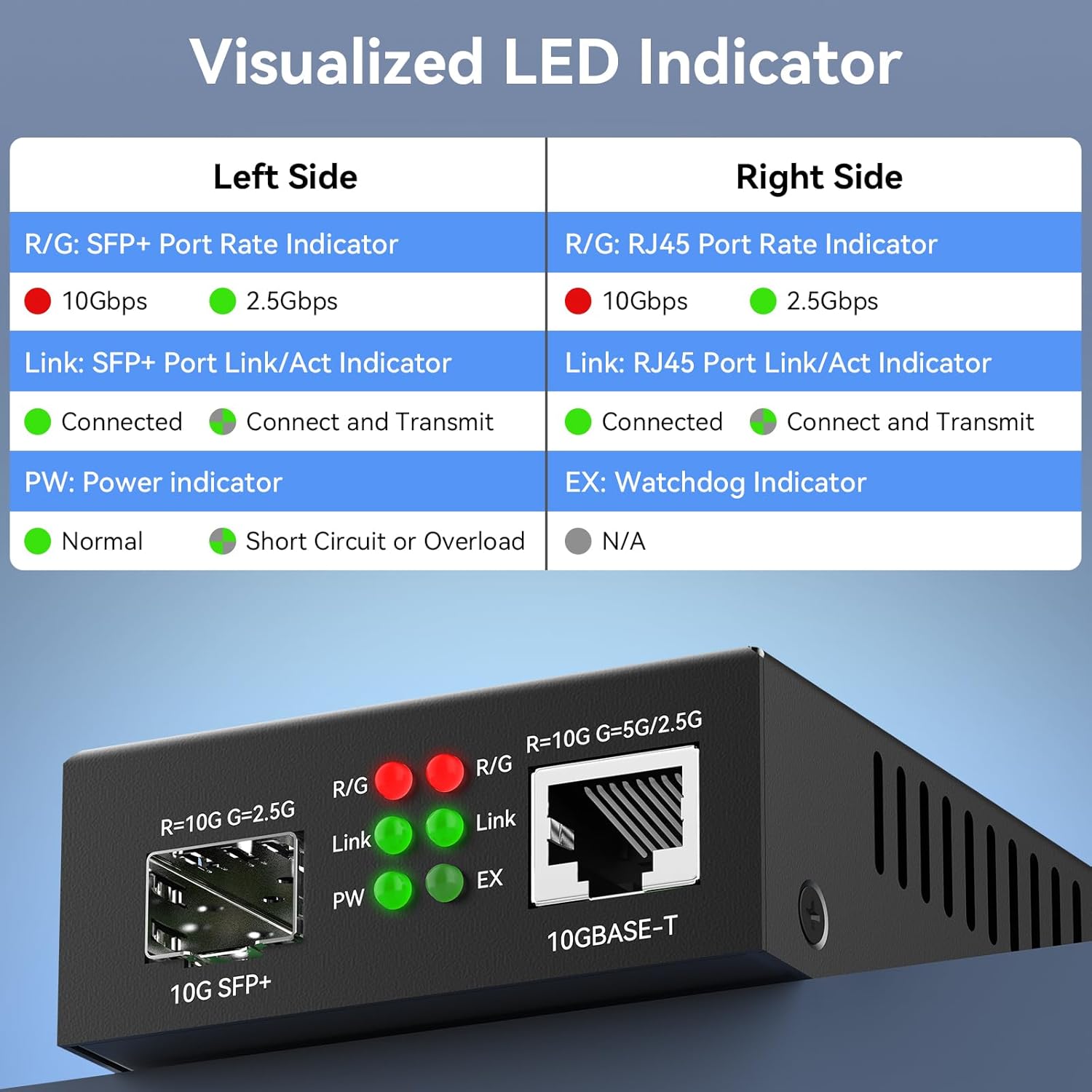
Image: A detailed table explaining the meaning of each LED indicator on the SODOLA media converter for both SFP+ and RJ45 ports.
| Indicator | Status | Description |
|---|---|---|
| R/G (SFP+ Port) | Red | 10Gbps speed detected on SFP+ port. |
| Green | 2.5Gbps speed detected on SFP+ port. | |
| Link (SFP+ Port) | Green (Solid) | SFP+ port is connected. |
| Green (Flashing) | SFP+ port is connected and transmitting data. | |
| R/G (RJ45 Port) | Red | 10Gbps speed detected on RJ45 port. |
| Green | 5Gbps/2.5Gbps speed detected on RJ45 port. | |
| Link (RJ45 Port) | Green (Solid) | RJ45 port is connected. |
| Green (Flashing) | RJ45 port is connected and transmitting data. | |
| PW (Power) | Green (Solid) | Device is powered on and operating normally. |
| Red (Solid) | Short circuit or overload detected. | |
| EX (Watchdog) | N/A | Not applicable for this model. |
6. Maintenance
The SODOLA 10Gb Ethernet Media Converter is designed for reliable, low-maintenance operation.
- Cleaning: Use a soft, dry cloth to clean the exterior of the device. Do not use liquid or aerosol cleaners.
- Environment: Ensure the device is operated within its specified temperature range (-20°C to +60°C) and in a well-ventilated area.
- Cable Management: Ensure all cables are securely connected and not under strain.

Image: The media converter's robust metal housing and heat sinks allow for stable operation in a wide temperature range of -20°C to +60°C.
7. Troubleshooting
If you encounter issues with your media converter, refer to the following common problems and solutions:
- No Link/Activity on SFP+ or RJ45 Port:
- Verify that both the SFP+ module and the RJ45 cable are securely connected.
- Ensure the SFP+ module is compatible and correctly inserted.
- Confirm that the connected devices at both ends are operating at the same speed (e.g., 10G-10G or 2.5G-2.5G). Adjust the SFP Rate Switch if necessary.
- Check the fiber cable for damage and ensure it is the correct type for your SFP+ modules.
- Ensure both the electrical (RJ45) and optical (SFP+) ports have active connections.
- Power LED is Red or Off:
- Check the power adapter connection to the device and the power outlet.
- Ensure the power adapter is functioning correctly.
- If the LED is red, it indicates a short circuit or overload. Disconnect and reconnect power. If the issue persists, contact support.
- Slow Speed or Intermittent Connection:
- Confirm that all connected devices and SFP+ modules support the desired speed (e.g., 10Gbps).
- Check for cable damage or poor connections.
- Ensure the SFP Rate Switch is set correctly for the operating speed.
8. Specifications
| Feature | Specification |
|---|---|
| Model Number | SL-10GE-XS |
| Interface Type | 1 x RJ45, 1 x SFP+ |
| RJ45 Port Speed | 100M/1G/2.5G/5G/10G Adaptive |
| SFP+ Port Speed | 1G/2.5G/10G Adaptive (with compatible SFP+ module) |
| Power Input | DC 12V-1A (5.5x2.1mm) |
| Product Dimensions | 2.76 x 3.66 x 1.1 inches |
| Item Weight | 13.7 ounces |
| Operating Temperature | -20°C to +60°C |
| Housing Material | Metal |
| Features | Wire-speed switching, Jumbo frame support, Port lightning protection, Fanless design |
9. Warranty and Support
For warranty information and technical support, please refer to the official Sodola website or contact your vendor. Keep your purchase receipt for warranty claims.


