
Introduction
The POWERTEC Arachni-Flex Portable Workbench is a versatile and collapsible workstand designed for various tasks, including woodworking, cutting, sanding, repairs, and crafts. This manual provides essential information for the safe and effective use of your workbench.
Key features include:
- Sturdy 2'x4' work surface.
- 36-inch ergonomic working height.
- 2,500 lbs (1134 kg) loading capacity.
- Instant setup with no assembly required.
- Foldable design with a removable carrying strap for portability.
- Includes 4 support brackets for 2x4 lumber studs and 4 adjustable hold-down clamps.
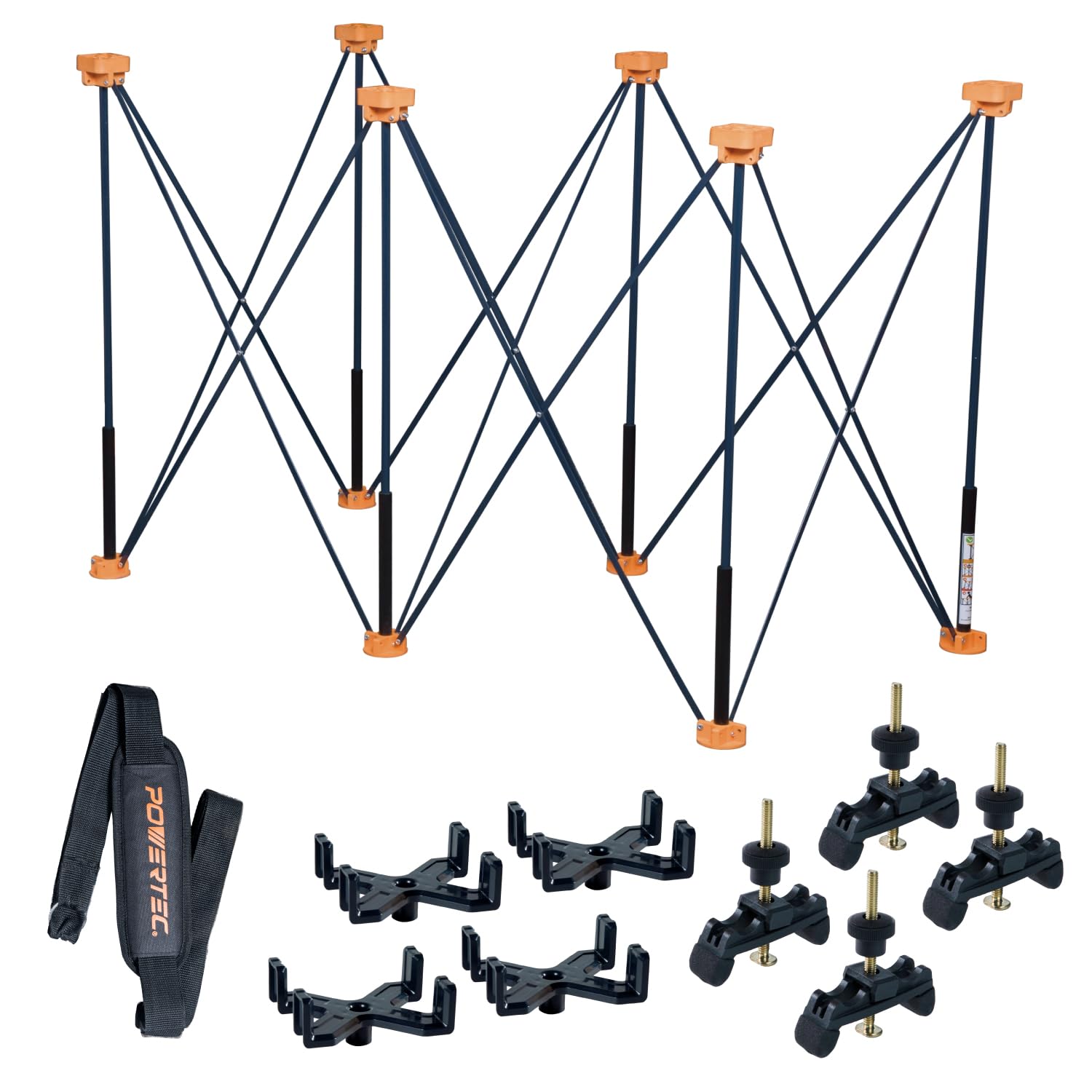
Figure 1: The POWERTEC Arachni-Flex Portable Workbench with a tabletop.
Setup
The Arachni-Flex Portable Workbench is designed for quick and easy deployment without the need for tools or complex assembly. It arrives ready to use out of the box.
- Unfold the Workbench: Place the folded workbench on a flat, stable surface. Gently pull the legs apart until the frame fully extends and locks into its open position. Ensure all leg joints are securely locked.
- Attach 2x4 Support Brackets: Insert the four provided 2x4 support brackets into the designated slots on the top of the workbench frame. These brackets are designed to hold standard 2x4 lumber studs, creating a stable base for your work surface.
- Position Work Surface: Place your desired work surface (e.g., plywood, a compatible tabletop, or 2x4 lumber) onto the support brackets.
- Secure with Hold-Down Clamps: Use the four adjustable hold-down clamps to secure your work surface to the workbench. Position the clamps as needed to firmly hold your material in place.

Figure 2: Instant setup of the workbench frame.

Figure 3: Attaching 2x4 lumber for a work surface.
Video 1: Demonstrates the quick setup and use of the POWERTEC Arachni Flex Workstand, including attaching 2x4s and a tabletop.
Operating the Workbench
The Arachni-Flex workbench provides a stable platform for various projects. Its design allows for flexibility in securing materials.
- Using 2x4 Supports: The included brackets allow you to quickly create a large, temporary work surface using standard 2x4 lumber. This is ideal for cutting long materials or supporting heavy items.
- Adjustable Clamps: The four adjustable hold-down clamps can be positioned along the workbench frame to secure various material thicknesses. Tighten the clamps firmly to prevent movement during work.
- Compatible Tabletops (Sold Separately): Enhance functionality with POWERTEC folding tabletops. Options include flat surfaces (Model 71931), surfaces with pre-drilled dog holes (Model 71932), and T-track integrated tabletops (Model 72034). These tabletops provide additional clamping options and versatility.

Figure 4: Using adjustable clamps to secure a workpiece.

Figure 5: Workbench with a compatible tabletop and various accessories for enhanced functionality.
Video 2: Overview of the Arachni Flex Portable Workbench, demonstrating its features and compatibility with various accessories.
Maintenance
To ensure the longevity and optimal performance of your POWERTEC Arachni-Flex Portable Workbench, follow these simple maintenance guidelines:
- Cleaning: After each use, wipe down the workbench frame and any accessories with a damp cloth to remove dust, sawdust, and debris. Avoid using harsh chemicals that may damage the finish.
- Inspection: Periodically inspect all moving parts, joints, and fasteners for wear or damage. Ensure all locking mechanisms are functioning correctly.
- Storage: When not in use, fold the workbench for compact storage. Store it in a dry environment to prevent rust or material degradation. Utilize the removable carrying strap for easy transport and storage.

Figure 6: The workbench folded for compact storage and transport.
Troubleshooting
If you encounter any issues with your Arachni-Flex Portable Workbench, consider the following common solutions:
- Workbench Instability: Ensure all leg joints are fully extended and securely locked. Verify that the workbench is placed on a flat, level surface.
- Clamps Not Holding: Check that the adjustable clamps are properly seated in their slots and tightened sufficiently for the material thickness.
- Difficulty Folding/Unfolding: Ensure no debris is obstructing the folding mechanisms. Apply a small amount of silicone lubricant to moving joints if they feel stiff.
For persistent issues or concerns not addressed here, please contact POWERTEC customer support.
Specifications
| Feature | Detail |
|---|---|
| Model Number | 71926 |
| Material | Aluminum |
| Product Dimensions (Open) | Approx. 45"D x 24"W x 36"H (based on 2x4ft base and 36" height) |
| Folded Dimensions | 45"D x 6"W x 9"H |
| Working Height | 36 inches |
| Load Capacity | 2,500 lbs (1134 kg) |
| Color | Black (frame) |
| Assembly Required | No (for base unit) |

Figure 7: Workbench open dimensions.

Figure 8: Workbench folded dimensions.
Warranty and Support
POWERTEC products are manufactured to high-quality standards. For specific warranty details, please refer to the warranty information included with your purchase or visit the official POWERTEC website. If you require assistance, have questions, or need to report an issue, please contact POWERTEC customer support through their official channels.
Contact Information: Please visit the POWERTEC Store on Amazon or their official website for the most current support options.