1. Introduction
Welcome to the user manual for your Diablo X.One Prime Gaming Chair. This manual provides essential information for the assembly, operation, maintenance, and troubleshooting of your new gaming chair. Please read this manual thoroughly before use to ensure proper function and safety.
The Diablo X.One Prime Gaming Chair is designed to offer an unparalleled gaming experience with its ergonomic features, cooling technology, and robust construction. It combines innovative design with maximum comfort and reliability, making it the ideal choice for gamers who value both comfort and aesthetics.
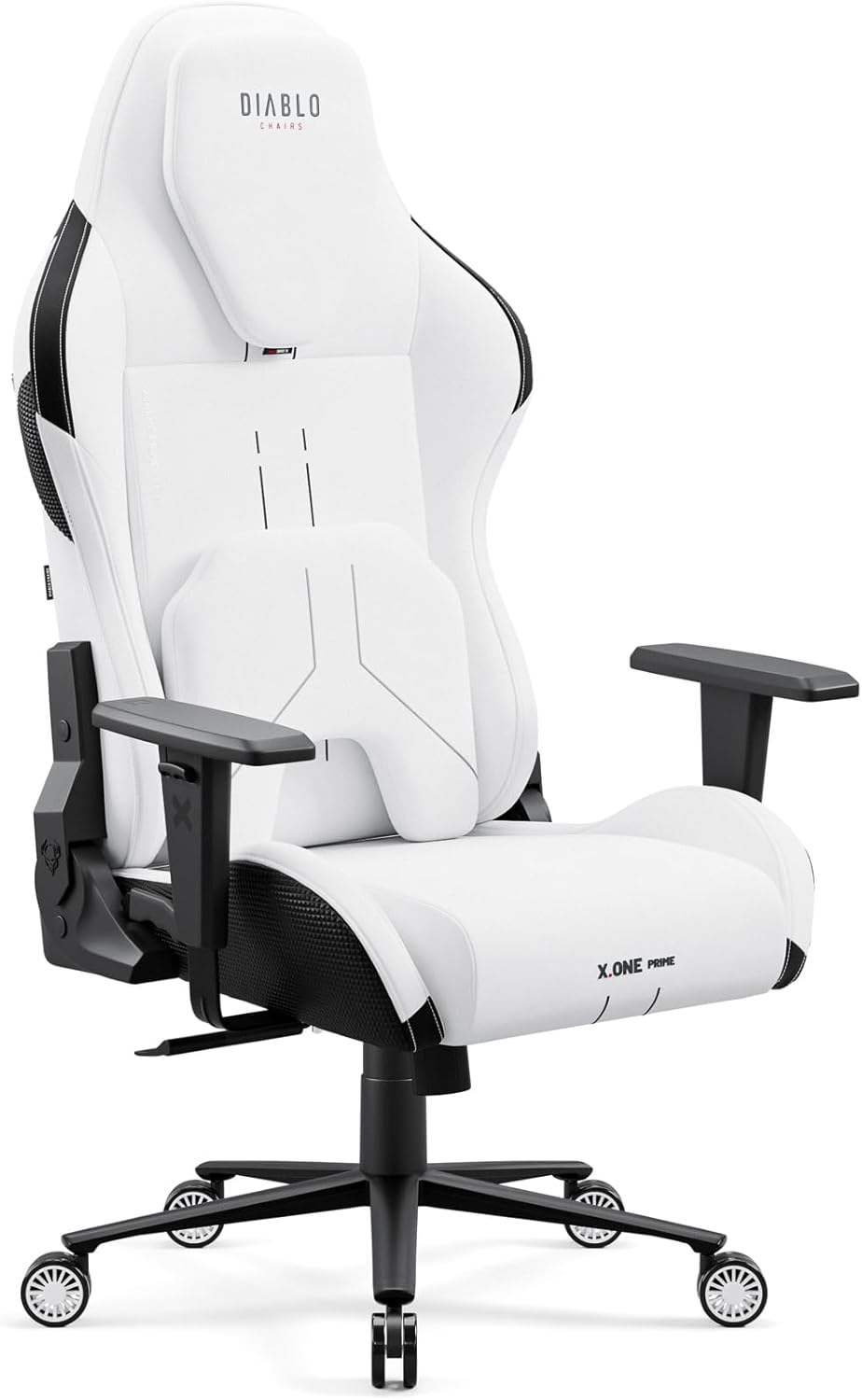
Figure 1.1: The Diablo X.One Prime Gaming Chair, showcasing its sleek design and white finish.
2. Safety Warnings
IMPORTANT SAFETY INFORMATION:
- Read the assembly instructions carefully before assembling the chair.
- Do not use chemical cleaners or excessive water to clean the chair. Spot cleaning is recommended.
- Always keep the chair on a stable and flat surface to prevent tipping hazards.
- Do not exceed the maximum weight capacity of 140 kg (308 lbs).
- Keep small parts away from children during assembly.
- Ensure all screws and bolts are securely tightened before use. Periodically check and re-tighten if necessary.
3. Product Features
The Diablo X.One Prime Gaming Chair is equipped with several advanced features designed for comfort and durability:
- Ergonomic Design: Advanced ergonomics for extended use, promoting proper posture and spinal relief.
- Magnetic Headrest: Memory foam headrest that precisely adapts to your head for optimal support.
- Adjustable Lumbar Cushion: Precisely adjustable lumbar support for personalized comfort during long gaming sessions.
- CoolComfort Technology: HR foam and CoolComfort technology provide a cooling effect to prevent overheating.
- Durable GentlePro Fabric: Three times more durable than standard materials, breathable, and resistant to intensive use.
- Sturdy Metal Base: Robust metal base and Class 4 gas lift cylinder support up to 140 kg (308 lbs).
- PFC 360 Rubber Wheels: Silent, smooth-gliding wheels that prevent scratches on floors.
- Height Adjustable Armrests: Customize armrest height for optimal arm and shoulder support.
- Relaxing Rocking Mode: Allows for a comfortable rocking motion.
- Backrest Tilt Adjustment: Backrest can be tilted up to 140 degrees for relaxation.

Figure 3.1: Key features of the Diablo X.One Prime Gaming Chair, including magnetic headrest, memory foam cushions, height-adjustable armrests, and a sturdy Class 4 actuator.

Figure 3.2: Detailed view of the magnetic headrest and memory foam cushions, highlighting neck support and precise adjustment.

Figure 3.3: Illustration of the chair's very soft fabric, sturdy construction, premium quality, and CoolComfort cooling technology.

Figure 3.4: Ergonomic recommendations for using the chair, including taking breaks, regularly changing position, adjusting cushion, and adjusting armrests.
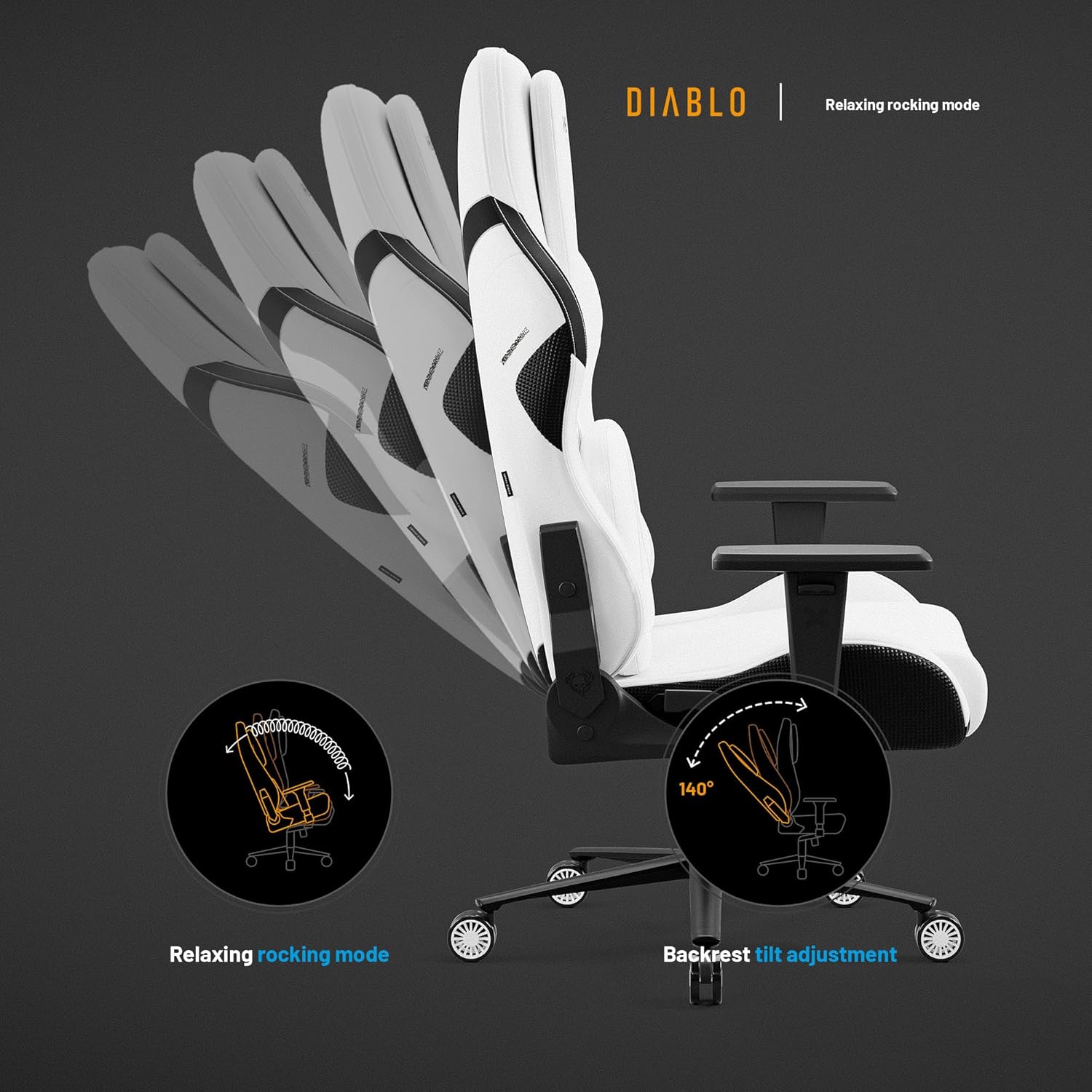
Figure 3.5: Demonstrates the relaxing rocking mode and the backrest tilt adjustment up to 140 degrees.

Figure 3.6: Close-up view of the adjustable lumbar support, indicating its vertical adjustment capability for precise positioning.
4. Setup and Assembly
While detailed assembly instructions are typically provided with the product packaging, here are general steps and tips for setting up your Diablo X.One Prime Gaming Chair:
- Unpack Components: Carefully remove all parts from the packaging and lay them out on a clean, flat surface. Verify all components are present against the parts list in your product box.
- Attach Wheels to Base: Insert the PFC 360 rubber wheels into the five-star metal base. Ensure they click securely into place.
- Install Gas Lift: Place the Class 4 gas lift cylinder into the center hole of the five-star base.
- Assemble Seat Mechanism: Attach the seat mechanism to the underside of the seat cushion using the provided screws. Pay attention to the "FRONT" indicator on the mechanism.
- Attach Armrests: Secure the height-adjustable armrests to the seat base using the designated screws.
- Connect Backrest to Seat: Align the backrest with the seat and attach it using the appropriate screws.
- Place Seat Assembly on Gas Lift: Carefully place the assembled seat and backrest onto the gas lift cylinder. The weight of the seat will secure it.
- Attach Headrest and Lumbar Cushion: Position the magnetic headrest and adjustable lumbar cushion as desired. The magnetic headrest will snap into place.
- Final Check: Before first use, ensure all screws are tightened and the chair is stable.
For visual guidance, refer to the assembly video if available, or the detailed diagrams in your product's physical manual.
5. Operating Instructions
Your Diablo X.One Prime Gaming Chair offers various adjustments to optimize your comfort and posture:
- Chair Height Adjustment: Locate the lever on the right side, under the seat. Pull the lever up while seated to lower the chair, or pull it up while standing to raise it. Release the lever at the desired height.
- Backrest Recline: Use the lever on the right side of the chair, near the backrest. Pull the lever up to recline the backrest to your desired angle (up to 140 degrees). Push the lever down to lock the backrest in place.
- Rocking Function: The chair features a relaxing rocking mode. To enable or disable this function, locate the knob under the seat. Turn it to adjust the tension of the rocking mechanism.
- Armrest Height Adjustment: Press the button on the side of each armrest and move the armrest up or down to your preferred height. Release the button to lock.
- Lumbar Cushion Adjustment: The lumbar cushion can be adjusted vertically to provide support to the curve of your lower back. Simply slide it up or down along the backrest.
- Magnetic Headrest Positioning: The headrest is magnetic and can be easily moved up or down to align with your head and neck for optimal support.
6. Maintenance and Care
Proper maintenance will extend the life and appearance of your Diablo X.One Prime Gaming Chair:
- Cleaning the Fabric: The GentlePro fabric is durable. For general cleaning, use a soft, damp cloth. For spills or stains, spot clean immediately with a mild soap solution and a clean cloth. Do not use harsh chemical cleaners, abrasive materials, or excessive water, as this may damage the fabric or internal components.
- Cleaning the Base and Wheels: Wipe the metal base and rubber wheels with a damp cloth to remove dust and debris. Periodically check the wheels for tangled hair or lint that might impede smooth movement.
- Checking Fasteners: Regularly inspect all screws and bolts to ensure they are tight. Re-tighten any loose fasteners to maintain stability and safety.
- Lubrication: The gas lift and moving parts are generally maintenance-free. If you notice any squeaking or stiffness, a small amount of silicone-based lubricant can be applied to pivot points, avoiding the gas lift cylinder itself.
- Storage: If storing the chair for an extended period, keep it in a cool, dry place away from direct sunlight and extreme temperatures.
7. Troubleshooting
Here are some common issues and their solutions:
| Problem | Possible Cause | Solution |
|---|---|---|
| Chair does not raise or lower. | Gas lift cylinder malfunction or lever not engaged properly. | Ensure the height adjustment lever is fully pulled up. If the issue persists, the gas lift may need replacement. Contact customer support. |
| Chair is wobbly or unstable. | Loose screws or improper assembly. | Check and tighten all assembly screws, especially those connecting the seat to the backrest and the mechanism to the seat. Ensure the gas lift is fully seated in the base. |
| Wheels do not roll smoothly. | Debris (hair, lint) caught in wheels or damaged wheels. | Turn the chair over and remove any debris from the wheels. If wheels are damaged, they may need replacement. |
| Backrest does not recline or lock. | Recline mechanism jammed or lever not fully engaged. | Ensure the recline lever is fully engaged. Check for any obstructions in the mechanism. |
| Squeaking noises. | Friction between moving parts or loose connections. | Tighten all screws. Apply a small amount of silicone lubricant to pivot points and joints (avoiding the gas lift). |
If you encounter issues not listed here or if the suggested solutions do not resolve the problem, please contact Diablo customer support for assistance.
8. Specifications
| Specification | Detail |
|---|---|
| Model Number | X.ONE PRIME |
| Brand | Diablo |
| Color | White |
| Material | Metal, Polyester |
| Product Dimensions (L x W x H) | 68 x 71 x 122.5 cm (26.8 x 28 x 48.2 inches) |
| Item Weight | 21.5 kg (47.4 lbs) |
| Maximum Weight Capacity | 140 kg (308 lbs) |
| Special Features | Magnetic Headrest, Ergonomic, Cooling Function, Height Adjustable |
| Back Style | High Back |
| Frame Material | Metal |
| Care Instructions | Spot clean |
9. Warranty and Support
Diablo stands behind the quality of its products. For warranty information, please refer to the warranty card included with your purchase or visit the official Diablo website. Keep your proof of purchase for any warranty claims.
For technical support, troubleshooting assistance, or to inquire about replacement parts, please contact Diablo customer service. Contact details can typically be found on the product packaging or the official Diablo website.
Online Resources:
- Official Diablo Website: www.diablochairs.com
- Product Support Page: Check the website for a dedicated support section for the X.One Prime model.


