1. Introduction
Thank you for choosing the Dr Trust USA Zurich 908 Portable Room Air Purifier. This device is designed to improve your indoor air quality by effectively removing airborne pollutants. Please read this manual thoroughly before use to ensure proper operation and maintenance.
Key Features:
- 360° Clean Airflow: Cylindrical design pulls air from all directions, covering up to 270 square feet with a Clean Air Delivery Rate (CADR) of 200 m³/h.
- 4-Layer Filtration + Filter Change Alert: Captures up to 99.97% of airborne particles as small as 0.3 microns, including dust, pollen, smoke, and pet dander. Features a pre-filter, True HEPA filter, activated carbon filter, and photocatalytic technology.
- Real-Time Air Quality Monitoring: PM2.5 air quality indicator with color-coded LED display (green, yellow, orange, red) and automatic fan speed adjustment in AUTO mode.
- Whisper-Quiet with Sleep Mode: Operates at just 50 dB, with a dedicated sleep mode for ultra-quiet operation.
- User-Friendly Design + UV-B Protection: Intuitive touch control panel for fan speeds, timers, and modes. Includes UV-B light technology to neutralize bacteria and viruses.

Image: Front view of the Dr Trust USA Zurich 908 Air Purifier.
2. Initial Setup
- Unpack the Unit: Carefully remove the air purifier from its packaging.
- Remove Filter Packaging: Before first use, open the bottom cover of the air purifier and remove the plastic packaging from the 4-layer filter.
- Install Filter: Place the filter back into the unit and secure the bottom cover.
- Position the Purifier: Place the air purifier on a flat, stable surface in the desired room. Ensure there is adequate space around the unit for optimal airflow.
- Connect Power: Plug the power cord into a suitable electrical outlet.

Image: Dr Trust Zurich 908 Air Purifier highlighting its features and design.
3. Operating Instructions
Control Panel Overview:
The Dr Trust Zurich 908 features an intuitive touch control panel located on the top of the unit. This panel allows you to manage all functions of the air purifier.
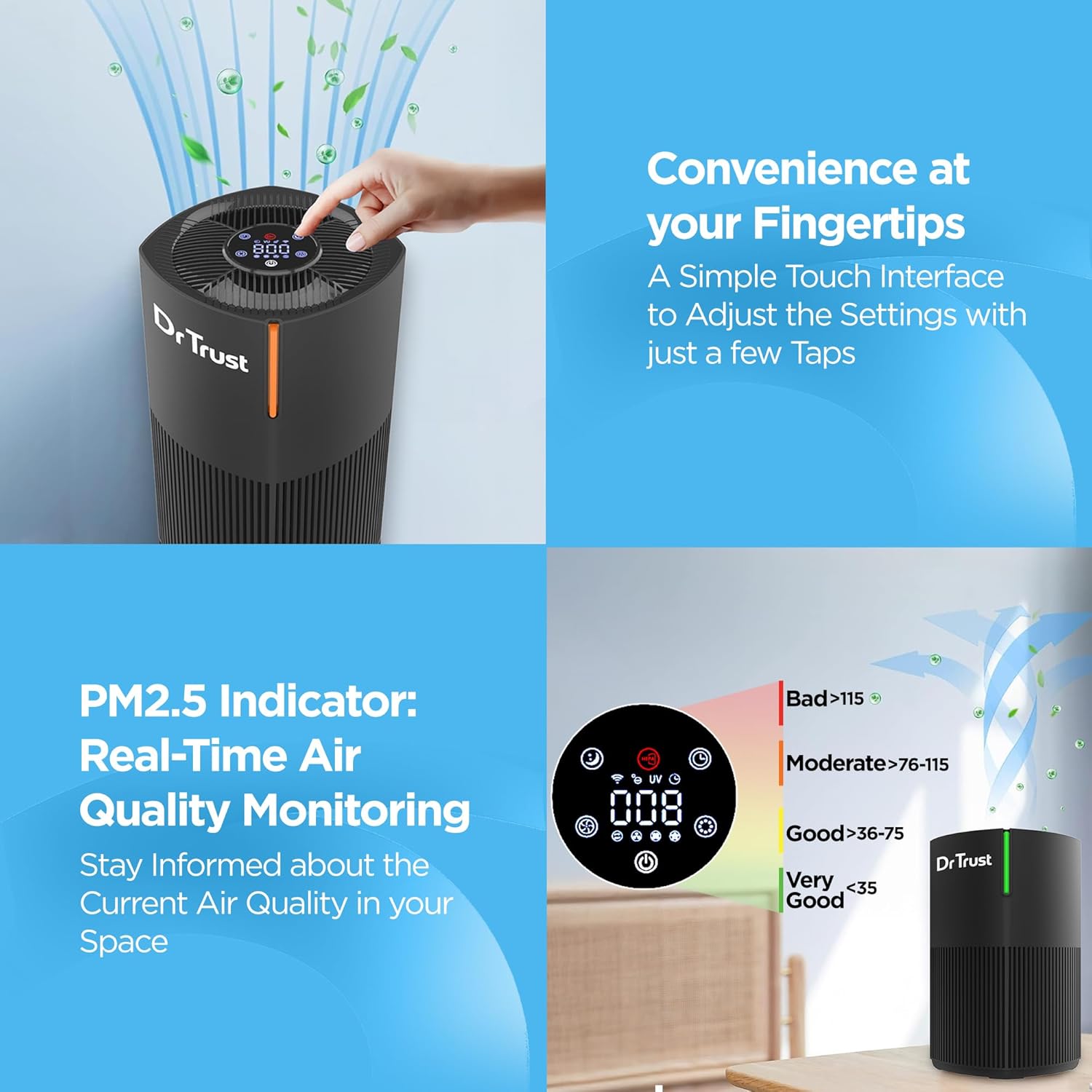
Image: Close-up of the air purifier's touch control panel.
Modes and Settings:
- Power On/Off: Touch the power icon to turn the unit on or off.
- Fan Speed: Select from 3 fan speeds to adjust the purification intensity.
- Sleep Mode: Activate sleep mode for quiet operation, ideal for nighttime use. The display lights will dim or turn off.
- Timer: Set the operational timer for up to 12 hours. The unit will automatically turn off after the set time.
- AUTO Mode: In AUTO mode, the purifier automatically adjusts fan speed based on the detected air quality.
- UV-B Light: Activate the UV-B light function for enhanced sterilization.
Air Quality Monitoring:
The integrated PM2.5 indicator provides real-time air quality readings. The color-coded LED display on the unit indicates the current air quality:
- Green: Very Good Air Quality
- Yellow: Good Air Quality
- Orange: Moderate Air Quality
- Red: Bad Air Quality

Image: PM2.5 air quality indicator with corresponding color codes.
4. Maintenance
Filter Replacement:
The Dr Trust Zurich 908 features a 4-layer filtration system that requires periodic replacement to maintain optimal performance. A convenient filter change alert will notify you when it's time to replace the filter.
- Power Off: Ensure the air purifier is turned off and unplugged from the power outlet.
- Remove Bottom Cover: Gently twist and remove the bottom cover of the unit.
- Remove Old Filter: Carefully pull out the used 4-layer filter.
- Install New Filter: Insert a new Dr Trust Zurich 908 replacement filter, ensuring it is seated correctly.
- Replace Cover: Securely reattach the bottom cover.
- Reset Filter Alert: Refer to the control panel instructions for resetting the filter change alert after replacement.

Image: Breakdown of the 4-layer filtration system.
Cleaning the Unit:
- Wipe the exterior of the air purifier with a soft, dry cloth.
- Do not use abrasive cleaners or solvents.
- Ensure no water enters the unit.
5. Troubleshooting
If you encounter any issues with your Dr Trust Zurich 908 Air Purifier, please refer to the following common troubleshooting steps:
- Unit Not Turning On: Check if the power cord is securely plugged into the outlet and the unit. Ensure the filter is correctly installed and the bottom cover is closed.
- Reduced Airflow or Purification: The filter may be clogged. Check the filter change alert and replace the filter if necessary. Ensure the air inlet and outlet are not obstructed.
- Unusual Noise: Check if the unit is placed on a stable surface. Ensure no foreign objects are obstructing the fan.
- Air Quality Indicator Not Changing: Ensure the sensor is clean and not obstructed. If the issue persists, contact customer support.
6. Product Specifications
| Specification | Detail |
|---|---|
| Brand | Dr Trust |
| Model Number | 908 Air Purifier |
| Colour | Black |
| Product Dimensions | 22.9D x 22.9W x 34.4H Centimeters |
| Floor Area Coverage | 270 Square Feet |
| Noise Level | 50 Decibels |
| Wattage | 22 Watts |
| Included Components | 1 Piece Air Purifier |
| Certifications | CE Certified, ETL Certified, RoHS Certified, UL Certified |
| Country of Origin | China |
7. Warranty and Customer Support
The Dr Trust USA Zurich 908 Portable Room Air Purifier comes with a 3-year warranty, ensuring peace of mind regarding your purchase.
For any product-related queries, technical assistance, or warranty claims, please contact Dr Trust customer support. Contact details can typically be found on the product packaging or the official Dr Trust website.
Manufacturer: Nureca Limited, Office No. 101, 1st Floor, Udyog Bhavan Sonawala Lane, Goregaon East, Mumbai, Maharashtra - 400063


