
SOBERNA S24
SOBERNA S24 Bluetooth Headphones User Manual
Model: S24
Introduction
Thank you for choosing the SOBERNA S24 Bluetooth Headphones. This manual provides detailed instructions on how to set up, operate, and maintain your new wireless earbuds. Please read this manual carefully before use to ensure optimal performance and longevity of your device.
Package Contents
- SOBERNA S24 Wireless Earbuds (Left and Right)
- Charging Case
- USB Charging Cable
- User Manual
Product Overview
Familiarize yourself with the components of your SOBERNA S24 Bluetooth Headphones.
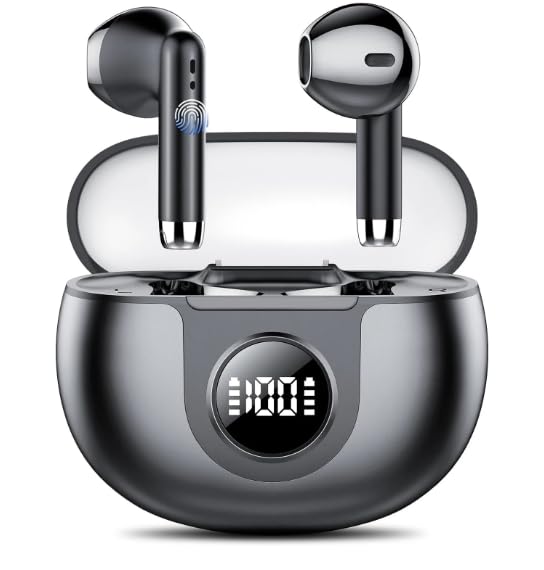
Image: The SOBERNA S24 wireless earbuds are shown nestled within their compact charging case. The earbuds feature an in-ear design, and the case is designed for portability and protection.
- Earbuds: In-ear design with touch control areas.
- Charging Case: Stores and charges the earbuds, typically featuring an LED indicator for battery status and a charging port.
Setup
1. Charging the Earbuds and Case
Before first use, fully charge both the earbuds and the charging case.
- Place the earbuds into the charging case. Ensure they are correctly seated.
- Connect the USB charging cable to the charging port on the case and plug the other end into a USB power adapter (not included) or a computer's USB port.
- The LED indicator on the charging case will show the charging status. Once fully charged, the indicator will typically change or turn off.
- Charging time is approximately 1-2 hours for a full charge.
2. Pairing with Your Device
Follow these steps to connect your SOBERNA S24 headphones to your Bluetooth-enabled device.
- Power On: Open the charging case. The earbuds will automatically power on and enter pairing mode. You may hear a voice prompt "Pairing".
- Activate Bluetooth: On your smartphone, tablet, or laptop, go to the Bluetooth settings and enable Bluetooth.
- Select Device: In the list of available Bluetooth devices, find and select "SOBERNA S24".
- Confirm Connection: Once connected, you will hear a voice prompt "Connected" or see a confirmation on your device screen.
- Automatic Reconnection: After the initial pairing, the earbuds will automatically connect to the last paired device when taken out of the case, provided Bluetooth is enabled on the device.
Note: If pairing fails, turn off the earbuds, disable Bluetooth on your device, and repeat the pairing steps.
Operating Instructions
The SOBERNA S24 earbuds feature touch controls for easy management of music and calls.
Power On/Off
- Power On: Open the charging case, or long-press the touch area on both earbuds for 3 seconds.
- Power Off: Place the earbuds back into the charging case and close the lid, or long-press the touch area on both earbuds for 5 seconds.
Music Playback
- Play/Pause: Single tap the touch area on either earbud.
- Next Track: Double tap the touch area on the right earbud.
- Previous Track: Double tap the touch area on the left earbud.
- Volume Up: Triple tap the touch area on the right earbud.
- Volume Down: Triple tap the touch area on the left earbud.
Call Management
- Answer/End Call: Single tap the touch area on either earbud.
- Reject Call: Long-press the touch area on either earbud for 2 seconds.
Voice Assistant
- Activate Voice Assistant: Long-press the touch area on either earbud for 2 seconds (when not on a call).
Maintenance
Proper care ensures the longevity and performance of your SOBERNA S24 headphones.
- Cleaning: Use a soft, dry, lint-free cloth to clean the earbuds and charging case. Do not use harsh chemicals or abrasive materials.
- Water Resistance: The earbuds are IPX7 waterproof. This means they can withstand immersion in water up to 1 meter for 30 minutes. However, the charging case is not waterproof. Ensure earbuds are dry before placing them back in the case.
- Storage: Store the headphones in their charging case when not in use to protect them from dust and damage. Avoid extreme temperatures.
- Charging: Charge the device regularly, even if not in frequent use, to maintain battery health.
Troubleshooting
If you encounter issues with your SOBERNA S24 headphones, refer to the following common solutions.
| Problem | Solution |
|---|---|
| Earbuds not pairing with device. |
|
| Only one earbud is working. |
|
| No sound or low volume. |
|
| Charging case not charging. |
|
Specifications
- Model Name: S24
- Brand: SOBERNA
- Connectivity Technology: Wireless (Bluetooth)
- Ear Placement: In Ear
- Form Factor: In Ear
- Color: Gray
- Water Resistance: IPX7 (Earbuds only)
- Playback Time: Up to 40 hours (with charging case)
- Built-in Media: Cable (USB Charging Cable)
Warranty Information
The SOBERNA S24 Bluetooth Headphones come with a 2-year warranty from the date of purchase. This warranty covers manufacturing defects and workmanship under normal use. It does not cover damage caused by misuse, accidents, unauthorized modifications, or normal wear and tear.
Please retain your proof of purchase for warranty claims.
Support
For further assistance, technical support, or warranty inquiries, please contact SOBERNA customer service through the retailer where you purchased the product or visit the official SOBERNA website.
Please have your model number (S24) and proof of purchase ready when contacting support.
Ask a question about this manual
Ask about setup, troubleshooting, compatibility, parts, safety, or missing instructions. Manuals+ will review the question and use this page’s manual context to help answer it.