

1. Introduction
Thank you for choosing the PUSUN PT-Mini Pro Portable Tennis Ball Machine. This automatic tennis ball launcher is designed to enhance your individual practice and training sessions, offering precise control over ball speed and frequency. Its compact design and smart control features make it an ideal tool for improving your tennis skills.
2. Product Overview
2.1 Key Features
- Portable Design: Compact and lightweight (8 kg), similar in size to a basketball, with a convenient handle for easy transport.
- Smart App Control: Adjust frequency, speed, spin, depth, and random modes via a dedicated smart application.
- Remote Control: Offers an alternative method for adjusting settings during practice.
- Long Battery Life: Integrated high-performance lithium battery provides 3-5 hours of continuous operation.
- High Capacity: Hopper holds over 65 tennis balls, minimizing interruptions during training.
- Adjustable Settings: Ball speeds from 8 to 60 km/h and frequencies from 1.6 to 8 seconds per ball. Vertical launch angle is manually adjustable from 25-70 degrees.

Image: The PUSUN PT-Mini Pro tennis ball machine highlighting its key performance specifications: speed range (8-60 km/h), service frequency (1.8-8 s/ball), maximum service distance (14+ m), and adjustable vertical angle (25°-70°).

Image: The PUSUN PT-Mini Pro tennis ball machine shown next to a basketball, illustrating its compact and portable size for easy transport.
2.2 Package Contents
The PUSUN PT-Mini Pro package includes the following items:
- PUSUN PT-Mini Pro Tennis Ball Machine
- Remote Control
- Charging Cable
- User Manual
3. Setup
3.1 Unpacking
Carefully remove all components from the packaging. Inspect the machine for any signs of damage. Retain the packaging for future storage or transport.
3.2 Charging the Battery
Before first use, fully charge the integrated lithium battery. Connect the charging cable to the machine's charging port and plug it into a standard power outlet. The charging indicator will show the charging status. A full charge typically provides 3-5 hours of operation.
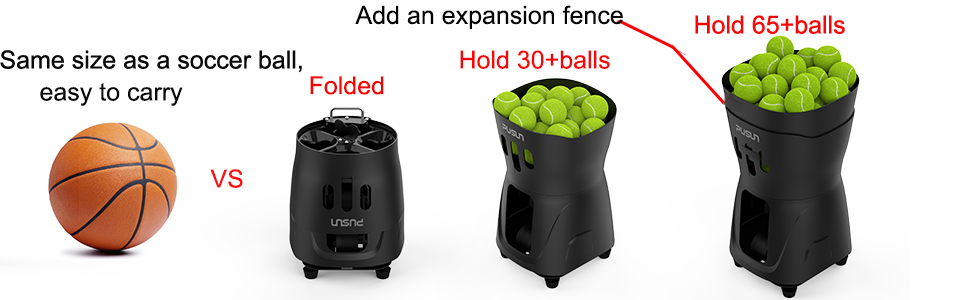
Image: The PUSUN PT-Mini Pro machine powered by a 14.8V 4AH lithium battery, indicating a battery life of 3-5 hours on a single charge. Regular battery care is recommended.
3.3 Loading Tennis Balls
Open the hopper and carefully place tennis balls inside. The machine can hold over 65 tennis balls. Ensure balls are clean and dry to prevent jamming.
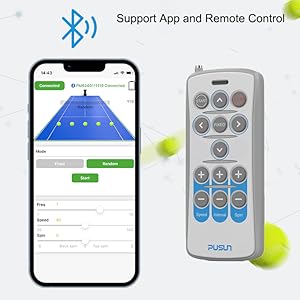
Image: The PUSUN PT-Mini Pro machine demonstrating its capacity to hold over 65 tennis balls.
4. Operating Instructions
4.1 Powering On/Off
Locate the power button on the machine. Press and hold to turn the machine on or off. Ensure the machine is placed on a stable, level surface before operation.
4.2 Remote Control Operation
The included remote control allows for convenient adjustments during play. Use the buttons to control ball speed, frequency, and other settings. Refer to the remote control diagram in the manual for specific button functions.
4.3 Smart App Control
Download the PUSUN Sport app from your device's app store. Pair your device with the PT-Mini Pro via Bluetooth. The app provides comprehensive control over all machine functions, including advanced settings for customized training programs.
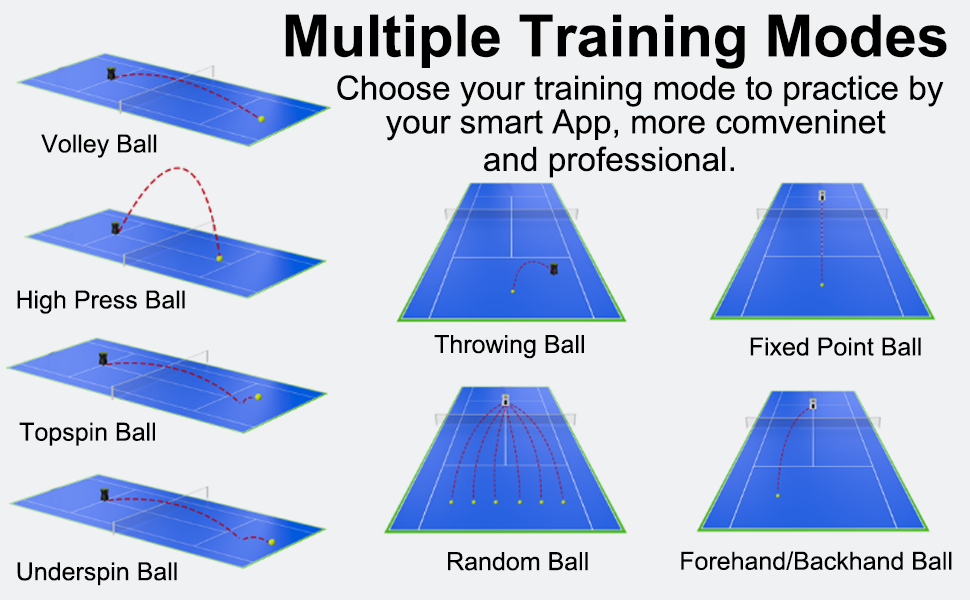
Image: The PUSUN PT-Mini Pro machine demonstrating dual-mode control via its smart app interface on a smartphone and the physical remote control.
4.4 Adjusting Ball Settings
- Speed: Adjust the ball launch speed from 8 to 60 km/h using the app or remote control.
- Frequency: Set the interval between ball launches from 1.6 to 8 seconds per ball.
- Spin: Apply topspin or backspin to the balls for varied practice.
- Depth: Control the ball's landing depth on the court.
- Vertical Angle: Manually adjust the launch angle from 25 to 70 degrees using the knob at the bottom of the machine to simulate different shot trajectories.
4.5 Training Modes
The PT-Mini Pro offers various training modes to simulate different shot types. These modes can be selected and customized via the smart app:
- Fixed Point Ball: Launches balls to a consistent spot.
- Random Ball: Launches balls to various positions across the court.
- Forehand/Backhand Ball: Alternates between forehand and backhand positions.
- Volley Ball: Simulates volleys.
- Smash Ball: Simulates overhead smashes.
- Throw Ball: Simulates lobs or high balls.
Note: The PT-Mini Pro covers approximately 2/3 of the court. For optimal training, position the ball machine in front of the net.
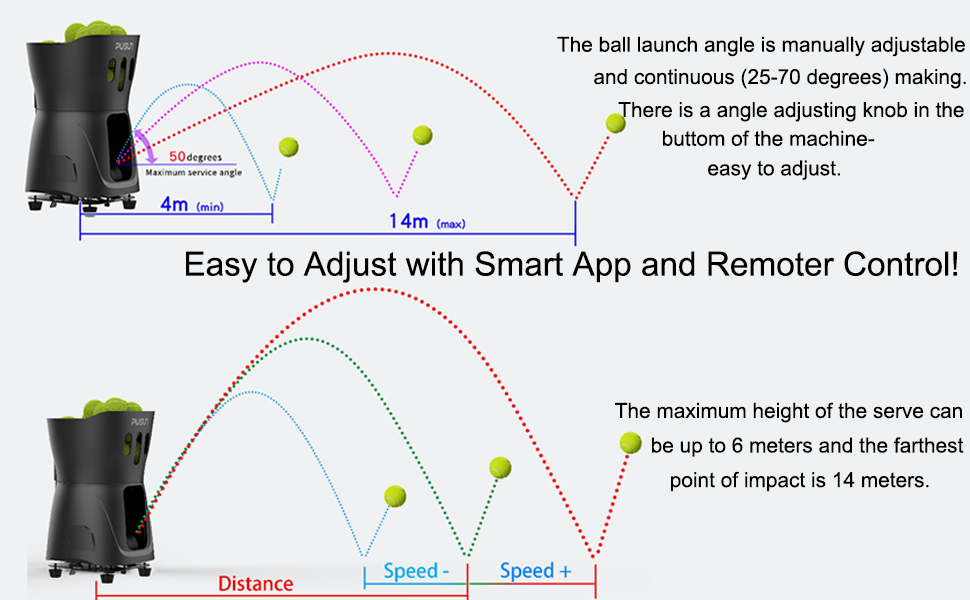
Image: Visual representation of different training modes, including Smash Ball, Volley Ball, Fixed Ball, Throw Ball, Random Ball, and Forehand/Backhand Ball trajectories.
5. Maintenance
5.1 Cleaning
Regularly clean the machine's exterior with a soft, damp cloth. Ensure no dust or debris accumulates in the ball hopper or launch mechanism. Do not use abrasive cleaners or solvents.
5.2 Battery Care
To prolong battery life, charge the battery every 2 months, even when the machine is not in use. Avoid fully discharging the battery frequently. Store the machine in a cool, dry place when not in use.
6. Troubleshooting
If you encounter issues with your PUSUN PT-Mini Pro, refer to the following common problems and solutions:
- Machine not powering on: Ensure the battery is charged and the power button is pressed correctly.
- Balls not launching: Check if the hopper is loaded correctly and if there are any obstructions in the launch mechanism. Verify speed and frequency settings.
- Remote control or app not connecting: Ensure Bluetooth is enabled on your device and the machine is within range. Re-pair the device if necessary.
- Inconsistent ball trajectory: Check the vertical angle adjustment and ensure the machine is on a stable surface.
For further assistance, please contact customer support.
7. Specifications
| Feature | Specification |
|---|---|
| Brand | PUSUN |
| Model Number | PT-Mini Pro |
| Material | Acrylonitrile Butadiene Styrene (ABS), Metal |
| Color | White |
| Sport Type | Tennis |
| Weight | 8 kg (approx.) |
| Ball Capacity | Over 65 balls |
| Ball Speed Range | 8 - 60 km/h |
| Ball Frequency Range | 1.6 - 8 seconds/ball |
| Vertical Angle Adjustment | 25° - 70° (manual) |
| Battery Type | Integrated Lithium Battery (14.8V 4AH) |
| Battery Life | 3 - 5 hours |
| Control Methods | Smart App, Remote Control |
| Manufacturer | PUSUN Sport |
8. Warranty and Support
Upon receiving your tennis machine, please ensure it is in good condition. Before first use, carefully read this user manual. For any questions, concerns, or technical support regarding your PUSUN PT-Mini Pro tennis ball machine, please do not hesitate to contact our customer support team. We are committed to responding to your inquiries within 12 hours.
Contact Information: Please refer to the contact details provided on the product packaging or the official PUSUN website for the most up-to-date support information.
