
1. Introduction
This manual provides detailed instructions for the MuliVid Waterproof RGB+IC Outdoor LED Strip Lights, Model AML006_IR30M. These 100ft LED strip lights are designed for both indoor and outdoor use, featuring IP67 waterproofing, RGB+IC technology for multi-color displays, and convenient control via a remote or smartphone application.

Image 1.1: MuliVid 100ft RGB+IC Outdoor LED Strip Lights product overview, including the packaging, remote control, and coiled waterproof LED strips.
2. Package Contents
Verify that all items listed below are included in your package:
- 2 rolls of 50ft/30m LED strip lights
- 1 x 12V power adapter
- 1 x 44-key remote control
- 1 x White controller
- 1 x User manual (this document)
- 2 x Installation instructions
3. Safety Information
- Ensure the power adapter is connected to a suitable power outlet.
- Do not cut or modify the LED strip lights, as this may damage the product and void the warranty.
- Avoid exposing the power adapter and controller to water or extreme weather conditions, as they are not waterproof.
- Keep the product out of reach of children.
- Do not stare directly into the LED lights for extended periods.
- Unplug the power adapter before cleaning or performing any maintenance.
4. Setup and Installation
- Unspool the Strips: Before powering on, completely unroll the LED strip lights from their spools. Operating the lights while coiled can cause overheating and damage.
- Connect Components: Connect the LED strip lights to the white controller, and then connect the controller to the 12V power adapter. Ensure all connections are secure.
- Prepare Remote Control: If using the remote control, remove the clear plastic tab from the battery compartment to activate it.
- Power On: Plug the power adapter into a suitable electrical outlet. The lights should illuminate.
- Placement: The LED strips feature a self-adhesive backing for easy attachment. For additional security, use the included clips and screws, especially for outdoor installations or on uneven surfaces.
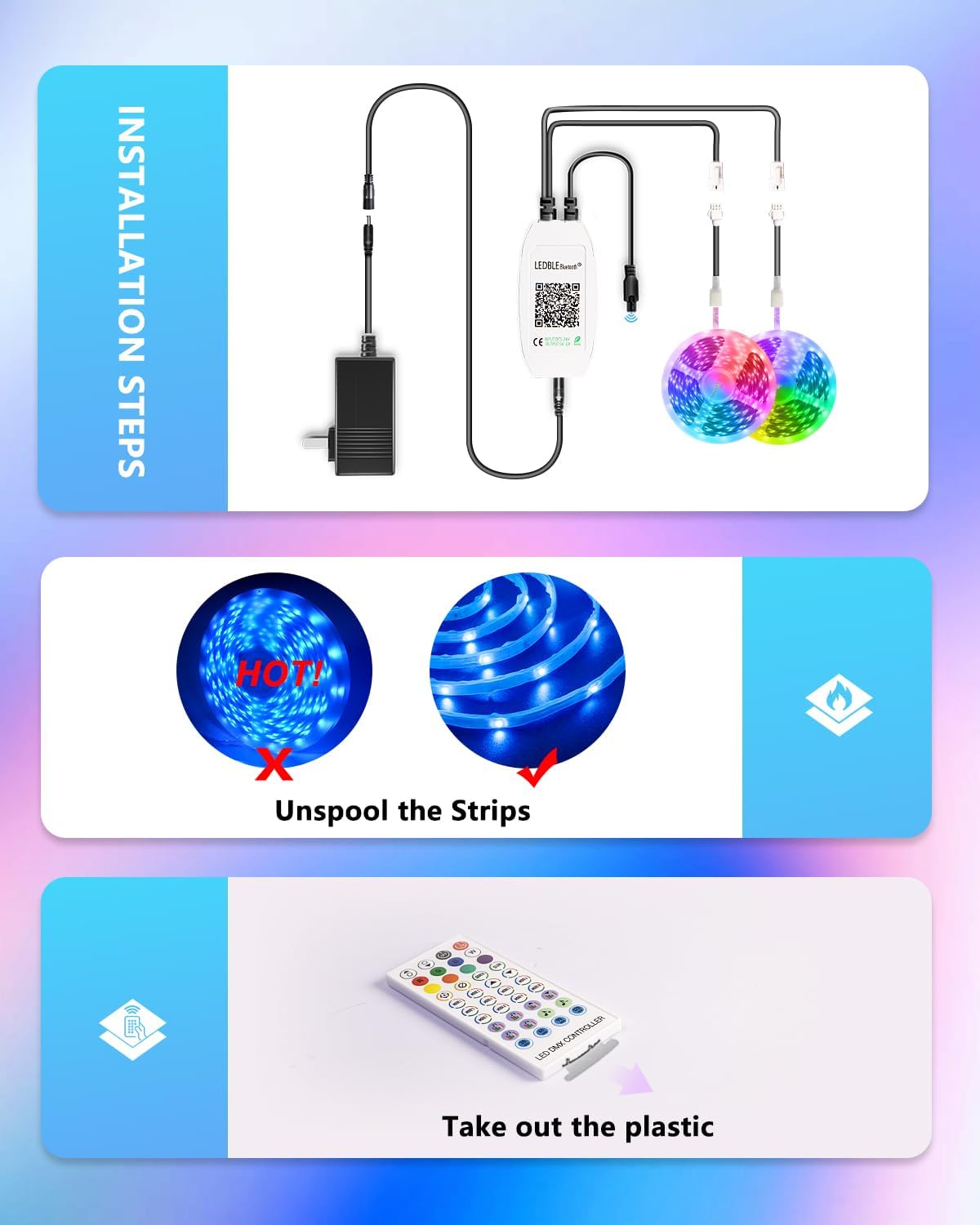
Image 4.1: Visual guide for installation, showing the importance of unspooling the LED strips before use and connecting the components.
4.1 Recommended Installation Locations
These waterproof LED strip lights are suitable for various indoor and outdoor applications:
- Outdoor: Eaves, decks, patios, gardens, balconies, yards, trees, garages.
- Indoor: For accent lighting in areas where moisture resistance is beneficial.

Image 4.2: Various outdoor settings demonstrating the application of MuliVid LED strip lights on eaves, decks, gardens, and garages.
5. Operating Instructions
The MuliVid LED Strip Lights can be controlled using the included 44-key remote control or the "illumi home" smartphone application.
5.1 App Control ("illumi home")
Download the "illumi home" app from Google Play Store (Android) or iOS App Store (Apple). Follow the in-app instructions to pair your LED strip lights. Once connected, you can access a range of functions:
- Brightness Adjustment: Increase or decrease the light intensity.
- Color Changing: Select from a wide spectrum of colors.
- On/Off: Power the lights on or off.
- Scene Modes: Choose from various pre-set lighting effects.
- Music Sync Mode: The lights will pulsate and change colors in rhythm with ambient sound and music, detected by the sensitive built-in microphone.
- Timing Function: Set schedules for the lights to automatically turn on or off.

Image 5.1: The "illumi home" smartphone application interface, demonstrating various control options for the LED strip lights.
5.2 Remote Control
The included 44-key IR remote control allows for direct adjustment of the LED strip lights. Point the remote directly at the white controller for optimal response.
- Color Buttons: Select specific colors (Red, Green, Blue, White, and various mixed colors).
- Brightness Control: Use the brightness up/down buttons to adjust intensity.
- Mode Buttons: Cycle through different dynamic lighting modes (e.g., flash, strobe, fade, smooth).
- On/Off Buttons: Power the lights on or off.
6. Key Features
6.1 RGB+IC Technology
The RGB+IC (Red, Green, Blue + Independent Control) technology allows for multiple colors to be displayed simultaneously on a single strip segment. This creates more dynamic and vibrant lighting effects compared to traditional RGB strips where only one color can be displayed across the entire strip at a time.
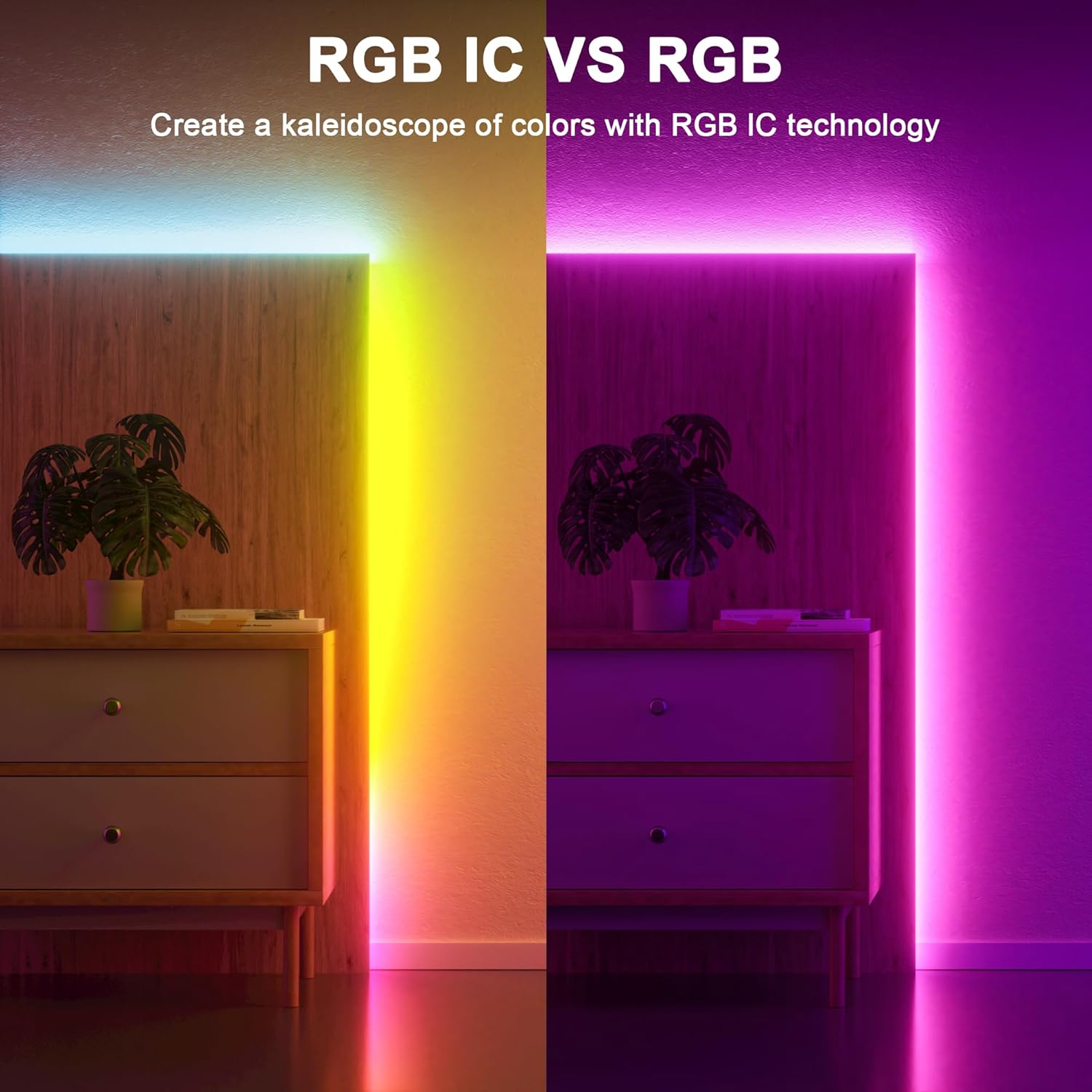
Image 6.1: Visual comparison illustrating the enhanced multi-color display capabilities of RGB+IC technology versus standard RGB.
6.2 IP67 Waterproof Rating
The LED strip lights are equipped with an IP67 waterproof casing, meaning they are protected against dust ingress and can withstand immersion in water up to 1 meter for 30 minutes. The strip is wrapped in silicone, effectively protecting the LEDs from external damage, splashing, or rainfall. This makes them ideal for outdoor use, though direct prolonged submersion is not recommended for the entire system (controller and adapter are not waterproof).

Image 6.2: A close-up view of the LED strip lights with water droplets, showcasing their IP67 waterproof construction.
6.3 Timing Function
Utilize the timing function via the "illumi home" app to schedule automatic on/off times for your lights. This feature allows for energy efficiency and convenience, ensuring your lights activate and deactivate according to your preferences.

Image 6.3: An example of the timing function in use, showing LED strip lights illuminating a house exterior at a set time.
7. Maintenance
- Cleaning: Gently wipe the LED strips with a soft, damp cloth to remove dust or dirt. Do not use harsh chemicals or abrasive cleaners.
- Connection Check: Periodically inspect all connections (power adapter, controller, and strip connections) to ensure they are secure and free from corrosion or damage.
- Storage: If storing the lights for an extended period, ensure they are clean, dry, and coiled loosely to prevent damage. Store in a cool, dry place.
8. Troubleshooting
| Problem | Possible Cause | Solution |
|---|---|---|
| Lights do not turn on. |
|
|
| Remote control not responding. |
|
|
| App cannot connect to lights. |
|
|
| Lights are overheating. |
|
|
9. Specifications
| Feature | Detail |
|---|---|
| Brand | MuliVid |
| Model Number | AML006_IR30M |
| Length | 100 Feet (2 rolls of 50ft/30m) |
| Waterproof Rating | IP67 (Strip only; controller and adapter are not waterproof) |
| Light Source Type | LED |
| Light Color | RGBIC (Color Changing) |
| Power Source | Corded Electric (12V power adapter) |
| Control Methods | 44-key Remote Control, "illumi home" App Control |
| Special Features | Dimmable, Energy Efficient, Music Sync (built-in microphone), Timer Function |
| Material | Plastic (Silicone-wrapped strip) |
| Item Weight | 2.25 pounds |
10. Warranty and Support
MuliVid offers an 18-month warranty for this product. If you encounter any issues or require assistance, please contact our customer service team. We are committed to providing prompt solutions within 24 hours.
For support, please refer to the contact information provided on the product packaging or the official MuliVid website.