
Introduction
Thank you for choosing the Koorlian Queen Upholstered Bed Frame. This manual provides detailed instructions for the safe assembly, operation, and maintenance of your new bed frame. Please read all instructions carefully before beginning assembly and retain this manual for future reference.
This bed frame features a 51-inch tall headboard with integrated LED lighting, USB and Type-C charging ports, and four dustproof storage drawers, combining modern design with practical functionality.
Safety Information
To ensure safe use and prevent damage, please observe the following:
- Mattress Compatibility: Ensure that the mattress size is compatible with the bed frame (Queen size, 8-16 inches thick).
- Height Consideration: Consider your desired bed height before final assembly.
- Room Dimensions: Measure the accurate dimensions of your bedroom to ensure the bed frame fits appropriately.
- Weight Capacity: Do not exceed the maximum weight capacity of 1000 lbs.
- Assembly: Assemble the bed frame on a soft, clean surface to prevent scratches. Ensure all bolts and screws are securely tightened before use.
- Electrical Safety: When using the charging ports and LED lights, ensure proper electrical connections and avoid overloading circuits.
Package Contents
Before assembly, please verify that all components listed below are present. If any parts are missing or damaged, contact customer support immediately.
- 2-tier storage headboard
- Footboard
- Metal side rails
- Wood slats
- Support legs
- 4 dustproof drawers with wheels
- Charging station (2 AC outlets, 1 Type-C, 1 USB port)
- RGB LED light with remote control
- Instruction manual
- Screws and tool kit (numbered)
Note: Mattress is not included.
Assembly Instructions
Assembly of the Koorlian Queen Upholstered Bed Frame is designed to be straightforward. Please follow the numbered steps and diagrams provided in the separate instruction manual included in your package. Ensure you have ample space and a soft surface to prevent damage during assembly.
- Unpack Components: Carefully unpack all parts and lay them out on a clean, soft surface. Verify all parts against the package contents list.
- Assemble Headboard: Follow the instructions to connect the headboard sections. Note the adjustable height feature (47", 49", 51").
- Attach Side Rails: Securely attach the metal side rails to the headboard and footboard using the provided hardware.
- Install Support Legs and Slats: Place the support legs and then evenly distribute and secure the wood slats across the frame. The noiseless foam on the slats helps prevent squeaking.
- Insert Storage Drawers: Assemble the four dustproof fabric-lined drawers. Each drawer has smooth rolling wheels. Align the drawer fixtures with the reserved holes on the bed frame to prevent them from slipping out.
- Connect Electrical Components: Carefully connect the power supply for the charging station and LED lights as per the detailed diagrams in the manual.
- Final Check: Ensure all connections are tight and the frame is stable before placing your mattress.

Image: Overall dimensions and drawer details of the Koorlian Queen Bed Frame.
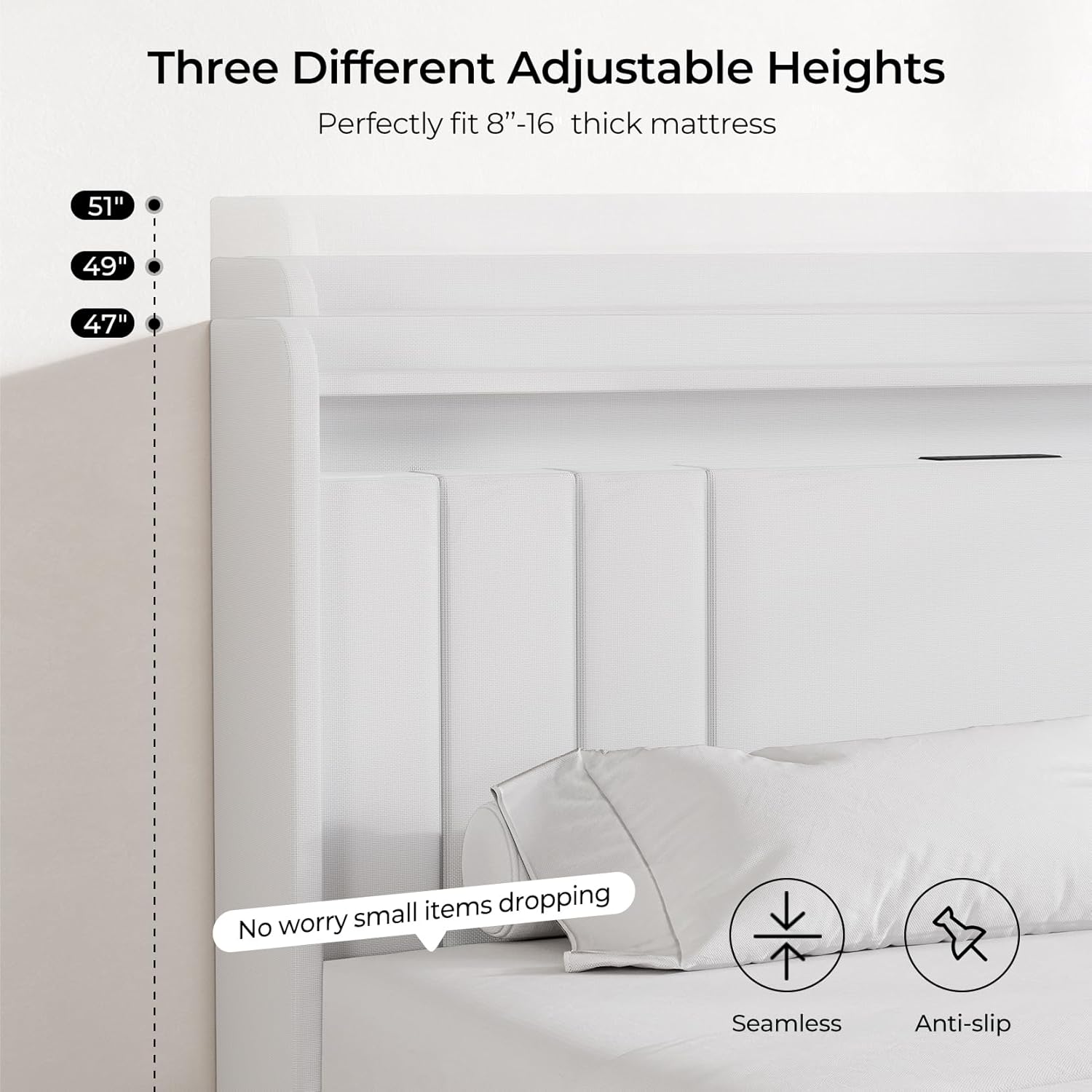
Image: Headboard height adjustment options.
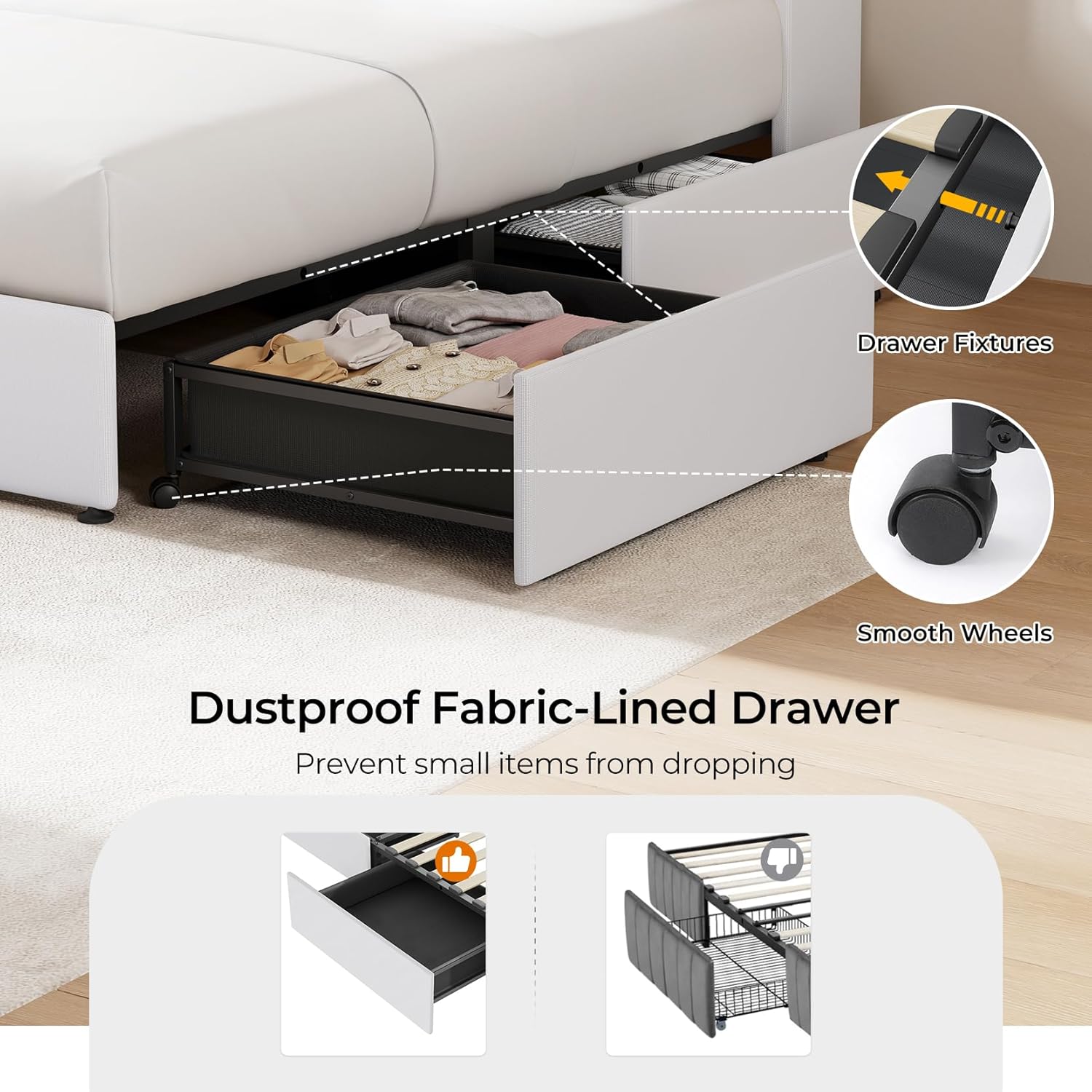
Image: Detail of the dustproof fabric-lined drawer with wheels and anti-slip fixtures.

Image: Structural features including metal frame, assembly points, and noise reduction.
Operating Instructions
A. Headboard Charging Station
The integrated charging station provides convenient power access for your devices.
- AC Outlets: Plug in standard electrical devices into the two AC outlets.
- USB & Type-C Ports: Use the USB and Type-C ports to charge compatible smartphones, tablets, and other electronic devices.
- Ensure the bed frame is properly connected to a power source for these features to function.

Image: Headboard charging station in use with LED lighting.
B. RGB LED Lighting
The RGB LED light strip integrated into the headboard offers customizable ambiance.
- Control Methods: The LED lights can be controlled via a dedicated mobile application or the included remote control.
- Functions: Adjust color, brightness, and various scene modes. You can also set timers for automatic on/off.
- Refer to the separate LED light instruction sheet for detailed pairing and operation of the mobile app and remote control.
C. Storage Drawers
The four dustproof storage drawers provide convenient under-bed storage.
- Access: Gently pull the drawers out using the integrated handles. The smooth wheels ensure easy operation.
- Security: Each drawer includes a fixture screw designed to align with a reserved hole on the bed frame, preventing accidental rolling out or swinging. Ensure these are engaged after closing the drawers.
- Dust Protection: The fabric lining helps protect stored items from dust.
Maintenance
- Cleaning Fabric: For the upholstered parts, gently spot clean with a damp cloth and mild detergent. Avoid harsh chemicals.
- Cleaning Frame: Wipe metal and wood surfaces with a soft, dry cloth.
- Drawer Maintenance: Periodically check drawer wheels for smooth operation and clean any accumulated dust or debris.
- Tighten Fasteners: Every few months, check all bolts and screws and tighten them if necessary to maintain stability.
- Electrical Components: Ensure charging ports and LED connections are free from dust and damage. Do not attempt to repair electrical components yourself.
Troubleshooting
| Problem | Possible Cause | Solution |
|---|---|---|
| Bed frame is wobbly or squeaks. | Loose bolts or screws; uneven floor; damaged slat. | Ensure all bolts and screws are securely tightened. Check if the floor is level. Inspect slats for damage and replace if necessary. |
| LED lights not working. | Power not connected; remote control battery low; app not paired. | Verify power connection to the bed frame. Replace remote control battery. Re-pair the mobile app with the LED lights according to the separate instructions. |
| Charging ports not functioning. | Bed frame not powered; device cable faulty; port damage. | Confirm the bed frame is plugged into a working power outlet. Try a different charging cable or device. If issues persist, contact customer support. |
| Drawers do not slide smoothly or fall out. | Obstruction in tracks; wheels damaged; fixture screws not engaged. | Check for debris in the drawer tracks. Inspect wheels for damage. Ensure the drawer fixture screws are properly aligned and engaged with the bed frame's reserved holes. |
Specifications
| Feature | Detail |
|---|---|
| Brand | koorlian |
| Model Number | JJ011WHQ-86 |
| Colour | White |
| Product Dimensions (L x W x H) | 218.44 x 154.94 x 129.54 cm (86 x 61 x 47-51 inches) |
| Material | Metal, Soft Fabric, Wood |
| Special Features | 2-tier headboard storage shelves, 3 adjustable headboard heights, 4 dustproof fabric storage drawers, Built-in AC outlets, USB, and Type-C charging ports, RGB LED light with multiple scene modes and timing function |
| Weight Capacity | 1000 lbs |
| Compatible Mattress Size | Queen, 8-16 inches thick (No box spring required) |
| Under-bed Clearance | 12 inches |
Warranty and Support
For warranty information, technical support, or to order replacement parts, please refer to the contact details provided in your purchase documentation or visit the official Koorlian website. Please have your model number (JJ011WHQ-86) and purchase date ready when contacting support.
Manufacturer: Koorlian