
1. Introduction
The COLAMY Zero-Gravity Massage Chair is designed to provide a comprehensive relaxation experience. This chair features a full-body massage system with an SL-frame design, multiple zero-gravity reclining positions, a heating function, and integrated Bluetooth speakers. This manual provides essential information for the safe and effective assembly, operation, and maintenance of your massage chair.
2. Safety Information
- Read all instructions before using the massage chair.
- Do not use the chair if you have any medical conditions that may be aggravated by massage or heat. Consult a physician before use if you have concerns.
- Keep children and pets away from the chair, especially during operation.
- Ensure the power cord is not damaged and is properly connected to a grounded outlet.
- Do not attempt to disassemble or repair the chair yourself. Contact customer service for assistance.
- Avoid placing the chair in direct sunlight or in areas with high humidity.
- Maximum weight capacity: 250 lbs.
3. Package Contents
Verify that all components are present before beginning assembly:
- Main Body of Massage Chair
- Center Connecting Support
- Five-foot Support (Base)
- Head Cushion
- Remote Control
- Power Cord
- User Manual (this document)
4. Assembly Instructions
Follow these steps to assemble your COLAMY Zero-Gravity Massage Chair. For a visual guide, please refer to the installation video below.
Video: Product Installation Guide
This video demonstrates the step-by-step assembly process of the COLAMY Zero-Gravity Massage Chair, including attaching the base, head cushion, and connecting power.
- Attach the Base: Put the chair upside down on the floor. Insert the Center Connecting Support into the groove on the bottom of the Main Body. Connect the Five-foot Support (base) to the Center Connecting Support. Ensure the first side of the Center connecting support fits to the fixing device.
- Install Head Cushion: Thread the Head Cushion through the holding strap on the backrest. Adjust its position until it is secure. Note: Flip the head cushion over the back of the chair when using the massage function for direct neck massage.
- Connect Power: Insert the Remote Control cable into the remote control terminal on the Main Body and tighten the screw cap. Insert the Power Cord into the power port on the chair, and then plug it into a wall outlet. Turn on the power switch located near the power port.
- Test Functionality: Using the Remote Control, test the massage and reclining functions of the chair to ensure successful assembly.

Image: Product Specification and Components
This image displays the overall dimensions of the COLAMY Zero-Gravity Massage Chair and highlights its key components, including the main body, base, and headrest.
5. Operating Instructions
Your COLAMY massage chair is operated using the wired remote control. Familiarize yourself with the remote's functions for optimal use.
5.1 Remote Control Functions
The remote control allows you to power on/off the chair, select massage modes, adjust recline positions, and activate the heating function.

Image: Remote Control and Chair Features
This image illustrates the remote control and various detailed features of the massage chair, including the massage headrest, side squeezing airbags, and USB charging port.
5.2 Massage Modes
The chair offers six automatic massage programs and various manual adjustments:
- Automatic Programs: Select from pre-programmed massage routines targeting different areas like shoulders, back, waist, hips, and full body.
- Manual Adjustments: Customize massage types (rolling, kneading, tapping), intensity, and specific areas.
- Heat Function: Activate the heating function for enhanced relaxation and improved blood circulation.
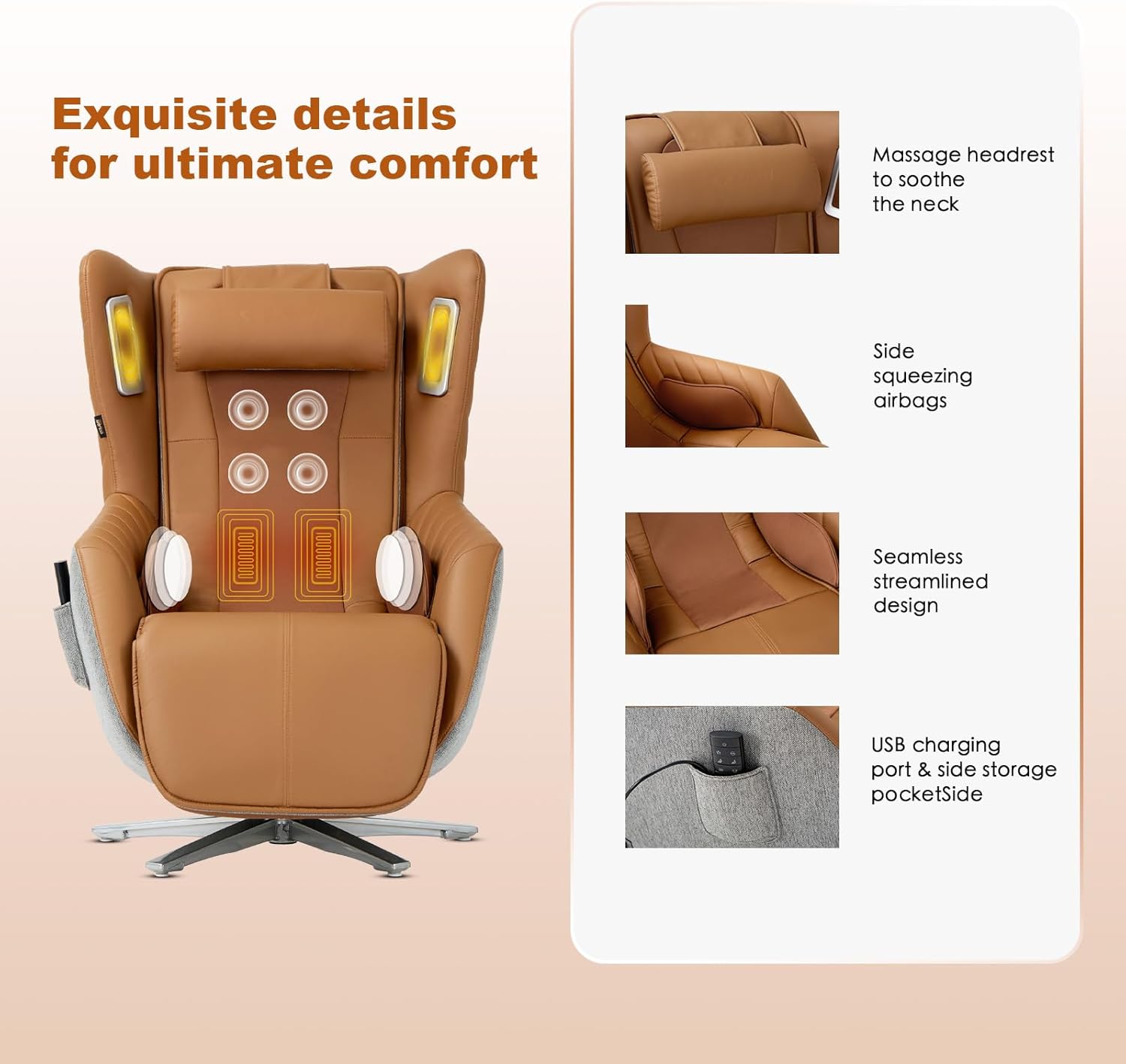
Image: 6 Automatic Programs
This image highlights the six automatic massage programs available on the COLAMY Zero-Gravity Massage Chair, designed for various relaxation needs.
5.3 Reclining Positions
The chair features multiple zero-gravity reclining angles. Use the remote control to adjust the backrest and footrest independently or simultaneously to find your preferred position. The zero-gravity position helps reduce pressure on the spine and promotes circulation.
Video: Zero-Gravity Massage Chair Display
This video highlights the zero-gravity reclining feature and overall design of the COLAMY Massage Chair, demonstrating its comfort and functionality.

Image: Zero Gravity Design
This image demonstrates the three adjustable zero-gravity angles of the COLAMY Massage Chair, allowing users to relax and relieve stress.
5.4 Bluetooth Speaker
The integrated low-noise 3D Bluetooth speakers allow you to connect your device and enjoy music or audio during your massage. Simply pair your smartphone or other Bluetooth-enabled device with the chair.
Video: Massage Chair Display
This video showcases the various features and functions of the COLAMY Massage Chair, including its reclining capabilities and massage modes.
6. Features Overview
- Full-Body SL-Frame Massage: The SL-frame design follows the natural curve of your spine, providing massage from neck to hips with finger-rolling massage balls. Features include percussive, straight roll, circular kneading, and a heating function.
- Space Capsule Zero Gravity: Offers multiple zero-gravity angles to reduce heart pressure and stimulate blood circulation.
- Low-Noise 3D Bluetooth Speaker: Inbuilt speakers allow audio streaming without disturbing others.
- 360° Swivel: The chair features a 360-degree swivel base for versatile positioning.
- Detachable Head Cushion: Adjustable for alignment and neck massage intensity.
- USB Charging Port: Conveniently located for charging devices during use.
- Side Storage Pocket: For storing the remote control or other small items.
Image: SL Track Full Body Massage
This image illustrates the SL track design of the massage chair, showing how it provides full-body massage from the neck to the thighs, including kneading, airbag, tapping, and heating functions.

Image: Reclining Angles and Craftsmanship
This image displays the various reclining angles of the chair and highlights features such as the soft headrest, exquisite craftsmanship, and durable metal swivel base.

Image: Performance Overview
This image provides a performance overview of the massage chair, detailing specifications such as automatic massage time, kneading and tapping rotation speeds, and upward-downward movement ranges.
7. Specifications
| Feature | Detail |
|---|---|
| Brand | COLAMY |
| Model Name | 6610-Brown massage chair |
| Product Dimensions (D x W x H) | 55.51" x 28.15" x 41" |
| Item Weight | 113 Pounds |
| Maximum Weight Recommendation | 250 Pounds |
| Material | Leather, Sponge, Metal Frame |
| Color | Brown |
| Additional Features | Ergonomic, 360° Swivel, Heat, Bluetooth Speaker, Zero-Gravity |
| Required Assembly | Yes |
8. Maintenance and Care
- Cleaning: Wipe clean with a soft, damp cloth. Avoid harsh chemicals or abrasive cleaners.
- Storage: Store the chair in a cool, dry place away from direct sunlight when not in use for extended periods.
- Inspection: Regularly check all connections and components for any signs of wear or damage.
9. Troubleshooting
If you encounter any issues with your massage chair, please refer to the following common troubleshooting tips:
- Chair not powering on: Ensure the power cord is securely plugged into both the chair and a working electrical outlet. Check the power switch on the chair.
- Massage not working: Verify the remote control is properly connected and the chair is powered on. Try selecting a different massage mode.
- Bluetooth not connecting: Ensure Bluetooth is enabled on your device and the chair. Try restarting both devices and re-pairing.
- Unusual noises: Discontinue use and inspect the chair for any loose parts. If the noise persists, contact customer support.
10. Warranty and Support
For warranty information, product support, or to report any operational defects or transport-related damage, please contact COLAMY customer service. We are committed to providing the best after-sales service possible.