
Lamicall BP09+BCSP05
Lamicall Motorcycle Phone Mount Holder BP09+BCSP05 User Manual
Model: BP09+BCSP05
1. Introduction
Thank you for choosing the Lamicall Motorcycle Phone Mount Holder BP09+BCSP05. This manual provides detailed instructions for the proper installation, operation, and maintenance of your new phone mount. Please read this manual carefully before use to ensure optimal performance and safety.
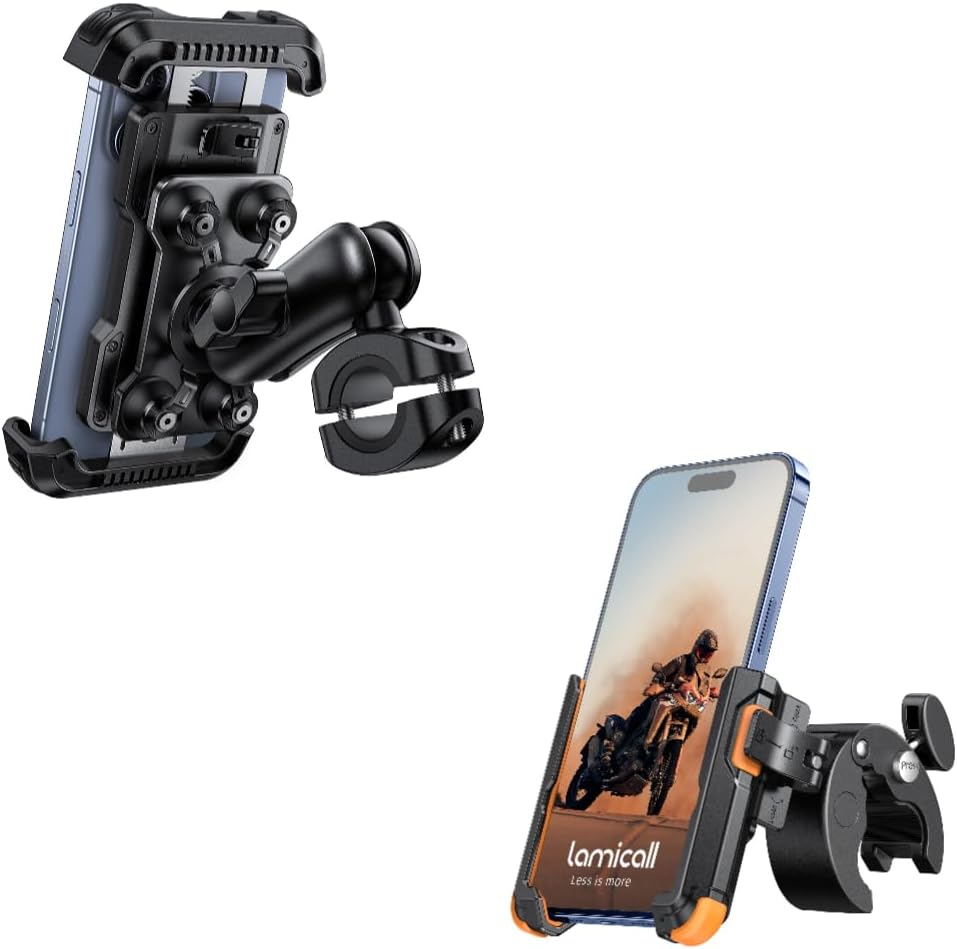
Image: The Lamicall Motorcycle Phone Mount Holder, designed for secure phone attachment on motorcycles and bikes.
2. Safety Information
Always prioritize safety when operating a motorcycle or bicycle. Ensure the mount is securely installed and your phone is firmly gripped before riding. Do not attempt to adjust the mount or phone while in motion. Regularly check all connections for tightness.
3. Package Contents
Please verify that all components are present:
- Phone Clip Holder
- Handlebar Clamp Mount with Adjustment Arm
- Hex Key (for anti-theft screw)

Image: The main components of the phone mount, including the phone clip and the handlebar clamp with its adjustable arm.
4. Setup and Installation
4.1. Handlebar Clamp Installation
- Identify a suitable location on your motorcycle or bike handlebar. The clamp is compatible with bars between 0.78 and 1.38 inches (20-35mm) in diameter.
- Open the handlebar clamp and position it around the handlebar.
- Tighten the screw on the clamp until it is firmly secured. For added security, use the provided hex key to tighten the anti-theft screw.

Image: Illustration of the handlebar clamp installation, showing compatibility with various bar sizes and the anti-theft screw mechanism.
4.2. Phone Clip Installation Steps
- Step 1: Adjust Width. Lift the knob on the side of the phone clip and turn it counter-clockwise to increase the width of the clip. This allows for easier insertion of your phone. The maximum width is 3.54 inches (90mm).
- Step 2: Secure Phone. Insert your phone into the clip. Turn the knob clockwise to grip your phone securely.
- Step 3: Lock Mechanism. Lock the knob up to secure your phone in place, preventing accidental release.

Image: A step-by-step visual guide demonstrating how to adjust the phone clip width, insert a phone, and lock it securely.
5. Operating Instructions
5.1. Inserting and Releasing Your Phone
Once the initial setup is complete, the mount allows for quick one-handed operation:
- To Insert: Unlock the knob (if locked), gently push the phone into the clip, and then turn the knob clockwise to secure it. Lock the knob up.
- To Release: Unlock the knob, turn it counter-clockwise to widen the clip, and remove your phone.

Image: Demonstrates the quick 1-second lock and release function of the phone mount, showing a hand inserting and securing a phone.
5.2. Adjusting Viewing Angle
The mount features an adjustment arm that allows for 720° rotation, enabling you to position your phone for optimal viewing from any angle. Loosen the adjustment knob, set your desired angle, and then tighten the knob to secure the position.

Image: A rider's perspective showing the adjustment arm in action, highlighting its 720-degree rotation capability for flexible viewing angles.
5.3. Anti-Vibration System
The Lamicall mount incorporates a patented anti-vibration design to reduce shakes and provide a steady ride for your phone. This system includes a cushioned pad, metal connection rod, damping spring, and damping board.

Image: An exploded view illustrating the internal components of the anti-vibration system, including the cushioned pad, metal rod, damping spring, and damping board.
5.4. Camera Friendly Design
The mount is designed to be camera-friendly, allowing you to use your phone's camera for shooting while riding, depending on your phone model and case.

Image: A phone mounted on a motorcycle, demonstrating how the design allows for camera usage while riding.
6. Maintenance
To ensure the longevity and proper function of your Lamicall phone mount, follow these maintenance guidelines:
- Cleaning: Wipe the mount with a soft, damp cloth to remove dust and dirt. Avoid harsh chemicals or abrasive cleaners.
- Inspection: Periodically check all screws and connections to ensure they are tight. Re-tighten if necessary.
- Storage: If not in use for an extended period, store the mount in a clean, dry place away from direct sunlight.
7. Troubleshooting
- Mount feels loose: Ensure the handlebar clamp screw and any adjustment knobs are fully tightened. Check if the handlebar diameter is within the specified range (0.78-1.38 inches).
- Phone not secure: Make sure the phone clip knob is turned clockwise until the phone is firmly gripped, and then lock the knob up. Verify your phone's width is within the 2.4-3.54 inch (60-90mm) range.
- Difficulty adjusting angle: Loosen the adjustment knob sufficiently before attempting to change the angle. Tighten it firmly after adjustment.
8. Specifications
| Model | BP09+BCSP05 |
| Brand | Lamicall |
| Compatible Phone Width | 2.4 - 3.54 inches (60 - 90 mm) |
| Compatible Bar Diameter | 0.78 - 1.38 inches (20 - 35 mm) |
| Rotation | 720° Adjustable Arm |
| Anti-Vibration | Patented System (Cushioned Pad, Metal Rod, Damping Spring, Damping Board) |

Image: Visual representation of phone compatibility, showing various phone models and their dimensions, along with a reminder to check for camera obstruction.
9. Warranty and Support
Lamicall products are designed for durability and performance. For warranty information, technical support, or any inquiries regarding your product, please visit the official Lamicall website or contact their customer service directly. Please retain your purchase receipt as proof of purchase.
Ask a question about this manual
Ask about setup, troubleshooting, compatibility, parts, safety, or missing instructions. Manuals+ will review the question and use this page’s manual context to help answer it.