
HITBOX MT2000
HITBOX MT2000 200A 4-in-1 Multi-Process MIG Welder Instruction Manual
Model: MT2000
1. Introduction
This manual provides essential information for the safe and effective operation of your HITBOX MT2000 200A 4-in-1 Multi-Process MIG Welder. Please read this manual thoroughly before operating the machine and retain it for future reference.
The HITBOX MT2000 is a versatile welding machine supporting multiple processes: Gas MIG, Flux Core MIG (Gasless MIG), Lift TIG, and Stick (MMA) welding. It is designed for various applications, from home DIY projects to outdoor repairs and light industrial use.
2. Safety Information
WARNING: Welding can be dangerous. Always follow safety precautions to prevent injury or death.
- Always wear appropriate personal protective equipment (PPE), including a welding helmet with proper shade, flame-resistant clothing, welding gloves, and safety shoes.
- Ensure adequate ventilation to avoid inhaling welding fumes.
- Protect bystanders from arc rays and sparks.
- Never weld near flammable materials.
- Ensure the welding machine is properly grounded.
- Disconnect power before performing any maintenance or changing accessories.
- Do not touch electrically live parts.
3. Package Contents
Verify that all items are present in your package:
- HITBOX MT2000 200A Multi-Process Welder
- 15AK MIG Gun (10 ft)
- Ground Clamp (4.9 ft)
- Electrode Holder (4.9 ft)
- Gas Hose (4.9 ft)
- 110V to 220V Adapter
- 0.030 Flux Cored Wire (2 lbs)
- Conductive Tips (0.030" x2, 0.039" x2)
- Rollers (V: 0.030/0.039)
- Hammer
- Hose Clamp x2
- User Manual

Figure 1: Included accessories with the HITBOX MT2000 Welder.
4. Setup
4.1 Power Connection
- The welder supports both 110V and 220V power inputs. Use the provided 110V to 220V adapter if necessary.
- Ensure the power source matches the machine's requirements and is capable of handling the welding current.
4.2 Wire Installation (MIG/Flux Core)
- Open the wire feeder compartment.
- Place the wire spool onto the spindle, ensuring it rotates freely.
- Feed the welding wire through the guide tube and into the drive roller mechanism.
- Secure the drive roller tension arm. Adjust tension as needed; too tight can deform the wire, too loose can cause slipping.
- Ensure the correct drive roller groove (0.030" or 0.039") is aligned with your wire diameter.
- Close the compartment.

Figure 2: Wire feeder mechanism with wire spool.
4.3 Torch and Ground Clamp Connection
- MIG Welding: Connect the MIG gun to the appropriate connector on the front panel. Connect the ground clamp to the workpiece.
- Lift TIG Welding: Connect the TIG torch (WP17V TIG torch required, not included) to the negative (-) terminal. Connect the ground clamp to the positive (+) terminal.
- Stick (MMA) Welding: Connect the electrode holder to the positive (+) terminal and the ground clamp to the negative (-) terminal for most electrodes (e.g., E6013). For E7018 electrodes, reverse the polarity (electrode holder to negative, ground clamp to positive).
Video 1: Demonstrates connecting the ground clamp and electrode holder for Stick welding, and TIG torch connection for Lift TIG welding on a similar HITBOX model.
5. Operating Modes
The HITBOX MT2000 features a large color display for easy setting adjustments and mode selection.

Figure 3: Large color display for intuitive control.
5.1 MIG Welding (Gas & Gasless)
- Synergic Control: Ideal for beginners. Select the welding wire diameter, and the machine automatically adjusts recommended current and wire feeding speed for both 110V and 220V operations.
- Gas MIG: Requires shielding gas (e.g., CO2 or Argon/CO2 mix) for cleaner welds. Connect the gas hose to the machine and gas cylinder.
- Flux Core MIG (Gasless): Uses flux-cored wire that produces its own shielding gas, eliminating the need for an external gas cylinder.

Figure 4: The 4-in-1 multi-process capabilities of the welder.
5.2 Lift TIG Welding
- Requires a separate WP17V TIG torch and shielding gas (typically Argon).
- Initiate the arc by touching the tungsten electrode to the workpiece and then lifting it slightly.
5.3 Stick (MMA) Welding
- Use appropriate welding electrodes for your material and application.
- The machine features Hot Start, Arc Force, and Anti-stick functions for improved arc ignition and stability.
6. Protection Features
The HITBOX MT2000 is equipped with multiple protection mechanisms to ensure safety and extend machine lifespan:
- Overcurrent Protection: Prevents damage from excessive current draw.
- Overvoltage Protection: Safeguards against voltage spikes.
- Overheating Protection: Shuts down the machine if internal temperatures become too high.
- Overload Protection: Protects components from sustained heavy loads.
- Voltage Fluctuation Compensation: Ensures stable performance even with inconsistent power supply.
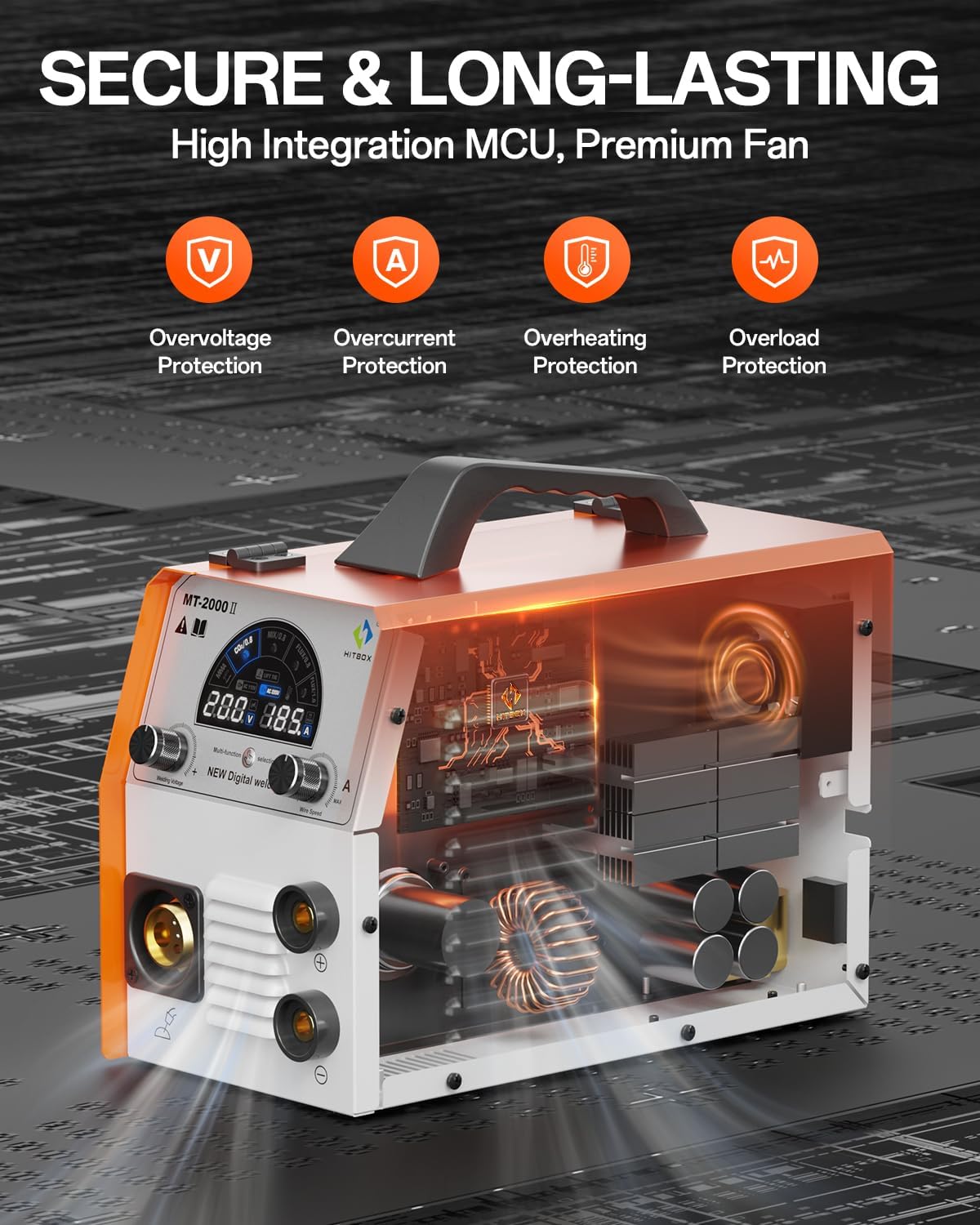
Figure 5: Internal view highlighting multiple protection features.
7. Maintenance
Regular maintenance ensures optimal performance and longevity of your welder:
- Keep the machine clean and free from dust and debris. Use compressed air to clear ventilation openings regularly.
- Inspect all cables and connections for damage before each use. Replace worn or damaged parts immediately.
- Check the MIG gun liner and contact tip regularly for wear and replace as needed to ensure consistent wire feeding.
- Ensure the drive rollers are clean and free of wire shavings.
8. Troubleshooting
| Problem | Possible Cause | Solution |
|---|---|---|
| No power | Power switch off, circuit breaker tripped, loose connection | Turn on switch, reset breaker, check connections |
| No arc | Poor ground connection, incorrect settings, electrode/wire issue | Ensure good ground, verify settings, check electrode/wire feed |
| Poor weld quality | Incorrect settings, contaminated material, improper technique | Adjust voltage/amperage/wire speed, clean workpiece, refine technique |
| Overheat warning | Exceeded duty cycle, blocked ventilation | Allow machine to cool, clear obstructions from vents |
9. Specifications
| Feature | Detail |
|---|---|
| Model | MT2000 |
| Max Output Current | 200A |
| Input Voltage | 110V / 220V (Dual Voltage) |
| Welding Processes | Gas MIG, Flux Core MIG, Lift TIG, Stick (MMA) |
| Technology | IGBT Inverter, MCU Control |
| Display | Large Color Display |
| Protection | Overcurrent, Overload, Overheating, Overvoltage, Voltage Fluctuation Compensation |
| Item Weight | 11.2 kg |
| Country of Origin | China |
10. Warranty and Support
HITBOX offers 2 years of quality support for this product. For warranty claims, technical assistance, or further inquiries, please refer to the contact information provided in your product packaging or visit the official HITBOX website.
Related documentsMT2000


Ask a question about this manual
Ask about setup, troubleshooting, compatibility, parts, safety, or missing instructions. Manuals+ will review the question and use this page’s manual context to help answer it.