
Introduction
Thank you for choosing the SOBERNA Tikland Wireless Earbuds, model s33. These earbuds are designed to provide a superior audio experience with advanced features such as Bluetooth V5.3 connectivity, CVC8.0 clear call technology, deep bass, and IPX7 waterproofing. This manual will guide you through the setup, operation, maintenance, and troubleshooting to ensure you get the most out of your new earbuds.
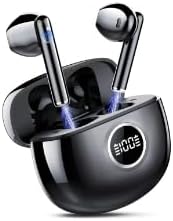
This image displays the SOBERNA Tikland Wireless Earbuds, black in color, resting within their sleek charging case. The case features a digital LED display on the front, indicating a 100% charge level. The earbuds themselves are visible, with their stems extending upwards, suggesting they are ready for use or charging.
What's in the Box
- SOBERNA Tikland Wireless Earbuds (Left and Right)
- Charging Case
- USB Charging Cable
- User Manual
Setup
Charging the Earbuds and Charging Case
- Initial Charge: Before first use, fully charge the earbuds and the charging case. Place the earbuds into the charging case.
- Charge Case: Connect the provided USB charging cable to the charging port on the case and plug the other end into a USB power adapter (not included) or a computer's USB port.
- LED Display: The LED display on the charging case will show the battery percentage. It will indicate 100% when fully charged. The earbuds will show a charging indicator (e.g., a light) while charging inside the case.
- Playtime: A full charge provides up to 60 hours of playtime with the charging case.
Pairing with Your Device
- Power On: Open the charging case. The earbuds will automatically power on and enter pairing mode. You may hear a voice prompt indicating they are ready to pair.
- Activate Bluetooth: On your device (smartphone, tablet, laptop), go to the Bluetooth settings and turn on Bluetooth.
- Select Device: Look for "Tikland s33" or a similar name in the list of available Bluetooth devices and select it to connect.
- Confirmation: Once connected, you will hear a voice prompt confirming the successful pairing. The earbuds are now ready for use.
- Automatic Reconnection: After the initial pairing, the earbuds will automatically connect to the last paired device when taken out of the case, provided Bluetooth is enabled on the device.
Wearing the Earbuds
Gently insert each earbud into your ear canal. Adjust them slightly until they fit snugly and comfortably. A proper fit ensures optimal sound quality and noise isolation.
Operating Instructions
Touch Controls
The Tikland s33 earbuds feature intuitive touch controls on each earbud. The following table outlines common functions:
| Action | Left Earbud | Right Earbud |
|---|---|---|
| Play/Pause | Single Tap | Single Tap |
| Next Track | Double Tap | Double Tap |
| Previous Track | Triple Tap | Triple Tap |
| Volume Up | N/A | Long Press |
| Volume Down | Long Press | N/A |
| Answer/End Call | Single Tap | Single Tap |
| Reject Call | Long Press | Long Press |
| Activate Voice Assistant | Quadruple Tap | Quadruple Tap |
LED Display Indicators
The charging case features an LED display that provides important information:
- Battery Percentage: Shows the remaining battery life of the charging case.
- Charging Status: Indicates when the case and earbuds are charging.
Maintenance
Cleaning
Regular cleaning helps maintain the performance and longevity of your earbuds:
- Use a soft, dry, lint-free cloth to wipe the earbuds and charging case.
- For stubborn dirt, slightly dampen the cloth with water or a mild, non-abrasive cleaner.
- Do not use harsh chemicals, aerosols, or abrasive cleaners.
- Ensure charging contacts on both earbuds and case are clean and dry.
Water Resistance (IPX7)
The earbuds are IPX7 waterproof, meaning they can withstand immersion in water up to 1 meter for 30 minutes. This makes them suitable for workouts and light rain. However, they are not designed for swimming or prolonged submersion. Always ensure the earbuds are dry before placing them back into the charging case to prevent damage.
Storage
When not in use, store the earbuds in their charging case to protect them from dust, dirt, and physical damage. Store the case in a cool, dry place away from direct sunlight and extreme temperatures.
Troubleshooting
- Earbuds not pairing or connecting:
- Ensure Bluetooth is enabled on your device. Make sure the earbuds are charged and out of the case. Try forgetting the device in your Bluetooth settings and re-pairing. If issues persist, try resetting the earbuds (refer to specific reset instructions if available in a separate quick start guide, or place them back in the case and try again).
- No sound or low volume:
- Check the volume level on both your device and the earbuds. Ensure the earbuds are properly seated in your ears. Confirm they are connected to the correct device. Clean any debris from the earbud grilles.
- Charging case not charging:
- Verify the USB cable is securely connected to both the case and the power source. Try a different USB cable or power adapter. Ensure the charging port is free of debris.
- One earbud not working:
- Place both earbuds back into the charging case, close the lid, wait a few seconds, then open it again. This often re-syncs them. Ensure both earbuds are charged.
Specifications
| Feature | Detail |
|---|---|
| Model Name | s33 |
| Brand | SOBERNA |
| Connectivity Technology | Wireless |
| Wireless Communication Technology | Bluetooth |
| Bluetooth Version | 5.3 |
| Playtime | Up to 60 hours (with charging case) |
| Call Technology | CVC8.0 Clear Call |
| Water Resistance Level | IPX7 Waterproof |
| Control Method | Touch |
| Earbud Weight | Mini 3.2g (per earbud) |
| Earpiece Shape | In-Ear |
| Included Components | Cable |
| Compatible Devices | Laptops, Desktops, Tablets, Telephones, Smart Speakers, Televisions, Car Audio Systems, Cellphones |
Warranty and Support
SOBERNA products are manufactured to high-quality standards. For specific warranty information, please refer to the warranty card included with your purchase or visit the official SOBERNA website. If you encounter any issues or require technical assistance, please contact SOBERNA customer support through the contact information provided on the product packaging or the official website. Please have your model number (s33) and purchase details ready when contacting support.