
1. Introduction
Thank you for choosing the Loewe We. BOOST Home Cinema System. This system is designed to deliver an immersive audio experience with its 4.1.2 surround sound configuration, Dolby Atmos technology, and a total output of 720 watts. Featuring wireless active satellite speakers and a wireless subwoofer, it offers a clean, cable-free setup for your home entertainment.
This manual provides essential information for setting up, operating, maintaining, and troubleshooting your Loewe We. BOOST system. Please read it carefully before use to ensure optimal performance and longevity of your device.
2. Package Contents
Ensure all the following components are present in your package:
- 1x Loewe We. BOOST Wireless Subwoofer
- 4x Loewe We. BOOST Active Satellite Speakers
- 1x HDMI eARC Dongle for wireless transmission
- 1x Remote Control
- Power Cables for Subwoofer and Satellite Speakers
- User Manual (this document)

Image: The complete Loewe We. BOOST system, showing the central subwoofer and four satellite speakers.
3. Setup
3.1 Speaker Placement
Proper placement of your speakers is crucial for an optimal surround sound experience. The Loewe We. BOOST system is a 4.1.2 configuration, meaning four satellite speakers, one subwoofer, and two upward-firing channels integrated into the satellite speakers for Dolby Atmos effects.
- Front Speakers: Place two satellite speakers to the left and right of your television, ideally at ear level when seated.
- Rear Speakers: Place the remaining two satellite speakers behind your primary listening position, to the left and right.
- Subwoofer: Position the wireless subwoofer in a corner or along a wall near your television for enhanced bass response. Experiment with placement to find the best sound for your room.

Image: An example setup of the Loewe We. BOOST system in a living room, demonstrating speaker placement.
3.2 Connecting the System
- Power Connection: Connect the power cables to the subwoofer and all four satellite speakers, then plug them into a power outlet. The system is designed for plug-and-play wireless operation.
- HDMI eARC Dongle: Insert the provided HDMI eARC dongle into an available HDMI eARC port on your television. This dongle facilitates wireless audio transmission from your TV to the sound system.
- Automatic Pairing: The subwoofer and satellite speakers will automatically connect wirelessly to the HDMI eARC dongle once powered on. No manual pairing is typically required.

Image: A satellite speaker shown alongside the compact HDMI eARC dongle, illustrating the wireless connection component.
3.3 Optional Central Speaker (Advanced)
For users desiring enhanced dialogue clarity, an active central speaker can be integrated. Connect an active speaker using a line cable with a 3.5mm jack on one end and a 2.5mm jack on the other. Plug the 2.5mm jack into the HDMI eARC dongle and the 3.5mm jack into your active central speaker. The system will automatically recognize and activate the new speaker, allowing its volume to be adjusted via the remote control.
4. Operating Instructions
4.1 Remote Control Functions
The included remote control provides full command over your Loewe We. BOOST system.
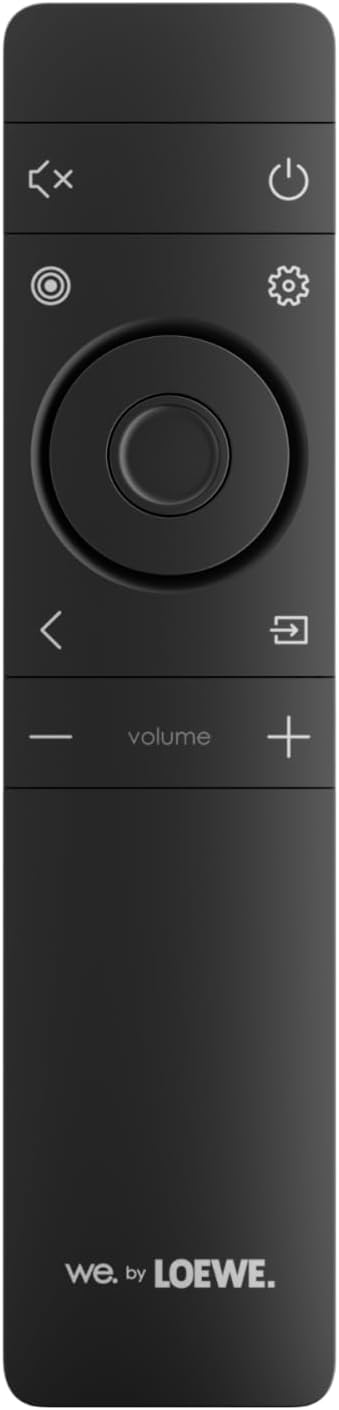
Image: The remote control for the Loewe We. BOOST system, featuring power, mute, settings, navigation, and volume controls.
- Power Button: Turns the system on or off.
- Volume +/-: Adjusts the overall system volume.
- Mute Button: Silences the audio output.
- Settings Button: Accesses audio settings and sound modes.
- Navigation Buttons: Used to navigate menus within the settings.
4.2 Sound Modes and Settings
The system supports various audio technologies to enhance your listening experience:
- Dolby Atmos: Provides a three-dimensional sound experience, creating an immersive audio bubble.
- Dolby Digital: Standard surround sound format.
- PCM: Uncompressed audio format.
Use the Settings Button on the remote to cycle through or select desired sound modes and adjust individual speaker levels (including the subwoofer and any optional central speaker).
4.3 Bluetooth Connectivity
To connect a smartphone or other compatible device via Bluetooth:
- Ensure your Loewe We. BOOST system is powered on.
- Activate Bluetooth on your mobile device.
- Select "Loewe We. BOOST" from the list of available Bluetooth devices.
- Once paired, audio from your device will play through the system.
4.4 Multi-Room Audio
The system supports multi-room audio functionality. Refer to the Loewe app or additional documentation for detailed instructions on integrating your We. BOOST system into a multi-room setup.
5. Maintenance
To ensure the longevity and optimal performance of your Loewe We. BOOST system, follow these maintenance guidelines:
- Cleaning: Use a soft, dry cloth to clean the surfaces of the speakers and subwoofer. Avoid abrasive cleaners, solvents, or liquid sprays directly on the components.
- Ventilation: Ensure adequate airflow around the subwoofer and speakers. Do not block ventilation openings.
- Environment: Keep the system away from direct sunlight, heat sources, excessive dust, and moisture. It is not waterproof.
- Cables: Periodically check power cables for any signs of damage.
6. Troubleshooting
If you encounter issues with your Loewe We. BOOST system, consult the following table for common problems and solutions.
| Problem | Possible Cause | Solution |
|---|---|---|
| No sound from speakers. | System not powered on, volume too low, incorrect input, speakers not paired. | Ensure all components are plugged in and powered. Increase volume. Check TV audio output settings (eARC). Power cycle the system to re-establish wireless connection. |
| Subwoofer not producing bass. | Subwoofer not powered, not paired, bass level set too low. | Verify subwoofer power. Power cycle the system. Adjust bass level via remote control settings. |
| Remote control not working. | Dead batteries, obstruction, remote out of range. | Replace batteries. Ensure no obstructions between remote and system. Point remote directly at the system. |
| Bluetooth device not connecting. | Bluetooth not enabled on device, system not in pairing mode, device already connected to another system. | Ensure Bluetooth is active on your device. Check system settings for Bluetooth pairing mode. Disconnect from other devices. |
| Sound distortion or crackling. | Interference, damaged cables, speaker placement issues. | Move system away from other wireless devices. Check all cable connections. Adjust speaker placement. |
If the problem persists after trying these solutions, please contact Loewe customer support.
7. Specifications
| Feature | Detail |
|---|---|
| Model Number | 64720T10 |
| Brand | LOEWE |
| Surround Sound Configuration | 4.1.2 |
| Total Output Power | 720 Watts |
| Supported Audio Technologies | Dolby Atmos, Dolby Digital, PCM |
| Wireless Connectivity | Wireless (speakers), Bluetooth (device connection) |
| Control Method | Remote Control |
| Compatible Devices | Smartphone, Television |
| Special Features | Multi-room Audio, Wireless Speakers, Wireless Subwoofer, HDMI eARC Dongle |
| Color | Ash Grey |
| Product Dimensions (L x W x H) | 35 x 40 x 55 cm |
| Item Weight | 17 Kilograms |
| Power Source | Corded Electric |
| Frequency Response | 20 Hz |
8. Warranty & Support
8.1 Product Warranty
Your Loewe We. BOOST Home Cinema System is covered by a manufacturer's warranty. Please refer to the warranty card included with your product or visit the official Loewe website for detailed information regarding warranty terms, conditions, and duration.
8.2 Customer Support
For technical assistance, service, or further inquiries, please contact Loewe customer support:
- Website: Visit the official Loewe website for support resources, FAQs, and contact information.
- Email/Phone: Refer to the contact details provided on the Loewe website or in your product documentation.
When contacting support, please have your product model number (64720T10) and purchase information readily available.


