
1. Introduction
The eppfun LE Audio Bluetooth 5.4 Transmitter is designed to provide high-quality wireless audio streaming from various audio sources to your Bluetooth-enabled headphones or speakers. Featuring advanced QCC3086 Bluetooth 5.4 Chipset, it supports AptX Lossless, AptX Adaptive, and LE Audio (96kHz/24Bit) codecs, ensuring a superior listening experience. Its versatile input options and long-range capability make it an ideal solution for home entertainment and personal audio.
2. Package Contents
- eppfun LE Audio Bluetooth 5.4 Transmitter
- Optical Audio Cable
- 3.5mm AUX Audio Cable
- RCA Audio Cable
- USB-C Power Cable
- User Manual (this document)
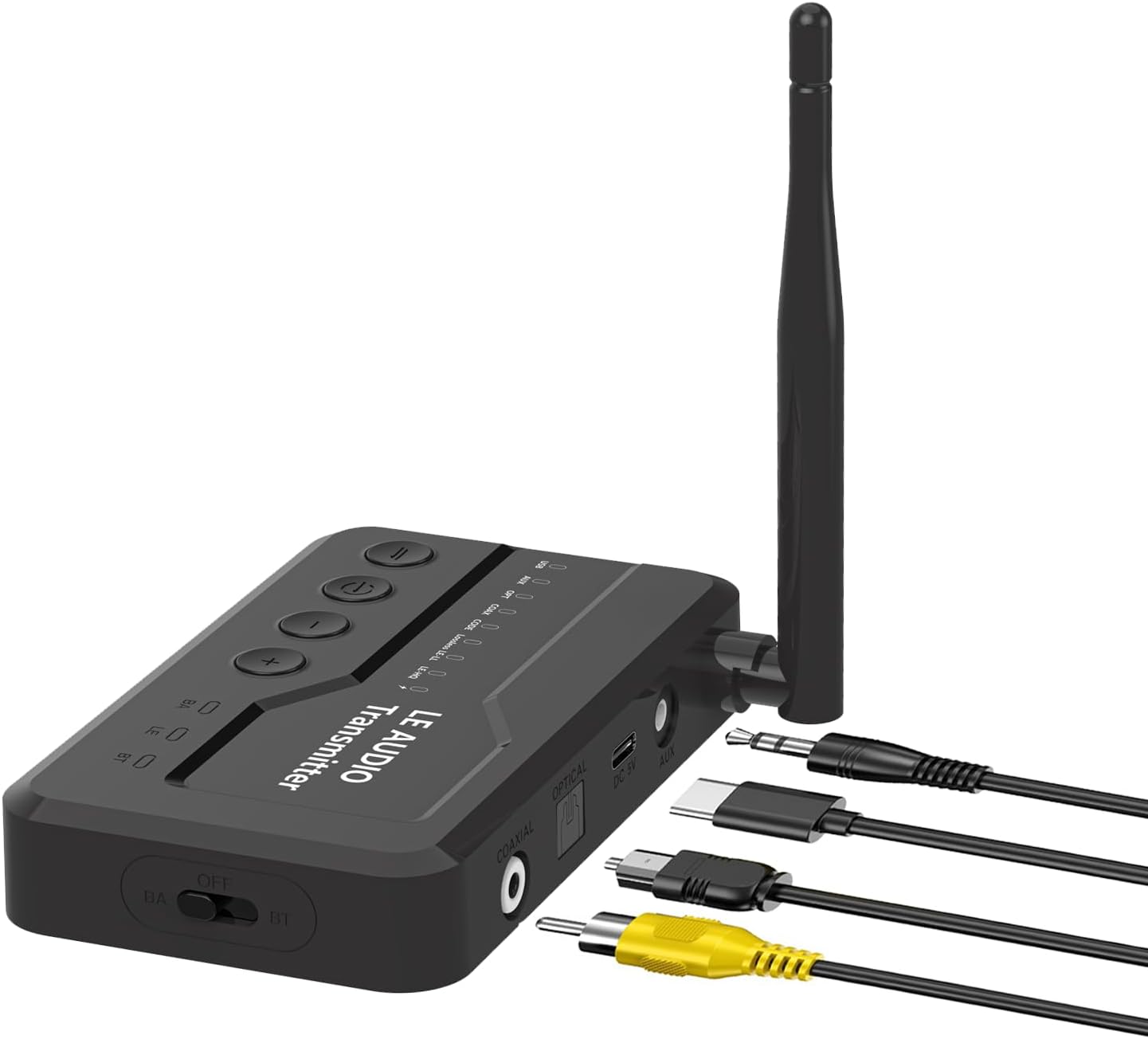
Image: The eppfun LE Audio Bluetooth 5.4 Transmitter shown with its various included audio and power cables, including optical, AUX, RCA, and USB-C.
3. Setup Guide
3.1 Powering On the Transmitter
Connect the provided USB-C power cable to the DC 5V port on the transmitter and the other end to a USB power adapter (not included) or a USB port on your TV/computer. The device will power on automatically.
3.2 Connecting to Audio Source
The transmitter supports multiple audio input types. Choose the appropriate cable based on your audio source (TV, PC, PS5, etc.):
- Optical Input: Use the optical cable to connect the transmitter's OPTICAL port to your TV's optical audio output.
- Coaxial Input: Use a coaxial cable (not included) to connect the transmitter's COAXIAL port to your audio source's coaxial output.
- AUX Input: Use the 3.5mm AUX cable to connect the transmitter's AUX port to your audio source's 3.5mm audio output.
- USB-C Input: Connect the USB-C cable to the USB port on the transmitter and to a USB audio output on your computer or PS5.

Image: Close-up view of the transmitter's rear panel, highlighting the Optical, Coaxial, DC 5V (power), and AUX input ports for various audio connections.

Image: A visual guide demonstrating how the transmitter connects to different devices like a PlayStation 5, a laptop, and a desktop PC using Coaxial, Fiber Optic, USB-C, and AUX inputs.
3.3 Pairing with Headphones/Speakers
Once connected to an audio source, the transmitter will automatically enter pairing mode (indicated by a flashing LED). Put your Bluetooth headphones or speakers into pairing mode. They should automatically connect to the transmitter. For optimal performance, it is recommended to use eppfun LE Audio headphones.
4. Operating Modes
The eppfun LE Audio Bluetooth 5.4 Transmitter supports both Classic Bluetooth (BT) and Broadcast Audio (BA) modes.
4.1 Classic Bluetooth (BT) Mode (1-to-1 Connection)
In BT mode, the transmitter connects to a single Bluetooth headphone or speaker, providing a dedicated audio stream. This is suitable for private listening.
4.2 Broadcast Audio (BA) Mode (1-to-Many Connection)
In BA mode, the transmitter can broadcast audio to multiple compatible headphones or speakers simultaneously. This is ideal for sharing audio with several listeners in the same room, such as watching a movie with family or friends. This mode offers low latency and is particularly useful with LE Audio compatible devices.

Image: A diagram illustrating the difference between BT (Classic Bluetooth + LE Audio) 1-to-1 connection and BA (Broadcast Audio) 1-to-N connection, showing multiple headphones receiving audio in BA mode.

Image: A visual representation of the Broadcast Operating Mode, demonstrating how a single audio emission from the transmitter can be received by multiple headphones or speakers with Broadcast functionality.
4.3 Audio Codec Selection
The transmitter supports various audio codecs including AptX Lossless, AptX Adaptive, LE Audio, and others. You can switch between supported audio codecs using the dedicated button on the device. Refer to the LED indicators on the transmitter for the currently active codec (e.g., AptX Lossless, AptX Adaptive, LE Audio 96kHz/24Bit).
5. Maintenance
To ensure the longevity and optimal performance of your eppfun LE Audio Bluetooth 5.4 Transmitter, follow these simple maintenance guidelines:
- Keep the device clean by wiping it with a soft, dry cloth. Avoid using harsh chemicals or abrasive cleaners.
- Store the transmitter in a cool, dry place away from direct sunlight and extreme temperatures.
- Avoid dropping the device or subjecting it to strong impacts.
- Do not attempt to disassemble or repair the device yourself, as this will void the warranty.
6. Troubleshooting
If you encounter issues with your eppfun LE Audio Bluetooth 5.4 Transmitter, please refer to the following common troubleshooting steps:
- No Power/Device Not Turning On: Ensure the USB-C power cable is securely connected to both the transmitter and a working USB power source. Check if the power source is active.
- No Audio Output:
- Verify that the correct audio input cable (Optical, AUX, Coaxial, USB-C) is securely connected to both the transmitter and your audio source.
- Ensure your audio source (TV, PC) is outputting audio through the selected port. For many TVs, the audio output setting (e.g., Optical Out) must be set to PCM format for the transmitter to receive the signal correctly.
- Check the volume levels on both your audio source and your connected headphones/speakers.
- Cannot Pair/Connect:
- Ensure both the transmitter and your headphones/speakers are in pairing mode.
- Move the devices closer to each other.
- Turn off and then turn on both devices to reset their Bluetooth connection.
- Clear previous pairing records on your headphones/speakers if possible.
- Audio Latency/Delay: While the device supports low-latency codecs, some delay may be noticeable depending on the connected headphones/speakers and the audio source. Ensure you are using AptX Low Latency or LE Audio compatible headphones for best results.
- Intermittent Connection/Short Range: Ensure there are no significant obstructions between the transmitter and your headphones/speakers. Avoid placing the transmitter near strong electromagnetic interference sources. The maximum range is up to 100 feet in open areas.
7. Specifications
| Feature | Specification |
|---|---|
| Model Number | LE |
| Bluetooth Version | 5.4 |
| Chipset | QCC3086 |
| Supported Audio Codecs | AptX Lossless, AptX Adaptive, LE Audio (96kHz/24Bit), AptX HD, AptX LL, AptX, AAC, SBC |
| Connectivity Technology | Bluetooth, Wireless |
| Input Interfaces | Optical, Coaxial, AUX (3.5mm), USB-C |
| Compatible Devices | Television, Computers, PS5 game console, Audio devices with supported outputs |
| Wireless Range | Up to 100 feet (approx. 30 meters) |
| Power Input | DC 5V |
| Item Weight | 8.4 ounces |
| Package Dimensions | 6.81 x 5.08 x 1.18 inches |
| Color | Black |
8. Warranty and Support
eppfun products are designed for reliability and performance. For warranty information and customer support, please refer to the documentation included with your purchase or contact the seller directly. For this product, the seller is EppFun Direct US.
For further assistance, you may also visit the official eppfun store on Amazon or contact their customer service channels.
