
Introduction
Thank you for choosing the TIQLAB Electric Standing Desk. This manual provides comprehensive instructions for the safe assembly, operation, and maintenance of your new desk. Designed for ergonomic comfort and productivity, this adjustable height desk allows you to seamlessly switch between sitting and standing positions throughout your workday. Please read this manual thoroughly before beginning assembly or operation.
Safety Information
- Always follow the assembly instructions carefully.
- Ensure the desk is placed on a level surface.
- Keep children and pets away from the desk during operation to prevent injury.
- Do not overload the desk. Refer to specifications for maximum weight capacity.
- Keep all cables organized and away from moving parts to prevent damage or entanglement.
- Disconnect power before cleaning or performing maintenance.
Package Contents
Before assembly, verify that all components are present and undamaged. If any parts are missing or damaged, please contact customer support.
All components of the TIQLAB standing desk laid out for assembly, including desktop panels, legs, motor, control panel, and hardware.
- Desktop Panels (Splice Board)
- Adjustable Height Legs (2)
- Motor and Control Box
- Control Panel with LED Display
- Two Fabric Drawers with Leather Pulls
- Monitor Stand/Storage Shelf
- Adjustable Foot Pads (4)
- Desk Hooks (2)
- Assembly Hardware (screws, allen wrench)
Setup & Assembly
Assembly typically takes approximately 45 minutes. Follow the step-by-step instructions provided in the included assembly guide. A specialized L-shaped allen wrench is provided.
Assembly Overview
Video demonstrating the assembly process of the TIQLAB standing desk, highlighting its ease of setup.
Key Components
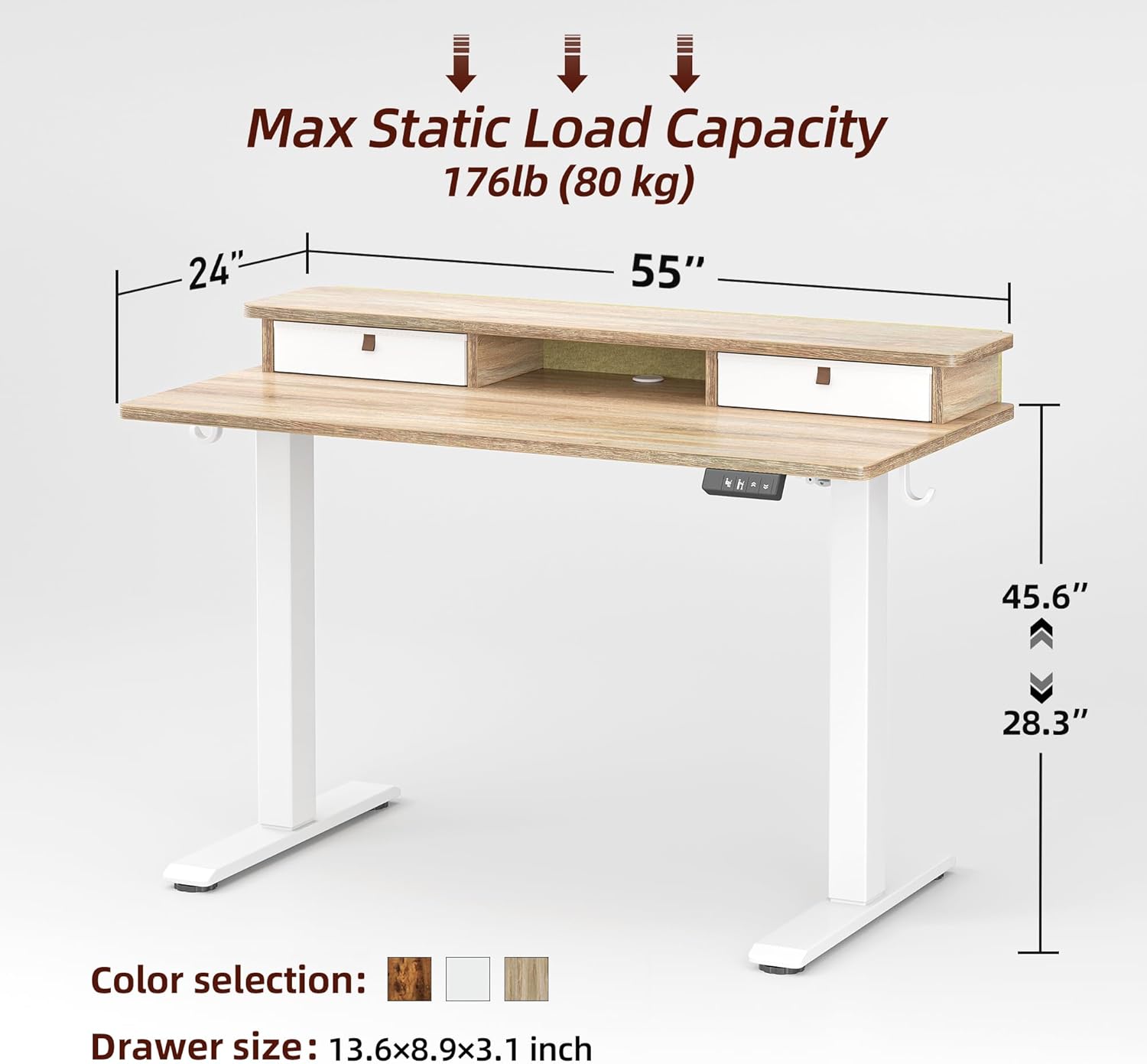
Diagram showing dimensions of the TIQLAB standing desk: 55 inches width, 24 inches depth, adjustable height from 28.3 to 45.6 inches.
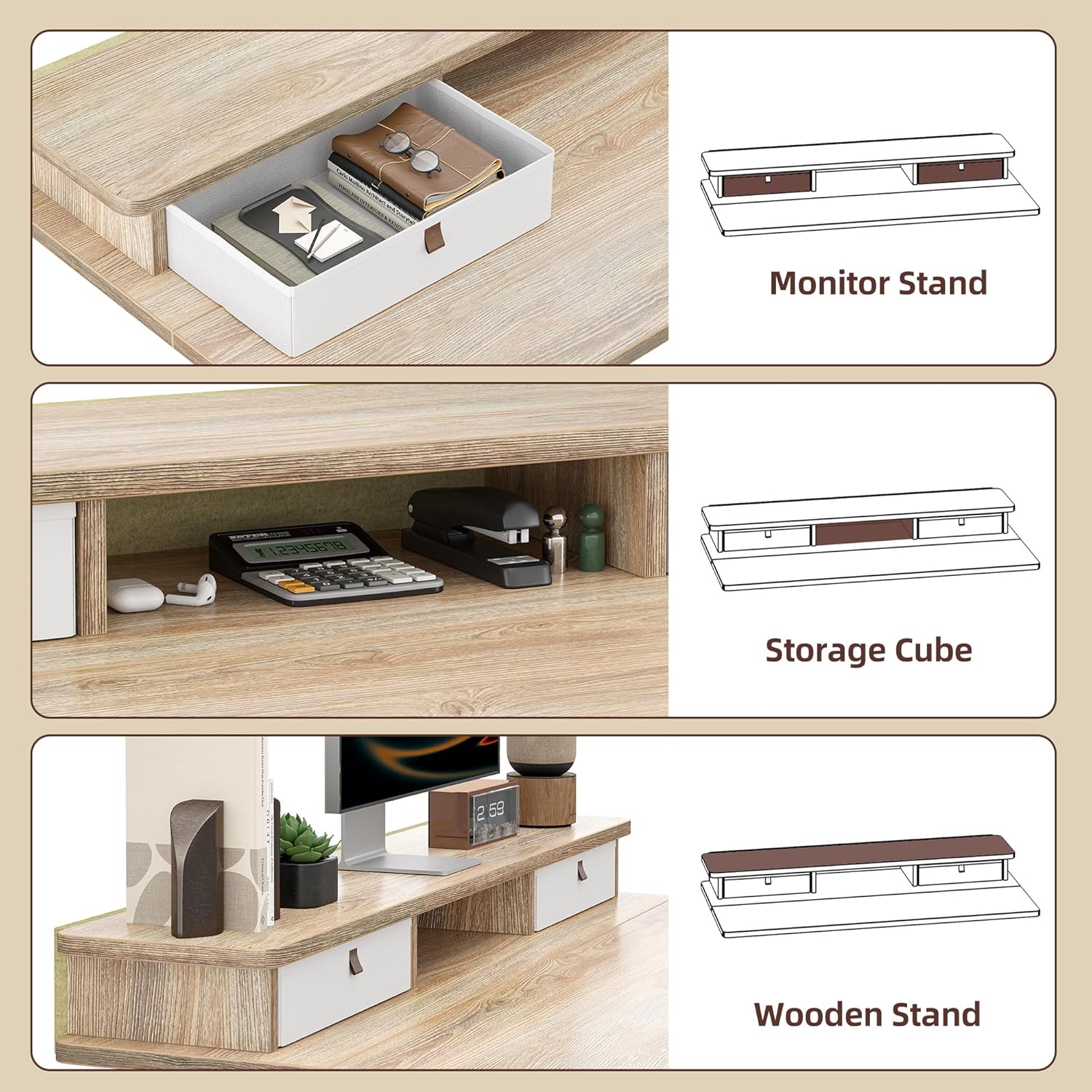
Close-up of the TIQLAB standing desk's integrated monitor stand with two pull-out drawers and a central storage cube.

Details of the TIQLAB standing desk: a cable management hole, four adjustable foot pads, and two desk hooks for accessories.
Operating Instructions
Your TIQLAB Electric Standing Desk features an intuitive control panel for easy height adjustment and personalized settings.
Height Adjustment & Memory Presets

Close-up of the TIQLAB standing desk's multifunctional controller with LED screen display, up/down movement buttons, three memorable height presets, and anti-collision technology.
- Adjusting Height: Use the Up (↑) and Down (↓) arrow buttons on the control panel to raise or lower the desk to your desired height. The current height is displayed on the LED screen.
- Setting Memory Presets: The desk features three programmable memory presets. Adjust the desk to your preferred sitting or standing height. Press the M button, then press one of the numbered preset buttons (1, 2, or 3) to save the current height.
- Using Memory Presets: To move the desk to a saved height, simply press the corresponding preset button (1, 2, or 3). The desk will automatically adjust to the programmed position.
- Anti-Collision Technology: The desk is equipped with anti-collision technology. If the desk encounters an obstacle during adjustment, it will automatically stop and reverse slightly to prevent damage.
Operation Demonstration
Video showcasing the electric height adjustment and memory preset functions of the TIQLAB standing desk.
Features & Benefits
- Ergonomic Design: Allows for easy transition between sitting and standing, promoting healthier posture and reducing strain.
- Spacious Work Surface: 55x24 inch desktop provides ample space for monitors, keyboards, and other office essentials.
- Integrated Storage: Two convenient drawers and a central storage shelf help keep your workspace organized.
- Quiet Operation: The powerful lift system operates smoothly and quietly, with noise levels below 50dB.
- Robust Construction: Built with multi-layer steel for rock-solid stability and durability.

Illustration of the TIQLAB standing desk's multi-layer steel construction, emphasizing rock-solid stability.

Graphic illustrating the quiet operation of the TIQLAB standing desk, showing noise levels below 45dB compared to normal voice and engine sound.
Maintenance & Care
- Regularly check all screws and bolts to ensure they are tight.
- Clean the desktop surface with a soft, damp cloth. Avoid harsh chemicals.
- Keep the motor and electrical components free from dust and moisture.
- Do not place hot items directly on the desktop without protection.
Troubleshooting
| Problem | Possible Cause | Solution |
|---|---|---|
| Desk not adjusting height | Power cable disconnected; Overload; Motor error | Check power connection; Reduce weight on desk; Reset the motor (refer to full manual for specific reset procedures). |
| Uneven height adjustment | Uneven load; Obstruction; Sensor issue | Distribute weight evenly; Check for obstructions; Contact customer support if issue persists. |
| Noise during operation | Loose screws; Normal operation sound | Tighten all assembly screws; Minor motor sound is normal (below 50dB). |
Specifications
- Brand: TIQLAB
- Model: TIQLAB-SD-55x24-Maple
- Product Dimensions: 24"D x 55"W x 29"H (Adjustable Height)
- Adjustable Height Range: 28.3" to 47.2"
- Color: Maple
- Top Material Type: Engineered Wood
- Base Material: Steel (Adjustable Desk Frame)
- Number of Drawers: 2
- Item Weight: 25.86 Kilograms
- Max Static Load Capacity: 220 lbs (Motor capacity)
- Noise Level: <50dB
- Assembly Required: Yes
Warranty & Support
Your TIQLAB Standing Desk comes with a Limited Warranty. For specific warranty details, please refer to the documentation included with your purchase or contact TIQLAB customer support.
- Return Policy: 30-day easy returns.
- Customer Support: For assistance, please visit the TIQLAB Store on Amazon or refer to the contact information provided in your product packaging.
- Protection Plans: Extended protection plans are available for purchase separately.