
1. Safety Information
Please read this manual thoroughly before operating the ByteTecpeak D14 Electric Folding Wheelchair. Failure to follow instructions may result in injury or damage to the product. Keep this manual for future reference.
- Always ensure the wheelchair is fully unfolded and locked before use.
- Do not exceed the maximum weight capacity of 150 kg.
- Use the safety belt at all times when operating the wheelchair.
- Exercise caution on inclines and uneven surfaces. The anti-tip wheels are designed for added stability.
- Keep hands and clothing clear of moving parts.
- Only use the provided charger for the battery.
2. Product Overview
The ByteTecpeak D14 is a lightweight, foldable electric wheelchair designed for ease of transport and reliable performance. It features a durable aluminum carbon fiber frame, a powerful 500W motor, and a removable 12Ah battery.
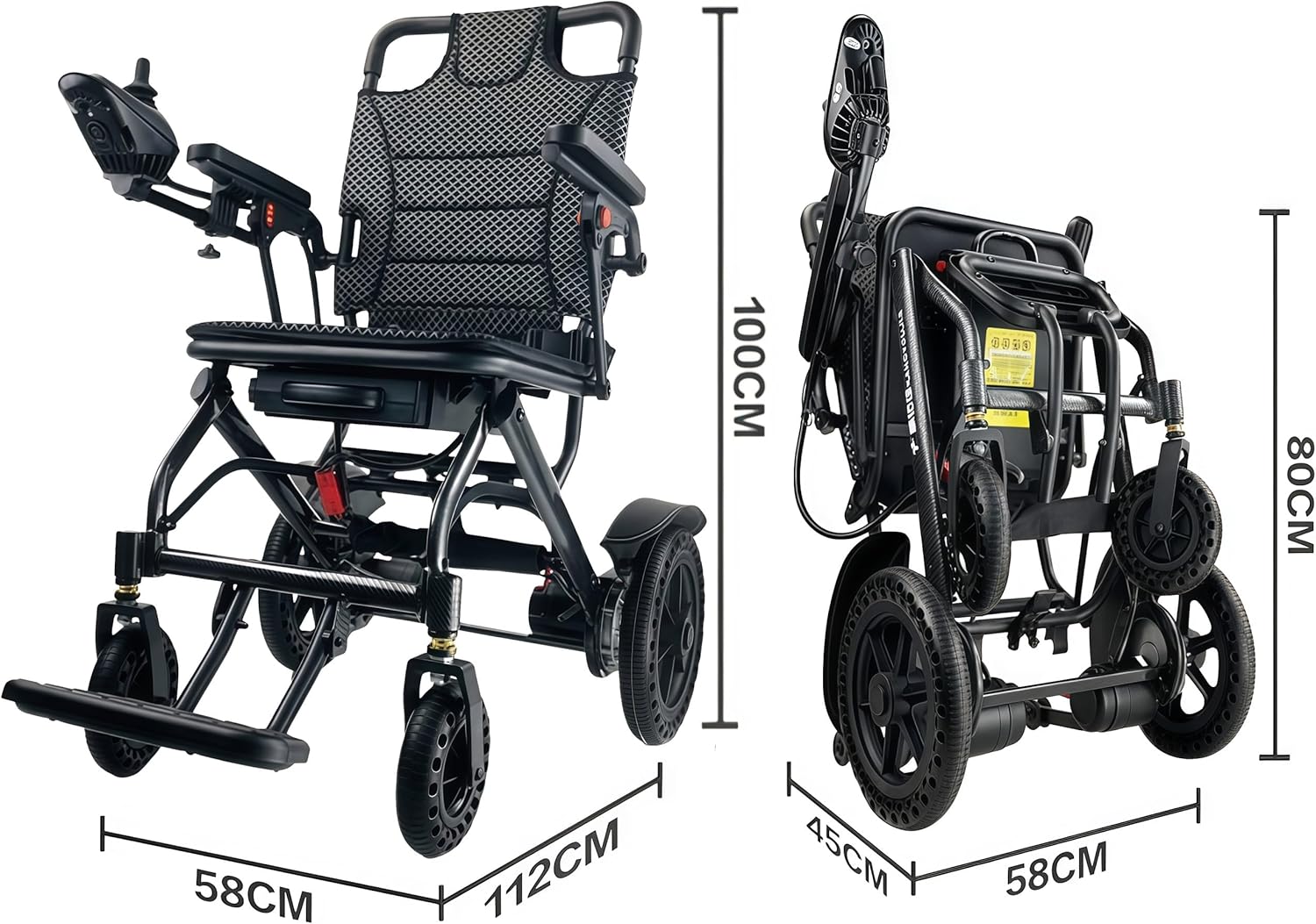
This image shows the ByteTecpeak D14 Electric Wheelchair in both its unfolded and folded states, highlighting its compact dimensions for transport and storage. Unfolded dimensions are approximately 112 cm length, 58 cm width, and 100 cm height. When folded, the dimensions are approximately 58 cm width, 45 cm depth, and 80 cm height.

This image details key structural and safety features of the wheelchair. It shows explosion-proof honeycomb tires designed for various road conditions, the elegant and durable carbon fiber transmission structure, and anti-tip auxiliary wheels for safer driving on inclines.
3. Setup and Assembly
3.1 Unfolding the Wheelchair
- Place the folded wheelchair on a flat, stable surface.
- Gently pull the backrest upwards until the frame locks into place.
- Push down on the seat frame until it is fully extended and secure.
- Ensure all locking mechanisms are engaged before use.
3.2 Attaching the Joystick Controller
- The joystick controller is typically pre-attached or easily slides into a designated slot on the armrest.
- Connect the controller cable to the corresponding port on the wheelchair. Ensure the connection is secure.
- Note: Some models may have a cable that requires careful routing. If the cable does not easily reach the armrest slot, check for any securing straps (e.g., Velcro under the seat) that may need to be released to allow sufficient slack.
3.3 Battery Installation and Initial Charge
The D14 features a removable battery for convenience.
- Locate the battery compartment, usually under the seat.
- Slide the battery into the compartment until it clicks securely into place.
- For initial use, fully charge the battery. Refer to the 'Charging the Battery' section for detailed instructions.
4. Operating Instructions
4.1 Joystick Controls

This image illustrates the various controls on the joystick: acceleration button, speed indicator, battery status indicator, power switch, horn button, and deceleration button. The joystick allows 360-degree movement for precise control.
- Power Switch: Press to turn the wheelchair on or off.
- Joystick Lever: Push forward to move forward, pull back to move backward, and move left/right to steer. The joystick offers 360-degree control.
- Acceleration Button: Increases the speed setting.
- Deceleration Button: Decreases the speed setting.
- Speed Indicator: Displays the current speed level.
- Battery Status Indicator: Shows the remaining battery charge.
- Horn Button: Activates the horn.
4.2 Switching Between Electric and Manual Mode

This image demonstrates the mechanism for switching between electric and manual modes. Red levers are used to engage or disengage the motors, allowing the wheelchair to be pushed manually or driven electrically.
To switch between modes, locate the red levers near the rear wheels. Push the levers to engage or disengage the motors. When motors are disengaged, the wheelchair can be pushed manually. Ensure both levers are in the desired position for the chosen mode of operation.
4.3 Comfort and Safety Features

This image highlights the comfort and safety elements, including a thickened shock-absorbing spring for a smoother ride, a breathable and comfortable seat cushion, and an adjustable safety belt for user security.
- Breathable Seat Cushion: Provides comfort during extended use.
- Adjustable Safety Belt: Secure the user in the wheelchair for safety.
- Thickened Shock Absorber: Enhances ride comfort over uneven terrain.
- Anti-tip Auxiliary Wheels: Provide additional stability, especially on inclines.
5. Maintenance
5.1 Charging the Battery
The 12Ah battery provides a range of up to 20 km. It can be charged in two ways:
- Charging via Controller: Connect the charger directly to the charging port on the joystick controller.
- Independent Battery Charging: Remove the battery from the wheelchair for charging.
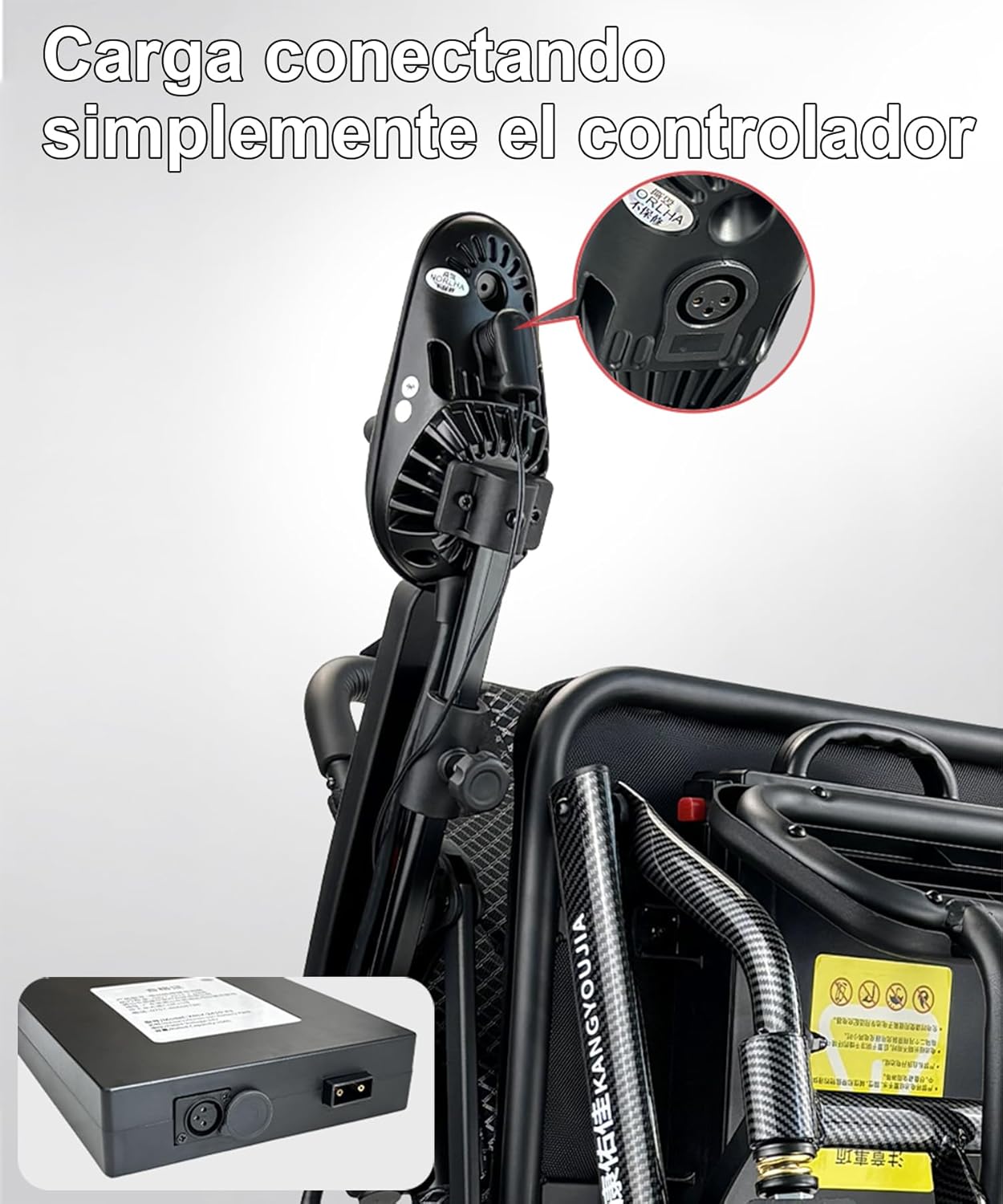
This image shows how to charge the wheelchair by plugging the charger directly into the controller unit, which is typically mounted on the armrest.

This image illustrates the process of removing the battery for independent charging. Step 1: Press the button to release the battery lock. Step 2: Pull the battery outwards to remove it from the wheelchair for charging.
- Ensure the charger is connected to a suitable power outlet.
- The battery indicator on the controller will show charging status.
- Avoid overcharging; disconnect the charger once the battery is full.
5.2 Cleaning and Storage
- Wipe down the frame and seat with a damp cloth. Do not use abrasive cleaners.
- Keep the electrical components dry.
- Store the wheelchair in a dry, cool place when not in use.
- For long-term storage, ensure the battery is partially charged (around 50-70%) and recharge it every few months to maintain battery health.
5.3 Tire Inspection
- Regularly inspect the honeycomb tires for any signs of wear or damage.
- Ensure the wheels rotate freely.
6. Troubleshooting
If you encounter any issues with your ByteTecpeak D14 Electric Folding Wheelchair, please refer to the following common solutions:
| Problem | Possible Cause | Solution |
|---|---|---|
| Wheelchair does not power on. | Battery not connected or discharged. | Ensure battery is securely installed and fully charged. Check power switch on joystick. |
| Wheelchair does not move. | Motors disengaged (manual mode). Joystick cable loose. | Check that the red levers near the rear wheels are in the electric mode position. Ensure joystick cable is securely connected. |
| Unusual noises during operation. | Loose components or obstruction. | Inspect for any loose parts or foreign objects. If noise persists, contact support. |
If the problem persists after attempting these solutions, please contact customer support.
7. Specifications
| Feature | Specification |
|---|---|
| Model | D14 |
| Unfolded Dimensions (L x W x H) | 112 x 58 x 100 cm |
| Folded Dimensions (W x D x H) | 58 x 45 x 80 cm |
| Product Weight | 20.3 kg (without battery) |
| Maximum Load Capacity | 150 kg |
| Motor Power | 500W |
| Battery Type | Removable 12Ah Lithium-ion |
| Maximum Range | Up to 20 km |
| Seat Width | 41 cm |
| Seat Height | 52 cm |
| Front Wheel Size | 6 inches |
| Rear Wheel Size | 12 inches |
| Material | Aluminum Carbon Fiber |

This image displays the powerful 500W motor, highlighting its design for efficient and reliable performance, enabling the wheelchair to handle various terrains.
8. Warranty and Support
For warranty information, please refer to the documentation provided at the time of purchase or contact your retailer. If you require technical assistance or have questions not covered in this manual, please contact ByteTecpeak customer support through the seller's contact information provided with your purchase.