
1. Product Overview
The AODK 69" L Shaped Desk is designed to provide a versatile and functional workspace for various environments, including home offices, gaming setups, and study areas. This desk features ample storage solutions, integrated power options, and customizable lighting to enhance user experience.
Key Features:
- Super Large Storage Space: Includes a monitor stand, a CPU stand, two open shelves, and four fabric drawers for organized storage of books, files, and office supplies.
- USB Charging Ports & Power Outlets: Equipped with three AC power outlets and two USB charging ports for convenient power access for electronic devices.
- Immersive LED Lighting: Features a detachable LED light strip with 10 colors and 10 lighting modes, including a memory function to retain the last setting.
- Reversible L-Shaped Design: The desk can be configured with the storage unit on either the left or right side to adapt to different room layouts.
- Adjustable Monitor Stand: An ergonomic monitor stand is included, designed to reduce neck and back strain by promoting a better sitting posture.

Figure 1: Main product view of the AODK 69" L Shaped Desk in a gaming setup.

Figure 2: AODK 69" L Shaped Desk configured for a home office environment.
2. Setup and Assembly
The AODK L-shaped desk is designed for straightforward assembly. Please follow the detailed instructions provided in the packaging. All parts are clearly labeled to assist with the process.
Important Safety Information:
- Always follow the provided instructions for assembly.
- Keep the workspace clear of debris and ensure all parts are accounted for before beginning assembly.
- Be aware of potential hazards such as sharp edges and heavy components.
- Always use appropriate tools and safety measures when assembling furniture.
Assembly Steps:
- Unpack all components and verify against the parts list in the included manual.
- Assemble the main desk frame according to the diagrams.
- Attach the L-shaped extension, ensuring proper alignment. The desk features a reversible design, allowing the extension to be placed on either the left or right side.
- Install the monitor stand, adjusting its height to one of the three available positions for ergonomic comfort.
- Insert the fabric drawers into their designated compartments.
- Secure the power strip and LED light strip as indicated in the manual.

Figure 3: Product dimensions for planning your workspace.
3. Operating Instructions
Power Outlets and USB Ports:
The desk is equipped with a recessed power strip featuring three AC outlets and two USB charging ports. To use, simply plug the desk's main power cord into a wall outlet. You can then connect your electronic devices directly to the integrated outlets and USB ports for convenient charging and power supply.

Figure 4: Integrated power outlets and USB ports for device charging.
LED Lighting System:
The detachable LED light strip offers 10 colors and 10 lighting modes. Control the lighting using the inline controller. The memory function ensures the lights resume the last selected mode when powered on again.

Figure 5: Detachable LED light strip with multiple color and mode options.
Adjustable Monitor Stand:
The monitor stand can be adjusted to three different height positions (approximately 3.9", 5.1", and 6.3" from the desktop) to help achieve an ergonomic viewing angle for your monitors, reducing strain on your neck and back.

Figure 6: Adjustable monitor stand for ergonomic comfort.
Storage Solutions:
Utilize the four fabric drawers for organizing smaller items, documents, and personal belongings. The open shelves provide space for books, decorative items, or additional equipment. A dedicated CPU stand is available to keep your computer tower off the floor and easily accessible.

Figure 7: Four large fabric drawers for organization.
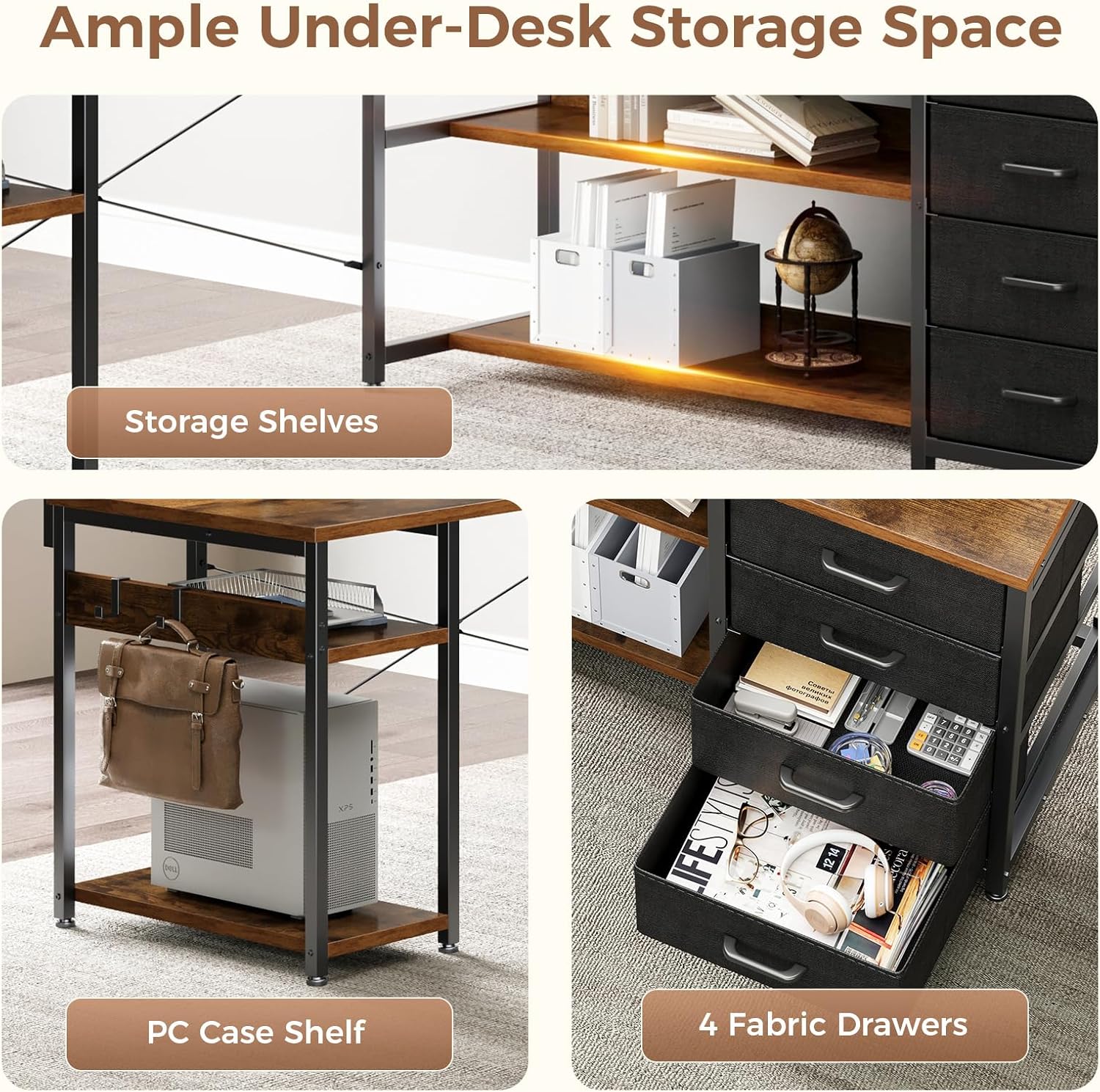
Figure 8: Ample under-desk storage with shelves and PC case space.
4. Maintenance
To ensure the longevity and appearance of your AODK desk, regular maintenance is recommended:
- Cleaning: Wipe surfaces with a soft, damp cloth. Avoid harsh chemicals or abrasive cleaners that may damage the finish. For spills, clean immediately.
- Dusting: Regularly dust all surfaces to prevent buildup.
- Hardware: Periodically check and tighten any loose screws or fasteners to maintain stability.
- Fabric Drawers: The fabric drawers can be spot cleaned with a mild detergent and water. Allow to air dry completely.
5. Troubleshooting
Common Issues and Solutions:
- Wobbly Desk: Ensure all screws and fasteners are securely tightened. Check that the desk is on a level surface; adjust leveling feet if necessary.
- LED Lights Not Working: Verify that the power cord for the LED strip is properly connected to the power strip and that the power strip itself is plugged into a functional wall outlet. Check the inline controller for any damage.
- Power Outlets/USB Ports Not Functioning: Confirm the desk's main power cord is securely plugged into a live wall outlet. Test the wall outlet with another device to ensure it is working.
- Missing or Damaged Parts: If you encounter missing or damaged parts during assembly, please refer to the 'Warranty & Support' section for assistance.
6. Specifications
| Feature | Detail |
|---|---|
| Brand | AODK |
| Product Dimensions | 43.3"D x 69"W x 30"H |
| Color | Vintage |
| Style | Modern |
| Base Material | Alloy Steel |
| Finish Type | Powder Coated |
| Special Feature | L shaped |
| Room Type | Bedroom, Dormitory, Living Room, Office, Study Room |
| Recommended Uses | Gaming, Studying, Working, Writing |
| Item Weight | 66.5 Pounds |
| Included Components | Built-in Outlet, Built-in USB Port, Headphone Hook, Power Strip |
| Top Material Type | Engineered Wood |
| Mounting Type | Freestanding |
| Drawer Type | Multi-drawer (Fabric) |
| Shape | L-Shape |
| Number of Drawers | 4 |
| Number Of Shelves | 4 |
| Tabletop Thickness | 0.5 Inches |
| Maximum Height | 29.72 Inches |
| Required Assembly | Yes |
| Warranty Type | Limited |
7. Warranty & Support
AODK provides a limited warranty for this product. For specific details regarding warranty coverage, please refer to the documentation included with your purchase.
If your AODK computer desk arrives damaged, has missing parts, or is scratched, please contact our professional customer support team. We are committed to helping you solve any issues within 24 hours.
Contact Support:
For assistance, please visit the AODK store on Amazon or use the contact information provided in your product packaging.
8. Product Videos
AODK L Shaped Desk with 4 Drawers
Video 1: This video provides a visual overview of the AODK L-shaped desk, showcasing its features such as the adjustable monitor shelf, power outlets, and storage drawers. It demonstrates the desk's adaptability for various room types and its reversible design.
AODK L Shaped Desk with Drawers
Video 2: This video highlights the storage capabilities of the AODK L-shaped desk, focusing on the four fabric drawers and open shelving. It illustrates how these features contribute to keeping a workspace organized and clutter-free.
