
Introduction
This manual provides detailed instructions for the assembly, operation, and maintenance of your koorlian Queen Upholstered Platform Bed Frame with Storage and LED Headboard. Please read all instructions carefully before beginning assembly and retain this manual for future reference.
Safety Information
- Always assemble the bed frame on a soft, clean surface to prevent damage to the product or your floor.
- Ensure all screws and fasteners are securely tightened before use. Periodically check and re-tighten as necessary.
- Do not exceed the maximum weight capacity of 1000 pounds.
- Keep small parts and packaging materials away from children.
- Exercise caution when handling electrical components. Ensure the charging station is properly connected and not exposed to moisture.
Package Contents
Before assembly, verify that all components are present and undamaged. Refer to the included parts list in your package. If any parts are missing or damaged, please contact customer support.

Image: All components of the koorlian Queen Bed Frame laid out for assembly, including the upholstered headboard, side rails, slats, and hardware.
Setup and Assembly
Assembly is recommended for two people due to the size and weight of some components. Do not fully tighten screws until all parts are aligned, then secure all fasteners.
Pre-Assembly Considerations:
- Ensure the mattress and bed frame are compatible in size.
- Measure your bedroom dimensions to ensure adequate space.
- Prepare a clear, spacious area for assembly.
Assembly Steps:
- Unpack all components and lay them out on a protective surface. Identify each part using the provided instruction manual.
- Assemble the headboard structure, ensuring the 2-tier storage and charging station components are correctly positioned.
- Attach the side rails to the headboard and footboard. Ensure proper alignment before partially tightening fasteners.
- Install the wood slats onto the metal frame. The 12 thickened wood slats with EVA quiet bars minimize noise.
- Assemble the four dustproof drawers. Insert the poles through the cloth drawers and then bolt them to the frames. Each drawer features 4 smooth rollers for easy movement and fixing screws to prevent sliding.
- Once all components are in place and aligned, securely tighten all screws to ensure the stability of the bed frame.

Image: Detailed view of the sturdy metal structure, wood slats, and assembly points, highlighting the easy and quick assembly process and noise-free design.
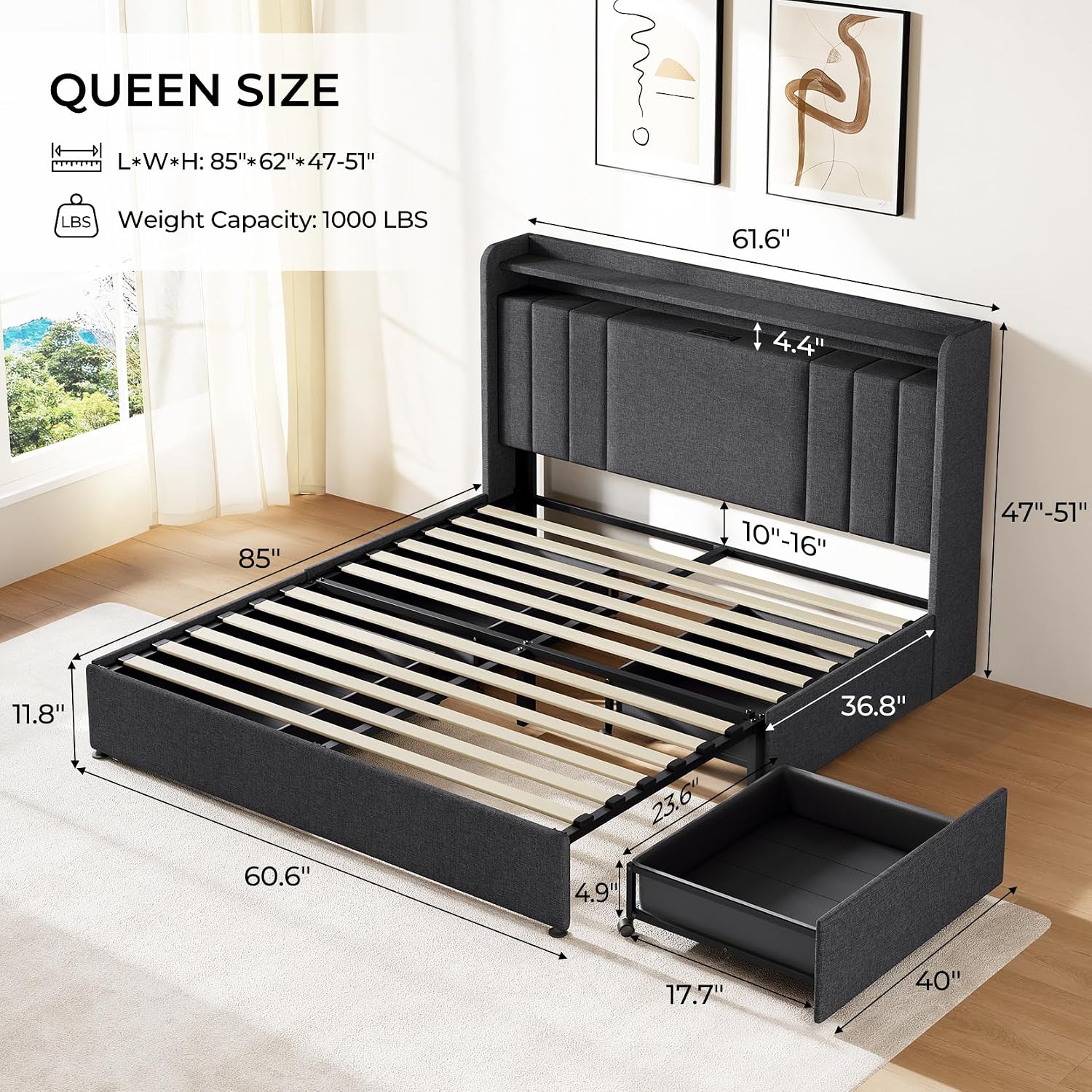
Image: Diagram showing the overall dimensions of the Queen bed frame (85"L x 62"W x 47"-51"H) and a detailed view of an open storage drawer with its smooth wheels and fixtures.
Operating Instructions
Multifunctional Headboard:
The headboard features a 2-tier storage shelf, an integrated charging station, and RGB LED lighting.
- Charging Station: Utilize the built-in 2 AC outlets, 1 USB port, and 1 Type-C port for convenient charging of electronic devices.
- RGB LED Lights: Control the LED lights using the provided remote control or a smart app. Adjust color, brightness, and scene modes, or set a timer for personalized ambiance.

Image: Close-up of the headboard showing the charging station with outlets and USB ports, and the RGB LED lights in operation, along with the remote control and app interface for light customization.
Adjustable Headboard Height:
The upholstered headboard offers three adjustable height settings: 47, 49, and 51 inches. This allows for optimal mattress fit (8-16 inches thick) and personalized comfort.
- To adjust the height, loosen the bolts connecting the headboard to the side rails, raise or lower the headboard to the desired position, and then re-tighten the bolts securely.

Image: Diagram illustrating the three adjustable height settings of the headboard (47, 49, 51 inches), ensuring a seamless fit with various mattress thicknesses.
Under-Bed Storage Drawers:
The bed frame includes four spacious, dustproof drawers for organized storage.
- Each drawer is lined with non-woven fabric to prevent small items from falling through.
- The drawers are equipped with smooth rollers for easy access and can be secured with fixing screws to prevent accidental movement.

Image: Comparison image showing a cluttered room with clothes piled on the floor versus an organized room with items neatly stored within the bed's under-bed drawers, demonstrating space-saving benefits.
Maintenance and Care
- Cleaning: Wipe clean with a cloth dampened in a mild cleaner. Wipe dry immediately with a clean, soft cloth. Avoid harsh chemicals or abrasive cleaners.
- Protection: When assembling or moving the bed frame, use appropriate padding and protective materials to prevent scratches or damage.
- Fasteners: Periodically check all screws and bolts to ensure they remain tight. Re-tighten as needed to maintain stability and prevent noise.
- Fabric Care: The upholstered fabric can be spot cleaned with a mild fabric cleaner. Test on an inconspicuous area first.
Troubleshooting
Noise from Bed Frame:
If you experience squeaking or wobbling:
- Ensure all assembly screws are fully tightened.
- Verify that the wood slats are correctly seated and secured within the metal frame.
- Check that the support legs are evenly distributed and making firm contact with the floor.
Drawers Not Sliding Smoothly or Falling Out:
- Inspect the drawer rollers for any obstructions or damage.
- Ensure the drawer fixing screws are properly aligned and engaged with the reserved holes on the bed frame.
- Confirm that the drawers are not overloaded, which could impede smooth operation.
LED Lights or Charging Station Not Functioning:
- Check that the power cord for the headboard is securely plugged into a working electrical outlet.
- Ensure all internal connections for the LED lights and charging station are firm.
- If using the remote control, verify that the batteries are functional.
Missing Parts or Assembly Issues:
If you encounter missing parts or difficulties during assembly that are not addressed in this manual, please contact koorlian customer support for assistance.
Specifications
| Brand | koorlian |
| Model Number | JJ011DGQ |
| Size | Queen |
| Product Dimensions | 85"L x 61"W x 51"H |
| Item Weight | 118 pounds |
| Weight Capacity | Up to 1000 pounds |
| Material | Fabric, Metal, Wood |
| Finish Type | Upholstered |
| Color | Grey |
| Headboard Features | 2-Tier Storage, Wingback Design, 3 Height Adjustable (47''-51''), RGB LED Lighting (App/Remote Control), Charging Station (2 AC outlets, 1 USB, 1 Type-C port) |
| Storage Options | 4 Under-bed Dustproof Drawers with wheels |
| Compatible Mattress Thickness | 8-16 inches (No Box Spring Needed) |
| Ground to Item Distance | 12 Inches |
Customer Support
For any questions, concerns, or assistance with missing parts or assembly, please contact koorlian customer support. Refer to your purchase documentation for specific contact details.