
SLYQMC MB C4
Contents
MB Star C4 Plus DOIP Function Diagnostic Tool User Manual
Model: MB C4
Introduction
This manual provides comprehensive instructions for the setup, operation, and maintenance of the SLYQMC MB Star C4 Plus DOIP Function Diagnostic Tool. This advanced diagnostic equipment is designed for current and future Mercedes-Benz vehicles, offering extensive capabilities for diagnosis, programming, and information retrieval.
Product Overview and Features
The MB Star C4 Plus is a state-of-the-art diagnostic tool that operates on a Windows 10 64-bit Professional operating system. It integrates several key systems to provide a complete diagnostic and information solution:
- DAS (Diagnosis Assistance System): Supports vehicle diagnostics through decision trees, guiding users through the diagnostic process.
- WIS net (Workshop Information System): Provides access to wiring diagrams, installation instructions, detailed technical information, and repair procedures.
- Star Utilities: An auxiliary and maintenance program for self-diagnosis of various components, word processing, and other functions.
- ASRA net (Optionally Available): Offers information regarding operation, standard texts, flat rates, and work units.
- Comprehensive Capabilities: Includes diagnosing, programming, simulation studying, repair information, automotive maintenance, and technical service bulletins.
- Connectivity: The new XENTRY system allows connection to the MB Internet for updates, programming, and coding. The SD-Connect interface ensures faster and more efficient operation compared to previous generations.
- System Recovery: Features built-in system recovery functions for enhanced reliability.
- Multi-Language Support: Supports English, Chinese, Czech, Danish, German, Greek, Spanish, Finnish, French, Hungarian, Italian, Japanese, Korean, Dutch, Polish, Portuguese, Romanian, Russian, Serbo, Slovak, Slovenian, Swedish, and Turkish.
Package Contents
Upon opening the package, verify that all components are present and in good condition:
- MB Star C4 Plus Diagnostic Unit
- Diagnostic Cables (various types for different vehicle connections)
- Protective Cover
- Chip Card Reader (for individual access to special modules)
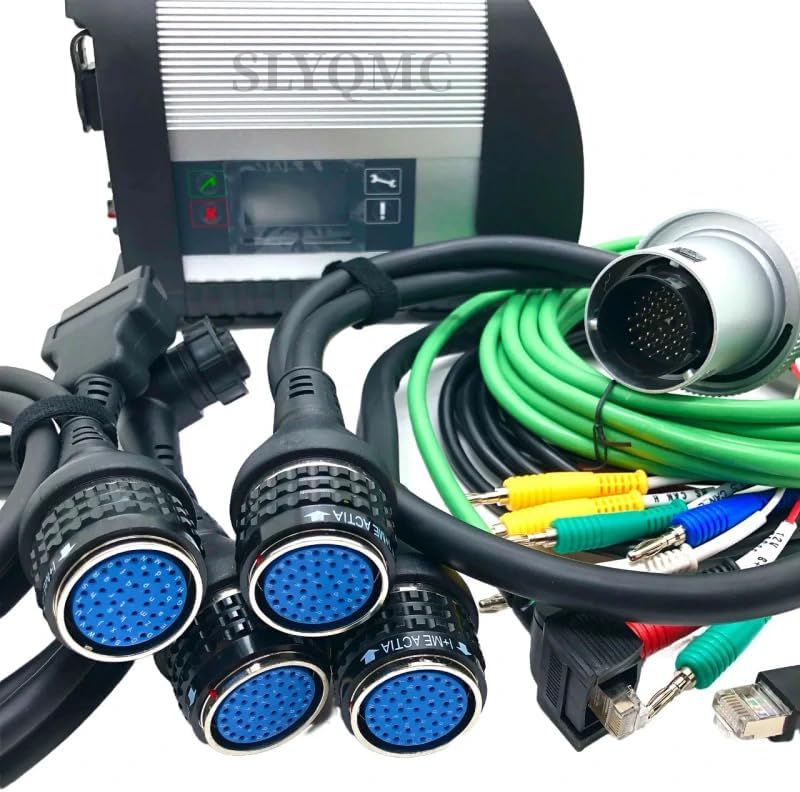
Image: The MB Star C4 Plus diagnostic unit shown with its accompanying set of diagnostic cables and connectors.

Image: A comprehensive assortment of diagnostic cables and adapters included with the tool, featuring various connector types and lengths.
Setup Instructions
- System Requirements: Ensure your laptop runs on Windows 10 64-bit Professional operating system and has a SATA hard disk.
- Connect Diagnostic Unit: Connect the MB Star C4 Plus diagnostic unit to your laptop using the appropriate cable.
- Power On: Ensure the diagnostic unit receives power.
- Software Installation: Install the provided diagnostic software (XENTRY, DAS, WIS net, Star Utilities) on your laptop. Follow the on-screen prompts for installation.
- Initial Configuration: Perform any necessary initial configuration steps within the software, such as language selection and network settings.

Image: Side view of the MB Star C4 Plus diagnostic unit, highlighting its robust casing and display panel.
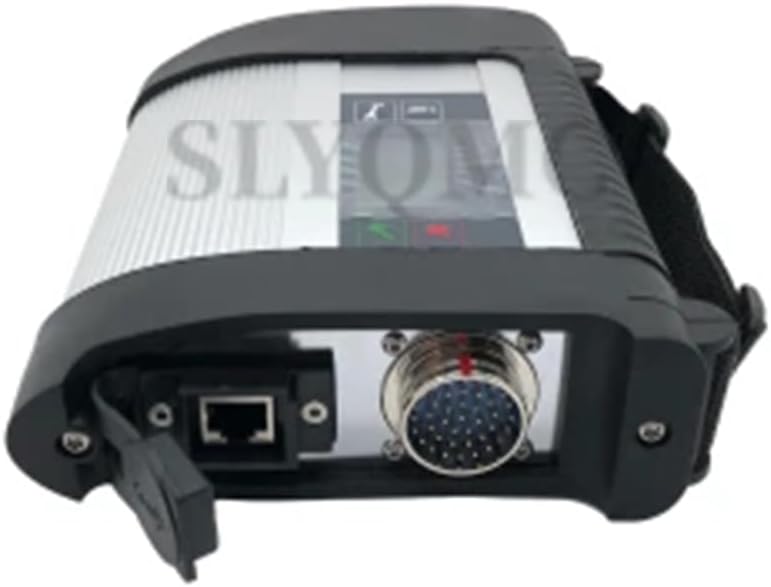
Image: Rear view of the MB Star C4 Plus diagnostic unit, displaying the various connection ports, including an Ethernet port and a multi-pin diagnostic connector.
Operating Instructions
Once the software is installed and the unit is connected, you can begin diagnostic operations:
- Vehicle Connection: Connect the appropriate diagnostic cable from the MB Star C4 Plus unit to the vehicle's diagnostic port.
- Launch Software: Open the XENTRY software on your laptop.
- Vehicle Identification: The software will guide you through identifying the vehicle, either automatically via VIN or manually.
- Diagnostic Functions:
- Diagnosis: Use DAS for guided diagnostics and fault code reading/clearing.
- Programming: Access programming functions for control units.
- Simulation: Utilize simulation features for training or testing.
- Information Retrieval: Refer to WIS net for repair information, wiring diagrams, and technical service bulletins.
- Updates: Connect to the MB Internet via the XENTRY software to download the latest updates for software and vehicle data.

Image: A close-up view of one of the diagnostic cable connectors, featuring multiple blue-tipped pins for secure and precise data transmission.

Image: Another close-up of a diagnostic cable connector, showcasing its durable silver casing and intricate pin arrangement.
Maintenance
- Cleaning: Regularly clean the diagnostic unit and cables with a soft, dry cloth. Avoid using harsh chemicals or abrasive materials.
- Storage: Store the device and its accessories in a clean, dry environment, away from extreme temperatures and direct sunlight. Use the provided protective cover when not in use.
- Software Updates: Periodically check for and install software updates to ensure optimal performance and compatibility with new vehicle models.
Troubleshooting
If you encounter issues with your MB Star C4 Plus diagnostic tool, consider the following general troubleshooting steps:
- Connection Issues: Ensure all cables are securely connected to both the diagnostic unit, the laptop, and the vehicle.
- Software Not Launching: Verify that your laptop meets the minimum system requirements (Windows 10 64-bit) and that the software installation was successful. Try restarting your laptop.
- Communication Errors: Check the vehicle's diagnostic port for any obstructions or damage. Ensure the vehicle's ignition is on.
- System Recovery: If software issues persist, utilize the built-in system recovery functions.
For persistent issues or technical support, please refer to the "Warranty and Support" section.
Specifications
| Brand | SLYQMC |
| Model | MB C4 |
| Operating System | Windows 10 (64-bit Professional recommended) |
| Automotive Fit Type | Universal Fit (for Mercedes-Benz vehicles) |
| Country of Origin | China |
| UPC | 763508500204 |
Warranty and Support
SLYQMC provides technical support for the MB Star C4 Plus DOIP Function Diagnostic Tool. If you encounter any problems during the use of this product, please contact customer service. We are committed to replying to your inquiries within 24 hours to assist with resolution.
For contact information, please refer to the product packaging or the official SLYQMC website.
Documents and downloads
Ask a question about this manual
Ask about setup, troubleshooting, compatibility, parts, safety, or missing instructions. Manuals+ will review the question and use this page’s manual context to help answer it.