Introduction
This manual provides detailed instructions for the installation, operation, and maintenance of your Dhiedas Smart Cabinet Lock A1BFPC. This smart lock offers multiple unlocking methods for enhanced security and convenience in various applications, including cabinets, drawers, and other furniture.
Key features include:
- 5-in-1 Unlocking Methods: Fingerprint, Keypad Passcode, Bluetooth App, RFID Card (13.56 MHz), and Apple Watch.
- Invisible Mounting: Secure installation inside cabinets using 3M adhesive tape or screws, without visible damage to furniture.
- Long Battery Life: Powered by 2 AA batteries (not included), lasting up to one year. Features a USB-C port for emergency power.
- Robust Construction: Made from durable zinc alloy for high security and resistance to tampering.
- Versatile Application: Suitable for single-door cabinets, double-door cabinets, drawers, desks, and various types of furniture.

Image: Overview of the Dhiedas Smart Cabinet Lock highlighting its six unlocking methods.
Setup and Installation
Package Contents
Before installation, ensure all components are present:
- Smart Cabinet Lock Unit (Main Lock Body and Keypad)
- 2 x RFID Cards
- 3M Adhesive Stickers
- Mounting Screws
- Double Door Accessory (for double-door cabinets)
- User Manual (this document)
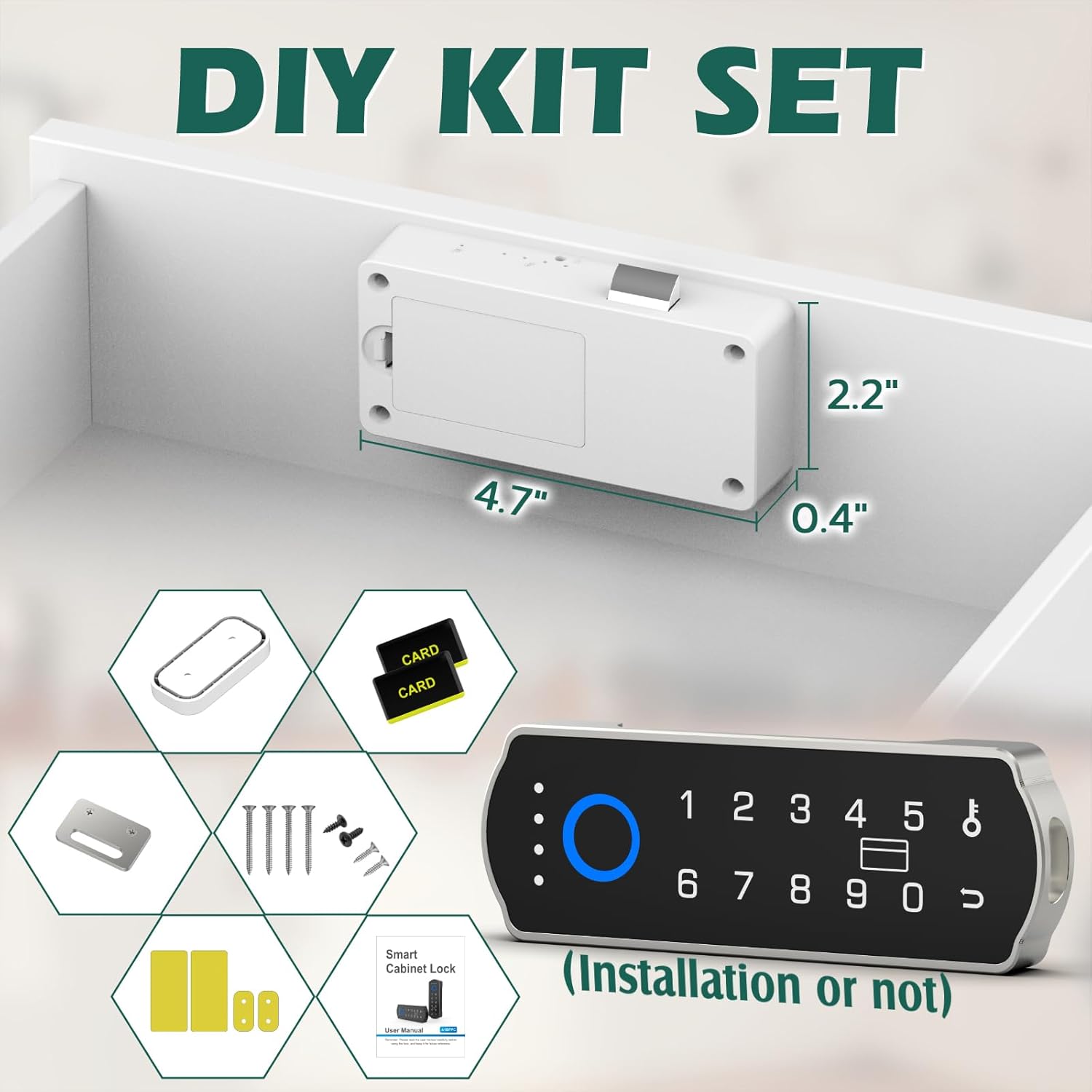
Image: Contents of the Dhiedas Smart Cabinet Lock DIY Kit Set.
Battery Installation
- Locate the battery compartment on the main lock unit.
- Insert 2 AA batteries (1.5V, not included) according to the polarity markings.
- Close the battery compartment cover securely.

Image: Battery installation and USB-C emergency power port on the lock unit.
Mounting Methods
The lock offers two primary mounting options:
- Adhesive Mounting (No Drilling): Clean the interior surface of the cabinet or drawer where the lock will be placed. Apply the 3M adhesive stickers to the back of the main lock unit and the buckle. Press firmly into position.
- Screw Mounting: For a more permanent installation, use the provided screws to secure the main lock unit and the buckle to the interior of the cabinet or drawer.
The front keypad unit can also be mounted with 3M tape or used without permanent mounting for remote unlocking within Bluetooth range.

Image: Dimensions of the lock components for installation planning.

Image: Visual guide for installing the lock using either screws or 3M adhesive tape.
Initial Setup (App Pairing & User Registration)
- Download the dedicated Bluetooth app (compatible with Android and iOS) from your device's app store.
- Open the app and follow the on-screen instructions to pair your smart lock. Ensure Bluetooth is enabled on your smartphone.
- Once paired, you can register fingerprints, set passcodes, and add RFID cards through the app interface. The lock supports up to 100 fingerprints and 20 passcodes.
Operating Instructions
Unlocking Methods
- Fingerprint: Place a registered finger on the fingerprint sensor on the keypad. The lock will unlock if the fingerprint is recognized.
- Keypad Passcode: Enter a registered passcode on the keypad and press the unlock button.
- Bluetooth App: Open the app on your smartphone and tap the unlock icon when within Bluetooth range (5-6 meters).
- RFID Card: Present a registered RFID card to the RFID reader area on the main lock unit.
- Apple Watch: Use the dedicated Apple Watch app to unlock the cabinet lock.

Image: Fingerprint unlocking method in use.

Image: RFID card unlocking method in use.

Image: Apple Watch unlocking method in use.
Temporary Passcodes
The Bluetooth app allows for the generation of temporary passcodes. These passcodes are valid for a limited time (e.g., 10 minutes) and can be used to grant temporary access without adding permanent users.

Image: Generating a temporary passcode via the mobile application.
Remote Unlocking
The front keypad unit can be used for remote unlocking within the Bluetooth range of 5-6 meters, allowing access without directly interacting with the hidden main lock unit.

Image: Remote unlocking functionality using a smartphone within Bluetooth range.
Maintenance
Battery Replacement
The lock is powered by 2 AA batteries. When the battery level is low, the lock will provide a low battery reminder. Replace batteries promptly to ensure continuous operation. The USB-C port can be used for emergency power if batteries are depleted before replacement.

Image: Battery indicator on the lock keypad.
Cleaning
Wipe the lock's exterior surfaces with a soft, dry cloth. Avoid using abrasive cleaners or solvents, as these can damage the finish or electronic components.
Troubleshooting
- Lock not responding: Check battery levels. If batteries are low or depleted, replace them or use the USB-C port for emergency power. Ensure the lock is within Bluetooth range if using the app or remote keypad.
- Fingerprint not recognized: Ensure your finger is clean and dry. Try re-registering your fingerprint through the app. Ensure proper placement on the sensor.
- Passcode not working: Verify the entered passcode is correct. Check if the passcode has expired (for temporary passcodes).
- RFID card not working: Ensure the RFID card is properly registered. Present the card directly to the RFID reader area.
- App connectivity issues: Ensure Bluetooth is enabled on your device. Restart the app or your smartphone. Re-pair the lock if necessary.
- Lock mechanism jammed: Do not force the lock. Check for any obstructions in the cabinet or drawer that might be preventing the lock from engaging or disengaging.
Specifications
| Feature | Detail |
|---|---|
| Brand | Dhiedas |
| Model Name | A1BFPC |
| Lock Type | Biometric, Keypad, RFID |
| Unlocking Methods | Fingerprint, Keypad, Bluetooth APP, RFID, Apple Watch |
| Material | Metal, Zinc Alloy |
| Color | Silver |
| Style | Horizontal |
| Item Dimensions (L x W x H) | 1.7 x 0.5 x 4.3 inches |
| Item Weight | 13.6 ounces (0.39 Kilograms) |
| Power Source | 2 x 1.5V AA Batteries (not included) |
| Emergency Power | USB-C Port |
| Connectivity Protocol | Bluetooth |
| Controller Type | Android, iOS, Hand Control |
| Max Fingerprints | 100 |
| Max Passcodes | 20 |
| Max RFID Cards | 100 |
Warranty and Support
Dhiedas provides comprehensive customer support for this product:
- Customer Support: 12 months of dedicated customer support.
- Technical Service: Lifetime technical service is available for the product.
For any questions or assistance, please refer to the contact information provided with your purchase or visit the official Dhiedas website.