
WANAI NB-01AICE
Contents
WANAI Countertop Portable Ice Maker Machine User Manual
Model: NB-01AICE
1. Introduction
Thank you for choosing the WANAI Countertop Portable Ice Maker Machine. This manual provides important information regarding the safe operation, maintenance, and troubleshooting of your new ice maker. Please read it thoroughly before first use and keep it for future reference.
This portable ice maker is designed for convenience, producing 9 bullet-shaped ice cubes in just 6-8 minutes, with a daily output of up to 26 lbs. It features a user-friendly design, low noise operation, and an automatic self-cleaning function, making it ideal for home, office, bar, or RV use.

Figure 1: WANAI Countertop Portable Ice Maker Machine, black color, with ice cubes and a drink beside it.
2. Safety Instructions
To reduce the risk of fire, electric shock, or injury when using your ice maker, follow these basic precautions:
- Read all instructions before use.
- Do not touch the evaporator or ice blades when the unit is in operation.
- Do not immerse the appliance, power cord, or plug in water or other liquids.
- Supervise children closely when the appliance is in use.
- Unplug the ice maker from the outlet when not in use or before cleaning.
- Do not operate any appliance with a damaged cord or plug, or after the appliance malfunctions or has been damaged in any manner.
- Use only attachments recommended by the manufacturer.
- Do not use outdoors.
- Do not place on or near a hot gas or electric burner, or in a heated oven.
- Ensure proper ventilation. Maintain at least 5 inches of space around the unit for proper air circulation.
- Use only potable water.
- Do not store explosive substances such as aerosol cans with a flammable propellant in this appliance.
- This appliance is intended to be used in household and similar applications only.
3. What's in the Box
Upon unpacking, please ensure all items are present and in good condition:
- WANAI Countertop Portable Ice Maker Machine
- Ice Basket
- Ice Scoop
- User Manual (this document)
4. Product Overview and Components
Familiarize yourself with the different parts of your ice maker:
- Control Panel: Features touch buttons for operation and indicator lights.
- Transparent Lid: Allows you to view the ice-making process.
- Ice Basket: Removable basket for collecting ice cubes.
- Water Reservoir: Area where water is stored for ice production.
- Ice Shovel: Moves ice from the evaporator to the ice basket.
- Evaporator: Metal rods where ice cubes are formed.
- Drain Plug: Located at the bottom for draining water.
- Heat Dissipation Fan: Located on the side for cooling.
- Portable Handle: For easy carrying.

Figure 2: Large viewable multi-function control panel with indicators for Small, Large, Clean, Power, Add Water, and Ice Full.

Figure 3: Close-up of the large transparent window on the ice maker lid.

Figure 4: Close-up of the heat dissipation fan on the side of the ice maker.

Figure 5: Close-up of the portable handle for easy carrying.
5. Setup
- Unpack: Carefully remove the ice maker from its packaging. Remove all packing materials, including any tape or protective films.
- Placement: Place the ice maker on a flat, stable surface away from direct sunlight and other heat sources (e.g., stove, furnace, radiator). Ensure there is at least 5 inches of clear space around the unit for proper ventilation.
- Initial Cleaning: Before first use, clean the interior of the ice maker. Refer to the "Maintenance" section for detailed cleaning instructions.
- Power Connection: Plug the ice maker into a grounded electrical outlet. Ensure the voltage matches the specifications of the unit (110 Volts).
- Allow to Settle: After transportation, allow the ice maker to stand upright for at least 2-4 hours before plugging it in. This allows the refrigerant to settle.
6. Operating Instructions
6.1 First Use and Ice Making Cycle
- Add Water: Open the lid and remove the ice basket. Fill the water reservoir with potable water up to the MAX water level mark. Do not overfill.
- Replace Basket: Place the ice basket back into its position. Close the lid.
- Power On: Press the "ON/OFF" button on the control panel to start the ice making process. The "POWER" indicator light will illuminate.
- Select Ice Size: Press the "SELECT" button to choose your desired ice cube size: "SMALL" or "LARGE". The corresponding indicator light will illuminate.

Figure 6: Comparison of Large (1.10in x 0.90in) and Small (0.95in x 0.78in) ice cube sizes.
- Ice Production: The ice maker will begin its cycle. The first batch of ice may take slightly longer (around 6-8 minutes) and may be smaller or irregular. Subsequent cycles will produce more consistent ice.
- Ice Full Indicator: When the ice basket is full, the "ICEFULL" indicator light will illuminate, and the ice making process will pause. Remove ice from the basket to resume operation.
- Add Water Indicator: If the water level in the reservoir is too low, the "ADD WATER" indicator light will illuminate. Add more water to the reservoir to continue ice production.
- Stop Operation: To stop the ice making process at any time, press the "ON/OFF" button.

Figure 7: Simplified steps for ice making: Step 1 Add Water, Step 2 Click "ON/OFF" Button, Step 3 Take Out The Ice.
6.2 Official Product Video: Ice Maker Display
Video 1: This video demonstrates the WANAI Countertop Ice Maker in operation, showcasing its features and the ice production process. It highlights the compact design and ease of use.
7. Maintenance
Regular cleaning and maintenance will ensure the longevity and optimal performance of your ice maker.
7.1 Self-Cleaning Function
The WANAI ice maker is equipped with an automatic self-cleaning function:
- Ensure the water reservoir is filled with clean water.
- Press and hold the "ON/OFF" button for 5 seconds. The "CLEAN" indicator light will illuminate, and the unit will begin its self-cleaning cycle.
- Once the cleaning cycle is complete, the unit will stop. Drain the dirty water by removing the drain plug at the bottom of the unit.
- Rinse the interior with fresh water and drain again.

Figure 8: Illustration of the self-cleaning function, showing water being circulated for cleaning and the bottom drain plug.
7.2 General Cleaning
- Always unplug the appliance before cleaning.
- Remove the ice basket and clean it with mild detergent and warm water. Rinse thoroughly.
- Clean the interior of the water reservoir and ice shovel with a soft cloth dampened with a mild detergent solution. Rinse with clean water.
- Wipe the exterior of the unit with a soft, damp cloth. Do not use abrasive cleaners or solvents.
- Ensure all parts are completely dry before reassembling and storing or using the unit.
- For long-term storage, drain all water, clean the unit, and store it in a dry, well-ventilated area.
8. Troubleshooting
Before contacting customer support, please refer to the following table for common issues and their solutions:
| Problem | Possible Cause | Solution |
|---|---|---|
| Ice maker not working. | No power. | Check if the unit is plugged in and the outlet is working. |
| "ADD WATER" indicator is on. | Water reservoir is empty or low. | Add potable water to the reservoir up to the MAX level. |
| "ICEFULL" indicator is on. | Ice basket is full. | Remove ice from the basket. |
| Ice cubes are too small or irregular. | First cycle or water temperature too high. | Allow several cycles for optimal ice production. Use colder water for faster and firmer ice. |
| Unit is noisy. | Normal operation sounds (compressor, fan, water pump). | This is normal. The unit operates at less than 40 decibels. Ensure proper ventilation. |
| Ice melts quickly. | Ice maker is not a freezer. | Transfer ice to a freezer for long-term storage. |
9. Specifications
| Feature | Detail |
|---|---|
| Brand | WANAI |
| Model Name | NB-01AICE |
| Product Dimensions | 12.6"D x 8.8"W x 11.6"H |
| Weight | 15 Pounds |
| Ice Production Capacity | 26 lbs per day |
| Ice Cube Production Time | 9 cubes in 6-8 minutes |
| Ice Cube Shapes | Bullet-shaped |
| Ice Cube Sizes | Small, Large |
| Voltage | 110 Volts |
| Noise Level | Less than 40 decibels |
| Special Features | Self-cleaning function, Portable handle, Transparent lid |
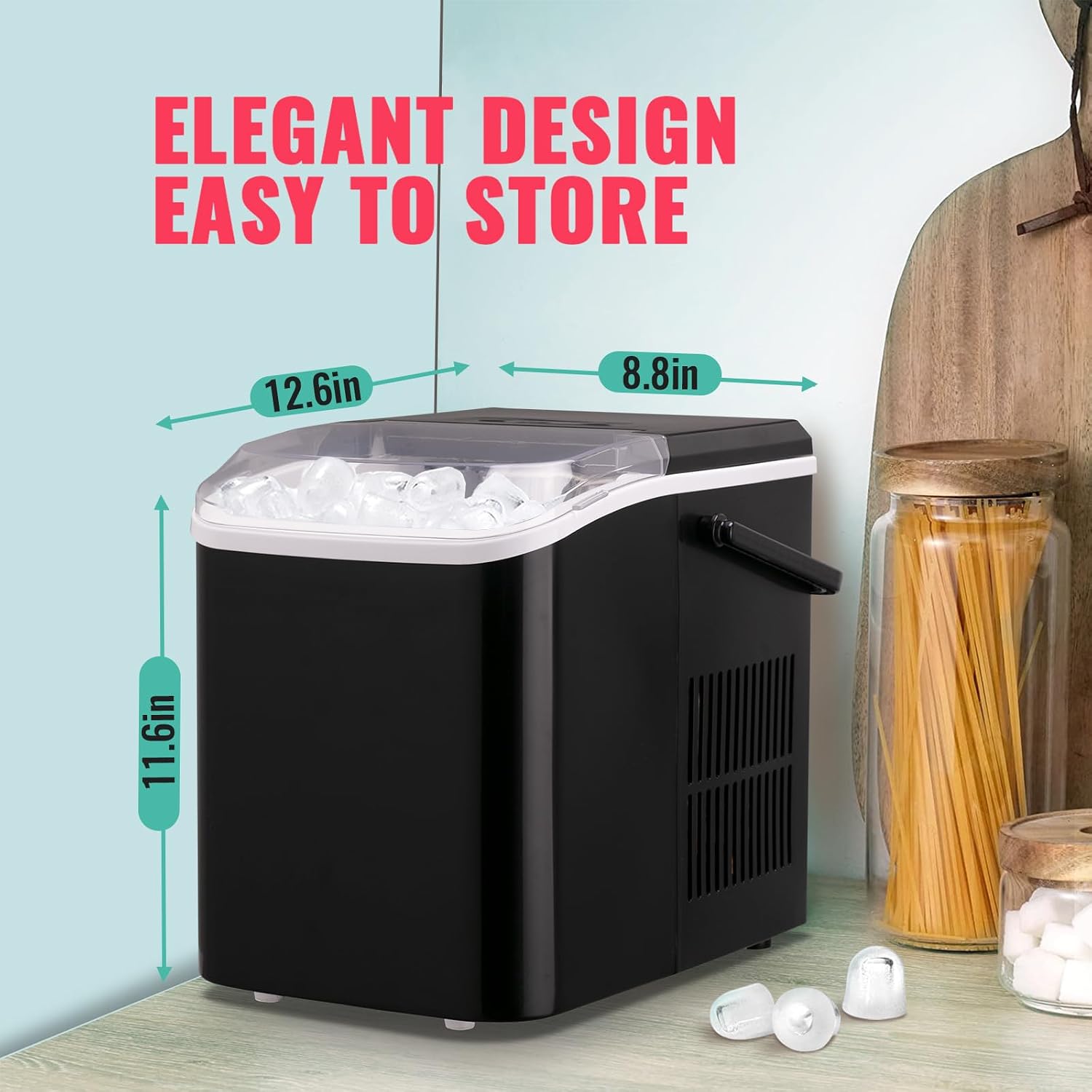
Figure 9: Dimensions of the WANAI Portable Ice Maker.

Figure 10: The ice maker features a high-efficiency compressor with a noise level less than 35dB, ensuring quiet operation.
10. Warranty and Support
For warranty information, please refer to the warranty card included with your product or contact WANAI customer support directly. Keep your purchase receipt as proof of purchase.
If you encounter any issues not covered in the troubleshooting section or require further assistance, please contact WANAI customer support:
- Website: Visit the official WANAI store on Amazon for support resources: WANAI Store
- Email: Refer to your product packaging or included documentation for specific customer service email.
- Phone: Refer to your product packaging or included documentation for specific customer service phone number.
Please have your model number (NB-01AICE) and purchase date ready when contacting support.
Documents and downloads
Ask a question about this manual
Ask about setup, troubleshooting, compatibility, parts, safety, or missing instructions. Manuals+ will review the question and use this page’s manual context to help answer it.