
iliD WL-GB05-4AD
Contents
iliD Smart Max Bidet Toilet Seat Instruction Manual
Model: WL-GB05-4AD | Brand: iliD
1. Introduction
Thank you for choosing the iliD Smart Max Bidet Toilet Seat. This electric elongated ecoseat is designed to enhance your bathroom experience with advanced features for hygiene and comfort. Please read this manual thoroughly before installation and use to ensure proper operation and maintenance.

Image: iliD Smart Max Bidet Toilet Seat, showcasing its sleek design.
2. Key Features
- Auto Open/Close: Advanced radar and body-sensing technology for automatic lid operation.
- Revolutionary Comfort & Sleek Design: 32% slimmer profile and 20% larger seat area for enhanced comfort.
- Instant Warm Water & Adjustable Comfort: Endless warm water, 3-level adjustable warm air drying, customizable water temperature and pressure.
- Thorough & Sanitary Cleaning: Self-cleaning, full ABS Plastic nozzle with multiple cleaning modes (Female Wash, Rear Wash, Power Wash, Child Wash).
- Simple Operation & Fast Installation: Manageable via side knob and wireless remote. Designed for elongated toilets.

Image: Illustration of the bidet seat's auto open/close lid functionality as a person approaches.

Image: Diagram illustrating the full cycle of hygiene and comfort features, including auto open, heated seat, nozzle self-cleaning, cleanse, dry, and auto close.
3. Setup and Installation
3.1. Pre-Installation Checks
- Ensure your toilet is an elongated model. Refer to the dimensions below for compatibility.
- Verify a grounded electrical outlet is within reach of the toilet.
- Confirm the T-valve size. If the included 7/8” T-valve is not suitable, contact customer support for a 3/8” T-valve replacement.

Image: Diagram showing how to measure your toilet for compatibility with the bidet seat, indicating required dimensions for elongated toilets.
3.2. Included Components
The package includes all necessary tools and parts for installation:
- T-Valve (G7/8"xG7/8"xG1/2")
- Cold Hose (G1/2" for both ends)
- Plumbing Tape
- Spanner
- Mounting Plate and Screws
- Wireless Remote Control

Image: Visual representation of all components included in the package, such as the T-valve, cold hose, plumbing tape, spanner, and remote control.
3.3. Installation Steps
- Preparation: Turn off the water supply valve and flush the toilet to drain the tank.
- Connect T-Adapter: Attach the T-valve to the toilet tank inlet. Ensure the rubber washer is properly seated to prevent leaks.
- Finish Up: Reconnect the water supply hose to the bottom of the T-valve.
- Mounting Plate: Install the fixing plate onto the ceramic toilet, adjusting for proper positioning.
- Attach Bidet Seat: Slide the bidet seat onto the installed mounting plate until it clicks into place.
- Connect Water Hose: Connect the bidet's water hose to the T-valve.
- Power Connection: Plug the bidet seat into a grounded electrical outlet.
- Restore Water Supply: Slowly turn on the water supply valve and check for leaks.
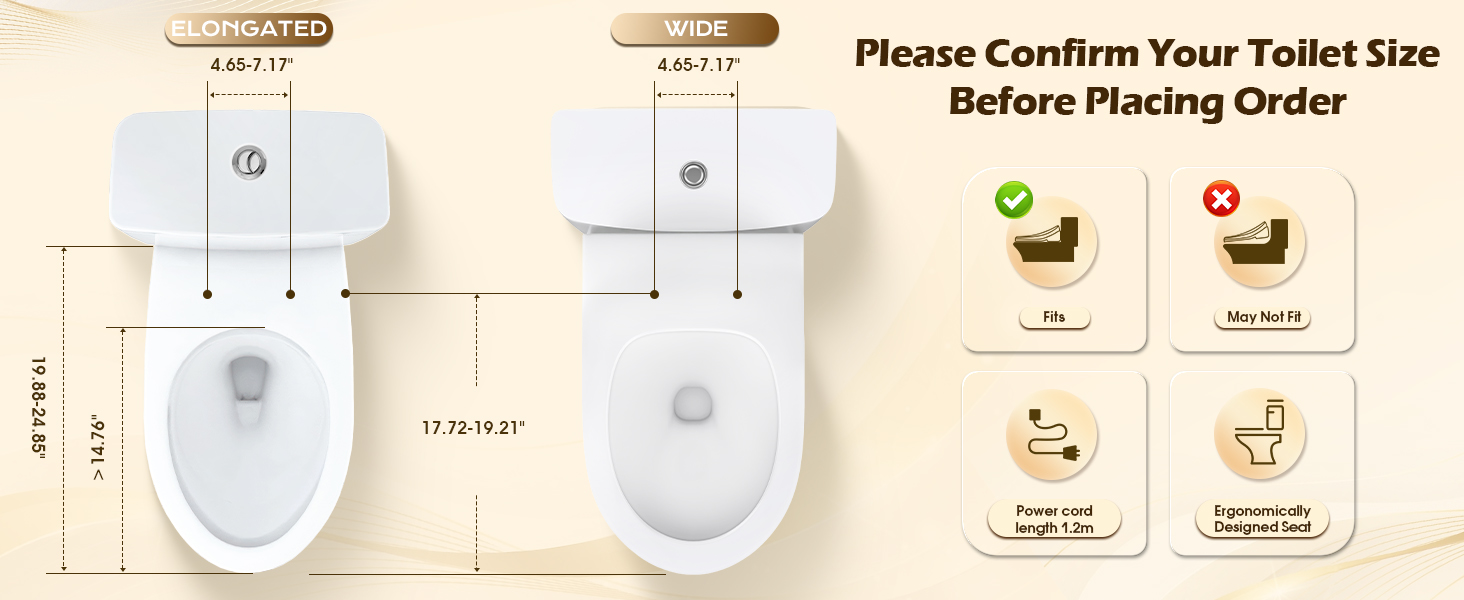
Image: Step-by-step guide for installing the T-valve for the bidet seat.

Image: Visual guide demonstrating the full installation procedure of the bidet seat onto the toilet.
3.4. Installation Video
Video: A detailed review and installation guide for the iliD Smart Max Bidet Toilet Seat, covering key features and setup tips.
4. Operating Instructions
The iliD Smart Max Bidet Toilet Seat can be operated using the side knob or the wireless remote control.
4.1. Remote Control Functions
The wireless remote provides full control over all bidet functions:
- Silent/Light: Turn the night light on/off.
- Auto: Activates automatic lid opening and closing.
- Rear Wash: Standard posterior cleansing.
- Front Wash: Gentle feminine cleansing.
- Position: Adjusts nozzle position.
- Pressure: Adjusts water pressure.
- Water Temp: Adjusts water temperature (3 levels).
- Seat Temp: Adjusts seat temperature (3 levels).
- Wind Temp/Dryer: Activates warm air dryer and adjusts temperature (3 levels).
- Nozzle Cleaning: Initiates self-cleaning cycle for the nozzle.
- Power: Turns the unit on/off.
- ECO Mode: Energy-saving mode.
- Child Mode: Gentle settings for children.

Image: The iliD Smart Max Bidet Toilet Seat with its wireless remote control, highlighting various functions.

Image: Detailed layout of the wireless remote control, showing all buttons and their corresponding functions for the bidet seat.
4.2. Automatic Functions
- Auto Open/Close: The lid automatically opens upon approach and closes gently when you leave. Avoid manual operation to prevent damage.
- Heated Seat: The seat automatically warms to your selected temperature when occupied.
- Instant Warm Water: Provides a continuous supply of warm water for washing.

Image: Visual explanation of the heated seat, instant warm water, and warm air dryer functions with temperature indicators.

Image: Internal view of the instant hot water heater, demonstrating consistent water temperature delivery.
4.3. Operating Videos
Video: A comprehensive review of the iliD Smart Max Bidet Toilet Seat, demonstrating its automatic lid, night light, heated seat, and various remote-controlled functions.
Video: A detailed demonstration of the iliD Smart Max Bidet Toilet Seat's features, including auto open/close, heated seat, and various wash modes, highlighting its user-friendly remote control.
5. Maintenance
5.1. Nozzle Cleaning
The bidet features a self-cleaning, full ABS Plastic nozzle. Use the 'Nozzle Cleaning' button on the remote to initiate a thorough cleaning cycle for optimal hygiene.

Image: Close-up of the self-cleaning nozzle, illustrating its three-level positions and pressure settings, along with different wash modes.
5.2. General Cleaning
Regularly wipe down the exterior of the bidet seat with a soft, damp cloth and mild, non-abrasive cleaner. Avoid harsh chemicals that may damage the surface.
5.3. Filter Replacement
For optimal performance and water quality, periodic filter replacement may be necessary. Contact customer support for information on purchasing a filter set and replacement instructions.
6. Troubleshooting
- Lid Not Operating Automatically: Ensure the bidet is powered on and the auto-sensing feature is enabled. Avoid manually forcing the lid, as this can damage the mechanism.
- Water Leakage During Installation: Double-check all connections, especially the T-valve, to ensure they are tightened correctly and washers are properly seated. If the T-valve size is incorrect, contact customer support for a replacement.
- No Power: Verify the power cord is securely plugged into a grounded outlet. Check your circuit breaker if necessary.
- Insufficient Water Pressure: Adjust the water pressure setting using the remote control. Ensure the main water supply valve is fully open.
7. Specifications
| Feature | Detail |
|---|---|
| Manufacturer | iliD |
| Part Number | WL-GB05-4AD |
| Item Weight | 9 pounds |
| Product Dimensions | 19.9 x 14.75 x 3.65 inches |
| Item Model Number | WL-GB05-4AD |
| Color | White |
| Included Components | Remote Control |
| Batteries Included? | No |
| Batteries Required? | No |
| ASIN | B0DM4DXPPR |
| Date First Available | November 6, 2024 |
8. Warranty and Support
iliD offers comprehensive support for your Smart Max Bidet Toilet Seat:
- Up to 2 Years of Coverage: Full repair or replacement support for peace of mind.
- 24/7 Customer Care: Get help anytime via email or live chat.
- 30-Day Easy Returns: Hassle-free returns or exchanges within 30 days.
- Lifetime Guidance: Expert tips and support to maximize your product experience.
For any questions, troubleshooting, or warranty claims, please contact iliD customer support.
Documents and downloads
Ask a question about this manual
Ask about setup, troubleshooting, compatibility, parts, safety, or missing instructions. Manuals+ will review the question and use this page’s manual context to help answer it.