
Volteck CTV-31W
Volteck CTV-31W WiFi Robotized Dome Camera
User Instruction Manual
Introduction
This manual provides detailed instructions for the installation, operation, and maintenance of your Volteck CTV-31W WiFi Robotized Dome Camera. Please read this manual thoroughly before using the product to ensure proper functionality and safety. Keep this manual for future reference.
Important Safety Information
- Ensure the power supply voltage matches the camera's requirements (12 V DC, 1 A).
- Do not expose the camera to extreme temperatures, humidity, or direct water immersion.
- Avoid placing the camera near strong electromagnetic fields.
- Handle the camera with care to prevent physical damage.
- Only use the provided power adapter.
Package Contents
Please check the package to ensure all items are present:
- 1x Volteck CTV-31W WiFi Robotized Dome Camera
- 1x AC Charger (Power Adapter)
- 1x Wall Mounting Plate
- 2x Wall Plugs
- 2x Screws
- 1x Power Cable
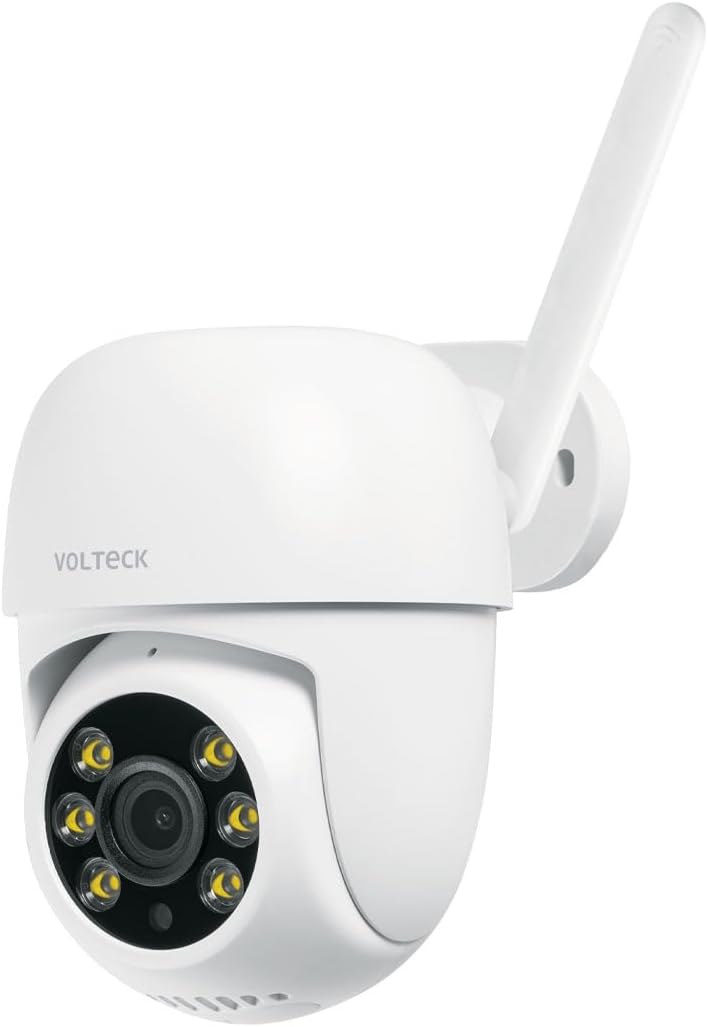
Image: The Volteck CTV-31W WiFi Robotized Dome Camera, showing its white dome design and antenna.

Image: The included AC power adapter with its cable, essential for powering the camera.
Product Features
The Volteck CTV-31W camera offers a range of advanced features for comprehensive surveillance:
- High Image Quality: Captures video in 3 MP resolution for clear and detailed footage.
- Mobile Device Compatibility: Easily connect and control the camera via your smartphone or tablet.
- Motion Detection Notifications: Receive instant alerts on your mobile device when motion is detected.
- Two-Way Audio: Communicate through the camera with built-in microphone and speaker.
- Video Angle Rotation (Pan/Tilt): Enjoy a wide viewing area with 355° horizontal rotation and 60° vertical tilt.
- Memory Card Slot: Supports local storage with a microSD card up to 128 GB (card not included).
- Full-Color Night Vision: Provides clear, colored images even in low-light conditions.
- Intelligent Tracking: Automatically follows detected movement within its field of view.
- Indoor/Outdoor Use: Designed for versatile placement in both indoor and outdoor environments.

Image: Diagram highlighting key features of the Volteck CTV-31W camera, including two-way audio, video rotation, memory card slot, full-color night vision, and intelligent tracking.
Setup Guide
1. Physical Installation
- Choose a Location: Select a suitable indoor or outdoor location for your camera. Ensure it has a clear view and is within range of your Wi-Fi network.
- Mounting:
- Position the wall mounting plate on the desired surface.
- Mark the screw holes.
- Drill pilot holes and insert the wall plugs.
- Secure the mounting plate with the provided screws.
- Attach the camera to the mounting plate.
- Power Connection: Connect the power cable to the camera and then plug the AC adapter into a power outlet. The camera will power on and initiate its startup sequence.
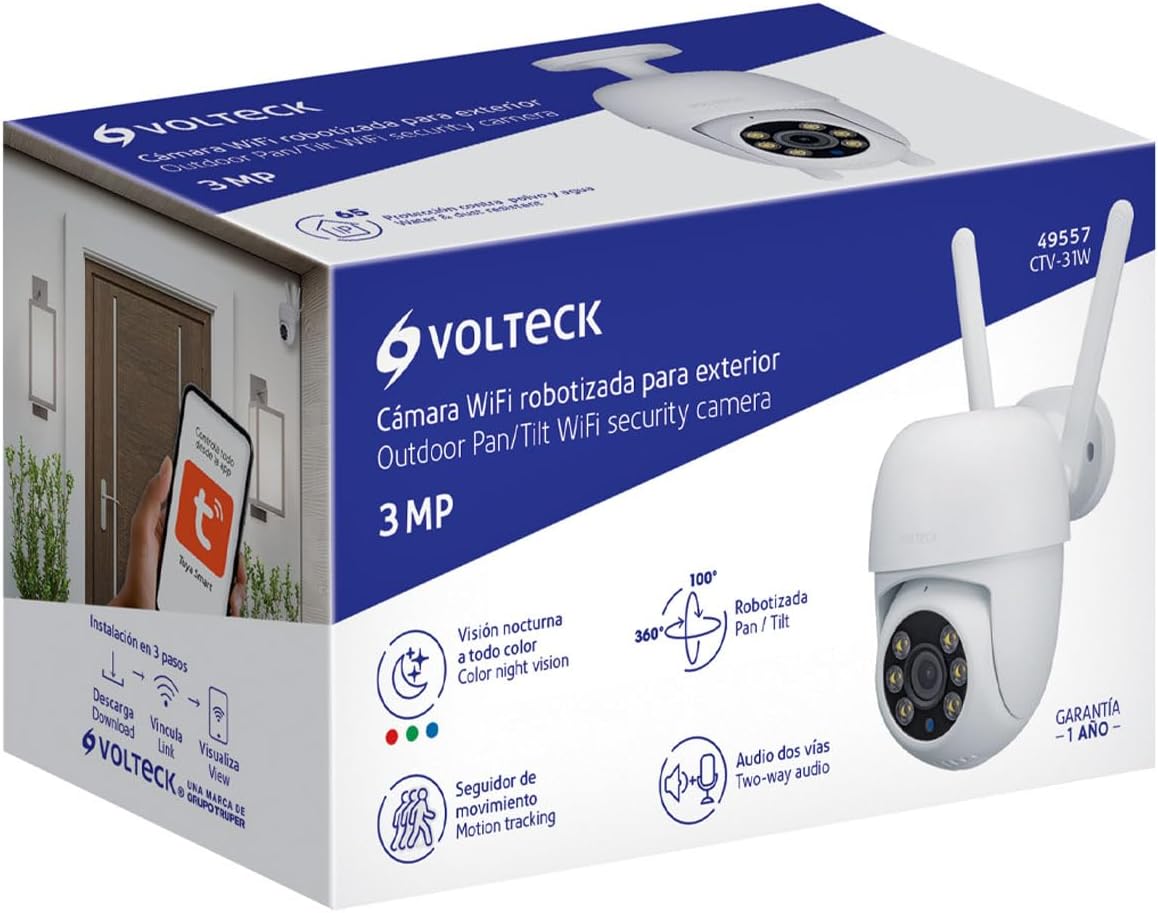
Image: An example of the Volteck CTV-31W camera mounted on an exterior wall, demonstrating a typical outdoor installation.
2. App Installation and Pairing
- Download the App: Search for "Tuya Smart" or "Smart Life" in your mobile device's app store (App Store for iOS, Google Play Store for Android) and download it.
- Register/Log In: Open the app and create a new account or log in if you already have one.
- Add Device:
- Tap the "+" icon or "Add Device" in the app.
- Select "Security & Video Surveillance" and then "Smart Camera (Wi-Fi)".
- Follow the on-screen instructions to connect the camera to your Wi-Fi network. This typically involves scanning a QR code displayed on your phone with the camera lens.
- Ensure your Wi-Fi network is 2.4 GHz, as 5 GHz networks are generally not supported by these devices.
- Device Ready: Once successfully paired, the camera will appear in your app's device list. You can now access its live feed and control its functions.

Image: Illustration showing a hand interacting with a mobile app interface, indicating control of the camera via the Tuya Smart app, available on App Store and Google Play.
Operating Instructions
Live View and Control
- Access Live Feed: Open the app and tap on your CTV-31W camera from the device list to view the live video stream.
- Pan and Tilt: Use the directional controls within the app to remotely rotate the camera horizontally (pan) and vertically (tilt) to adjust the viewing angle.
- Two-Way Audio: Tap the microphone icon in the app to speak through the camera's speaker, and listen to audio from the camera's microphone.
- Snapshot and Record: Use the dedicated buttons in the app to take still images or record video clips of the live feed.
Motion Detection and Alerts
- Enable Motion Detection: Navigate to the camera settings in the app and enable motion detection. You can often adjust sensitivity levels.
- Receive Notifications: When motion is detected, your mobile device will receive a push notification.
- Intelligent Tracking: If enabled, the camera will automatically follow moving objects within its range.
Video Storage
- MicroSD Card Recording: Insert a microSD card (up to 128 GB) into the camera's slot for continuous or event-triggered recording. The app allows you to manage recordings.
- Cloud Storage: Check the app for available cloud storage options, which may require a subscription.
Night Vision
- The camera automatically switches to night vision mode in low-light conditions, providing full-color images for enhanced visibility.
Maintenance
- Cleaning: Use a soft, dry cloth to clean the camera lens and body. Do not use harsh chemicals or abrasive cleaners.
- Firmware Updates: Regularly check the app for firmware updates to ensure optimal performance and security.
- Environmental Conditions: While designed for outdoor use, avoid direct exposure to extreme weather conditions if possible to prolong the product's lifespan.
Troubleshooting
| Problem | Possible Cause | Solution |
|---|---|---|
| Camera not powering on | Power adapter not connected or faulty. | Ensure the power adapter is securely plugged into the camera and a working power outlet. Check the adapter for damage. |
| Unable to connect to Wi-Fi | Incorrect Wi-Fi password; Camera too far from router; 5 GHz Wi-Fi network. | Verify Wi-Fi password. Move camera closer to the router. Ensure you are connecting to a 2.4 GHz Wi-Fi network. |
| Poor image quality | Dirty lens; Insufficient lighting; Network bandwidth issues. | Clean the camera lens with a soft cloth. Ensure adequate lighting or check night vision settings. Verify your internet connection speed. |
| Motion detection not working | Motion detection disabled; Sensitivity too low; Incorrect detection zone. | Enable motion detection in the app settings. Adjust sensitivity. Configure detection zones correctly. |
| Two-way audio not functioning | Microphone/speaker muted in app; Network issues. | Check app settings to ensure audio is enabled and not muted. Verify stable network connection. |
Technical Specifications
| Feature | Specification |
|---|---|
| Model Number | CTV-31W (Manufacturer Model: 49557) |
| Resolution | 3 MP (720p video capture resolution) |
| Camera Voltage | 12 V DC |
| Camera Current | 1 A |
| Adapter Voltage | 100 V AC - 240 V AC |
| Adapter Current | 200 mA - 150 mA |
| Adapter Frequency | 50 Hz / 60 Hz |
| Dimensions (Height x Diameter) | 21 cm x 10 cm (Product: 10.49 x 20.24 x 12.65 cm) |
| Weight | 480 g |
| Connectivity Technology | Wired (Power), Wi-Fi (Data) |
| Special Feature | Night Vision (Full-Color) |
| Usage Environment | Outdoor, Indoor |
| Mounting Type | Wall Mount |
| Color | White |
| Max. MicroSD Card Capacity | 128 GB |

Image: Diagram illustrating the dimensions of the Volteck CTV-31W camera, showing a height of 21 cm and a depth of 10 cm.
Warranty and Support
Your Volteck CTV-31W camera comes with a 1-year warranty from the date of purchase, covering manufacturing defects. Please retain your proof of purchase for warranty claims.
For technical support, troubleshooting assistance, or warranty inquiries, please contact Volteck customer service through their official website or the contact information provided with your product packaging.
Ask a question about this manual
Ask about setup, troubleshooting, compatibility, parts, safety, or missing instructions. Manuals+ will review the question and use this page’s manual context to help answer it.