
FUNMILY B0DHCJYGC3
FUNMILY Walking Pad Treadmill User Manual
Model: B0DHCJYGC3 | Brand: FUNMILY
1. Introduction
Thank you for choosing the FUNMILY Walking Pad Treadmill. This versatile 4-in-1 fitness machine is designed to integrate seamlessly into your home or office, offering options for walking, running, and incline training. This manual provides essential information for safe operation, proper setup, maintenance, and troubleshooting to ensure you get the most out of your new equipment.
2. Important Safety Information
Please read all instructions carefully before using the treadmill. Keep this manual for future reference.
- Always place the treadmill on a flat, stable surface.
- Ensure adequate clear space around the treadmill (at least 2 feet on sides and 6 feet behind).
- Do not allow children or pets near the treadmill while it is in operation.
- Always attach the safety key clip to your clothing before starting a workout.
- Do not step on or off the treadmill while the belt is moving.
- Wear appropriate athletic footwear.
- Maximum user weight capacity: 300 lbs. Do not exceed this limit.
- Unplug the treadmill from the power outlet when not in use or before cleaning/maintenance.
- If you experience dizziness, nausea, chest pain, or any other abnormal symptoms, stop your workout immediately and consult a physician.
3. Package Contents
Upon unpacking, please verify that all components are present and in good condition:
- Treadmill Base
- Motor Housing
- Treadmill Belt
- Remote Control
- Power Cord
- Safety Key
- User Manual
- Warranty Documentation

Figure 3.1: Included Components
4. Setup Guide
The FUNMILY Walking Pad Treadmill comes pre-assembled, requiring minimal setup before first use.
4.1 Initial Placement
Unpack the treadmill and place it on a firm, level surface. Ensure there is sufficient space around the unit for safe operation and movement.
4.2 Unfolding and Raising the Handrail (for Treadmill Mode)
- Carefully lift the handrail from its folded position until it locks into place.
- Secure the quick-release wrench to ensure the handrail is stable.
- Install the iPad holder onto the designated slot on the handrail.
- Attach the safety key to the console and clip the other end to your clothing.
4.3 Incline Adjustment
The treadmill features an 8% incline system for enhanced workouts. To adjust the incline:
- Locate the fixing screw at the base of the treadmill.
- Pull out the fixing screw.
- Raise the incline adjustment device to the desired position.
- Turn the middle footpad counterclockwise to secure the incline.

Figure 4.1: Treadmill Incline Feature
Video 4.1: Demonstrating Incline Adjustment and Setup
This video illustrates the process of adjusting the treadmill's incline and preparing it for use, including raising the handrail and attaching the safety key.
5. Operating Modes
The FUNMILY Walking Pad Treadmill offers four distinct operating modes to suit various fitness needs:
- Walking Pad Mode (Under-Desk): Ideal for light activity while working or relaxing. Speed range: 0.6-4 km/h (approx. 0.4-2.5 mph). In this mode, the handrail is folded down.
- Incline/Running/Handrail Mode: For more intense workouts, including incline walking or running. Speed range: 0.6-7.5 km/h (approx. 0.4-4.7 mph). The handrail must be raised and secured for this mode.
Control the treadmill using either the integrated touchscreen display or the remote control. The LED display shows real-time data including speed, distance, time, and calories burned.

Figure 5.1: Treadmill Operating Modes

Figure 5.2: Walking and Climbing Modes
6. Key Features
6.1 Powerful & Quiet Motor
Equipped with a 2.5HP low-noise silent motor, this treadmill offers a longer lifespan, quieter operation (below 40dB), and higher energy efficiency compared to traditional motors. Enjoy smooth and quiet workouts without disturbing others.
6.2 Advanced Running Belt & Shock Absorption
The 7-layer non-slip running belt provides a spacious 40" x 16" surface. Integrated silicone shock absorbers are designed to protect your knees and joints, enhancing running comfort and reducing impact.
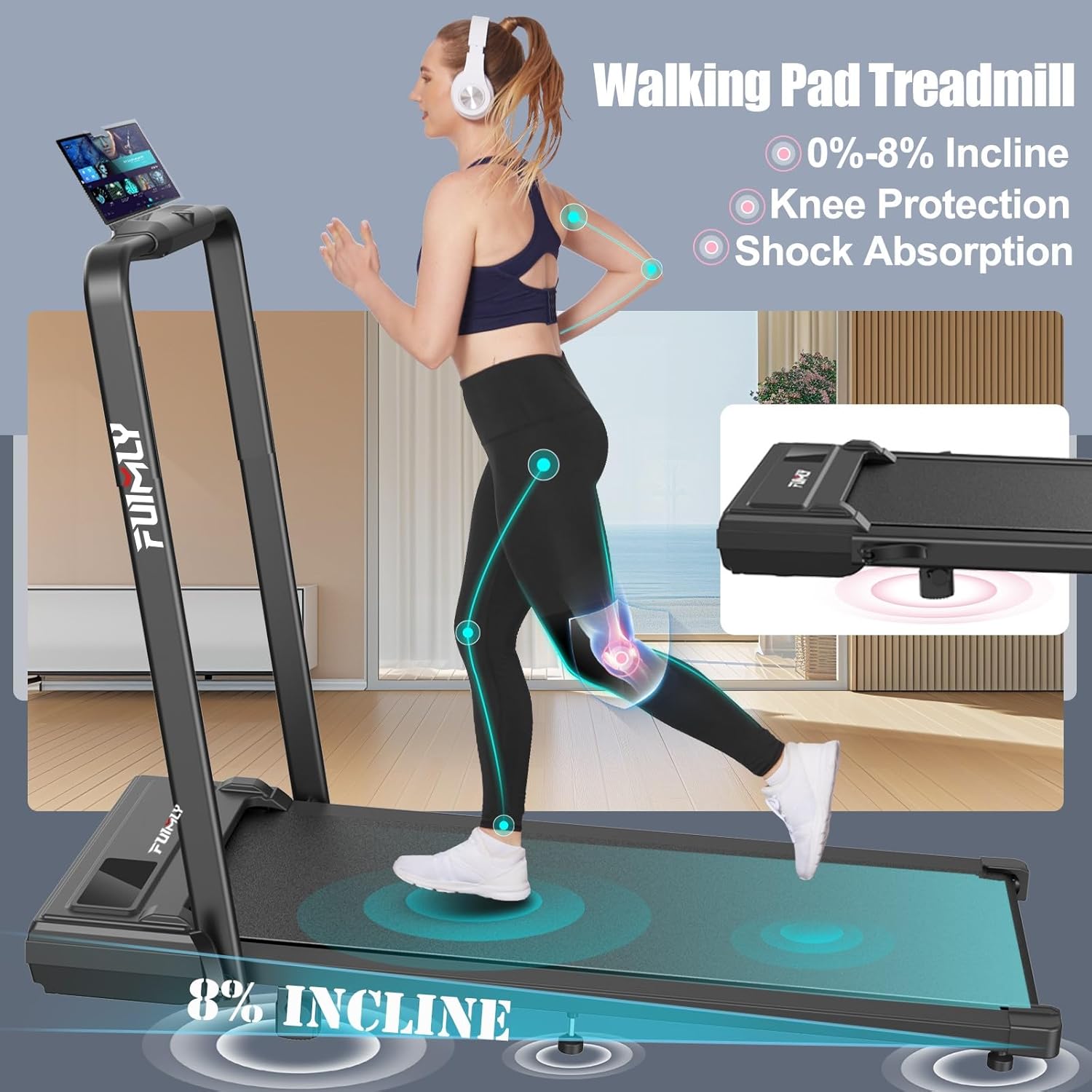
Figure 6.1: Knee Protection and Shock Absorption

Figure 6.2: Running Belt Dimensions and Features
6.3 Smart LED Display & Workout Programs
Monitor your speed, distance, time, and calories in real-time through the intuitive LED display. The treadmill also includes 12 engaging workout programs to keep you motivated and vary your routine.
6.4 Portability & Easy Storage
This treadmill is designed for convenience. It folds quickly to a compact 54"(D) x 27"(W) x 6"(H), allowing for easy storage under a bed or sofa. Weighing just 55 lbs (25kg) and equipped with front transport wheels, it is highly portable, making it perfect for homes, apartments, and offices.

Figure 6.3: Easy Folding and Storage
7. Maintenance
Regular maintenance ensures the longevity and optimal performance of your treadmill.
7.1 Cleaning
- Wipe down the treadmill after each use with a damp cloth to remove sweat and dust.
- Do not use abrasive cleaners or solvents, as they may damage the surface.
7.2 Lubrication
The running belt requires periodic lubrication to reduce friction and extend its lifespan. Refer to the included user manual for specific instructions on how often to lubricate and the correct procedure.
7.3 Belt Tension and Alignment
Over time, the running belt may become loose or misaligned. Consult the detailed user manual for instructions on how to check and adjust the belt tension and alignment. Proper tension and alignment are crucial for smooth operation and user safety.
8. Troubleshooting
If you encounter any issues with your FUNMILY Walking Pad Treadmill, please refer to the table below for common problems and solutions. If the problem persists, contact customer support.
| Problem | Possible Cause | Solution |
|---|---|---|
| Treadmill does not start | Power cord not plugged in; Safety key not in place; Power switch off. | Ensure power cord is securely plugged in; Place safety key correctly; Turn on power switch. |
| Running belt slips or hesitates | Belt too loose; Lack of lubrication. | Adjust belt tension (refer to manual); Lubricate the running belt. |
| Unusual noise during operation | Loose parts; Motor issue; Belt friction. | Check for loose screws and tighten; Lubricate belt; If noise persists, contact support. |
| Display not working | Loose connection; Power issue. | Check power connections; Ensure safety key is properly inserted. |
9. Product Specifications
| Feature | Detail |
|---|---|
| Brand | FUNMILY |
| Model | B0DHCJYGC3 |
| Color | Black |
| Product Dimensions (Unfolded) | 54"D x 27"W x 6"H |
| Folded Size | 54"D x 27"W x 6"H |
| Item Weight | 55 Pounds (approx. 25 kg) |
| Material | Alloy Steel |
| Maximum Speed | 7.5 Miles per Hour |
| Maximum Horsepower | 2.5 HP |
| Maximum Incline Percentage | 8% |
| Assembly Required | No (Pre-assembled) |
| Display Type | LED |
| Number of Programs | 12 |
| Running Belt Area | 40" x 16" |
| Maximum Weight Recommendation | 300 Pounds |
10. Warranty and Customer Support
FUNMILY offers a one-year replacement guarantee for the motor, frame, and any treadmill parts. For professional customer support, inquiries, or assistance with your product, please contact us directly through the seller's contact information on the platform where you purchased the treadmill or visit the official FUNMILY store: FUNMILY Store on Amazon.
Ask a question about this manual
Ask about setup, troubleshooting, compatibility, parts, safety, or missing instructions. Manuals+ will review the question and use this page’s manual context to help answer it.