1. Safety Information
Read all instructions carefully before using the appliance to prevent accidents and ensure proper operation. Keep this manual for future reference.
General Safety Precautions
- Ensure the washing machine is properly grounded.
- Do not allow children to play on or in the appliance.
- Keep flammable materials away from the appliance.
- Do not operate the machine with a damaged power cord or plug.
- Always unplug the appliance before cleaning or performing maintenance.
- Do not wash items that have been cleaned in, washed in, soaked in, or spotted with combustible or explosive substances.
2. Setup and Installation
Proper installation is crucial for the performance and longevity of your washing machine. Follow these steps carefully.
2.1 Unpacking
Remove all packaging materials, including the base packaging, foam, and tape. Ensure no packing materials remain inside the drum. Keep packaging materials out of reach of children.
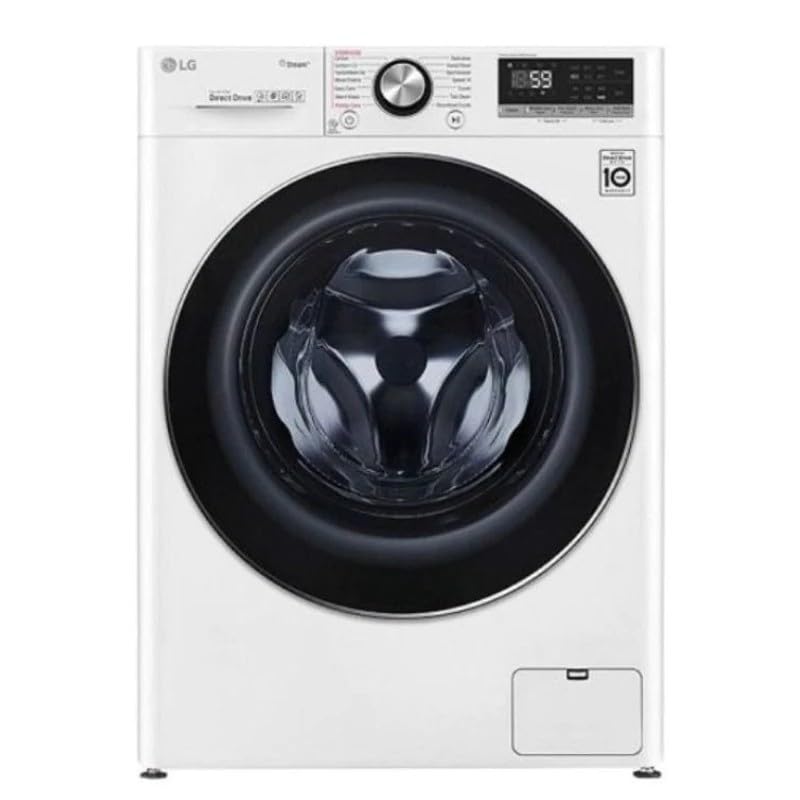
Image: Front view of the LG WFR1114WH washing machine. This image illustrates the general appearance of the appliance after unpacking.
2.2 Location Requirements
- Place the washing machine on a solid, level floor.
- Avoid direct sunlight or extreme temperatures.
- Ensure adequate space around the machine for ventilation and maintenance.
- The appliance dimensions are approximately 66 cm (Depth) x 66 cm (Width) x 66 cm (Height).
2.3 Leveling the Appliance
Use a spirit level to check if the machine is perfectly level. Adjust the leveling feet at the bottom of the machine by turning them clockwise or counter-clockwise until the machine is stable and level. An unlevel machine can cause excessive vibration and noise during operation.
2.4 Water Supply Connection
- Connect the inlet hoses to the hot and cold water taps. Ensure the rubber seals are correctly fitted to prevent leaks.
- Tighten the hose connections securely by hand, then use a wrench for an additional quarter turn. Do not overtighten.
- Open the water taps fully and check for any leaks.
2.5 Drain Hose Installation
- Position the drain hose correctly to prevent water backflow or siphoning.
- The drain hose can be placed over the edge of a sink or connected to a standpipe. Ensure the end of the hose is at a height between 60 cm and 100 cm from the floor.
- Secure the drain hose to prevent it from dislodging during the wash cycle.
2.6 Electrical Connection
Connect the power cord (included) to a properly grounded electrical outlet. The washing machine operates at 35 Watts. Do not use extension cords or adapters. Ensure the voltage and frequency match the specifications of the appliance.
3. Operating Instructions
This section guides you through the basic operation of your LG WFR1114WH washing machine.
3.1 Control Panel Overview
The washing machine features a touch control unit. The control panel typically includes a power button, program selector, start/pause button, and various option buttons for temperature, spin speed, and additional functions.
Note: Refer to the detailed diagram in the printed manual for specific button locations and functions.
3.2 Loading Laundry
- Open the front-load door.
- Load laundry loosely into the drum, ensuring not to overload. The maximum capacity is 11 kg.
- Close the door firmly until it clicks shut.
3.3 Adding Detergent and Additives
Pull out the detergent dispenser drawer. Add the appropriate amount of detergent to the main wash compartment. If using fabric softener or pre-wash detergent, add them to their respective compartments. Close the dispenser drawer gently.
3.4 Selecting a Wash Cycle
Turn the program selector or use the touch controls to choose a wash cycle. The machine offers standard cycles such as:
- Normal: For everyday cottons and mixed fabrics.
- Heavy Duty: For heavily soiled items and durable fabrics.
- Delicate: For fragile items requiring gentle care.
This model features 6 Motion Technology, which uses various drum movements to optimize washing for different fabric types, providing enhanced cleaning and fabric care.
3.5 Using Smart ThinQ (Smart Connectivity)
Your washing machine is equipped with Smart ThinQ technology, allowing for smart connectivity. This feature enables remote control, cycle downloads, and smart diagnosis via a compatible smartphone application. Refer to the Smart ThinQ app instructions for detailed setup and usage.
3.6 Starting a Wash Cycle
After selecting the desired cycle and options, press the Start/Pause button to begin the wash cycle. The machine will automatically fill with water and start the washing process.
3.7 Pausing or Canceling a Cycle
To pause a cycle, press the Start/Pause button. To cancel a cycle, press and hold the Power button for a few seconds until the machine turns off. You may then select a new cycle.
4. Maintenance and Cleaning
Regular maintenance ensures optimal performance and extends the lifespan of your washing machine.
4.1 Cleaning the Exterior
Wipe the exterior surfaces with a soft, damp cloth. Do not use abrasive cleaners, harsh chemicals, or solvents, as these can damage the finish. The machine features a stainless steel finish.
4.2 Cleaning the Drum
Periodically run a "Tub Clean" or "Drum Clean" cycle (if available on your model) using a washing machine cleaner or a small amount of bleach. This helps remove detergent residue and odors.
4.3 Cleaning the Detergent Dispenser
Remove the detergent dispenser drawer and rinse it under warm running water to remove any accumulated detergent or softener residue. Use a small brush if necessary. Dry thoroughly before reinserting.
4.4 Cleaning the Drain Filter
Locate the drain pump filter, usually at the bottom front of the machine. Place a shallow pan underneath to catch any water. Unscrew the filter cover and carefully remove any lint, coins, or foreign objects. Clean the filter under running water and reinsert it securely.
4.5 Water Inlet Filter Cleaning
If water supply issues occur, check the water inlet filters located at the connection point of the inlet hoses to the machine. Turn off the water supply, disconnect the hoses, and use pliers to pull out the mesh filters. Rinse them clean and reinsert.
5. Troubleshooting Guide
Before contacting service, review this section for solutions to common issues.
| Problem | Possible Cause | Solution |
|---|---|---|
| Machine does not start | Power cord unplugged; door not closed properly; power outage. | Check power connection; ensure door is latched; check household circuit breaker. |
| No water filling | Water taps closed; inlet hoses kinked; water pressure too low; inlet filters clogged. | Open water taps; straighten hoses; check water supply; clean inlet filters. |
| Excessive vibration/noise | Machine not level; shipping bolts not removed; unbalanced load. | Adjust leveling feet; ensure shipping bolts are removed (during installation); redistribute laundry evenly. |
| Water leaks | Hose connections loose; drain hose improperly installed; excessive detergent. | Tighten hose connections; check drain hose position; use correct amount of detergent. |
| Error code displayed | Specific malfunction detected by the machine's AI. | Refer to the full user manual for a list of error codes and their solutions, or use the Smart ThinQ app for smart diagnosis. |
If the problem persists after attempting these solutions, please contact customer support.
6. Product Specifications
Detailed technical specifications for the LG WFR1114WH Front Load Washing Machine.
| Brand | LG |
| Model Information | WFR1114WH |
| Product Dimensions (D x W x H) | 66 cm x 66 cm x 66 cm |
| Capacity | 11 Kilograms |
| Installation Type | Freestanding |
| Part Number | WFR1114WH |
| Special Features | Artificial Intelligence (AI), 6 Motion Technology, Smart ThinQ |
| Color | White |
| Control Unit Type | Touch |
| Standard Cycles | 3 (Normal, Heavy Duty, Delicate) |
| Access Location | Front Load |
| Electrical Power | 35 Watts |
| Material Type | Stainless Steel, Solid |
| Included Components | Power Cord |
| Batteries Required | No |
| Item Weight | 66 Grams |
| First Available Date | November 5, 2024 |
7. Warranty and Customer Support
For warranty information and customer support, please refer to the warranty card included with your product or visit the official LG website for your region.
Warranty Information
Your LG WFR1114WH washing machine is covered by a manufacturer's warranty. The terms and conditions of the warranty, including coverage period and what is covered, are detailed in the warranty documentation provided at the time of purchase. Please retain your proof of purchase for warranty claims.
Customer Support
If you encounter any issues that cannot be resolved using the troubleshooting guide, or if you require technical assistance, please contact LG customer support. Contact details can typically be found on the LG website or in your product documentation.
- Online Support: Visit the official LG website for FAQs, manuals, and online service requests.
- Telephone Support: Contact the LG customer service hotline for your region.
- Service Centers: Locate authorized LG service centers for repairs.