
Introduction
This manual provides detailed instructions for setting up, operating, and maintaining your BALDR WiFi Weather Station, Model 388+666WH. This device offers real-time indoor and outdoor temperature and humidity monitoring, weather forecasting, and smart home integration via the HomGar App.
Package Contents:
- BALDR WiFi Weather Station Main Unit
- Remote Sensor
- Power Adaptor
- Instruction Manual (this document)

Image: The BALDR WiFi Weather Station main unit, remote sensor, and a smartphone displaying the HomGar App interface.
Setup Instructions
1. Powering the Main Unit
- Connect the provided power adaptor to the main unit's power input port.
- Plug the power adaptor into a standard electrical outlet. The display will illuminate.
2. Installing Batteries in the Remote Sensor
- Open the battery compartment on the back of the remote sensor.
- Insert two AA batteries (not included), ensuring correct polarity (+/-).
- Close the battery compartment securely.
3. Connecting to Wi-Fi and HomGar App
The weather station connects to your home Wi-Fi network (2.4 GHz only) via the HomGar App for real-time data access and advanced features.
- Download the HomGar App from your smartphone's app store (iOS or Android).
- Create an account or log in to the HomGar App.
- Follow the in-app instructions to add a new device. Select the BALDR WiFi Weather Station.
- Ensure your smartphone is connected to a 2.4 GHz Wi-Fi network during the pairing process.
- Once connected, the weather station will automatically synchronize time and date.
4. Placement Methods
The main unit can be placed on a table using its integrated bracket or mounted on a wall using the designated hole.

Image: Illustrations showing the weather station placed on a table using its stand and mounted on a wall.
Operating Instructions
1. Display Overview
The 7.5-inch LCD screen provides a clear display of various weather data and time information.

Image: The weather station display highlighting different data points: Weather Forecast, Current Time, Calendar Display, Channel, Pressure Barometer, Indoor Temperature & Humidity, Local Temperature & Humidity.
2. Interpreting Weather Forecasts
The station provides real-time weather forecasts based on local data. Icons indicate conditions such as sunny, partly cloudy, cloudy, rainy, or snowy.

Image: Visual representation of weather forecast icons displayed on the weather station.
3. Monitoring with the HomGar App
The HomGar App allows you to monitor indoor and outdoor conditions remotely, view historical data, and manage multiple sensors.
- Open the HomGar App on your smartphone.
- View real-time temperature, humidity, and other sensor data.
- The app supports pairing up to 16 sub-devices (sold separately), including additional temperature/humidity sensors, pool sensors, soil moisture sensors, rain gauges, CO2 monitors, and water flow monitors.

Image: An illustration of the HomGar App interface demonstrating connectivity with various smart home sensors.
4. Customizable Backlight
The display features 5 adjustable backlight levels and can be programmed for a dimmer setting at night for optimal viewing comfort.

Image: Examples of the weather station display with varying backlight intensities.
Maintenance
1. Battery Replacement (Remote Sensor)
When the battery indicator on the main unit or app shows low power for the remote sensor, replace the two AA batteries. Ensure correct polarity.
2. Cleaning
Wipe the main unit and remote sensor with a soft, dry cloth. Do not use abrasive cleaners or immerse the devices in water.
3. Sensor Placement
For accurate outdoor readings, place the remote sensor in a shaded area, protected from direct sunlight and precipitation. Ensure it is within the wireless range of the main unit.
Troubleshooting
| Problem | Possible Solution |
|---|---|
| Remote sensor loses connection. | Check sensor batteries. Ensure sensor is within range of the main unit and free from obstructions. Re-pair the sensor via the HomGar App if necessary. |
| HomGar App not opening or syncing data. | Ensure your smartphone has a stable internet connection. Check if the app is updated to the latest version. Restart the app or your phone. Verify the weather station is connected to your 2.4 GHz Wi-Fi network. |
| Inaccurate temperature/humidity readings. | Ensure the remote sensor is not in direct sunlight or near heat sources. Allow time for readings to stabilize after initial setup or battery replacement. Compare with other reliable thermometers if available. |
| Display is dim or unreadable. | Adjust the backlight settings. Ensure the main unit is properly powered by the adaptor. Check for any physical obstructions or glare on the screen. |
Specifications
| Feature | Detail |
|---|---|
| Product Dimensions (Main Unit) | 1"D x 8"W x 5"H (approx. 2.54cm D x 20.32cm W x 12.7cm H) |
| Item Model Number | 388+666WH |
| Remote Sensor Batteries | 2 AA batteries (not included) |
| Power Source (Main Unit) | Corded Electric (Power Adaptor included) |
| Connectivity Technology | 2.4 GHz Wi-Fi |
| Special Features | App-Controlled, Accurate Weather Data, Indoor/Outdoor Temperature & Humidity, Supports up to 16 Sub-Devices, Vivid Display with Wide Angle Viewing, Weather Forecast |
| Recommended Uses | Garden, Home, Office |
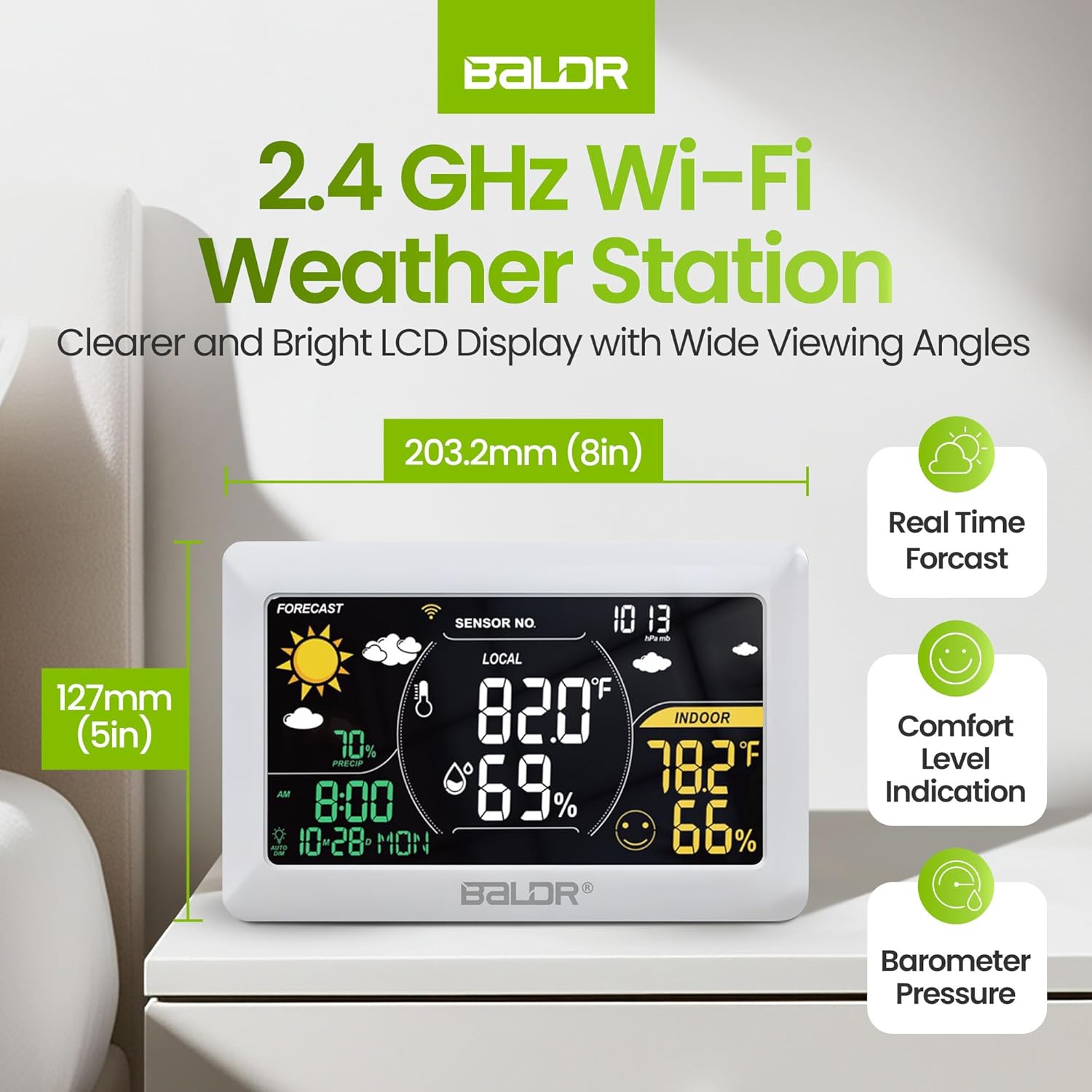
Image: The weather station main unit with its approximate dimensions (8 inches wide, 5 inches high) and key features like Real Time Forecast, Comfort Level Indication, and Barometer Pressure.
Warranty and Support
BALDR products are designed for reliability and performance. For specific warranty details, please refer to the warranty card included with your product or visit the official BALDR website. If you encounter any issues or require technical assistance, please contact BALDR customer support through the HomGar App or the contact information provided on the BALDR website.


