
INIU A12-E1
INIU 30W USB C Charger Block User Manual
Model: A12-E1
Introduction
Thank you for choosing the INIU 30W USB C Charger Block. This compact and powerful charger is designed to provide efficient and safe charging for a wide range of devices, including smartphones, tablets, and laptops. Featuring both USB-C and USB-A ports, GaN technology, and a foldable plug, it's an ideal solution for both home and travel use. Please read this manual carefully to ensure proper use and maintenance of your charger.

Image: The INIU 30W USB C Charger Block, highlighting its compact design and included USB-C cable, ready for fast charging.
What's in the Box
Your package should contain the following items:
- 2 x INIU 30W Wall Charger
- 2 x 60W Fast Charging USB-C Cable
- 1 x User Manual (this document)
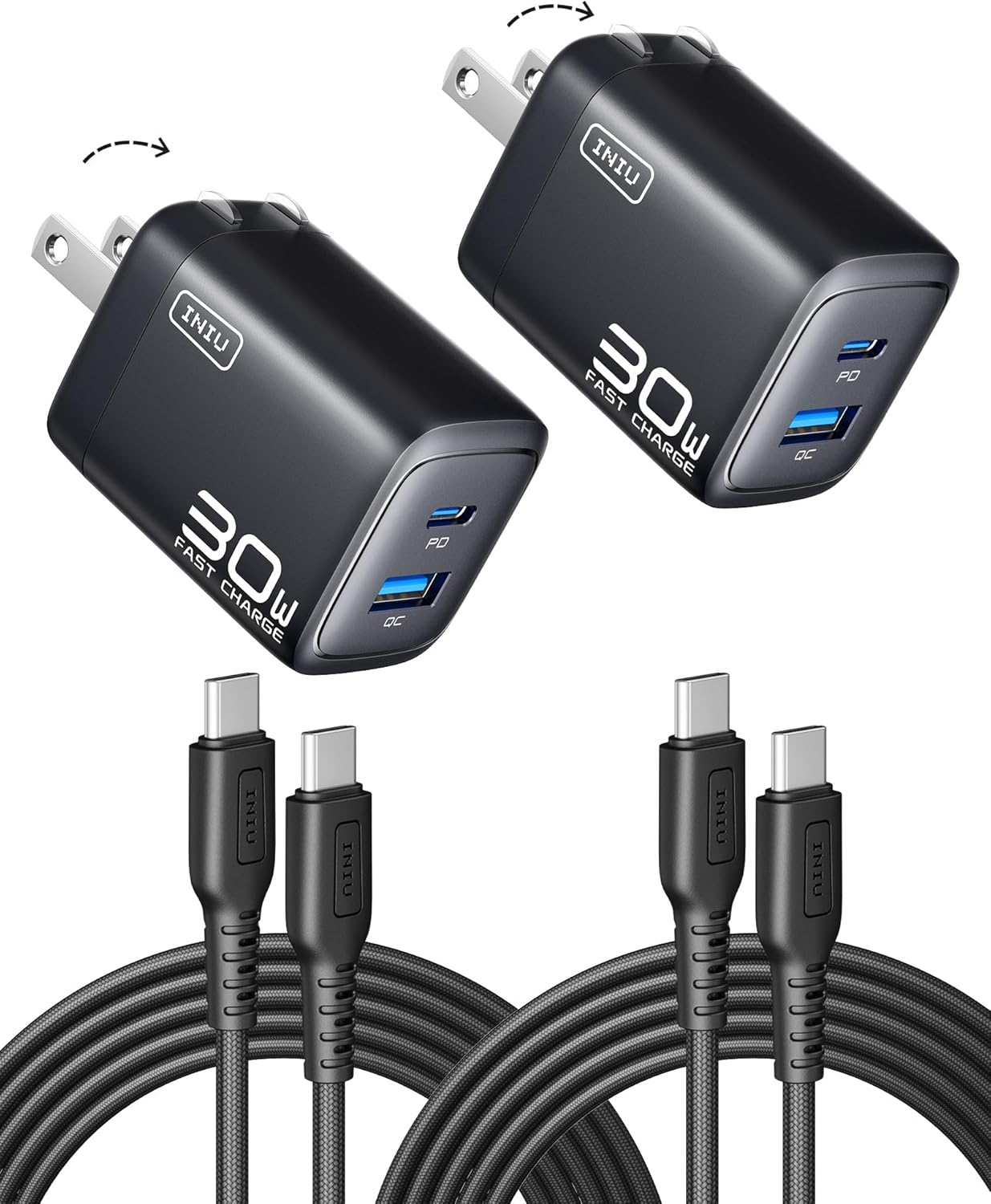
Image: A visual representation of the package contents, including two INIU 30W charger blocks with foldable plugs and two USB-C to USB-C charging cables.
Product Features
30W PD Fast Charging
Experience rapid charging speeds. The charger can power up compatible devices like the new iPhone 16 series to 71% in just 30 minutes. It also supports MacBook Air charging speeds, significantly reducing downtime.

Image: An INIU 30W charger connected to an iPhone, illustrating its capability to fast charge the device to 71% in 30 minutes, compared to a 20W charger.
Dual Device Charging
Equipped with both a USB-C port and a USB-A port, this charger allows you to charge two devices simultaneously from a single wall outlet. This is ideal for users with multiple devices or when power outlets are limited.

Image: The INIU 30W charger plugged into a wall outlet, with both its USB-C and USB-A ports actively charging two separate devices, demonstrating its dual charging capability.
Ultra-Compact Design with Foldable Plug
The charger is designed to be 30% smaller than typical 30W chargers, making it incredibly portable. Its foldable plug further enhances portability, allowing it to fit easily into any pocket or bag, making it your perfect travel companion.

Image: A size comparison showing the INIU 30W charger, which is significantly smaller than a typical 30W charger, emphasizing its ultra-compact design and foldable plug.
GaN Technology for Enhanced Safety
Utilizing advanced Gallium Nitride (GaN) technology, the charger offers superior power efficiency and heat dissipation. This ensures safe charging for all your devices by preventing overcharge, excessive heat, and leakage risks, prolonging your device's battery life.

Image: A transparent view of the INIU charger highlighting the integrated GaN chip, illustrating the advanced technology responsible for safe and efficient power delivery.
Wider Compatibility
The charger is compatible with a broad range of devices, including various iPhone models (16, 15, 14, 13, 12, 11, SE, XS, XR, X, 8 series), Samsung Galaxy phones (S25, S24, S23, S22, S21, S20, S10, S9, S8 series, Note series), Google Pixel phones, iPads, Apple Watch, AirPods, and even the Nintendo Switch. It supports both USB-A and USB-C cables for versatile connectivity.

Image: A detailed compatibility chart demonstrating the INIU 30W charger's ability to charge a wide array of devices, including Apple products, Android phones, and small electronics, via its dual ports.
Setup Guide
- Unfold the Plug: Gently pull out the foldable prongs from the charger body until they lock into place.
- Connect the Cable: Insert one end of your USB-C or USB-A charging cable into the corresponding port on the INIU charger.
- Connect to Device: Plug the other end of the charging cable into your electronic device (e.g., smartphone, tablet, laptop).
- Plug into Wall Outlet: Insert the charger's prongs firmly into a standard wall power outlet (100-240V).
- Begin Charging: Your device should now begin charging. The charger is designed for immediate use upon connection.
Image: A detailed view of the INIU charger, illustrating the foldable plug mechanism, which can be extended for use and retracted for portability.
Operating Instructions
The INIU 30W USB C Charger Block is designed for simple and efficient operation. Follow these guidelines for optimal performance:
- Single Device Charging: For fastest charging, connect a single device to either the USB-C (PD) port for Power Delivery compatible devices or the USB-A (QC) port for Quick Charge compatible devices. The charger will automatically detect and deliver the optimal charging current.
- Dual Device Charging: To charge two devices simultaneously, connect one device to the USB-C port and another to the USB-A port. The charger will intelligently distribute the 30W total output power between the two ports. Note that when both ports are in use, the maximum output for each port may be adjusted to ensure stable and safe charging. For example, the USB-C port may deliver up to 15W and the USB-A port up to 18W, with a combined maximum of 30W.
- Optimal Cable Usage: Always use high-quality charging cables that are compatible with your device and support fast charging protocols (e.g., PD, QC) to achieve the best charging speeds. The included 60W USB-C cables are recommended for USB-C devices.
- Charging Indicator: The charger does not have a specific charging indicator light. Charging status is typically displayed on your connected device's screen.

Image: A visual guide detailing the maximum power output for the USB-C (PD) and USB-A (QC) ports when used individually (30W Max for USB-C, 18W Max for USB-A) and when used simultaneously (15W Max for USB-C, 18W Max for USB-A, combined 30W Max).

Image: The INIU charger in use, plugged into a wall socket, demonstrating its compact form factor and ease of integration into daily routines, such as charging a phone while getting ready.
Maintenance
- Cleaning: Disconnect the charger from the power outlet and all devices before cleaning. Use a soft, dry cloth to wipe the surface. Do not use liquid cleaners or aerosols.
- Storage: When not in use, retract the foldable prongs and store the charger in a cool, dry place away from direct sunlight and extreme temperatures.
- Handling: Avoid dropping the charger or subjecting it to strong impacts. Do not attempt to disassemble or modify the charger, as this will void the warranty and could lead to safety hazards.
- Cable Care: Handle charging cables by the plug, not the cord, to prevent damage. Avoid bending or crimping cables excessively.
Troubleshooting
| Problem | Possible Cause | Solution |
|---|---|---|
| Charger not charging device. |
|
|
| Slow charging speed. |
|
|
| Charger feels warm during use. |
|
|
| One port not charging when both are connected. |
|
|
Specifications
| Model Number | A12-E1 |
| Input Voltage | 100-240V ~ 50/60Hz |
| Connectivity Technologies | Output: USB-C * 1 (PD) and USB-A * 1 (QC) |
| Max Output Power | 30W (Total) |
| Special Features | 30W PD Fast Charging, Lightweight Design, Multi Device Charging, USB-C Braided Cable, GaN 3 Technology, Foldable Plug |
| Form Factor | Compact Wall Charger |
| Colour | Black |
| Item Weight | 260 g (for 2-pack) |
| Parcel Dimensions | 14.8 x 14.3 x 3.9 cm |
| Compatible Devices | For iPhone: iPhone 16, 16 Plus, 16 Pro, 16 Pro Max, iPhone 15, 15 Plus, 15 Pro, 15 Pro Max, iPhone 14, 14 Plus, 14 Pro, 14 Pro Max, iPhone 13 series, iPhone 12 series, iPhone 11 series, iPhone SE (2nd gen), iPhone XS, XS Max, XR, X, 8, 8 Plus. For Samsung: Galaxy S24 Ultra, S24, S23 Ultra, S23+, S22 series, S21 series, S20 Ultra, S10, S10 Plus, S10e, S9, S9 Plus, S8, S8 Plus; Galaxy Note 20, Note10, Note 9, Note 8. For Google: Pixel 6, 6 Pro, 5, 4A, 3a, 3XL, 3, 2 XL, 2. For iPad: iPad mini (6th gen), iPad Pro 12.9-inch (1st-5th gen), iPad Pro 11-inch (1st-3rd gen), iPad Pro 10.5-inch, iPad Air (3rd & 4th gen), iPad (7th, 8th & 9th gen), iPad mini (5th gen). For Watch Series: Watch Series 7, 6, SE, 5, 4, 3, 2, 1. For AirPods: AirPods Max, AirPods Pro, AirPods (3rd gen), AirPods with Wireless Charging Case (2nd gen), AirPods (2nd gen), AirPods (1st gen). Others: DJI Mini 3 Pro, Nintendo Switch, and more. |
Warranty and Support
INIU stands behind the quality of its products. Your INIU 30W USB C Charger Block comes with:
- Industry-Leading 3-Year INIU Care: This warranty covers manufacturing defects and ensures your product performs as expected for three years from the date of purchase.
- Lifetime Technical Support: For any technical questions or assistance with your product, INIU provides lifetime technical support.
For warranty claims or technical support, please visit the official INIU website or contact their customer service through the contact information provided on their packaging or website. Please retain your proof of purchase for warranty validation.

Image: A visual representation of the INIU 3-Year Care warranty, symbolized by a shield icon, assuring product reliability and customer support.
Related documentsA12-E1


Ask a question about this manual
Ask about setup, troubleshooting, compatibility, parts, safety, or missing instructions. Manuals+ will review the question and use this page’s manual context to help answer it.