1. Introduction
This manual provides detailed instructions for the installation, operation, and maintenance of your KETOTEK KTF0176B Wireless Smart Thermostat. This thermostat is designed for water underfloor heating systems and offers smart control features, including compatibility with Alexa and the Smart Life App. Please read this manual thoroughly before installation and use to ensure proper function and safety.

Image 1.1: KETOTEK KTF0176B Smart Thermostat for Water Underfloor Heating. This image shows the thermostat unit alongside a diagram of underfloor heating pipes, illustrating its intended application.
2. Product Overview
The KETOTEK KTF0176B is a WLAN-compatible thermostat for water underfloor heating systems. It allows for automatic control of your heating via applications, voice commands, or based on scheduled time periods and scenarios. A 2.4 GHz wireless local area network is required for smart features.
2.1 Key Features
- Smart Control: Compatible with Alexa and Smart Life App for remote and voice control.
- High Precision: Integrated NTC temperature sensors for accurate indoor temperature regulation. Display precision: 0.5℃. Temperature setting range: 1℃~70℃.
- Programmable Modes: Manual, Programming (5+2, 6+1, 7 days with 6 periods), and Holiday modes.
- Advanced Functions: Temperature calibration (-9.9°C to 9.9°C), Power-Off memory, Child Safety Lock, Window function, Adjustable Sleep backlight, Factory reset option.
2.2 Package Contents
- 1x KETOTEK KTF0176B Water Underfloor Heating Thermostat (flush-mounted, max. 3A current, AC 90~240V 50/60Hz)
- 1x User Manual
- 2x Mounting Screws

Image 2.1: Front view of the KETOTEK KTF0176B Smart Thermostat. This image displays the thermostat's digital screen and rotary knob, along with a smartphone showing the companion app.

Image 2.2: Detailed view of the KTF0176B thermostat display and controls. This image highlights various indicators on the screen such as setting temperature, week, lock, clock, WiFi status, window function, cooling mode, heating mode, manual mode, program mode, and holiday mode. It also specifies power supply (90-240Vac 50/60Hz), temperature adjustment range (5~35℃), limit temperature range (1~70℃), and display accuracy (0.5℃).
3. Installation
Important: Installation should be performed by a qualified electrician to ensure safety and compliance with local electrical codes. Always turn off the main power supply before beginning installation.
3.1 Mounting
The thermostat is designed for flush mounting in a standard 86mm or European 60mm pattress box.
3.2 Wiring Diagram
Refer to the wiring diagrams below for connecting the thermostat to your water underfloor heating system. Ensure all connections are secure.
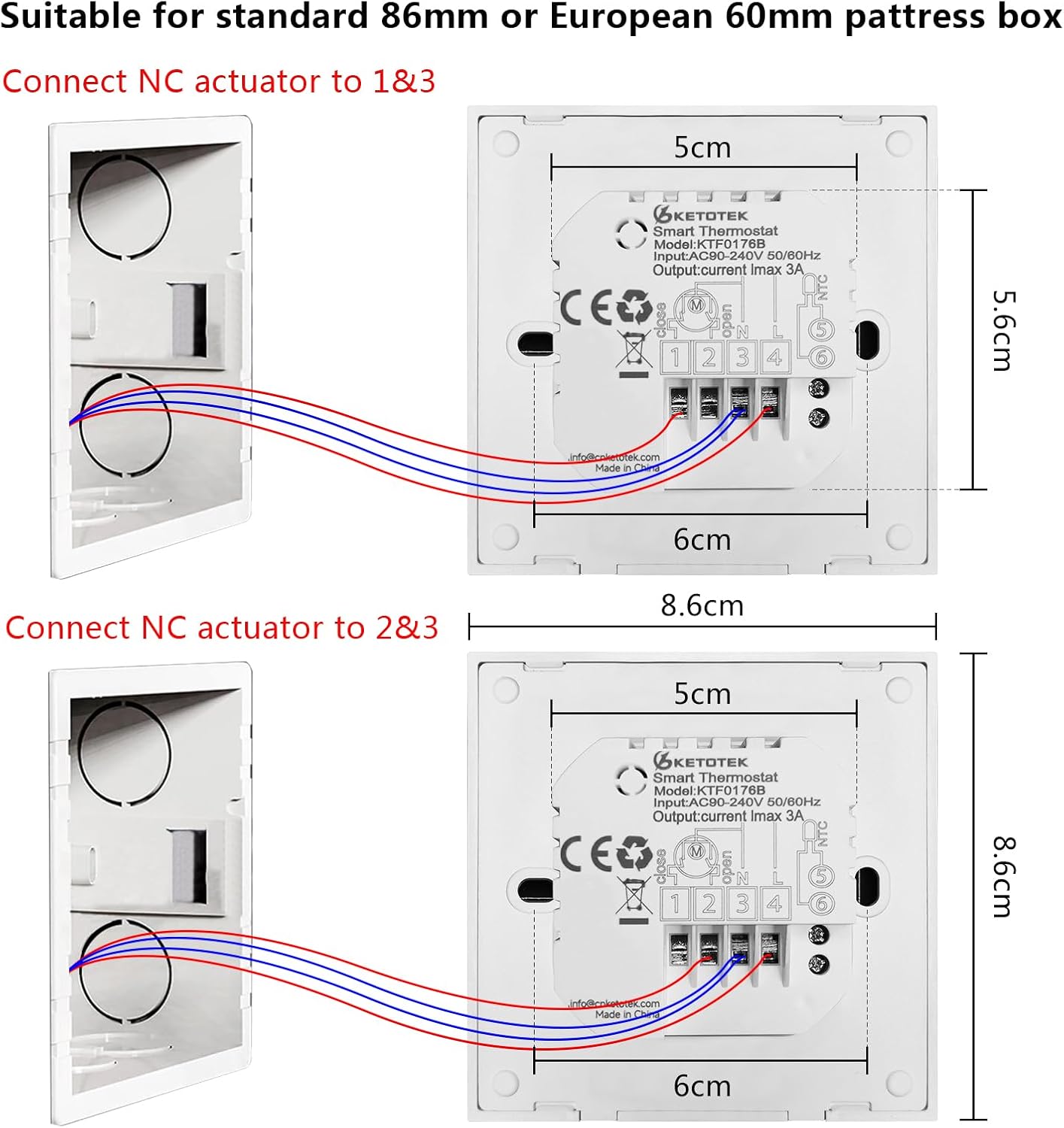
Image 3.1: Wiring diagram for the KTF0176B thermostat. This image illustrates how to connect the thermostat to an NC (Normally Closed) actuator, showing connections to terminals 1, 2, 3, and 4. It also provides dimensions for mounting (8.6cm x 8.6cm).
- Connect the NC actuator to terminals 1 and 3.
- Alternatively, connect the NC actuator to terminals 2 and 3.
- The thermostat supports a maximum current of 3A and operates on AC 90~240V 50/60Hz.
Note for Boiler Systems: Some boiler systems may require a 240V return to activate. In such cases, a link may need to be fitted between the incoming live and the 'dry contact' pin 5, with the return to the boiler then connected to pin 6. Consult a professional if unsure.
4. Operating Instructions
4.1 Power On and Initial Setup
After successful installation and power restoration, the thermostat display will illuminate. You can then proceed with initial settings.
4.2 Control Modes
The thermostat offers three main operating modes:
- Manual Mode: Set your desired temperature directly. The thermostat will maintain this temperature until changed.
- Programming Mode: Create a weekly heating schedule with different temperature settings for various times of the day.
- Holiday Mode: Set a constant temperature for a specified duration, ideal for when you are away. The thermostat will maintain this temperature until the holiday period ends.

Image 4.1: Screenshot of the thermostat app interface, illustrating the selection options for Manual, Program, and Holiday modes.
4.3 Programming Schedule
In Programming Mode, you can set up to 6 time periods per day with individual temperature settings. The thermostat supports flexible weekly scheduling options:
- 5+2 Days: Weekdays (Monday-Friday) with one schedule, and Weekends (Saturday-Sunday) with another.
- 6+1 Days: Monday-Saturday with one schedule, and Sunday with another.
- 7 Days: A unique schedule for each day of the week.

Image 4.2: Example of a programmable thermostat schedule. This image shows a weekly cycle with 6 time slots, detailing suggested temperatures for 'Wake up', 'Out door', 'Back home', and 'Sleep' periods, along with the 5+2, 6+1, and 7-day programming options.
4.4 Smart Life App and Voice Control
The KTF0176B thermostat can be controlled remotely via the Smart Life App (or Tuya App) and integrated with voice assistants like Amazon Alexa.
- Download the App: Search for "Smart Life" or "Tuya Smart" in your smartphone's app store.
- Register/Log In: Create an account or log in to your existing one.
- Add Device: Follow the in-app instructions to add your KTF0176B thermostat. Ensure your phone and thermostat are connected to a 2.4 GHz Wi-Fi network.
- Voice Control: Once connected to the app, enable the Smart Life/Tuya skill in your Alexa app to link your thermostat for voice commands.
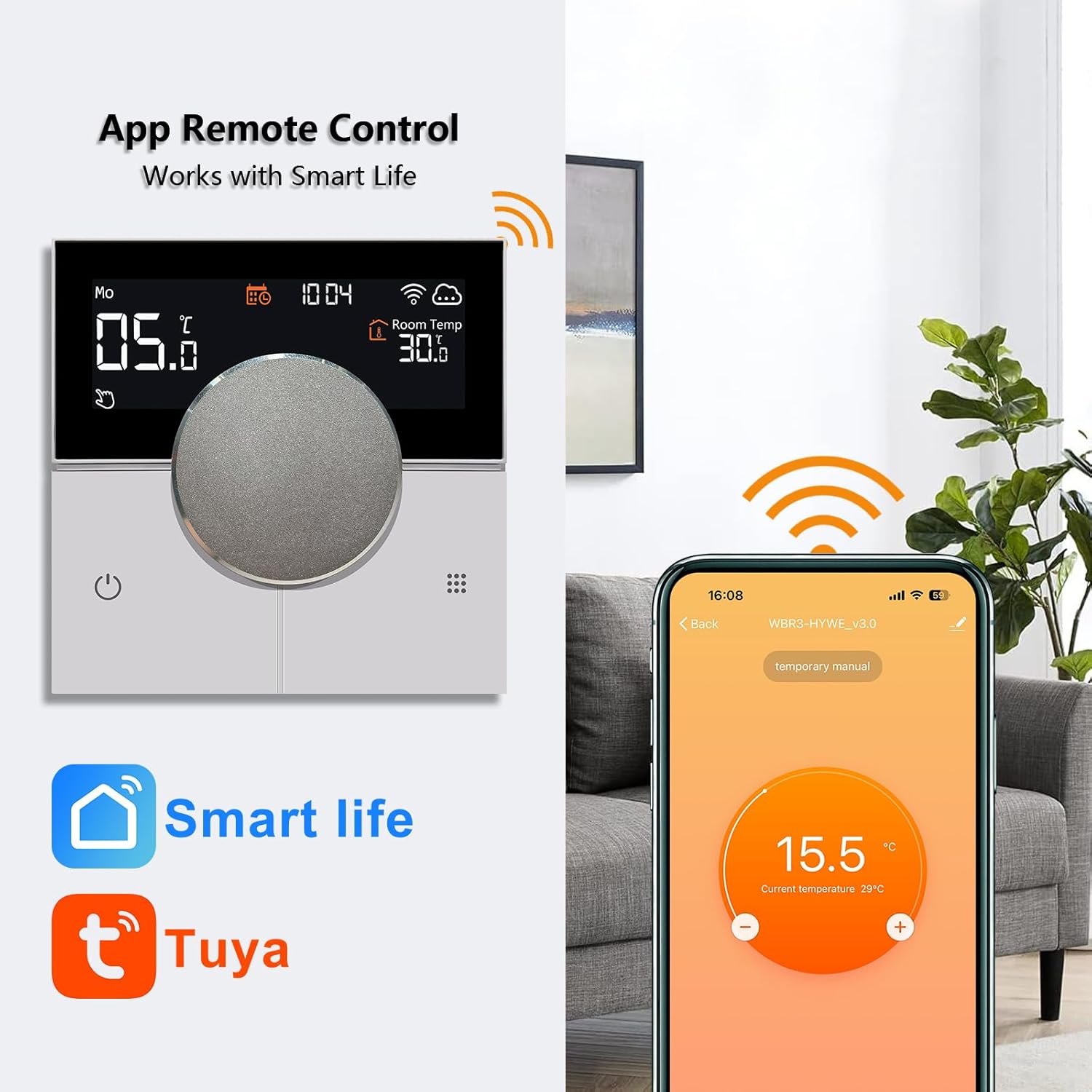
Image 4.3: The KTF0176B thermostat demonstrating app remote control functionality. This image shows the thermostat display next to a smartphone running the Smart Life app, with logos for Smart Life and Tuya.

Image 4.4: The KTF0176B thermostat integrated with Alexa. This image shows the thermostat on a wall with various Amazon Echo devices, indicating compatibility with Alexa voice control.

Image 4.5: The Smart Life app displaying the "Share Device" feature. This image illustrates how multiple family members can control the thermostat via their smartphones.
5. Advanced Functions
5.1 Temperature Calibration
If you find the displayed temperature does not match an external reference, you can calibrate the thermostat. The differential calibration range is -9.9°C to 9.9°C.
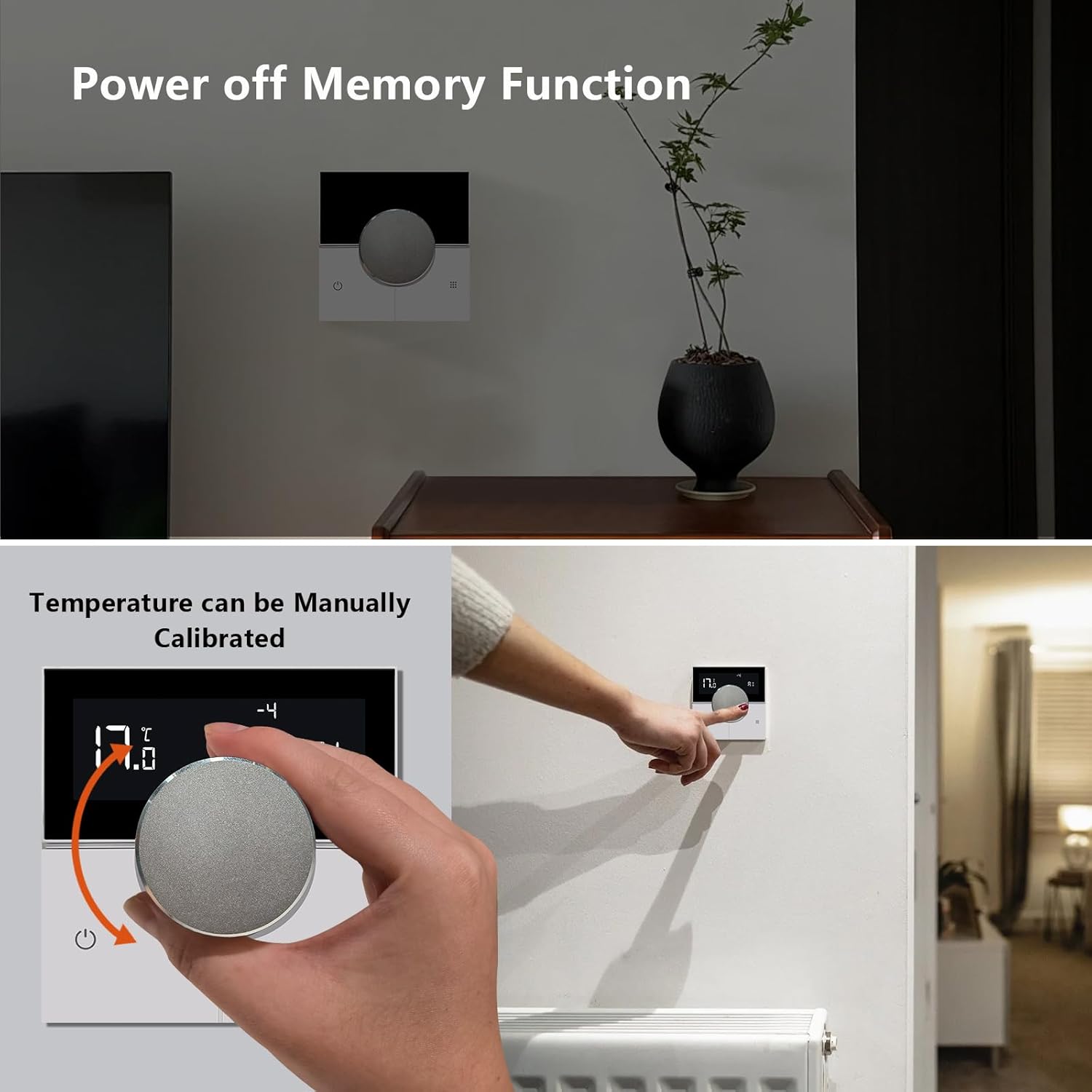
Image 5.1: Illustration of manual temperature calibration. This image shows a hand adjusting the thermostat's rotary knob to calibrate the temperature, with the display showing a calibration offset.
5.2 Power-Off Memory Function
The thermostat retains its settings even after a power outage, ensuring your programmed schedule and preferences are not lost.
Image 5.2: The thermostat demonstrating the power-off memory function. This image shows the thermostat mounted on a wall, implying that its settings are preserved even if power is interrupted.
5.3 Child Safety Lock
Activate the child lock feature to prevent unauthorized changes to the thermostat settings.

Image 5.3: Illustration of the child lock setting. This image shows a child reaching for the thermostat, with a "no entry" symbol over the thermostat and a lock icon, indicating the child safety feature.
5.4 Window Function
The window function detects open windows and temporarily pauses heating to save energy.
5.5 Adjustable Backlight
Adjust the brightness of the thermostat's backlight, including a sleep backlight setting, for comfortable viewing in various lighting conditions.

Image 5.4: The thermostat demonstrating adjustable backlight. This image shows the thermostat display with varying brightness levels, including a dim setting for sleep.
5.6 Temperature History Function
The thermostat can record and display temperature history, allowing you to monitor heating performance over time. This feature is typically accessible via the Smart Life app.
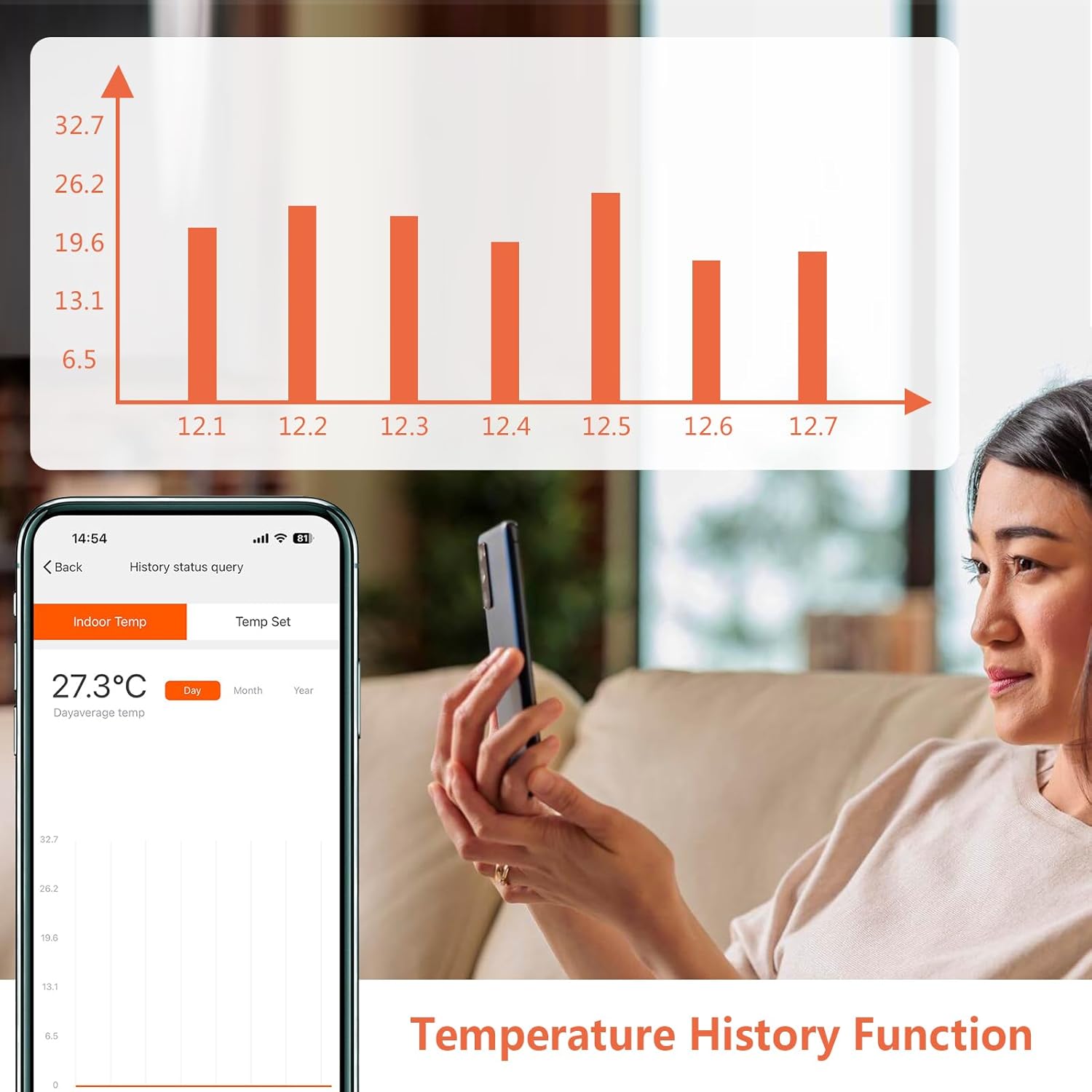
Image 5.5: Screenshot of the thermostat app displaying a temperature history graph. This image shows a bar chart representing temperature data over several days, accessible through the app.
6. Maintenance
The KETOTEK KTF0176B thermostat requires minimal maintenance.
- Cleaning: Wipe the display and casing with a soft, dry cloth. Do not use abrasive cleaners or solvents.
- Software Updates: Ensure your Smart Life/Tuya app is up to date to receive the latest features and performance improvements for your thermostat.
7. Troubleshooting
If you encounter issues with your KETOTEK KTF0176B thermostat, consider the following:
- No Power: Check the main power supply and wiring connections. Ensure the circuit breaker is not tripped.
- No Heating: Verify the thermostat is in heating mode and the set temperature is above the current room temperature. Check the wiring to the heating system.
- Wi-Fi Connection Issues: Ensure your Wi-Fi router is operating on a 2.4 GHz frequency. Restart your router and the thermostat. Re-attempt the pairing process in the Smart Life app.
- Inaccurate Temperature Reading: Use the temperature calibration function as described in Section 5.1.
- Thermostat Unresponsive: Check if the child lock is activated. If issues persist, consider performing a factory reset (refer to the full product manual for specific steps).
For further assistance, please contact KETOTEK customer support.
8. Specifications
| Brand | KETOTEK |
| Model Number | KTF0176B |
| Color | White |
| Dimensions (L x W x H) | 1.7 x 8.6 x 1.7 cm |
| Weight | 258 grams |
| Voltage | AC 90~240V 50/60Hz |
| Max Current | 3A |
| Temperature Display Accuracy | 0.5℃ |
| Temperature Setting Range | 1℃~70℃ |
| Connectivity Technology | Wi-Fi (2.4 GHz) |
| Controller Type | Android (via Smart Life/Tuya App) |
| Special Features | App and Voice Control, Holiday Mode, Window Function, Power-Off Memory, Child Lock, Adjustable Backlight |
9. Warranty and Support
Specific warranty information for the KETOTEK KTF0176B thermostat is not provided in this manual. Please refer to the product packaging or the retailer's website for warranty details.
For technical support, product inquiries, or warranty claims, please contact KETOTEK customer service through their official website or the contact information provided with your purchase.


