
1. Product Overview
The Enzemit GS05 Smart Glasses combine stylish eyewear with advanced audio technology, offering a unique open-ear listening experience. Featuring magnetic interchangeable lenses, you can easily switch between anti-blue light lenses for screen use and UV400 polarized lenses for outdoor activities. These glasses are designed for comfort, safety, and convenience, allowing you to listen to music, make calls, and access voice assistants while remaining aware of your surroundings.

Figure 1.1: Enzemit GS05 Smart Glasses with magnetic clip-on polarized lenses attached.
Key Features:
- Magnetic Lens Design: Easily switch between anti-blue light and UV400 polarized lenses.
- Open-Ear Sound Experience: Listen to audio while staying aware of your environment.
- Hands-Free Calling: Built-in microphone for clear calls with noise cancellation.
- 100% UV400 Protection: Polarized lenses block harmful UVA, UVB, and some blue light.
- Blue Light Blocking Technology: Protects eyes during computer use and gaming.
- Long Battery Life: Up to 4-6 hours of continuous playback.
- Bluetooth 5.0 Connectivity: Stable and easy pairing with devices up to 30 feet away.
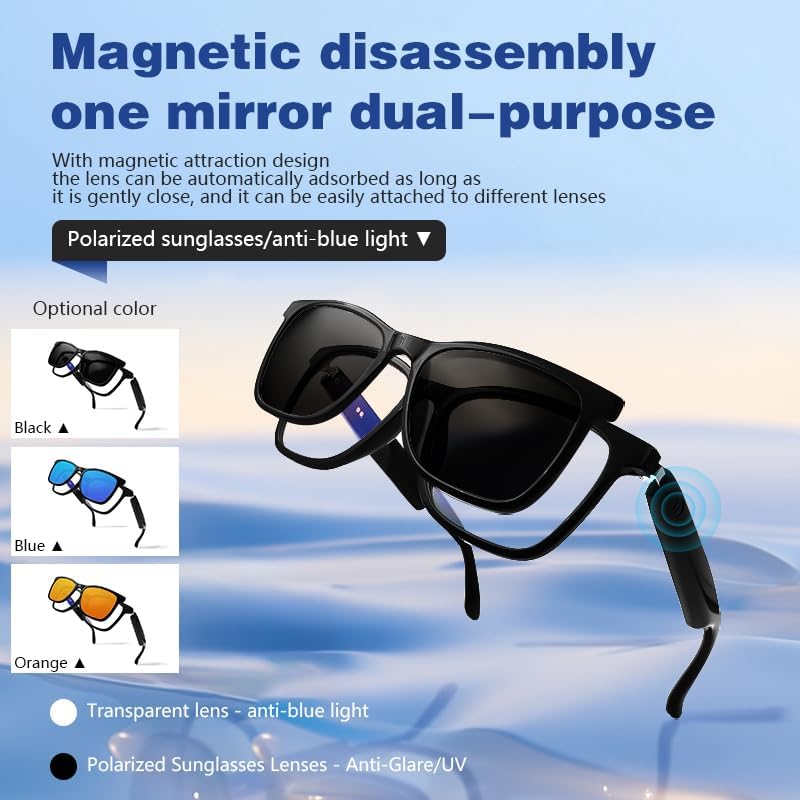
Figure 1.2: Magnetic lens system allowing easy interchangeability between anti-blue light and polarized lenses.
2. Setup Guide
2.1 Package Contents
Before you begin, ensure all items are present in your package:
- Enzemit GS05 Smart Glasses (with anti-blue light lenses)
- Magnetic Polarized Sunglasses Lens
- Charging Cable
- User Manual
- Cleaning Cloth
- Storage Pouch

Figure 2.1: Included items in the Enzemit GS05 Smart Glasses package.
2.2 Charging the Glasses
The glasses come with a built-in rechargeable Li-ion 55mAh battery on each side. For first-time use, fully charge the glasses.
- Connect the charging cable to the charging port on the glasses (typically located on the temple arm).
- Plug the other end of the cable into a USB power source (e.g., computer USB port, wall adapter).
- The indicator light on the glasses will show charging status (refer to the specific light behavior in your manual for details).
- A full charge takes approximately 2 hours.
2.3 Bluetooth Pairing
To connect your GS05 Smart Glasses to your smartphone or other Bluetooth-enabled device:
- Ensure the glasses are charged and powered off.
- Press and hold the power button (or touch sensor) on the glasses for approximately 5 seconds until the indicator light flashes, indicating pairing mode.
- On your device, go to Bluetooth settings and turn Bluetooth on.
- Search for available devices. The glasses should appear as "GS05 Smart Glasses" or similar.
- Select the glasses from the list to pair. Once connected, the indicator light will change (e.g., solid blue) and you may hear an audible confirmation.
2.4 Attaching Magnetic Lenses
The GS05 Smart Glasses feature a magnetic design for easy lens attachment:
- Hold the magnetic polarized sunglasses lens near the front frame of the smart glasses.
- The magnets will automatically align and secure the lens in place.
- To remove, gently pull the magnetic lens away from the frame.
3. Operating Instructions
The GS05 Smart Glasses are equipped with intuitive touch controls on the temple arms for easy operation.

Figure 3.1: Overview of touch controls for the GS05 Smart Glasses.
3.1 Power On/Off
- Power On: Long press the touch sensor on the temple for 5 seconds.
- Power Off: Long press the touch sensor on the temple for 5 seconds.
3.2 Music Playback
- Play/Pause: Single click the touch sensor.
- Next Song: Double click the touch sensor.
- Previous Song: Double click the touch sensor (some models may require triple click or specific side).
3.3 Call Management
- Answer Call: Double click the touch sensor.
- Hang Up/Reject Call: Triple click the touch sensor.
3.4 Voice Assistant
- Activate Voice Assistant: Long press the touch sensor for 2 seconds.
3.5 Remote Photo Capture
- Take a Photo: Touch the sensor 3 times (ensure your phone's camera app is open and connected).

Figure 3.2: The open-ear design allows for safe driving by maintaining environmental awareness.
4. Maintenance and Care
Proper care will extend the life and performance of your Enzemit GS05 Smart Glasses.
4.1 Cleaning
- Lenses: Use the provided cleaning cloth or a soft, lint-free cloth. For stubborn smudges, lightly dampen the cloth with lens cleaning solution or water. Avoid harsh chemicals or abrasive materials.
- Frame: Wipe the frame with a soft, damp cloth. Do not submerge the glasses in water.
4.2 Storage
- When not in use, store the glasses in the provided storage pouch or a protective case to prevent scratches and damage.
- Avoid storing in extreme temperatures (hot or cold) or in direct sunlight for prolonged periods.
4.3 Water Resistance
The GS05 Smart Glasses have an IP7 waterproof rating. This means they are protected against immersion in water up to 1 meter for up to 30 minutes. While they can withstand splashes and light rain, they are not designed for swimming or prolonged submersion. Ensure charging ports are dry before charging.
5. Troubleshooting
If you encounter issues with your GS05 Smart Glasses, try the following solutions:
5.1 Cannot Power On
- Ensure the battery is charged. Connect the charging cable and allow it to charge for at least 30 minutes before attempting to power on again.
- Try a different charging cable or USB power source.
5.2 Cannot Connect via Bluetooth
- Ensure Bluetooth is enabled on your device and the glasses are in pairing mode.
- Move the glasses closer to your device (within 10 meters/33 feet) and ensure no obstacles are interfering with the signal.
- Forget the device from your phone's Bluetooth settings and try pairing again.
- Restart both your device and the smart glasses.
5.3 No Sound or Low Volume
- Check the volume levels on both the glasses and your connected device.
- Ensure the glasses are properly connected via Bluetooth.
- If only one side has sound, try re-pairing the glasses.
5.4 Call Quality Issues
- Ensure the microphone is not obstructed.
- Move to an area with less background noise.
- Check your phone's network signal.
If problems persist, please refer to the contact information in the Warranty and Support section.
6. Specifications
Detailed technical specifications for the Enzemit GS05 Smart Glasses:
| Feature | Specification |
|---|---|
| Model Number | GS05 Smart Glasses |
| Lens Type | Anti-blue light lens / UV-400 Polarized lens (magnetic) |
| Lens Material | Acrylic |
| Speaker Type | Dynamic Speaker (Open-Ear) |
| Microphone | -40dB±3dB |
| Compatible Profiles | A2DP, AVRCP, HSP, HFP |
| Transmission Distance | 33 feet (10 meters) |
| Battery | Rechargeable Li-ion 55mAh (per side) |
| Continuous Playback | 3-6 hours (normal volume) |
| Standby Time | 10 days |
| Charging Time | 2 hours |
| Waterproof Grade | IP7 |
| Bluetooth Version | CSR5.0 |
| Working Temperature | -10°C to +50°C |
| Humidity | 0-90% |
| Weight | Approximately 36g |

Figure 6.1: Frame dimensions of the GS05 Smart Glasses.
7. Warranty and Support
Enzemit stands behind the quality of its products. For warranty information, technical support, or any inquiries regarding your GS05 Smart Glasses, please contact the seller or manufacturer directly through the platform where you purchased the product.
Please retain your proof of purchase for warranty claims.