
1. Product Overview
The BAOFENG T20D is a compact and lightweight FRS (Family Radio Service) two-way radio designed for reliable communication. It comes pre-programmed with 16 channels and factory-set CTCSS/DCS codes, ensuring compatibility with other BAOFENG FRS radios right out of the box. This manual provides essential information for setting up, operating, and maintaining your T20D radios.

This image displays the complete package, including six BAOFENG T20D radios, a charging base for all six units, and individual earpieces for hands-free communication.
2. Package Contents
Upon opening your BAOFENG T20D package, verify that all the following items are included:
- BAOFENG T20D Two-Way Radios (quantity as purchased)
- Rechargeable CR5 Batteries (one per radio)
- Belt Clips (one per radio)
- Earpieces (one per radio)
- Multi-Unit Charger (for charging multiple radios simultaneously)
- User Manual (this document)
3. Product Features
- Compact and Lightweight Design: Easy to carry and operate.
- 16 Pre-programmed Channels: Ready for immediate use.
- One-Key Frequency Copy: Simplifies synchronization with other radios.
- Type-C Charging Port: Offers convenient and durable charging options.
- Clear Sound Quality: Equipped with a high-quality speaker for effective communication.
- 1500mAh Battery: Provides extended battery life for prolonged use.
- Call Alert Function: Notifies users of incoming transmissions.
- Fixed Antenna: Integrated for reliable signal performance.
- Kenwood Standard 2-Pin Earpiece Jack: For accessory compatibility.

This image highlights key features of the BAOFENG T20D, including its 16 channels, 1500mAh battery, and advanced functions like VOX and one-click frequency duplication.
4. Getting Started (Setup)
4.1 Radio Components

This diagram labels the main external features of the BAOFENG T20D, including the power/volume knob, Type-C charging port, belt clip, antenna, and Push-to-Talk button.
4.2 Charging the Radios
- Insert the rechargeable battery into the radio unit.
- Place the radio into the multi-unit charging base, ensuring proper contact.
- Connect the charging base to a power source using the provided adapter. The indicator light on the charger will show charging status.
- Alternatively, use a Type-C cable to charge individual radios directly from a power bank, car charger, or laptop.
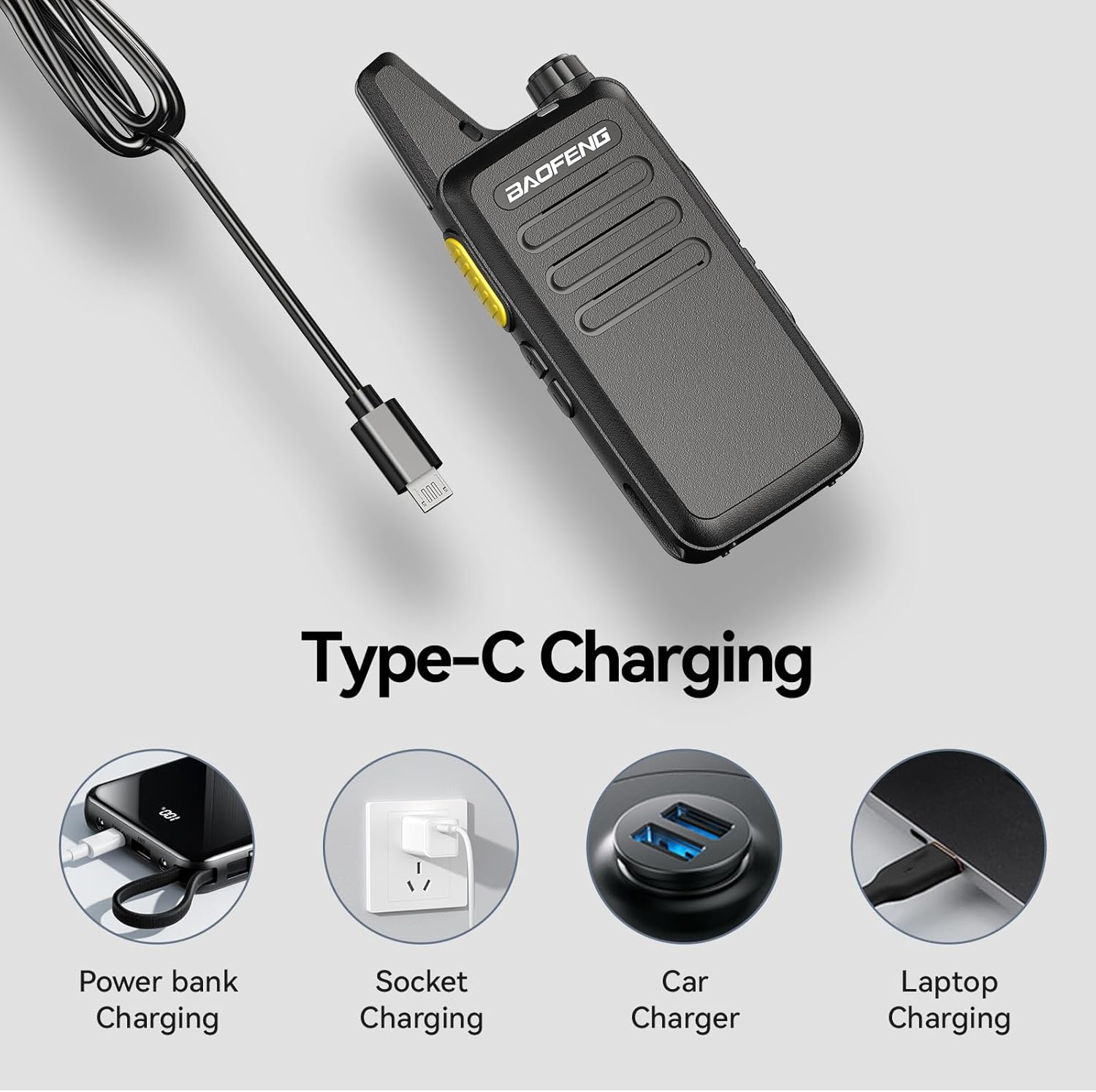
The BAOFENG T20D supports versatile charging via its Type-C port, allowing connection to power banks, wall adapters, car chargers, and laptops.
4.3 Attaching Accessories
- Belt Clip: Align the belt clip with the screw holes on the back of the radio and secure it with the provided screws.
- Earpiece: Insert the 2-pin earpiece connector into the earpiece jack on the side of the radio. Ensure it is fully seated for proper audio and microphone function.

This image highlights the radio's fixed antenna for reliable signal, the standard 2-pin jack for earpiece connection, and the versatile USB charging capabilities.
4.4 Powering On/Off
Rotate the Power/Volume knob clockwise to turn the radio on. Continue rotating to increase the volume. Rotate counter-clockwise until a click is heard to turn the radio off.
4.5 Frequency Synchronization (One-Key Copy)
The BAOFENG T20D features a one-key frequency copy function to easily synchronize channels between two radios. This eliminates the need for complex programming when setting up multiple units for team communication.

The one-key frequency copy feature allows for quick and easy synchronization of channels between two BAOFENG T20D radios without complex programming.
5. Operation
5.1 Channel Selection
The T20D radios come with 16 pre-programmed channels. Use the channel selector knob (typically located on top of the radio) to select your desired channel. Ensure all radios in your group are set to the same channel for communication.
5.2 Transmitting and Receiving
- To Transmit: Press and hold the Push-to-Talk (PTT) button located on the side of the radio. Speak clearly into the microphone (or earpiece microphone) at a normal volume. Release the PTT button to stop transmitting.
- To Receive: Ensure the radio is powered on and the volume is adjusted appropriately. The radio will automatically receive transmissions on the selected channel.
5.3 Volume Adjustment
Rotate the Power/Volume knob clockwise to increase the listening volume and counter-clockwise to decrease it.
5.4 Clear Sound Quality
The BAOFENG T20D is equipped with a high-quality speaker and professional-level noise reduction technology, ensuring clear and loud sound even in challenging or noisy environments.

The BAOFENG T20D is equipped with advanced audio processing for clear and loud communication, even in noisy environments, thanks to its noise reduction capabilities.
5.5 Use Cases
The compact and robust design of the T20D makes it suitable for a variety of applications:
- Outdoor Activities: Hiking, camping, skiing, and other adventures.
- Professional Use: Restaurants, retail, construction sites, and event coordination.
- Family Communication: Keeping in touch with family members during outings or at home.

The BAOFENG T20D is suitable for diverse applications, including team coordination during outdoor activities like hiking and climbing, or for general communication with friends.

The BAOFENG T20D is a versatile communication tool suitable for various professional and recreational activities, such as construction, emergency services, and outdoor sports.
6. Maintenance
6.1 Battery Care
The T20D radios are equipped with a 1500mAh rechargeable battery, designed for long-term standby and communication. To maximize battery life:
- Fully charge batteries before first use.
- Avoid overcharging or completely draining the battery.
- Store radios with partially charged batteries if not used for extended periods.
- The Type-C charging port enhances durability and reduces wear from frequent plugging/unplugging.

The BAOFENG T20D features a 1500mAh battery, providing extended operational time and reliable communication throughout the day.
6.2 Cleaning and Storage
- Clean the radio's exterior with a soft, damp cloth. Do not use harsh chemicals or abrasive cleaners.
- Ensure the radio is dry before charging or storing.
- Store radios in a cool, dry place away from direct sunlight and extreme temperatures.
- The radio is Not Water Resistant; avoid exposure to water or high humidity.
7. Troubleshooting
If you encounter issues with your BAOFENG T20D radio, refer to the following common problems and solutions:
| Problem | Possible Cause | Solution |
|---|---|---|
| Radio does not power on | Battery is low or not installed correctly. | Charge the battery fully. Ensure the battery is securely installed. |
| Cannot transmit or receive | Incorrect channel selected. Radios out of range. Battery low. | Verify all radios are on the same channel. Move closer to other radios. Recharge battery. |
| Static or unclear audio | Weak signal. Interference. Earpiece connection issue. | Move to an open area. Avoid sources of electronic interference. Re-seat the earpiece connector. |
| Short communication range | Obstructions (buildings, terrain). Environmental factors. | Move to a higher elevation or more open area. Range is affected by line-of-sight. |
If the problem persists after attempting these solutions, please contact customer support.
8. Specifications
| Feature | Specification |
|---|---|
| Model Number | T20D |
| Brand | BAOFENG |
| Color | Black |
| Number of Channels | 16 |
| Frequency Range | 400-470 MHz |
| Talking Range Maximum | 3 Kilometer |
| Battery Capacity | 1500mAh (CR5 batteries included) |
| Voltage | 3.7 Volts |
| Item Weight (per radio) | Approximately 113g (4 oz) |
| Water Resistance Level | Not Water Resistant |
| Manufacturer | Fujian Baofeng Electronics Co., Ltd |
9. Warranty and Support
9.1 Warranty Information
BAOFENG offers a comprehensive warranty program for your T20D radios:
- Radio Body: 2-year warranty.
- Accessories: 1-year warranty (includes batteries, belt clips, earpieces, and charger).
- Return Policy: 30-day no-reason return policy from the date of purchase.
After the warranty period, maintenance services are available at your cost.
9.2 Customer Support
For any questions, technical assistance, or warranty claims, please contact us through the Amazon platform. We aim to provide a prompt response within 12 hours.


