
1. Introduction
This manual provides detailed instructions for the assembly, operation, and maintenance of your FURRIFIC Full Bunk Bed with L-Desk & USB Charging, RGB LED Lights. Please read this manual thoroughly before assembly and use to ensure safe and correct operation. Keep this manual for future reference.

Image 1.1: Overview of the FURRIFIC Full Bunk Bed with integrated L-Desk and RGB LED lighting.
2. Safety Information
WARNING: Failure to follow these warnings and instructions could result in serious injury or death.
- This product comes with safety warnings related to its assembly, use, and weight limits. Adhere to all weight limits specified in the specifications section.
- Always ensure all connections are securely tightened before use. Periodically check and re-tighten hardware as necessary.
- Do not allow children under 6 years of age on the upper bunk.
- Use only a mattress that is 75 inches (190 cm) long and 54 inches (137 cm) wide on the upper bunk.
- The maximum mattress thickness for the upper bunk should not exceed 6 inches (15 cm) to ensure adequate guardrail height.
- Always use the recommended size mattress or mattress support, or both, to prevent the likelihood of entrapment or falls.
- The use of a night light may provide added safety precaution for a child using the upper bunk.
- Always use the ladder for entering and exiting the upper bunk.
- Do not attach or hang items to any part of the bunk bed that are not designed for use with the bed; for example, but not limited to, hooks, belts, and jump ropes.
- An anti-tip device is included and must be installed to prevent the bed from tipping over.

Image 2.1: Illustration of the anti-tip device and its installation for enhanced stability and safety.
3. Package Contents
Before beginning assembly, ensure all parts are present and undamaged. Refer to the included Installation Manual for a complete list of components and hardware.
- Metal Frame Components
- L-Desk Panels
- USB Charging Station and Sockets
- RGB LED Light Strip and Controller
- 3 Shelves
- 3 Fabric Drawers
- CPU Holder
- Side Bar (for hanging)
- Assembly Hardware (screws, bolts, nuts, etc.)
- Anti-Tip Device
- Installation Manual
4. Assembly Instructions
Assembly of the FURRIFIC Full Bunk Bed is designed to be straightforward. A detailed Installation Manual with step-by-step instructions and diagrams is included with your product. Please follow the manual carefully.
- Unpack Components: Carefully remove all parts from the packaging and lay them out on a clean, soft surface to prevent scratches. Verify all components against the parts list in the Installation Manual.
- Assemble Main Frame: Begin by assembling the main metal frame structure according to the manual's instructions. Ensure all bolts are finger-tightened initially.
- Install L-Desk and Shelves: Attach the L-desk panels and shelves to the frame. Ensure they are level and securely fastened.
- Integrate USB Charging: Install the USB charging station and power sockets into the designated areas on the desk. Connect the power cable.
- Attach Fabric Drawers: Insert the fabric drawers into their respective compartments.
- Install LED Lights: Adhere the RGB LED light strip to the desired location, typically along the desk or bed frame. Connect the controller.
- Final Tightening: Once all components are in place, systematically tighten all bolts and screws using the provided tools. Do not overtighten.
- Install Anti-Tip Device: Securely attach the anti-tip device to the bed frame and to a wall stud as per the instructions. This step is critical for safety.
- Final Check: Before use, double-check all connections for tightness and stability. Ensure the bed is level and stable.
Note: Two people are recommended for assembly. No additional box spring is required for this bunk bed.

Image 4.1: Dimensional diagram of the L-Desk area, showing measurements for the desk surface and overall structure.
5. Operating Instructions
5.1. L-Desk and USB Charging Station
The integrated L-desk provides a spacious work area. The USB charging station and power sockets allow for convenient connection of laptops, lamps, and other electronic devices. Ensure the bed is plugged into a functional power outlet for the charging features to work.
5.2. RGB LED Lighting System
Your bunk bed is equipped with smart RGB LED lights. These lights can be controlled via a dedicated mobile application or the included remote control.
- Color Selection: Choose from over 60,000 colors to match your mood or room decor.
- Intensity Adjustment: Adjust the brightness of the lights.
- Music Sync Mode: The lights can synchronize with music, creating a dynamic visual experience.
- Timer Function: Set a timer for the lights to turn on or off automatically.
- Customizable Styles: Explore various pre-set lighting styles or create your own.

Image 5.1: Display of the RGB LED lighting system, highlighting control options via mobile app and physical remote.
5.3. Storage Features
The bunk bed includes three open shelves and three fabric drawers for organized storage. A dedicated CPU holder and a side bar for hanging items like backpacks or coats are also integrated.

Image 5.2: Detail view of the integrated storage, showing three open shelves and three fabric drawers.
6. Maintenance
- Cleaning: Wipe the metal frame and desk surfaces with a soft, damp cloth. Avoid abrasive cleaners or harsh chemicals that could damage the finish.
- Hardware Check: Periodically inspect all bolts, screws, and connections to ensure they remain tight. Re-tighten as needed to maintain stability and safety.
- LED Lights: Ensure the LED light strip and controller are kept dry. Avoid bending the light strip sharply.
- Fabric Drawers: The fabric drawers can be spot cleaned with a mild detergent and water. Allow to air dry completely.
- Weight Distribution: Distribute weight evenly on the desk and shelves to prevent warping or damage.
7. Troubleshooting
| Problem | Possible Cause | Solution |
|---|---|---|
| Bed feels unstable or wobbly. | Loose hardware connections. Anti-tip device not installed or improperly installed. Uneven floor. | Check and tighten all bolts and screws. Ensure the anti-tip device is securely fastened to both the bed and a wall stud. Place shims under bed legs if the floor is uneven. |
| USB charging station or power sockets not working. | Bed not plugged into a power outlet. Loose power connection. Faulty outlet. | Ensure the bed's power cord is securely plugged into a functional wall outlet. Check all internal power connections. Test the outlet with another device. |
| RGB LED lights not turning on or responding to control. | Power connection issue. Remote control battery dead. App not connected. | Check the power connection to the LED strip and controller. Replace remote control batteries. Ensure your mobile device is properly paired with the LED controller via the app. |
| Missing parts during assembly. | Packaging error. | Carefully re-check all packaging materials. If parts are genuinely missing, contact FURRIFIC customer support immediately with your purchase details and the specific parts required. |
8. Specifications
| Feature | Detail |
|---|---|
| Model Number | MC200-ALL |
| Brand | FURRIFIC |
| Size | Matrimonial / Full |
| Color | Black |
| Frame Material | Metal |
| Product Dimensions (L x W x H) | 79.53"L x 55.51"W x 72.05"H (approx. 202cm L x 141cm W x 183cm H) |
| Item Weight | 49 Kilograms (approx. 108 lbs) |
| Maximum Weight Recommendation | 250 Kilograms (approx. 550 lbs) |
| Special Features | Integrated L-Desk & USB Charging, RGB LED Lights, Ample Built-in Storage (3 shelves, 3 fabric drawers, CPU holder, side bar) |
| Required Assembly | Yes |
| UPC | 740863475286 |
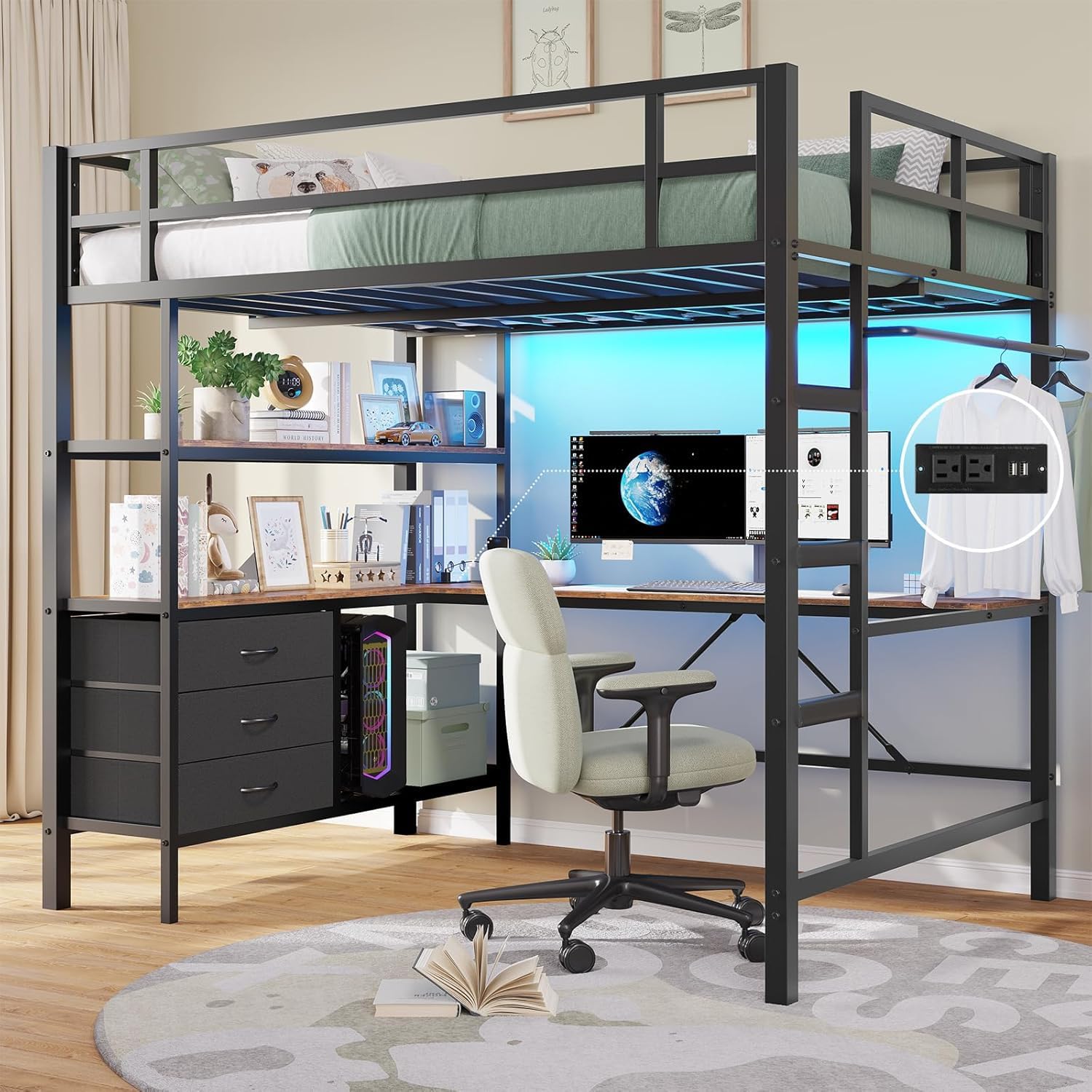
Image 8.1: Comprehensive dimensional diagram of the bunk bed, including overall height, width, and length, as well as desk and shelf measurements.
9. Customer Support & Warranty
For any questions, missing parts, or assistance with assembly or operation, please contact FURRIFIC customer support. Our team is available to provide immediate support and quick solutions.
Please refer to your purchase documentation for specific warranty details. Keep your proof of purchase for warranty claims.
Contact Information: Please refer to the contact details provided with your purchase or on the official FURRIFIC website.