
AsperX AX1011
AsperX 10000mAh Portable Charger User Manual
Model: AX1011
Introduction
Thank you for choosing the AsperX 10000mAh Portable Charger. This device is designed to provide convenient and reliable power for your mobile devices on the go. Featuring built-in cables, multiple output ports, and an LED display, it ensures your devices stay charged whenever you need them. Please read this manual thoroughly before using the product to ensure proper operation and to maximize its lifespan.
Product Features
- Dual 10000mAh Capacity: Two portable chargers for extended power.
- Built-in Cables: Integrated USB-C and Micro-USB cables for convenience.
- Multiple Outputs: Includes built-in cables, USB-C port, and USB-A port for charging up to four devices simultaneously.
- Dual Inputs: Can be recharged via the built-in USB-C cable or the USB-C port.
- Smart LED Display: Shows remaining power percentage (0-100%) for precise monitoring.
- Compact and Lightweight Design: Easy to carry for travel, business, or outdoor activities.
- Comprehensive Safety Protection: Built-in safeguards against overcharge, over-discharge, short circuit, overcurrent, and overheating.
Package Contents
- 2 x AsperX 10000mAh USB C Portable Charger (Blue+Pink)
- 1 x User Manual
Product Overview

Figure 1: AsperX 10000mAh Portable Chargers (Blue and Pink)
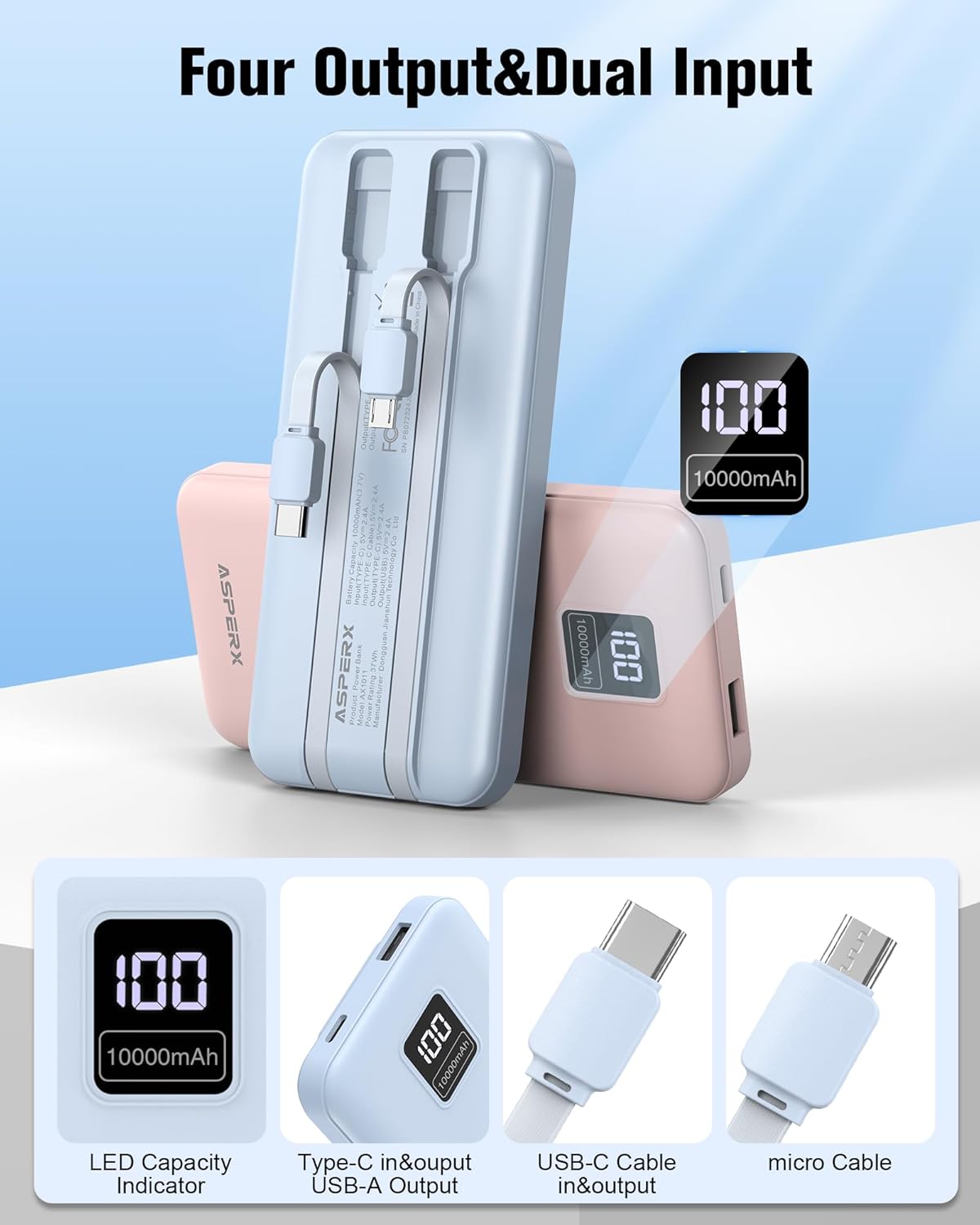
Figure 2: Four Output & Dual Input Overview
Components:
- LED Digital Display: Shows the battery percentage.
- Built-in USB-C Cable: For charging USB-C devices and recharging the power bank.
- Built-in Micro-USB Cable: For charging Micro-USB devices.
- USB-C Input/Output Port: Universal port for charging and recharging.
- USB-A Output Port: Standard USB port for charging various devices.
Setup
The AsperX portable charger comes pre-charged, but it is recommended to fully charge it before first use to ensure optimal performance and battery calibration.
Initial Charging:
- Connect the power bank to a power source (e.g., wall adapter, computer USB port) using either the built-in USB-C cable or an external USB-C cable plugged into the USB-C port.
- The LED display will show the charging progress, indicating the battery percentage increasing.
- Once the display shows "100%", the power bank is fully charged and ready for use.
Operating Instructions
Charging the Power Bank:
You can recharge your AsperX power bank using two methods:
- Using the Built-in USB-C Cable: Extend the built-in USB-C cable and plug its USB-C end into a compatible USB power adapter or computer USB port.
- Using the USB-C Input Port: Connect an external USB-C to USB-A or USB-C to USB-C cable to the power bank's USB-C input port, and then connect the other end to a power adapter.
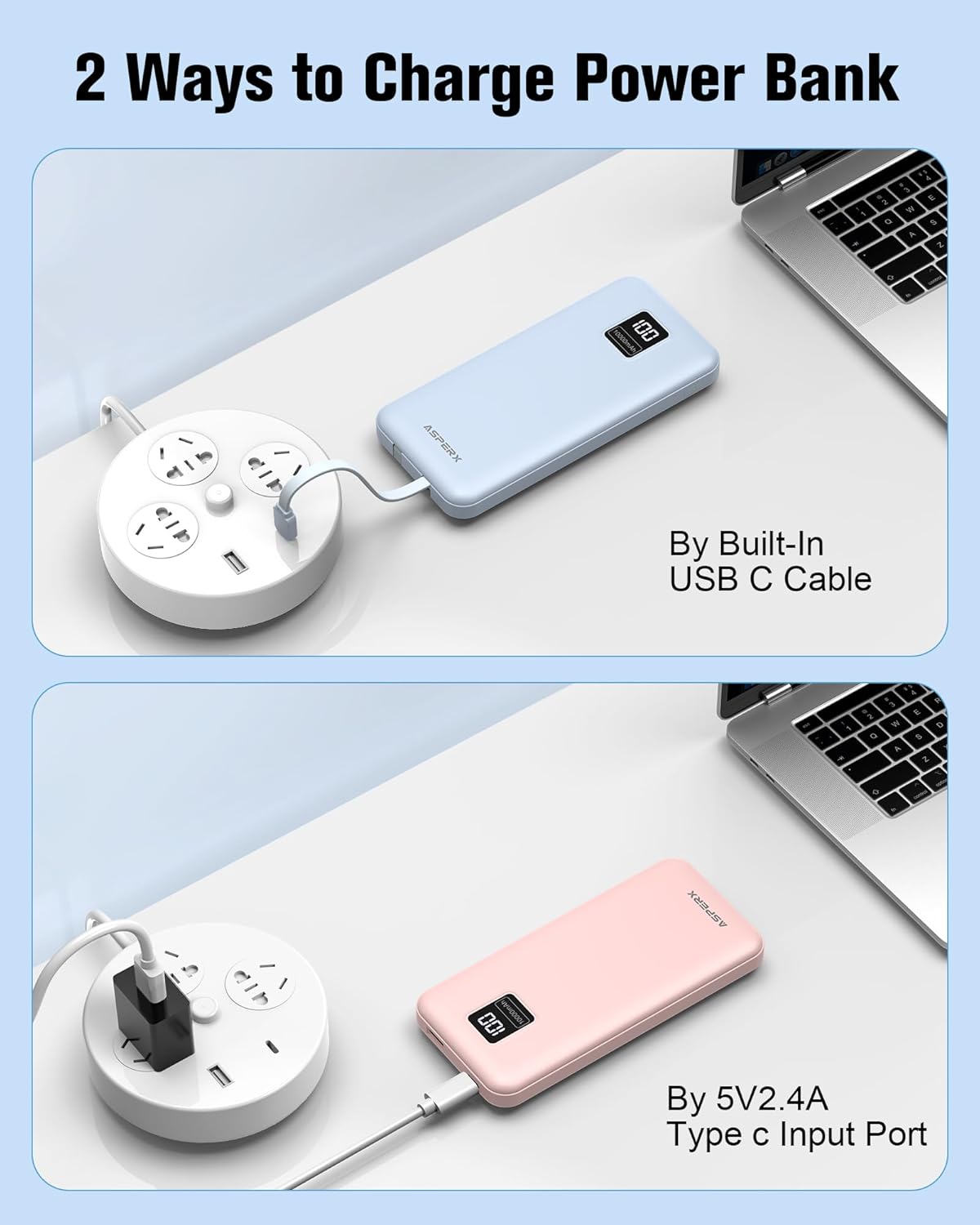
Figure 3: Two Ways to Charge the Power Bank
The LED display will show the current battery percentage during charging. When it reaches 100%, the power bank is fully charged.
Charging Your Devices:
The power bank offers multiple output options to charge various devices simultaneously.
- Using Built-in Cables:
- For USB-C devices (e.g., iPhone 15 series, Samsung Galaxy, Google Pixel, Tablets): Extend the built-in USB-C cable and plug it directly into your device's USB-C port.
- For Micro-USB devices: Extend the built-in Micro-USB cable and plug it directly into your device's Micro-USB port.
- Using USB-C Output Port: Connect your device's USB-C to USB-C cable to the power bank's USB-C port and your device.
- Using USB-A Output Port: Connect your device's USB-A cable (e.g., for iPhone 14 series and earlier models, AirPods, Bluetooth headsets, smartwatches, 5V heated vests) to the power bank's USB-A port and your device.

Figure 4: Simultaneously Charging Multiple Devices
The power bank will automatically begin charging your device once connected. The LED display will show the power bank's remaining charge.
LED Display Guide
The smart LED display provides an accurate percentage of the remaining power, from 0% to 100%. This allows you to know exactly how much charge is left and plan your recharges accordingly.

Figure 5: Accurate LED Display
Maintenance
- Cleaning: Use a soft, dry cloth to clean the surface of the power bank. Do not use liquid cleaners or aerosols.
- Storage: Store the power bank in a cool, dry place away from direct sunlight and extreme temperatures.
- Battery Care: To prolong battery life, fully charge the power bank at least once every three months if not in regular use.
- Avoid Drops: Do not drop or subject the power bank to strong impacts.
Troubleshooting
| Problem | Possible Cause | Solution |
|---|---|---|
| Power bank not charging | Charging cable is faulty or not properly connected. Power adapter is not working. | Check cable connections. Try a different charging cable or power adapter. |
| Device not charging from power bank | Power bank battery is depleted. Device cable is faulty or not properly connected. Device is not compatible. | Recharge the power bank. Ensure cables are securely connected. Verify device compatibility (e.g., iPhone 14 and earlier models require your own Lightning cable). |
| LED display not working | Power bank is completely discharged. Internal malfunction. | Attempt to charge the power bank. If issue persists, contact customer support. |
| Slow charging | Using a low-power adapter or cable. Device requires higher input. | Use a higher wattage power adapter (e.g., 5V/2.4A). Ensure cables are high quality. |
Specifications
| Feature | Detail |
|---|---|
| Model Number | AX1011 |
| Battery Capacity | 10000mAh (per power bank) |
| Battery Type | Lithium Polymer |
| Inputs | Built-in USB-C Cable, USB-C Port |
| Outputs | Built-in USB-C Cable, Built-in Micro-USB Cable, USB-C Port, USB-A Port |
| Product Dimensions | 3.94 x 1.97 x 0.59 inches |
| Item Weight | 1.23 pounds (for the pack) |
| Special Features | Built-in Cables, Digital Display, Lightweight, Pocket Size, Slim |
Safety Information
- Do not expose the power bank to extreme temperatures (above 60°C/140°F or below 0°C/32°F).
- Do not disassemble, modify, or repair the device yourself.
- Keep away from water, moisture, and flammable materials.
- Do not use if the power bank is damaged, swollen, or leaking.
- Dispose of the product responsibly according to local regulations.
- Keep out of reach of children.

Figure 6: Super Security Protections
Warranty and Support
AsperX provides a comprehensive warranty and customer support for this product.
- Warranty: The product comes with a 24-month care plan.
- Refund Guarantee: Enjoy a 30-day refund guarantee.
- Customer Service: We offer pleasant customer service 24 hours a day, seven days a week.
If you encounter any issues or have questions regarding your AsperX portable charger, please do not hesitate to contact us through the Amazon platform or visit the official AsperX store for support.
AsperX Store: Visit the AsperX Store on Amazon
Related documentsAX1011


Ask a question about this manual
Ask about setup, troubleshooting, compatibility, parts, safety, or missing instructions. Manuals+ will review the question and use this page’s manual context to help answer it.