
1. Important Safety Instructions
When using electrical appliances, basic safety precautions should always be followed to reduce the risk of burns, electric shock, fire, injury to persons, or exposure to excessive microwave energy.
- Read all instructions before using the appliance.
- Do not operate the microwave if it has a damaged cord or plug, if it is not working properly, or if it has been dropped or damaged.
- Do not heat liquids or other foods in sealed containers as they are liable to explode.
- Do not attempt to service or repair this appliance yourself. Contact qualified service personnel for examination, repair, or adjustment.
- Ensure proper grounding to avoid electrical shock.
- Always supervise children when the microwave is in use.

Image: Rear view of the microwave with important electrical and safety warnings. Always read all labels before operation.
2. Product Overview
The RecPro High Pointe Built-in Black Microwave offers efficient cooking with a compact design, ideal for various installations. It features a 0.9 cubic foot capacity and 900W output power, designed for quick and even heating.
Key Features:
- Six Auto Cook Options: Includes settings for popcorn, potato, pizza, frozen vegetable, beverage, and dinner plate.
- Instant Start: Add 30 seconds of cooking time with each touch.
- Multi-Stage Cooking: Program multiple cooking stages for varied recipes.
- Defrost Options: Weight and time-based defrost settings.
- Child Lock: Prevents unintended operation.
- Mute Mode: Silences operational beeps.
- Eco Function: Reduces energy consumption.
- Memory Function: Stores frequently used cooking settings.
- Touch Pad Controls: Intuitive and easy to use interface.
- 11-inch Turntable: Ensures even cooking.
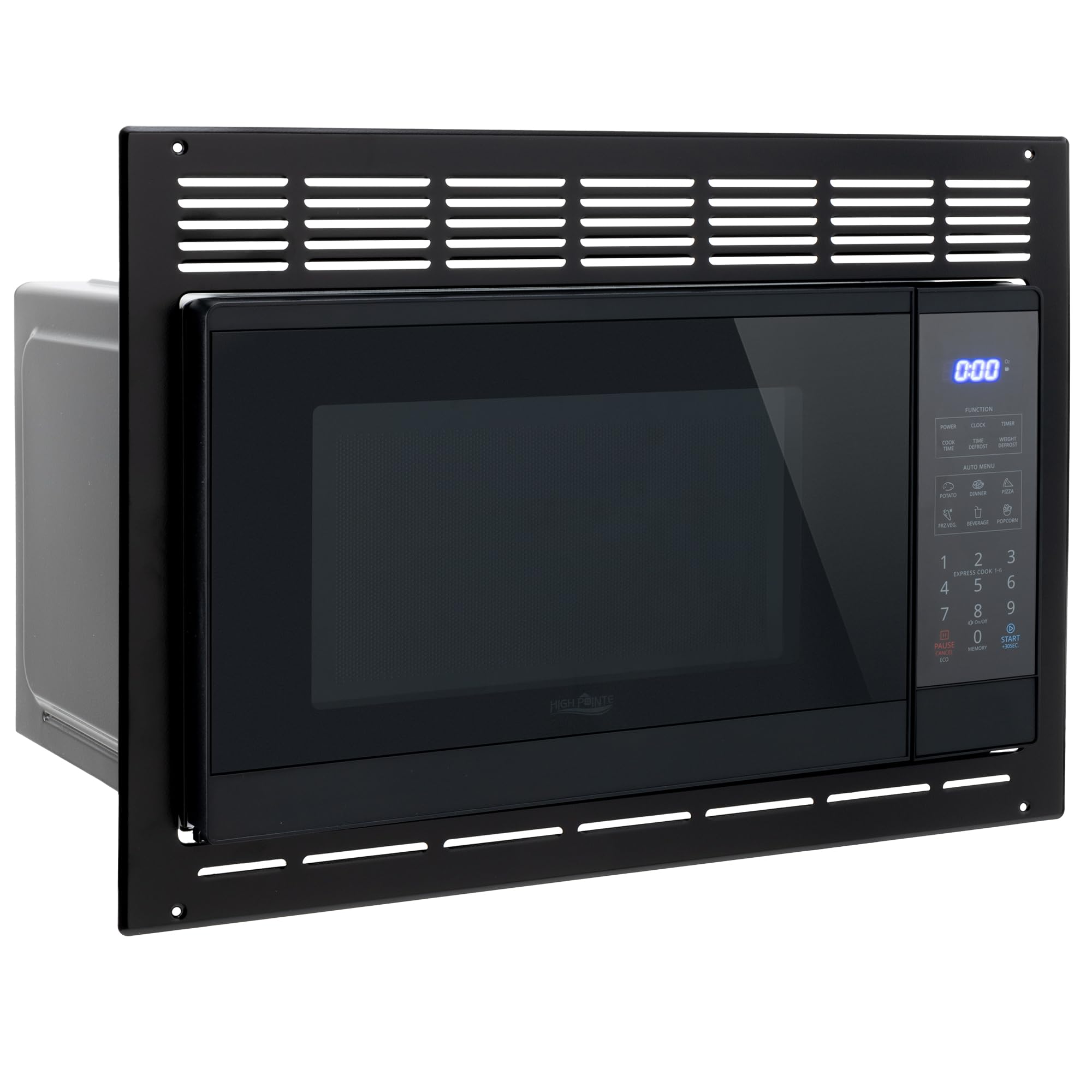
Image: Front view of the RecPro High Pointe Built-in Black Microwave, showcasing its sleek design and control panel.

Image: Visual representation of the microwave's core features including cooking options, capacity, and power output.
3. Installation
This microwave is designed for built-in installation, fitting seamlessly into compatible cabinets. Proper ventilation and clearance are essential for safe and efficient operation.
Installation Requirements:
- Minimum Cabinet Dimensions: 19 19/64"W x 13 1/8"H x 13 1/8"D
- Maximum Cabinet Dimensions: 20"W x 13 1/2"H
- Ensure the installation area provides adequate space for the microwave and its trim kit.
- The microwave requires a standard 120V electrical outlet.
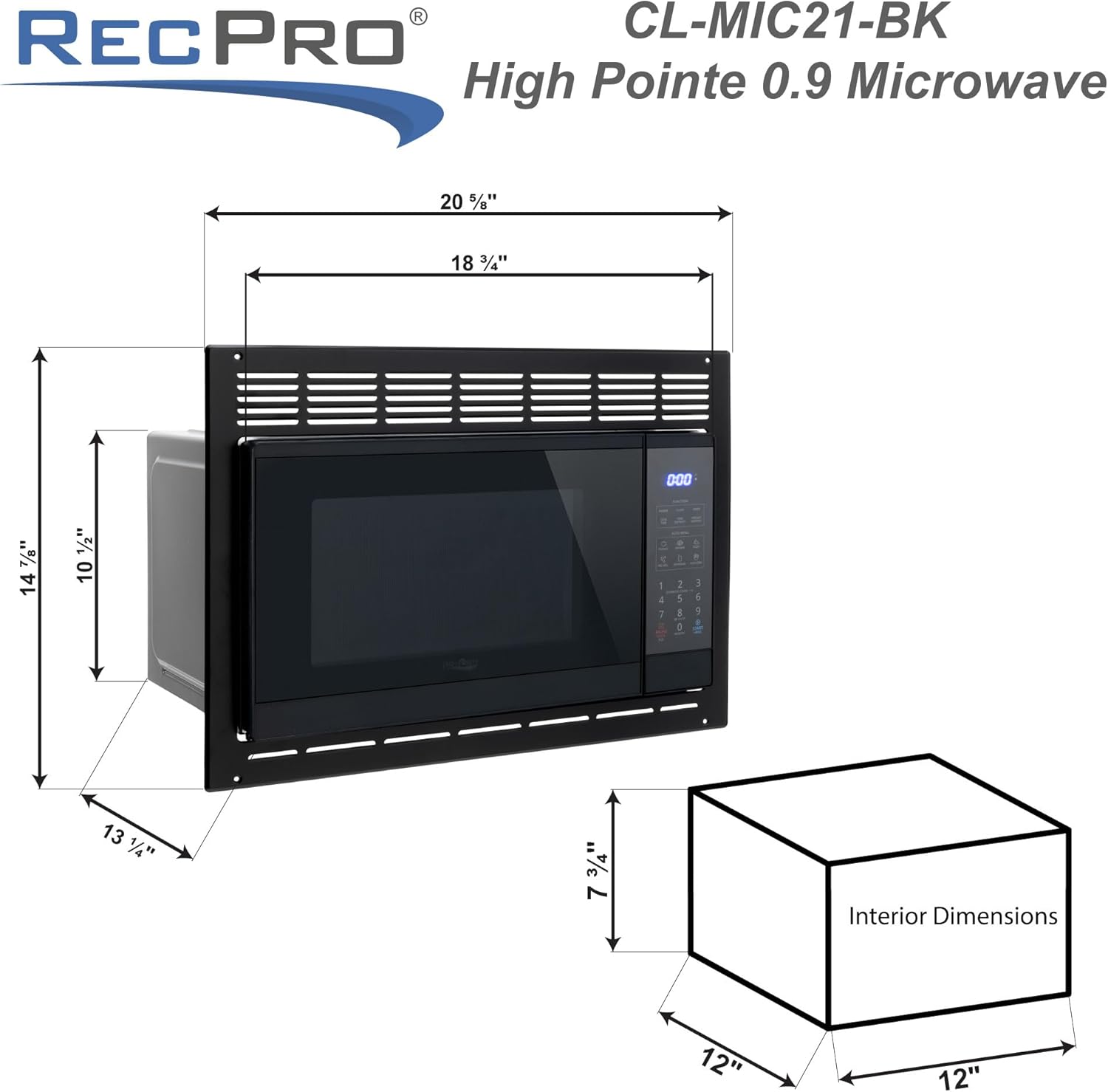
Image: Detailed diagram illustrating the external and internal dimensions of the microwave for accurate installation.
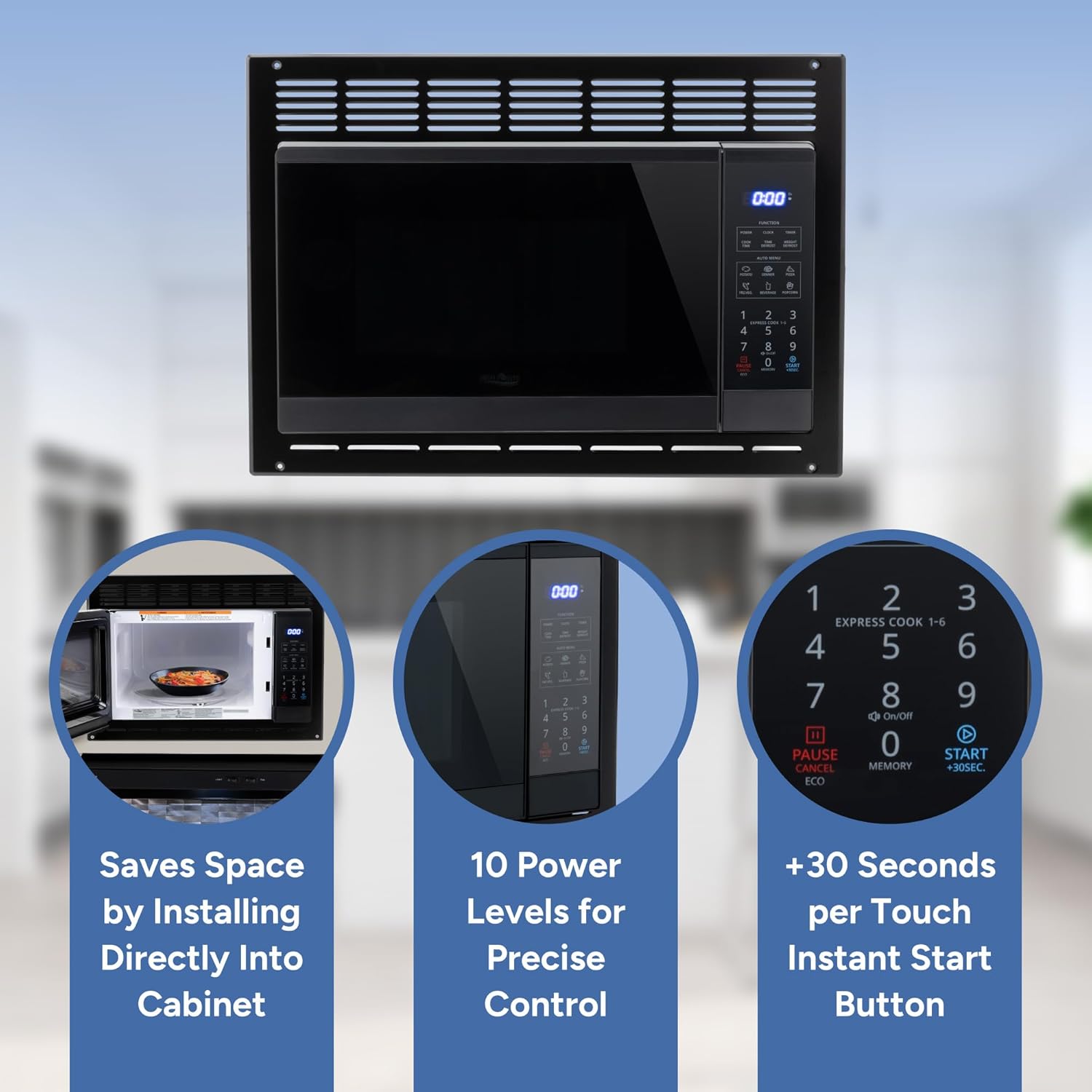
Image: The microwave integrated into a modern home kitchen cabinet, demonstrating a typical installation.

Image: The microwave installed within an RV kitchen, highlighting its suitability for mobile environments.
4. Operating Instructions
Familiarize yourself with the control panel to effectively use all features of your RecPro microwave.
Control Panel Overview:

Image: Detailed view of the microwave's touch pad controls and digital display.
- Power: Adjusts cooking power levels (1-10).
- Clock: Sets the current time.
- Timer: Functions as a kitchen timer.
- Cook Time: Manually set cooking duration.
- Weight Defrost/Time Defrost: Select defrost method based on food weight or desired time.
- Auto Menu: Pre-programmed settings for common foods (Popcorn, Potato, Pizza, Frozen Vegetable, Beverage, Dinner Plate).
- Instant Start (+30 Seconds): Quickly adds 30 seconds to cooking time.
- Pause/Cancel/Eco: Stops cooking, clears settings, or activates Eco mode.
- Memory: Recalls saved cooking settings.
- Child Lock: Press and hold to activate/deactivate.
- Mute Mode: Press and hold to silence operational sounds.
Basic Cooking:
- Place food in a microwave-safe container on the turntable.
- Close the microwave door.
- Press the 'Cook Time' button.
- Enter the desired cooking time using the number pad.
- Press the 'Power' button, then select a power level (1-10). For full power, skip this step.
- Press 'Start' to begin cooking.
Using Auto Cook Modes:
- Place food in the microwave.
- Select the desired Auto Menu option (e.g., 'Popcorn').
- Follow any on-screen prompts for quantity if applicable.
- Press 'Start'.
5. Maintenance and Cleaning
Regular cleaning and maintenance will ensure the longevity and optimal performance of your microwave.
Cleaning the Interior:
- Wipe the interior cavity with a damp cloth after each use to prevent food buildup.
- For stubborn stains, use a mild detergent or a microwave-safe cleaner. Avoid abrasive cleaners.
- The glass turntable can be removed and washed with warm, soapy water. Ensure it is dry before placing it back.
Cleaning the Exterior:
- Wipe the exterior surfaces with a soft, damp cloth.
- Clean the control panel gently with a soft, slightly damp cloth. Avoid excessive moisture.
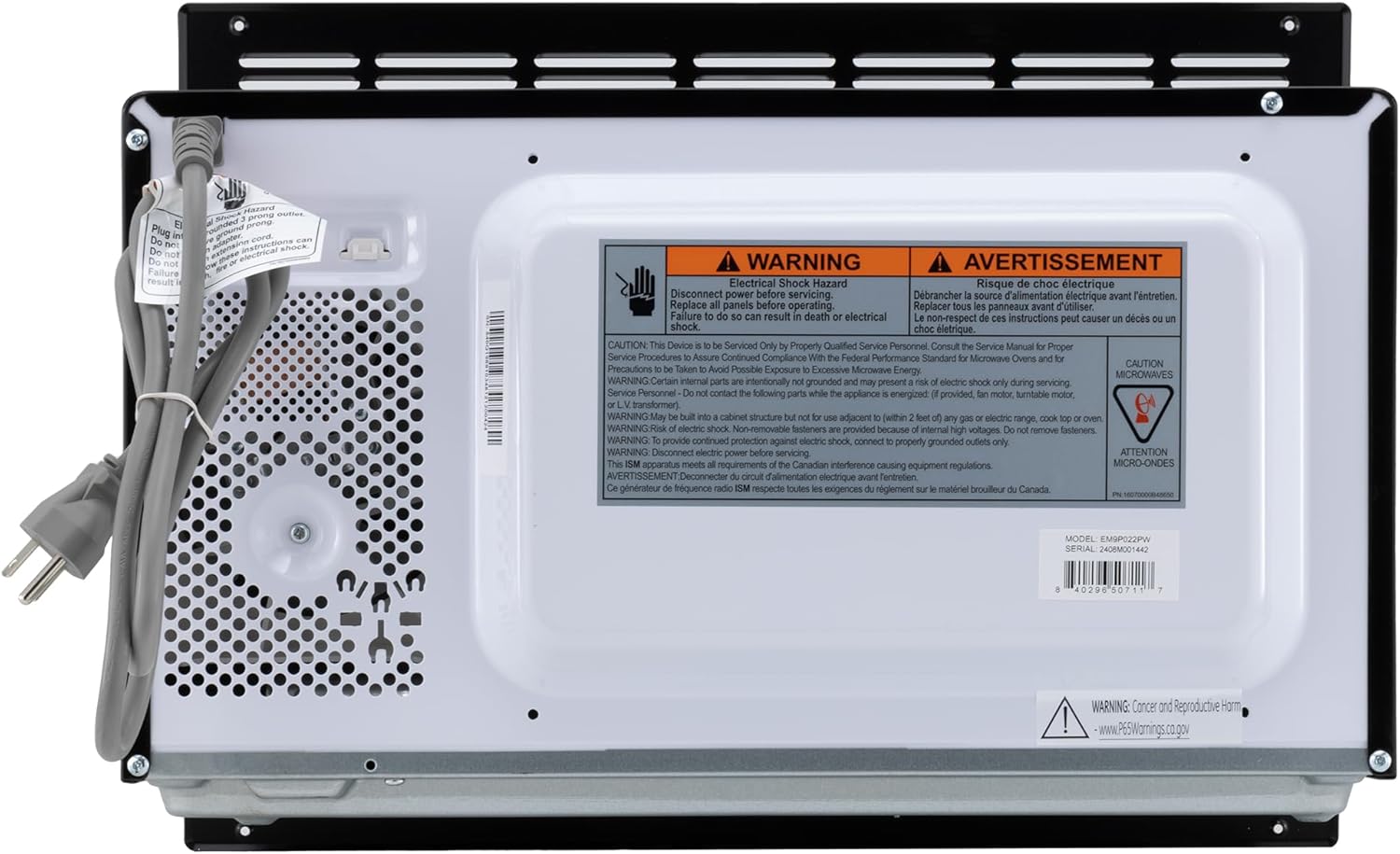
Image: Interior view of the microwave, showing the removable glass turntable for easy cleaning.
6. Troubleshooting
If you encounter issues with your microwave, refer to the following common problems and solutions:
| Problem | Possible Cause | Solution |
|---|---|---|
| Microwave does not start | Door not closed properly; Power cord unplugged; Blown fuse/tripped circuit breaker. | Ensure door is securely closed; Check power cord connection; Check household fuse/circuit breaker. |
| Food not heating evenly | Food not stirred/rotated; Incorrect power level/cook time; Turntable not rotating. | Stir or rearrange food during cooking; Adjust power level/cook time; Ensure turntable is correctly placed and rotates freely. |
| Display shows error message | Internal malfunction. | Unplug the microwave for a few minutes, then plug it back in. If the error persists, contact customer support. |
| Loud noise during operation | Turntable not seated correctly; Foreign object inside. | Re-seat the turntable; Check for and remove any foreign objects. |
For issues not listed here or if problems persist, please contact RecPro customer support.
7. Specifications
Detailed technical specifications for the RecPro High Pointe Built-in Microwave.
| Feature | Specification |
|---|---|
| Brand | RecPro |
| Model Name | CL-MIC21-BK |
| Product Dimensions (D x W x H) | 13.38"D x 20.75"W x 15"H |
| Capacity | 0.9 Cubic Feet |
| Color | Black |
| Installation Type | Built-In |
| Wattage (Output) | 900 watts |
| Voltage | 120 Volts |
| Number of Power Levels | 10 |
| Controller Type | Touch |
| Heating Method | Microwave Radiation |
| Defrost System Type | Auto Defrost |
| Turntable Diameter | 11 Inches |
| Material (Inner) | Glass |
| Included Components | Microwave with Trim |
8. Product Video
Watch this video for an overview of RecPro products, including the microwave, in an RV setting.
Video: An informational video from RecPro showcasing various products, including the microwave, in a recreational vehicle context.
9. Warranty and Support
For warranty information, technical support, or service inquiries, please refer to the documentation included with your purchase or visit the official RecPro website. Keep your purchase receipt for warranty claims.
RecPro offers a 30-day easy return policy and customer support for assistance.