
Introduction
The FUNMILY Under Desk Elliptical is a portable, fully assembled leg exerciser designed for use while sitting. It features a display monitor and remote control, making it ideal for home or office use. This elliptical provides a low-impact, joint-friendly exercise that boosts circulation, builds muscle, and burns calories without strain. It is suitable for all ages and fitness levels, from seniors to office workers.

Figure 1: Main view of the FUNMILY Under Desk Elliptical.
Setup
The FUNMILY Under Desk Elliptical comes 100% pre-assembled, ready for immediate use. Simply remove it from the packaging and place it on a flat, stable surface where you intend to use it, such as under a desk or in front of a chair.
Connecting Power
Locate the power input port on the device and connect the provided power adapter. Plug the adapter into a standard electrical outlet.
Video 1: Demonstration of the fully assembled leg exerciser and initial setup.
Adjusting Safety Straps
The elliptical features adjustable Velcro straps on the pedals to secure your feet during exercise. Adjust these straps to ensure a snug and comfortable fit, preventing your feet from slipping off the pedals during use.

Figure 2: Close-up view of the adjustable safety straps on the pedals.
Operating Instructions
The FUNMILY Under Desk Elliptical offers both automatic and manual modes with adjustable speed and resistance levels, controlled conveniently via a magnetic remote control.
Using the Remote Control
The magnetic remote control allows for effortless adjustment of settings without bending or reaching. It can be stored securely on the elliptical's base when not in use.
- Start/Stop: Press the 'Start/Stop' button to begin or end your exercise session.
- Mode: Switch between Auto Mode (12 speed levels) and Manual Mode (9 resistance levels).
- Speed/Resistance Adjustment: Use the '+' and '-' buttons to increase or decrease speed in Auto Mode, or resistance in Manual Mode.
- Time Adjustment: Use the 'Time +' and 'Time -' buttons to set your desired exercise duration.
- Reverse: Change the direction of pedal rotation.
Video 2: Detailed demonstration of the remote control functions and various exercise modes.
Understanding the Digital Display
The large LCD display provides real-time tracking of your exercise data:
- Speed: Current speed level.
- Resis (Resistance): Current resistance level.
- Dist (Distance): Distance covered during your session.
- Cal (Calories): Estimated calories burned.
- Time: Duration of your exercise session.

Figure 3: The large LCD display clearly showing speed, resistance, distance, calories, and time.
Exercise Benefits and Features
This elliptical is designed for low-impact, joint-friendly exercise, making it suitable for individuals with stiff or restricted joints, seniors, and office workers. Its whisper-quiet operation (below 15dB) ensures no disruption in quiet environments.

Figure 4: Visual representation of low-impact and zero-pressure benefits for joints and muscles.
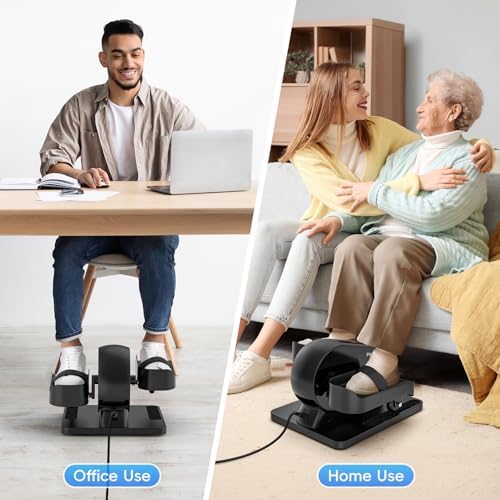
Figure 5: The elliptical's high-precision whisper-quiet design ensures smooth and silent workouts.
Maintenance
To ensure the longevity and optimal performance of your FUNMILY Under Desk Elliptical, follow these simple maintenance guidelines:
- Cleaning: Wipe down the unit regularly with a soft, damp cloth. Avoid using abrasive cleaners or solvents that could damage the finish.
- Storage: Store the elliptical in a cool, dry place away from direct sunlight and extreme temperatures. Its compact size and portable handle make it easy to move and store when not in use.
- Inspection: Periodically check all moving parts and connections to ensure they are secure.

Figure 6: The portable handle design allows for easy movement and storage of the elliptical.
Troubleshooting
If you encounter any issues with your FUNMILY Under Desk Elliptical, please refer to the following common troubleshooting steps:
- Unit Not Powering On: Ensure the power adapter is securely plugged into both the elliptical and a working electrical outlet. Check if the power switch on the unit is in the 'On' position.
- Remote Control Not Responding: Verify that the remote control's battery is not depleted. Ensure there are no obstructions between the remote and the elliptical's sensor.
- Unusual Noises During Operation: Check for any loose parts or foreign objects that might be interfering with the pedals or internal mechanism. Ensure the unit is placed on a flat, stable surface.
- Inaccurate Display Readings: If readings appear incorrect, try restarting the unit by unplugging it for a few seconds and then plugging it back in.
If these steps do not resolve the issue, please contact customer support for further assistance.
Specifications
| Feature | Detail |
|---|---|
| Brand | FUNMILY |
| Model Name | MEB001 |
| Color | Black |
| Material | Aluminum |
| Item Weight | 8.62 Kilograms |
| Item Dimensions (LxWxH) | 16 x 15 x 11 inches |
| Number of Batteries | 1 Lithium Metal (included) |
| Assembly Required | No (100% Pre-assembled) |
| Resistance Levels | 9 (Manual Mode) |
| Speed Levels | 12 (Auto Mode) |
| Noise Level | Below 15dB |
Warranty and Support
FUNMILY offers a 12-month warranty on this product. Additionally, we provide lifetime after-sales service and lifetime support for all owners. This includes a three-month return service and 100% free return and exchange service for any product issues.
For any questions, concerns, or support needs regarding your FUNMILY Under Desk Elliptical, please do not hesitate to contact our customer service team. We are committed to ensuring your satisfaction.