Introduction
This manual provides comprehensive instructions for setting up, operating, and maintaining your TOZO NC2 Hybrid Active Noise Cancelling Wireless Earbuds. Please read this guide thoroughly to ensure optimal performance and longevity of your device.
What's in the Box
- TOZO NC2 Hybrid Active Noise Cancelling Wireless Earbuds
- Wireless Charging Case
- Eartips (various sizes)
- USB-C Charging Cable
- User Manual
Product Overview
The TOZO NC2 earbuds feature advanced audio technology for an immersive listening experience. Key functionalities include Active Noise Cancellation, Transparency Mode, and Optical Sensors for smart interaction.

Figure 1: TOZO NC2 Hybrid Active Noise Cancelling Wireless Earbuds shown within their charging case.
Setup
1. Charging the Earbuds and Case
Before first use, fully charge the earbuds and the charging case. The earbuds can last for over 8 hours of playtime on a single charge, with an additional 32 hours provided by the compact charging case.
- Place the earbuds into the charging case. Ensure they are properly seated to initiate charging.
- Connect the USB-C charging cable to the charging case and a power source. The indicator lights on the case will show the charging status.
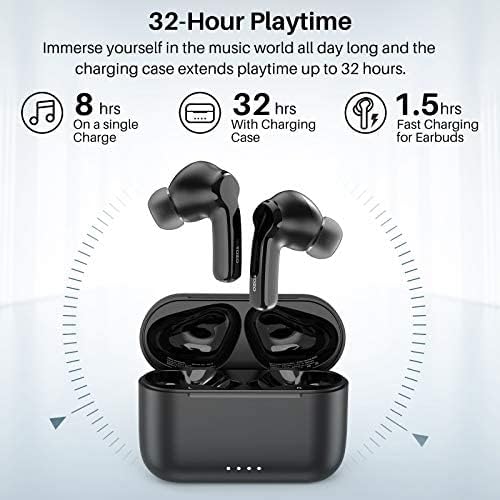
Figure 2: Battery life breakdown, showing 8 hours on a single charge and 32 hours with the charging case.
2. One-Step Pairing
The TOZO NC2 earbuds feature one-step pairing for quick and easy connection.
- Open the charging case and remove both earbuds. They will automatically power on and enter pairing mode.
- Enable Bluetooth on your mobile phone or device.
- Select "TOZO-NC2" from the list of available Bluetooth devices to pair. A voice prompt will confirm successful connection.

Figure 3: Illustration of the one-step pairing process with a smartphone.
3. Wearing the Earbuds
For optimal sound quality and comfort, ensure the earbuds are worn correctly.
- Choose the correct size eartips for a secure and comfortable fit.
- Gently insert the earbuds into your ear canals and twist slightly to lock them in place.
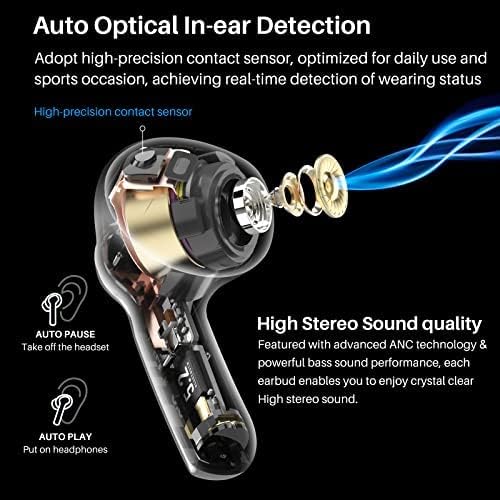
Figure 4: Proper wearing technique for the TOZO NC2 earbuds, demonstrating how they fit in the ear.
Operating Instructions
1. Touch Controls
The TOZO NC2 earbuds feature intuitive touch controls for managing audio and calls.
- Single Tap: Play/Pause audio, Answer/End call.
- Double Tap (Right Earbud): Next track.
- Double Tap (Left Earbud): Previous track.
- Press and Hold (Right Earbud): Volume up.
- Press and Hold (Left Earbud): Volume down.
- Triple Tap (Left Earbud): Toggle Active Noise Cancellation / Transparency Mode.
2. Active Noise Cancellation (ANC)
The hybrid 3-layer Active Noise Cancellation technology reduces environmental noise by up to 35dB, providing a focused listening experience.
- Outward-facing microphones detect external sounds and counter with anti-noise.
- Inward-facing microphones listen inside the ear canal to further reduce remaining noise.
- Ear caps provide passive noise isolation.
- To activate/deactivate ANC, triple tap the left earbud.

Figure 5: Detailed diagram of the Hybrid 3-layer Active Noise Cancellation mechanism.

Figure 6: Active Noise Cancellation in action, reducing lower frequency noises for improved focus.
3. Transparency Mode
Transparency Mode allows you to hear your surroundings while still enjoying your audio, enabling interaction with the world around you without removing the earbuds.
- This mode enhances the voice frequency band.
- To activate/deactivate Transparency Mode, triple tap the left earbud.

Figure 7: Transparency Mode allows users to hear and interact with their environment.
4. Optical Sensors Technology
The earbuds feature optical sensors that detect wearing status, optimizing for daily use and sports occasions.
- Auto Pause: Audio pauses automatically when earbuds are removed from ears.
- Auto Play: Audio resumes automatically when earbuds are placed back in ears.
Maintenance
Proper maintenance ensures the longevity and performance of your earbuds.
- Regularly clean the eartips and charging contacts with a soft, dry cloth.
- Avoid exposing the earbuds to extreme temperatures or direct sunlight.
- Store the earbuds in their charging case when not in use to protect them and keep them charged.
- The earbuds are IPX6 waterproof, protecting against sweat and raindrops, but are not designed for submersion.
Troubleshooting
If you encounter issues with your TOZO NC2 earbuds, refer to the following common solutions:
- Earbuds not pairing: Ensure both earbuds are removed from the case and your device's Bluetooth is on. Forget "TOZO-NC2" from your device's Bluetooth list and try pairing again.
- One earbud not working: Place both earbuds back into the charging case, close the lid, then reopen and remove them to reset the connection.
- Charging issues: Clean the charging contacts on both the earbuds and the case. Ensure the USB-C cable is securely connected and the power source is functional.
- Low battery life: Battery degradation can occur over time. Ensure earbuds and case are fully charged before extended use.
Specifications
| Model Name | NC2 |
| Connectivity Technology | Bluetooth 5.2 |
| Noise Control | Active Noise Cancellation |
| Battery Life (Earbuds) | 8 Hours (single charge) |
| Battery Life (with Case) | Up to 32 Hours |
| Water Resistance Level | IPX6 Waterproof |
| Control Method | Touch |
| Material | Plastic, Silicone |
| Item Weight | 3.52 ounces |
Warranty and Support
TOZO products typically come with an 18-month warranty. For detailed warranty information, product support, or to contact customer service, please refer to the official TOZO website or the contact information provided in your product packaging.
For further assistance, visit the TOZO Brand Store on Amazon.


