Introduction
This manual provides detailed instructions for the operation and maintenance of your ZIPCIDE 128GB Digital Voice Recorder. This device is designed for high-quality audio recording, featuring intelligent noise reduction, voice activation, and a compact, discreet design. It is suitable for various applications including lectures, meetings, interviews, and personal notes.
What's in the Box
Verify that all items are present in the package:
- Digital Voice Recorder (Pen) x 1
- 128GB TF Card x 1
- 3.5mm Headphones x 1
- Headphone Controller x 1
- Micro-USB Cable x 1
- Replacement Refill x 5
- Screwdriver x 1
- User Manual x 1

Image: The ZIPCIDE Voice Recorder shown with its accessories, including headphones, a 128GB memory card, and replacement pen refills.
Product Overview
The ZIPCIDE Voice Recorder is designed to resemble a standard writing pen, ensuring discretion and portability. Key components include:
- Top Button: Used for one-click recording, saving, and power control.
- Microphone: Integrated for audio capture.
- USB Port: Located by unscrewing the pen body, used for charging, data transfer, and headphone connection.
- TF Card Slot: Supports memory expansion (128GB card included).
- Pen Tip: Functions as a regular writing pen.
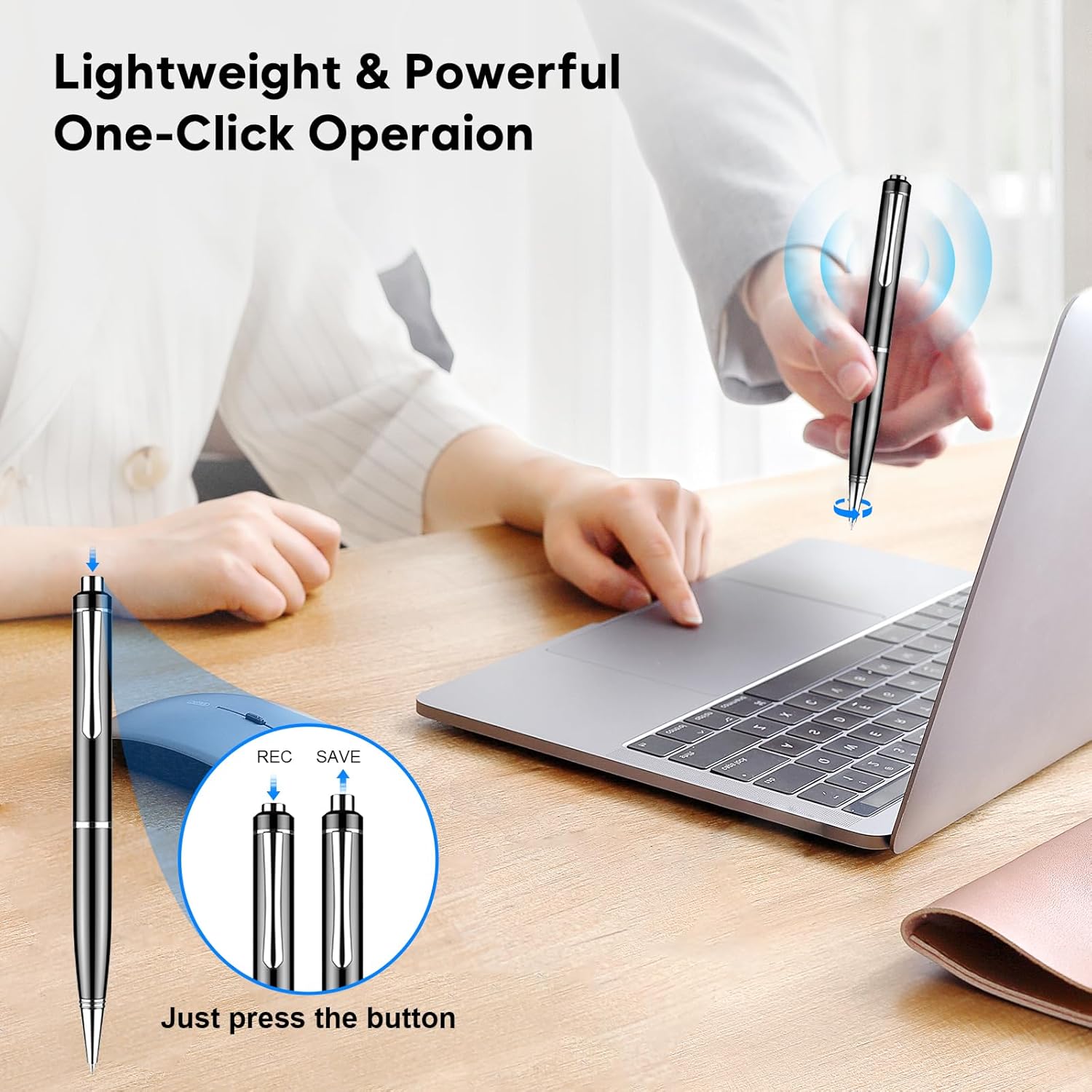
Image: A detailed view of the voice recorder pen, highlighting the one-click operation button and the internal structure for recording and saving.
Setup
1. Charging the Device
Before first use, fully charge the voice recorder. Connect the Micro-USB cable to the device's USB port (located by unscrewing the pen body) and the other end to a USB power source (e.g., computer, USB wall adapter). The device takes approximately 1.5 hours to fully charge.
2. Inserting the TF Card
The device comes with a 128GB TF card pre-installed. If you need to replace or insert a new card, unscrew the pen body to access the TF card slot. Ensure the card is inserted correctly.

Image: Illustration of the TF card slot, charging method, and the one-click recording feature of the voice recorder.
Operating Instructions
1. One-Click Recording and Saving
- To start recording, long press the top button for three seconds. The device will indicate it has started recording (refer to LED indicator behavior in the user manual for specific light patterns).
- To save the recording, long press the top button again for three seconds. The recording will be saved as a WAV file with a timestamp.

Image: A hand demonstrating the simple one-click operation of the voice recorder pen for instant recording.
2. Voice Activated Recording (VOR)
The voice-activated recording function is off by default. To enable and set the VOR level:
- Connect the recorder to your computer using the Micro-USB cable.
- Access the device's storage.
- Locate and modify the configuration file (e.g., MRECSET.TXT as mentioned in some reviews) to turn on VOR and adjust sensitivity.
- Once enabled, the recorder will automatically start recording when surrounding sound decibel changes and pause during silence, saving memory and time.

Image: The voice recorder pen in a meeting, demonstrating its Voice Activated Recording (VOR) capability to capture sound and skip silences.
3. Playback Modes
You can listen to your recordings in two ways:
a. Headphone Playback
- Unscrew the pen body to reveal the USB port.
- Connect the provided 3.5mm headphones to the device using the headphone controller and Micro-USB adapter cable.
- Use the headphone controller to navigate recordings, adjust volume, and play/pause.
b. Computer Playback and File Transfer
- Connect the recorder to your computer using the Micro-USB cable.
- The device will appear as a removable disk.
- Access the recorded WAV files directly from the device. Each file is timestamped for easy identification.
- You can copy, move, or delete files as needed.

Image: The voice recorder connected to a laptop, illustrating the convenient process of transferring and managing recorded files.
Features and Specifications
The ZIPCIDE Voice Recorder offers a range of features and technical specifications:
- Memory Capacity: 128GB (TF card included), expandable.
- Recording Time: Up to 4800 hours (at 192kbps).
- Battery Life: Up to 15 hours continuous recording, 30 hours headphone playback.
- Charging Time: Approximately 1.5 hours.
- Battery: 270mAh rechargeable battery.
- Sound Quality: Professional AI + DSP chip with intelligent digital noise reduction.
- Recording Format: WAV.
- Voice Activation: Adjustable VOR levels.
- Timestamp: Each recording file is timestamped.
- Functionality: Doubles as a music player and USB drive.
- Dimensions: 0.77 x 0.77 x 0.33 inches.
- Item Weight: 5.3 ounces.
- Hardware Interface: Micro USB 2.0 Type A.
- Microphone Form Factor: Built-In.
- Headphones Jack: 3.5 millimeters.

Image: An infographic summarizing the key features and capabilities of the ZIPCIDE voice recorder.
Maintenance
- Keep the device clean by wiping it with a soft, dry cloth.
- Avoid exposing the device to extreme temperatures, direct sunlight, or moisture.
- Store the device in a cool, dry place when not in use.
- Use only the provided or compatible Micro-USB cables for charging and data transfer.
- To replace the pen refill, use the included screwdriver to access the refill mechanism and insert a new refill.
Troubleshooting
| Problem | Possible Cause / Solution |
|---|---|
| Device not turning on or recording. | Battery may be depleted. Charge the device for at least 1.5 hours. Ensure the top button is pressed correctly for 3 seconds to initiate recording. |
| Poor audio quality / Excessive noise. | Ensure the microphone is not obstructed. The device features intelligent noise reduction, but very loud environments may still affect quality. Adjust gain settings if available via computer configuration. |
| Cannot transfer files to computer. | Ensure the Micro-USB cable is securely connected to both the device and the computer. Try a different USB port or cable. The device should appear as a removable disk. |
| Voice Activated Recording (VOR) not working. | VOR is off by default. Connect to a computer and modify the configuration file to enable VOR and set the desired sensitivity level. |
| Incorrect timestamp on recordings. | Connect the device to a computer and update the time and date in the configuration file (e.g., MRECSET.TXT). This may need to be done if the battery completely drains. |
Warranty and Support
ZIPCIDE offers a 1-Year Replacement Promise for this product. If you encounter any issues or require assistance, please contact ZIPCIDE customer service. Professional support is available 24 hours a day, and returns/exchanges are supported within 30 days.
- Warranty Period: 1 Year
- Support Availability: 24/7 Professional Support
- Returns/Exchanges: 30 Days

Image: An overview of the included accessories and the 1-Year Replacement Promise.


