
1. Introduction
This manual provides essential information for the safe and efficient operation of your DaranEner NEOZ 300W Portable Power Station. Please read this manual thoroughly before using the device and retain it for future reference.
The DaranEner NEOZ is a compact and versatile portable power station designed to provide reliable power for various electronic devices and small appliances. Featuring a durable LiFePO4 battery, multiple output ports, and flexible recharging options, it is suitable for outdoor activities, emergency backup, and general home use.
2. Safety Information
Always observe the following safety precautions to prevent injury or damage to the device:
- Do not disassemble, repair, or modify the unit.
- Do not expose the unit to fire, direct sunlight, or high temperatures.
- Avoid extreme temperatures and humidity. Store in a cool, dry place.
- Keep out of reach of children and pets.
- Ensure proper ventilation during use and charging.
- Do not use the unit if it is damaged or appears to be malfunctioning.
- Use only approved accessories and charging cables.
- Avoid dropping or subjecting the unit to strong impacts.
- Do not block the ventilation openings.
3. Product Overview

Figure 1: Front view of the DaranEner NEOZ Portable Power Station, showing the display, input/output ports, and controls.
3.1 Components and Features
- Digital Display: Shows battery level, input/output wattage, remaining runtime, and active ports.
- AC Outlets (x2): 110V, 300W continuous (600W surge) pure sine wave output for household appliances.
- USB-C PD (x1): 60W Power Delivery for fast charging compatible devices.
- USB-A QC3.0 (x2): 18W Quick Charge 3.0 for rapid charging of smartphones and tablets.
- DC Output (x1): 12V port for various DC-powered devices.
- Input/MPPT Port: For charging via AC wall adapter, solar panel, or car charger.
- LED Flashlight: Built-in light with multiple modes (Low, High, Strobe, SOS).
- LiFePO4 Battery: Long-lasting and safe battery technology with over 3,500 cycles.
- Battery Management System (BMS): Protects against overcurrent, overheat, and short circuits.
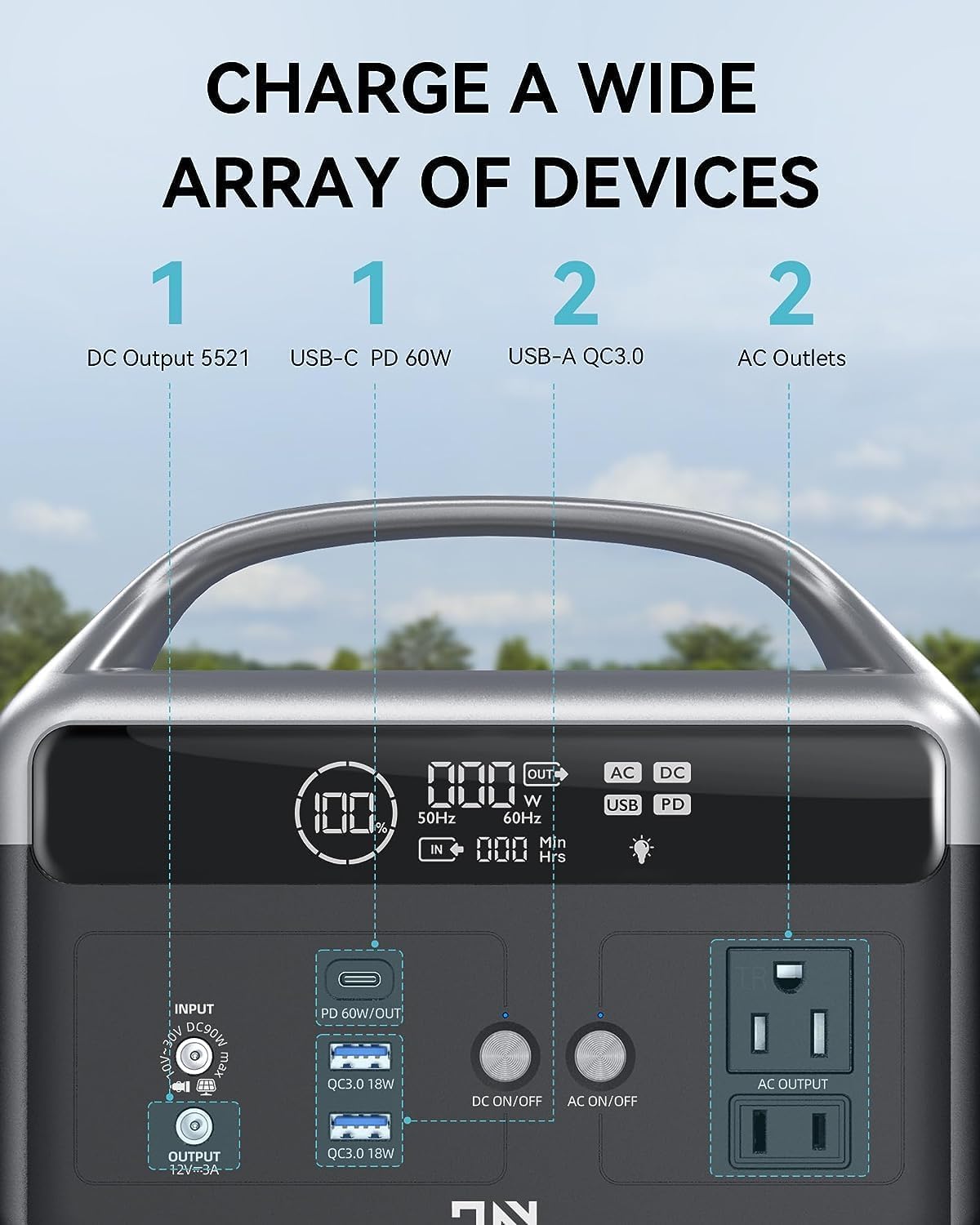
Figure 2: Detailed diagram of the DaranEner NEOZ control panel, highlighting each port and button.
4. Setup
4.1 Unboxing and Initial Charge
- Carefully remove the DaranEner NEOZ from its packaging.
- Inspect the unit for any signs of damage. If damaged, do not use and contact customer support.
- Before first use, fully charge the power station using the provided AC wall adapter. Plug the adapter into the Input/MPPT port and then into a standard wall outlet. The display will indicate charging status.

Figure 3: The DaranEner NEOZ can be recharged using an AC wall outlet, a solar panel (sold separately), or a car charger (sold separately).
5. Operating Instructions
5.1 Powering On/Off
- To power on the unit, press and hold the main power button for 3 seconds. The digital display will illuminate.
- To power off the unit, press and hold the main power button for 3 seconds. The display will turn off.
5.2 Using AC Outlets
- Ensure the power station is turned on.
- Press the "AC ON/OFF" button to activate the AC outlets. The AC indicator on the display will light up.
- Plug your AC-powered device into one of the 110V AC outlets.
- Monitor the display for real-time wattage output and estimated remaining runtime.
- After use, press the "AC ON/OFF" button again to turn off the AC outlets.
5.3 Using DC Ports (USB-C, USB-A, 12V)
- Ensure the power station is turned on.
- Press the "DC ON/OFF" button to activate the DC ports. The DC and USB indicators on the display will light up.
- Plug your USB or 12V DC-powered device into the appropriate port.
- Monitor the display for real-time wattage output and estimated remaining runtime.
- After use, press the "DC ON/OFF" button again to turn off the DC ports.
5.4 Charging the Power Station
The DaranEner NEOZ offers three flexible charging methods:
- AC Wall Charging: Connect the provided AC wall adapter to the Input/MPPT port and a wall outlet. Fully charges in approximately 2 hours.
- Solar Charging: Connect a compatible solar panel (up to 60W, sold separately) to the Input/MPPT port. The integrated MPPT controller optimizes charging efficiency.
- Car Charging: Connect a compatible car charger (sold separately) to the Input/MPPT port and your vehicle's 12V cigarette lighter socket.
5.5 LED Flashlight Operation
- Press the LED button once for Low brightness mode.
- Press again for High brightness mode.
- Press a third time for Strobe mode.
- Press a fourth time for SOS mode.
- Press a fifth time to turn off the flashlight.

Figure 4: The built-in LED flashlight offers multiple lighting modes for various situations.
5.6 Display Information
The digital display provides real-time operational data:
- Battery Level Indicator: Shows remaining battery capacity as a percentage.
- Input Indicator: Displays incoming wattage during charging.
- Output Indicator: Shows outgoing wattage to connected devices.
- Time Unit Indicator: Displays estimated remaining runtime in hours or minutes.
- Alarm Indicator: Alerts to potential issues (e.g., overload, overheat).
- Port Indicators: Icons for AC, DC, USB, and PD illuminate when active.

Figure 5: The digital display provides comprehensive information about the power station's status.
6. Maintenance
6.1 Battery Care
- For optimal battery life, fully charge the unit every 3-6 months, even if not in use.
- Avoid completely draining the battery frequently.
- Store the unit in a cool, dry place away from direct sunlight and extreme temperatures.
6.2 Cleaning
- Use a soft, dry cloth to clean the exterior of the power station.
- Do not use abrasive cleaners or solvents.
- Keep ports free of dust and debris.
7. Troubleshooting
| Issue | Possible Cause | Solution |
|---|---|---|
| Unit does not turn on | Battery is completely drained. | Charge the unit using the AC wall adapter. |
| No output from AC/DC ports | AC/DC output not activated. Device power consumption exceeds limit. | Press the respective ON/OFF button. Check device wattage (max 300W). |
| Charging is slow or not working | Incorrect charger/cable. Solar panel not receiving enough sunlight. | Ensure correct charger/cable. Reposition solar panel for direct sunlight. |
| Alarm indicator is on | Overload, overheat, or other internal error. | Disconnect devices, allow unit to cool down. If issue persists, contact support. |
8. Specifications
| Feature | Detail |
|---|---|
| Model Name | NEOZ |
| Battery Type | LiFePO4 |
| Capacity | 192Wh |
| AC Output | 300W (600W Surge), 110V Pure Sine Wave |
| USB-C PD Output | 60W |
| USB-A QC3.0 Output | 18W (x2) |
| DC Output | 12V/10A |
| AC Input Charging | Up to 100W (approx. 2 hours to 100%) |
| Solar Input Charging | Up to 60W (MPPT compatible) |
| Product Dimensions | 7.1 x 8.6 x 5.1 inches |
| Item Weight | 7.06 pounds |
| Lifespan | 3,500+ cycles to ≥80% capacity |
9. Warranty and Support
DaranEner offers a 5-year service for this product. For any questions or support needs, please contact DaranEner customer service. They aim to respond within 24 hours.
For further assistance, please visit the official DaranEner store: DaranEner Store
10. Product Videos
Fast Charging Generator for Camping
Description: This video from DaranEner Direct demonstrates the fast charging capabilities of the portable power station, highlighting its use for camping and outdoor activities.
300W(600W Surge) Portable Power Station with Storage Bag
Description: An official video from DaranEner Direct showcasing the 300W portable power station, including its design and the convenience of an optional storage bag.
Portable Power Station 56,000mAh with Storage Bag
Description: This video from DaranEner Direct highlights the features of the portable power station, emphasizing its 56,000mAh capacity and the utility of its storage bag.


