1. Introduction
Thank you for choosing the 10L0L 15A/48V Golf Cart Battery Charger. This manual provides essential information for the safe and efficient operation, installation, and maintenance of your charger. This charger is designed for 48V golf carts, specifically compatible with Club Car DS and Precedent models, and supports various battery types including lead-acid, maintenance-free, and lithium iron phosphate batteries. It features an IP67 waterproof rating, an efficient cooling system, and Bluetooth app functionality for monitoring.
2. Safety Information
Please read all safety instructions carefully before using the charger. Failure to follow these instructions may result in electric shock, fire, or serious injury.
- Electrical Safety: Always connect the charger to a grounded outlet. Do not use if the power cord or charging cables are damaged. Avoid touching live parts.
- Battery Safety: Wear eye protection and gloves when handling batteries. Ensure proper ventilation in the charging area. Do not charge frozen batteries.
- Environmental Conditions: The charger has an IP67 waterproof rating, allowing for outdoor use. However, avoid submerging the charger in water. Operate within specified temperature ranges.
- Children and Pets: Keep the charger and charging area away from children and pets.
- Modifications: Do not attempt to open or modify the charger. Repairs should only be performed by qualified personnel.
3. Package Contents
Verify that all items are present in the package:
- 10L0L 15A/48V Golf Cart Battery Charger
- OBC (On-Board Computer) Bypass Cable
- User Manual
4. Setup & Installation
This charger is designed for Club Car DS and Precedent models. For these models, it is necessary to bypass the On-Board Computer (OBC) for proper operation. The OBC bypass cable is included.
4.1 OBC Bypass Installation
Warning: Ensure the golf cart is turned off and the tow/run switch is in the 'TOW' position before beginning installation. Disconnect the main battery pack before proceeding.
- Locate the golf cart's batteries and the OBC unit.
- Disconnect the negative lead from the battery pack.
- Disconnect the wires from the OBC unit.
- Connect the provided OBC bypass cable according to the specific wiring diagram for your golf cart model. Ensure all connections are secure.
- Insulate any exposed wires with electrical tape.
- Reconnect the negative lead to the battery pack.
- Return the tow/run switch to the 'RUN' position.
For a visual guide on OBC bypass and charger connection, please refer to the installation video below:
Video Description: This video demonstrates the quick and easy installation process, including bypassing the OBC (On-Board Computer) and connecting the 10L0L 15A/48V Golf Cart Battery Charger to a Club Car golf cart. It shows step-by-step instructions for securing battery terminals and charger connections.
4.2 Connecting the Charger
- Ensure the golf cart is off and the tow/run switch is in the 'TOW' position.
- Plug the charger's output cable into the golf cart's charging port.
- Plug the charger's AC input cable into a standard 120VAC wall outlet.

Image Description: A 10L0L 15A/48V Golf Cart Battery Charger, orange in color, is shown connected to a light blue golf cart. A hand holds a smartphone displaying the charger's Bluetooth app interface, showing charging status. The charger is plugged into a wall outlet.
5. Operating Instructions
5.1 Battery Type Selection
The charger supports three battery types: Flooded/Wet, AGM/GEL, and Lithium. It is crucial to select the correct battery type for optimal charging and battery longevity.
- After connecting the charger to the golf cart and power outlet, the indicator lights will show the initial status.
- To select the battery type, unplug the charging head from the golf cart.
- Press the 'MODE SELECT' button on the charger four times in a row. The indicator light for the currently selected battery type will illuminate.
- Long press the 'MODE SELECT' button until the prompt light shows green to confirm your selection.
- Reconnect the charging head to the golf cart.
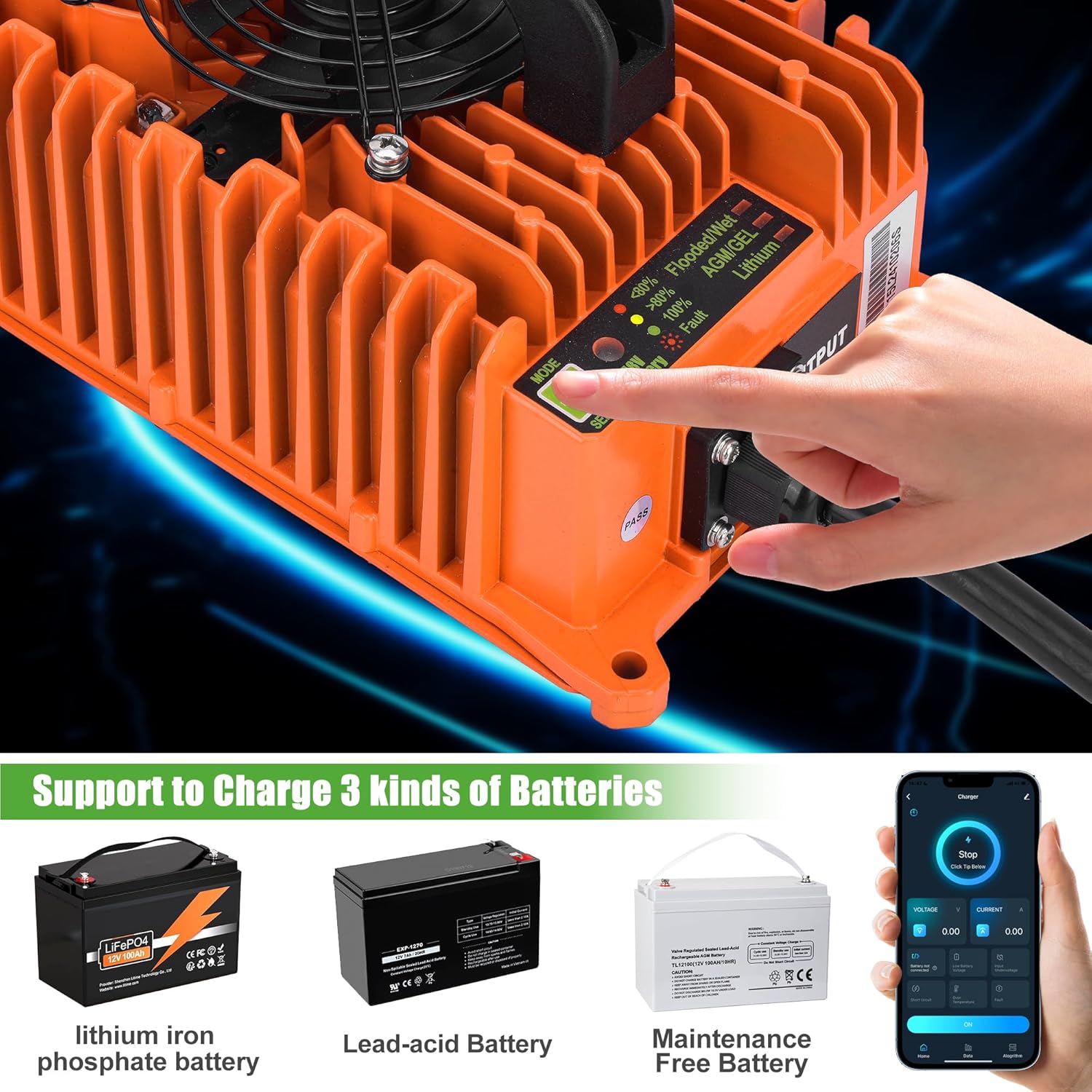
Image Description: A close-up view of the 10L0L 15A/48V Golf Cart Battery Charger's control panel. It shows the 'MODE SELECT' button and indicator lights for 'Flooded/Wet', 'AGM/GEL', and 'Lithium' battery types, with a hand pressing the button.
5.2 Charging Process
Once the correct battery type is selected and the charger is connected, it will begin charging automatically. The indicator lights provide charging status:
- Red Light: Battery level is less than 80%.
- Yellow Light: Battery level is greater than 80%.
- Green Light: Battery is 100% charged.
The charger offers 15A fast charging, typically fully charging your battery in 6 to 10 hours.

Image Description: The 10L0L 15A/48V Golf Cart Battery Charger is shown with its charging plug emitting a blue lightning effect, symbolizing its 48V 15AMP fast charging capability. Text indicates '4-6 HOURS FULL CHARGE' and '900W High Power Output'.
5.3 Bluetooth App Functionality
The charger features a built-in Bluetooth function, allowing you to monitor and control charging via a smartphone app.
- Scan the QR code provided in the manual or on the charger to download the 'Smart Life' app.
- Open the app and add a new device. The app will search for nearby devices.
- Select the 'Charger' from the discovered devices to pair.
- Once connected, you can monitor charging progress, time, and access historical charging data.
- The app also allows you to select the charging mode (battery type) remotely. The default password for changing charging modes via the app is 654321.
Video Description: This video demonstrates the Bluetooth APP functionality of the 10L0L 15A/48V Golf Cart Battery Charger. It shows how to connect the charger to the app, monitor charging status, select battery charging modes, and view charging data.
6. Maintenance
Proper maintenance ensures the longevity and performance of your charger.
- Cleaning: Regularly wipe the charger's exterior with a dry, soft cloth. Do not use harsh chemicals or abrasive cleaners. Ensure the cooling fan is free from dust and debris.
- Storage: Store the charger in a cool, dry place when not in use. Avoid extreme temperatures.
- Cable Inspection: Periodically inspect the AC input cable and DC output cable for any signs of damage, fraying, or loose connections.
- Automatic Recharge: If the battery voltage drops below 48V after 7 days, the charger will automatically initiate a recharge cycle to maintain battery health.

Image Description: A person's hand is shown holding the 10L0L 15A/48V Golf Cart Battery Charger by its integrated black handle. The image highlights the charger's portable and easy-to-carry design, with text indicating 'Upgrade The Handle Design' and 'Light Weight And Easy To Carry'.
7. Troubleshooting
If you encounter issues with your charger, refer to the following common problems and solutions:
| Problem | Possible Cause | Solution |
|---|---|---|
| Charger not turning on | No power from outlet, loose connection, charger fault. | Check power outlet, ensure cables are securely connected. If still not working, contact support. |
| Charging indicator light not changing | Incorrect battery type selected, battery fault, charger fault. | Verify correct battery type selection. Check for fault indicators on the charger or app. |
| Fault indicator light (red) is on | Various faults (e.g., short circuit, over-temperature, low battery voltage, high input voltage). | Refer to the charger's indicator legend or the Bluetooth app for specific fault details and recommended actions. Disconnect and reconnect the charger. |
| Bluetooth app not connecting | Bluetooth off on phone, charger not in pairing mode, interference. | Ensure phone's Bluetooth is on. Restart charger and app. Try pairing in close proximity. |
The charger is equipped with multiple protection features including overvoltage, overcurrent, overheating, short-circuit, reverse connection, no-load, and timing charging protection to prevent damage.

Image Description: A graphic illustrating various safety features of the 10L0L 15A/48V Golf Cart Battery Charger, including Overvoltage Protection, Overcurrent Protection, Overheating Protection, Short-circuit Protection, Reverse Connection Protection, No-load Protection, and Timing Charging Protection.
8. Specifications
| Feature | Specification |
|---|---|
| Model Number | DM48LB0K8 |
| Input Voltage | 120VAC, 50/60Hz, 11A |
| Output Voltage | 48V |
| Output Current | 15A |
| Power | 800W |
| Product Dimensions | 9.65 x 5.35 x 3.35 inches |
| Item Weight | 8.56 pounds |
| Waterproof Rating | IP67 |
| Battery Compatibility | Flooded/Wet Lead-Acid, AGM/GEL, Lithium Iron Phosphate |
| Cooling System | Integrated Fan |
| Connectivity | Bluetooth App |
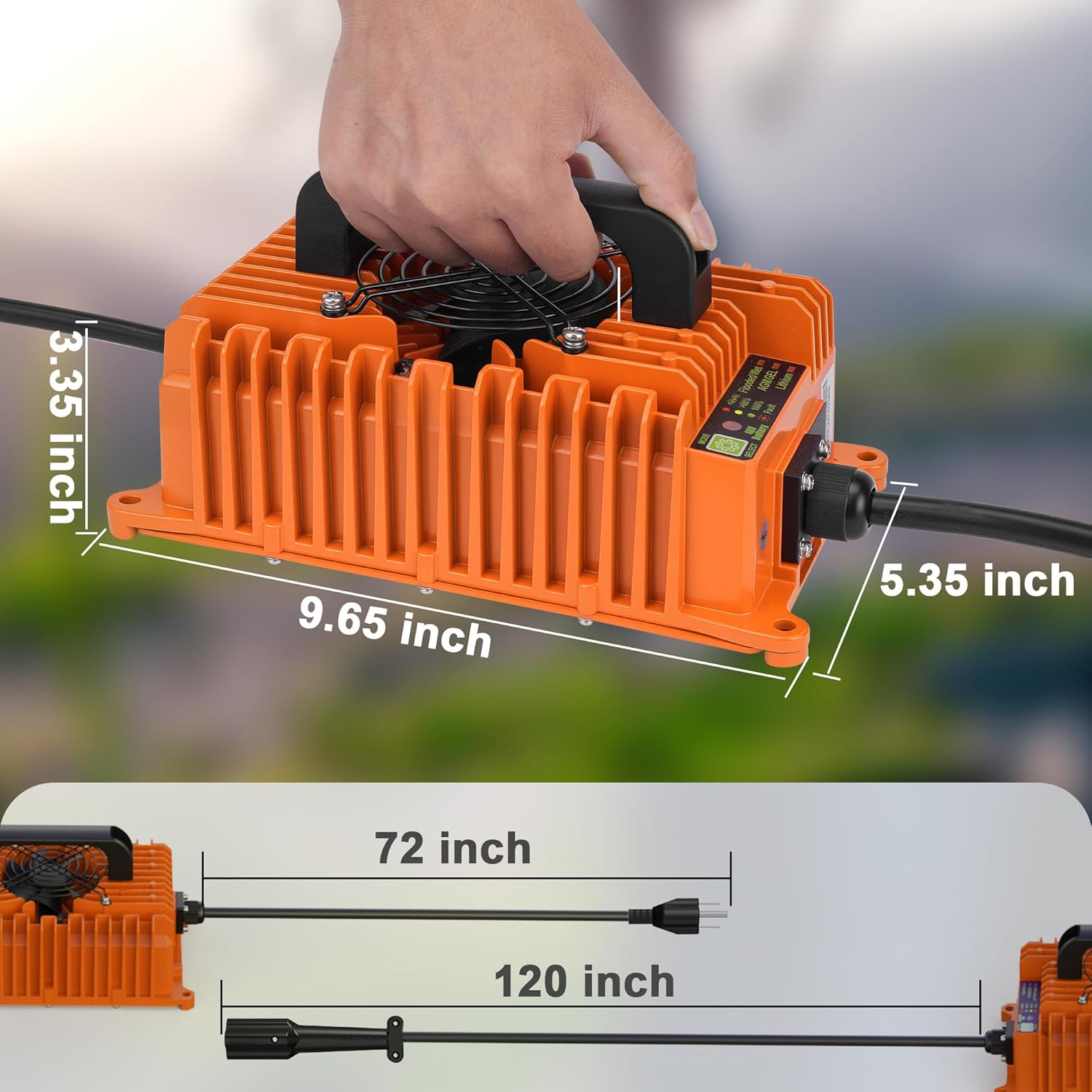
Image Description: A diagram illustrating the physical dimensions of the 10L0L 15A/48V Golf Cart Battery Charger. The charger measures 9.65 inches in length, 5.35 inches in width, and 3.35 inches in height. Cable lengths are also indicated as 72 inches for the AC input and 120 inches for the DC output.
9. Warranty & Support
For warranty information, technical support, or service inquiries, please refer to the product packaging or contact 10L0L customer service directly. Keep your purchase receipt for warranty claims.


