1. Important Safety Instructions
Please read and understand all safety instructions before using this product. Keep these instructions for future reference.
- Power Source: Use only the specified power adapter or batteries. Ensure the voltage matches the unit's requirements.
- Water and Moisture: Do not expose the unit to rain, moisture, or dripping water. Do not place objects filled with liquids on the unit.
- Ventilation: Ensure proper ventilation. Do not block any ventilation openings.
- Heat: Keep the unit away from heat sources such as radiators, heat registers, stoves, or other apparatus that produce heat.
- Cleaning: Clean only with a dry cloth. Do not use liquid cleaners or aerosol cleaners.
- Servicing: Do not attempt to service this product yourself. Refer all servicing to qualified service personnel.
- Laser Safety: This unit contains a laser component. Do not open the CD compartment while a disc is playing. Avoid direct exposure to the laser beam.
2. Package Contents
Verify that all items are present in the package:
- G Keni Portable CD and Cassette Player Boombox Combo
- AC Power Cord
- Remote Control
- User Manual (this document)
3. Product Overview
The G Keni BT-9224MU is a versatile audio system combining a CD player, cassette player/recorder, AM/FM radio, Bluetooth speaker, and USB playback. It features dual 3W speakers for stereo sound and can be powered by AC or batteries for portability.
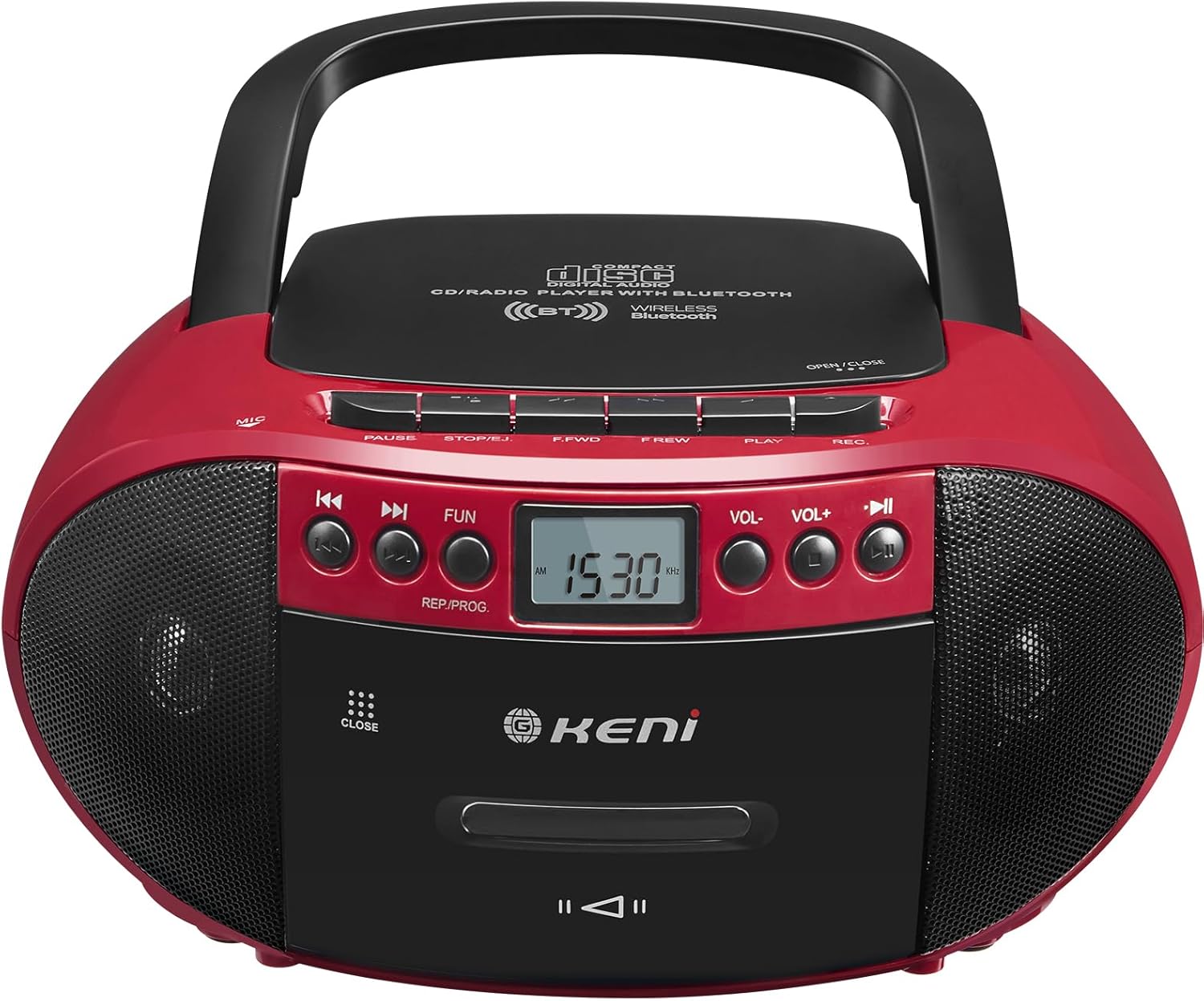
Figure 3.1: Front view of the G Keni BT-9224MU Boombox.

Figure 3.2: The boombox highlighting its five playback modes: CD Player, Cassette Player, FM/AM Radio, USB Input, and Bluetooth.
4. Setup
4.1 Powering the Unit
The boombox can be powered by either AC power or batteries.
4.1.1 AC Power Connection
- Locate the AC power input jack on the back of the unit.
- Connect the supplied AC power cord to the jack.
- Plug the other end of the AC power cord into a standard wall outlet (100-240V, 50/60Hz).
4.1.2 Battery Installation
For portable use, the unit requires 6 x 'C' size batteries (not included).
- Open the battery compartment cover located on the bottom of the unit.
- Insert 6 'C' size batteries, ensuring correct polarity (+/-) as indicated inside the compartment.
- Close the battery compartment cover securely.

Figure 4.1: Illustrations of AC power connection and battery installation.
4.2 Antenna Adjustment
For optimal FM radio reception, extend the telescopic antenna. For AM reception, the unit has a built-in ferrite bar antenna, so repositioning the unit may improve reception.
5. Operating Instructions
5.1 General Controls
- POWER Button: Turns the unit ON or OFF.
- FUNCTION/MODE Button: Switches between CD/USB/Bluetooth, Cassette, and AM/FM Radio modes.
- VOLUME +/- Buttons: Adjusts the audio output level.
- PLAY/PAUSE Button: Starts or pauses playback in CD, USB, or Bluetooth modes.
- STOP/EJECT Button: Stops playback and opens the CD lid or cassette door.
- SKIP/SEARCH Buttons (◀◀ / ▶▶): Skips tracks/files or fast forwards/rewinds.
5.2 CD Player Operation
The unit supports CD, CD-R, CD-RW, and MP3 discs.
- Important: Before first use, remove the laser lens protector paper plate from the CD compartment.
- Press the FUNCTION/MODE button to select CD mode.
- Press the STOP/EJECT button to open the CD compartment lid.
- Place a CD with the label side facing up onto the spindle.
- Close the CD compartment lid. The unit will read the disc.
- Press the PLAY/PAUSE button to start playback.
- Use SKIP/SEARCH buttons to navigate tracks.

Figure 5.1: Inserting a CD into the boombox, with the remote control visible.
5.3 Cassette Player & Recorder Operation
The unit allows playback and recording of standard audio cassettes.
5.3.1 Cassette Playback
- Press the FUNCTION/MODE button to select Cassette mode.
- Press the STOP/EJECT button to open the cassette door.
- Insert a cassette tape with the open edge facing upwards.
- Close the cassette door.
- Press the PLAY button (usually indicated by a triangle) to start playback.
- Use FAST FORWARD (F.FWD) and REWIND (F.REW) buttons to navigate the tape.
- Press the STOP/EJECT button to stop playback and open the door.

Figure 5.2: A cassette tape being inserted into the boombox.
5.3.2 Cassette Recording
The unit can record from the radio, CD, or via its built-in microphone.
- Insert a blank cassette tape into the cassette compartment.
- Select the desired source for recording (CD, Radio, or ensure no other source is playing for voice recording).
- Press the RECORD (REC) button (usually red) to begin recording. The PLAY button will also engage automatically.
- To stop recording, press the STOP/EJECT button.
5.4 AM/FM Radio Operation
Enjoy local radio broadcasts with the built-in tuner.
- Press the FUNCTION/MODE button to select AM or FM radio mode.
- Extend the telescopic antenna for FM reception. Adjust its position for best signal.
- Use the TUNING knob or buttons (if available) to scan for stations. The LCD screen will display the frequency.
- Adjust the VOLUME to your desired level.

Figure 5.3: The boombox being used to listen to AM/FM radio outdoors.
5.5 Bluetooth Operation
Connect your Bluetooth-enabled devices to stream audio wirelessly.
- Press the FUNCTION/MODE button to select Bluetooth mode. The unit will enter pairing mode, indicated by a flashing Bluetooth icon or audible prompt.
- On your mobile device, enable Bluetooth and search for available devices.
- Select "G Keni BT-9224MU" (or similar name) from the list to pair.
- Once paired, you can play audio from your device through the boombox.

Figure 5.4: A smartphone streaming music to the boombox via Bluetooth 5.1.
5.6 USB Playback
Play MP3/WMA audio files directly from a USB flash drive.
- Insert a USB flash drive into the USB port on the unit.
- Press the FUNCTION/MODE button to select USB mode. The unit will automatically detect and begin playing compatible audio files.
- Use PLAY/PAUSE and SKIP/SEARCH buttons to control playback.
5.7 Using the Remote Control
The included remote control provides convenient operation for certain functions.
- The remote control can operate functions for CD, Bluetooth, and USB playback.
- It cannot control cassette and radio playback.
- Ensure the remote control has working batteries and is pointed towards the front of the boombox.
5.8 Headphone Usage
Connect headphones to the 3.5mm headphone jack for private listening. When headphones are connected, the main speakers will be muted.
6. Maintenance
6.1 Cleaning the Unit
- Wipe the exterior of the unit with a soft, dry cloth.
- Do not use abrasive cleaners, waxes, or solvents as they may damage the finish.
6.2 CD Lens Care
- A dirty CD lens can cause skipping or playback errors. Use a specialized CD lens cleaning kit if necessary.
- Avoid touching the lens directly.
6.3 Cassette Head Cleaning
- Over time, cassette heads can accumulate dust and oxide, affecting sound quality. Use a cassette head cleaning tape or a cotton swab with isopropyl alcohol to gently clean the heads and pinch rollers.
7. Troubleshooting
If you encounter issues with your G Keni BT-9224MU, refer to the following common problems and solutions:
| Problem | Possible Cause | Solution |
|---|---|---|
| No power | AC cord not connected; Batteries depleted or incorrectly inserted. | Check AC cord connection; Replace batteries or ensure correct polarity. |
| CD not playing / Skipping | Disc is dirty or scratched; Laser lens is dirty; Disc inserted incorrectly. | Clean the disc; Clean the laser lens; Re-insert disc with label side up. Ensure laser lens protector was removed. |
| Cassette not playing / Poor sound | Tape is tangled or damaged; Cassette heads are dirty. | Check tape condition; Clean cassette heads and pinch rollers. |
| Poor radio reception | Antenna not extended/adjusted; Weak signal. | Extend and adjust FM antenna; Reposition the unit for AM reception. |
| Bluetooth not connecting | Unit not in Bluetooth mode; Device not in pairing mode; Too far from unit. | Ensure unit is in Bluetooth mode; Put device in pairing mode; Move device closer to the unit. |
| Remote control not working | Batteries depleted; Obstruction between remote and unit. | Replace remote batteries; Remove any obstructions. Note: Remote does not control cassette or radio. |
8. Specifications
| Feature | Specification |
|---|---|
| Model Number | BT-9224MU |
| Power Source | AC 100-240V ~ 50/60Hz / 6 x 'C' size batteries (DC 9V) |
| Speaker Output Power | 3 Watts (per speaker, total 6W) |
| Connectivity | Bluetooth 5.1, USB, Auxiliary, AM/FM Radio |
| Compatible Disc Types | CD, CD-R, CD-RW, MP3 |
| Audio Output Mode | Stereo |
| Product Dimensions | 10 x 8.8 x 5 inches (25.4 x 22.35 x 12.7 cm) |
| Item Weight | 2.64 pounds (1.2 kg) |
| Material | Plastic |
| Included Components | AC Cord, Remote Control |
9. Warranty and Support
9.1 Warranty Information
This G Keni product is covered by a 12-month warranty service from the date of purchase. This warranty covers manufacturing defects and workmanship under normal use.
9.2 Customer Support
For any questions, technical assistance, or warranty claims, please contact G Keni customer service. We are committed to providing support and ensuring customer satisfaction.
Please refer to the detailed user manual included in your package or visit the official G Keni website for the most up-to-date support information.


