
Introduction
Thank you for choosing the Qecnato G2 Bluetooth Headset. This manual provides detailed instructions for setting up, operating, and maintaining your new headset. The G2 headset features advanced Bluetooth 5.3 technology for stable connections, Environmental Noise Control (ENC) for clear calls, and a comfortable, flexible design for extended wear.

Image: Qecnato G2 Bluetooth Headset and its charging case.
What's in the Box
Verify that all items are present in the package:
- Bluetooth Earpiece (1 unit)
- User Manual
- Charging Cable (Type-C)
- Wireless Charging Case
- Replaceable Ear Caps (S/M/L sizes)

Image: Package contents of the Qecnato G2 Bluetooth Headset.
Product Features
- Bluetooth 5.3 Technology: Ensures quick, stable, and low-latency connections up to 15 meters (49 feet).
- Environmental Noise Control (ENC) Mic: Passively eliminates up to 75% of background noise for clear calls.
- High-Fidelity Audio: Features 14.2mm composite dynamic drivers with AAC and SBC audio encoding for immersive sound.
- Extended Battery Life: Up to 60 hours of standby time with the 400mAh charging case. Single earpiece provides approximately 12 hours of music time or 10 hours of talk time.
- LED Digital Display: Shows the remaining power of the charging case.
- IP7 Waterproof Rating: Provides protection against water immersion.
- Ergonomic and Flexible Design: Lightweight earpiece with soft silicone ear pads. Features a 360° rotatable ear hook and 180° rotatable arm for a comfortable and secure fit on either ear.
- Smart Button Controls: Independent volume and multimedia buttons for easy adjustment, call management, and voice assistant activation.
- Voice Assistant Support: Easily activate Siri or other voice assistants.
- Dual Device Connection: Connects to two devices simultaneously.

Image: Exploded view illustrating the HiFi stereo sound components of the headset.

Image: Headset in charging case with LED display and battery life indicators.

Image: Headset demonstrating noise cancellation in a busy setting.
Setup Instructions
1. Charging the Headset and Case
Before first use, fully charge the headset and its charging case.
- Connect the provided Type-C charging cable to the charging case and a USB power source.
- The LED digital display on the charging case will show the charging status and battery level.
- A full charge for the earpiece takes approximately 1.5 hours. The charging case also takes about 1.5 hours to fully charge.

Image: Headset charging via Type-C cable, showing battery indicators.
2. Pairing with a Device
The Qecnato G2 headset uses Bluetooth 5.3 for quick and stable connections.
- Ensure the headset is charged.
- Turn on the headset. It will automatically enter pairing mode (indicated by a flashing LED light).
- On your smartphone, tablet, or other Bluetooth-enabled device, go to the Bluetooth settings.
- Search for available devices and select "Qecnato G2" from the list.
- Once connected, the LED light on the headset will stop flashing.
- The headset can connect to two devices simultaneously.

Image: Headset connected to various devices via Bluetooth 5.3.
3. Adjusting for Comfort
The headset is designed for superior comfort and can be adjusted to fit either ear.
- The ear hook can rotate 360° to fit your left or right ear.
- The arm of the earpiece can rotate 180° for optimal positioning.
- Experiment with the included S/M/L ear caps to find the best fit for noise isolation and comfort.
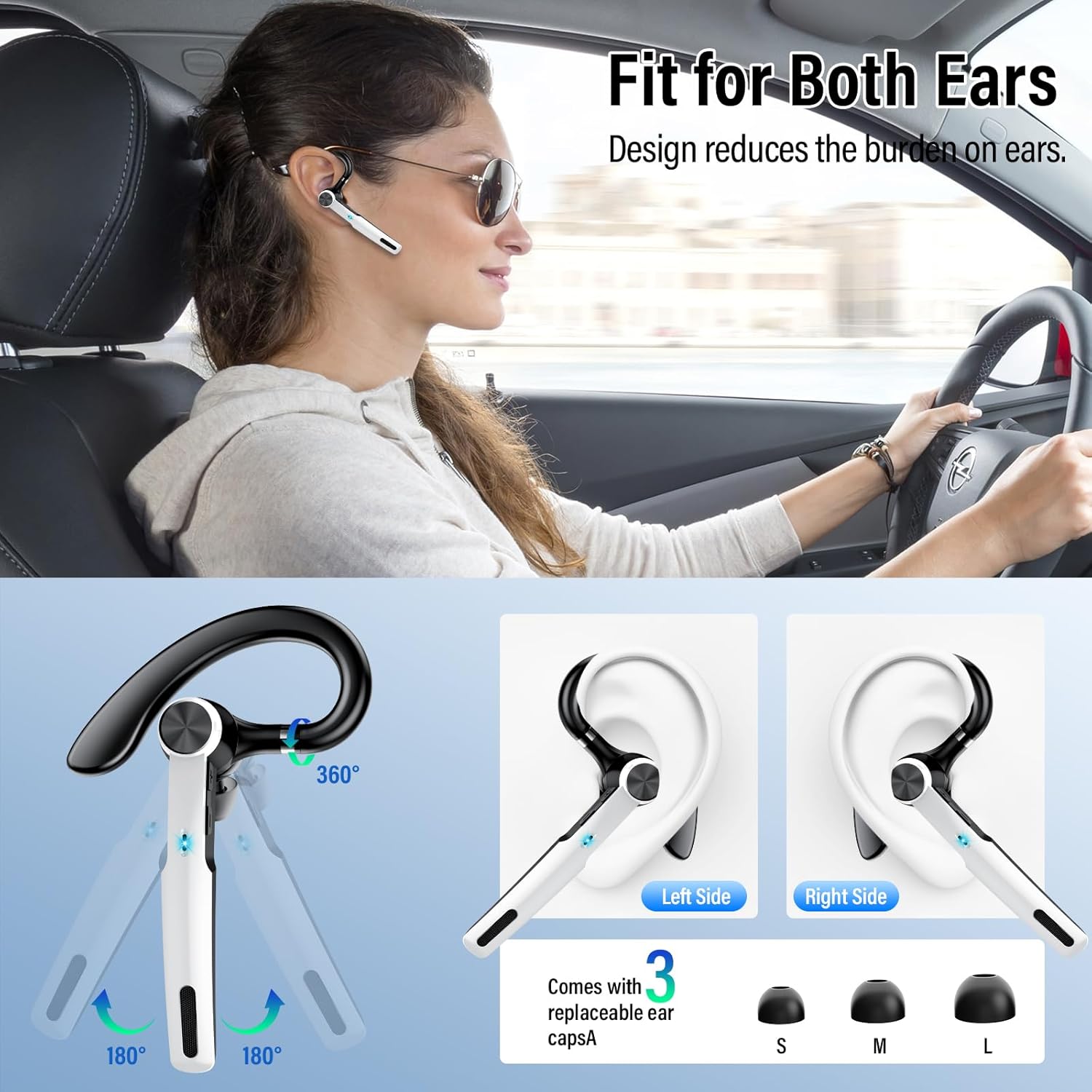
Image: Headset adjustability for left/right ear and ear cap options.
Operating Instructions
Button Functions
The Qecnato G2 headset features intuitive button controls for various functions.

Image: Overview of headset button controls.
- Power On/Off: Press and hold the Power button.
- Play/Pause Music: Single press the Multi-function button.
- Answer/End Call: Single press the Multi-function button during an incoming call or active call.
- Reject Call: Press and hold the Multi-function button during an incoming call.
- Volume Up/Down: Use the dedicated Volume +/- buttons.
- Next/Previous Track: Press the Volume +/- buttons (specific press duration or double-tap may apply, refer to quick start guide if included).
- Mute/Unmute: Press the Mute button (if available, or a combination of volume buttons).
- Activate Voice Assistant (Siri/Google Assistant): Press and hold the Multi-function button for 1 second.
Maintenance
Proper maintenance ensures the longevity and optimal performance of your Qecnato G2 headset.
- Cleaning: Use a soft, dry cloth to wipe the headset and charging case. Do not use abrasive cleaners or solvents.
- Water Resistance: The headset is IP7 waterproof. This means it can withstand immersion in water up to 1 meter for 30 minutes. However, it is not recommended for swimming or prolonged submersion. Ensure the charging port is dry before charging.
- Storage: Store the headset in its charging case when not in use to protect it and keep it charged. Avoid extreme temperatures.
- Ear Caps: Regularly clean the ear caps with a damp cloth. Replace them if they become worn or damaged to maintain hygiene and sound quality.

Image: Headset demonstrating IP7 waterproof capability.
Troubleshooting
If you encounter issues with your Qecnato G2 headset, refer to the following common solutions:
| Problem | Possible Solution |
|---|---|
| Headset does not power on. | Ensure the headset is fully charged. Place it in the charging case and connect the case to power. |
| Cannot pair with device. |
|
| No sound or low volume. |
|
| Call quality is poor. |
|
| Charging case LED display is off. | Connect the charging case to a power source to check if it's charging. The display activates when charging or when the case is opened. |
Specifications
| Feature | Detail |
|---|---|
| Model Number | G2 |
| Bluetooth Version | 5.3 |
| Bluetooth Range | Up to 15 meters (49 feet) |
| Ear Placement | Over Ear |
| Form Factor | In Ear |
| Earpiece Shape | Hook |
| Noise Control | Passive Noise Cancellation (ENC Mic) |
| Audio Driver Type | Dynamic Driver (14.2mm) |
| Frequency Range | 20Hz - 20,000Hz |
| Control Type | Button Control (Push Button, Voice) |
| Battery Charge Time (Earpiece) | 1.5 Hours |
| Battery Average Life (Earpiece) | Approx. 10-12 Hours (Talk/Music) |
| Charging Case Battery Capacity | 400 mAh |
| Charging Case Battery Life | Up to 48 Hours (additional playtime) |
| Charging Case Charge Time | 1.5 Hours |
| Connectivity | Wireless (Bluetooth) |
| Water Resistance Level | IP7 Waterproof |
| Compatible Devices | iOS, Android, and other Bluetooth-enabled devices (e.g., iPhone 11-16, Samsung Galaxy S6-S8, Moto, Sony Xperia, Xiaomi, Huawei, LG) |
| Material | Plastic |
Warranty and Support
Qecnato provides a 24-month repairment warranty for this product. If you encounter any issues or require support, please contact Qecnato customer service through the retailer where you purchased the product or visit the official Qecnato store page for assistance.
For further information or to register your product, please visit: Qecnato Official Store