

1. Introduction
This manual provides essential instructions for the safe and effective use of your KINGULL G9 Drone Rechargeable Battery. Please read this manual thoroughly before using the product to ensure proper operation and to prevent damage or injury. Keep this manual for future reference.
2. Safety Information
Observe the following safety precautions to prevent damage to the battery or drone, and to avoid personal injury:
- Use only the original USB charge cable provided with the battery or drone. Using unauthorized chargers may cause fire, injury, or damage.
- Do not disassemble, puncture, impact, or short-circuit the battery. This can lead to fire or explosion.
- Keep the battery away from fire, water, and extreme temperatures (both high and low). Optimal operating temperature is between 0°C and 40°C (32°F and 104°F).
- Do not leave the battery charging unattended. Always charge in a fire-safe area.
- If the battery shows signs of swelling, leakage, or damage, discontinue use immediately and dispose of it properly.
- Keep out of reach of children and pets.
- Dispose of used batteries according to local regulations. Do not dispose of with household waste.
3. Product Overview
The KINGULL G9 Intelligent Battery is specifically designed for the KINGULL G9 drone, providing reliable power for extended flight times.
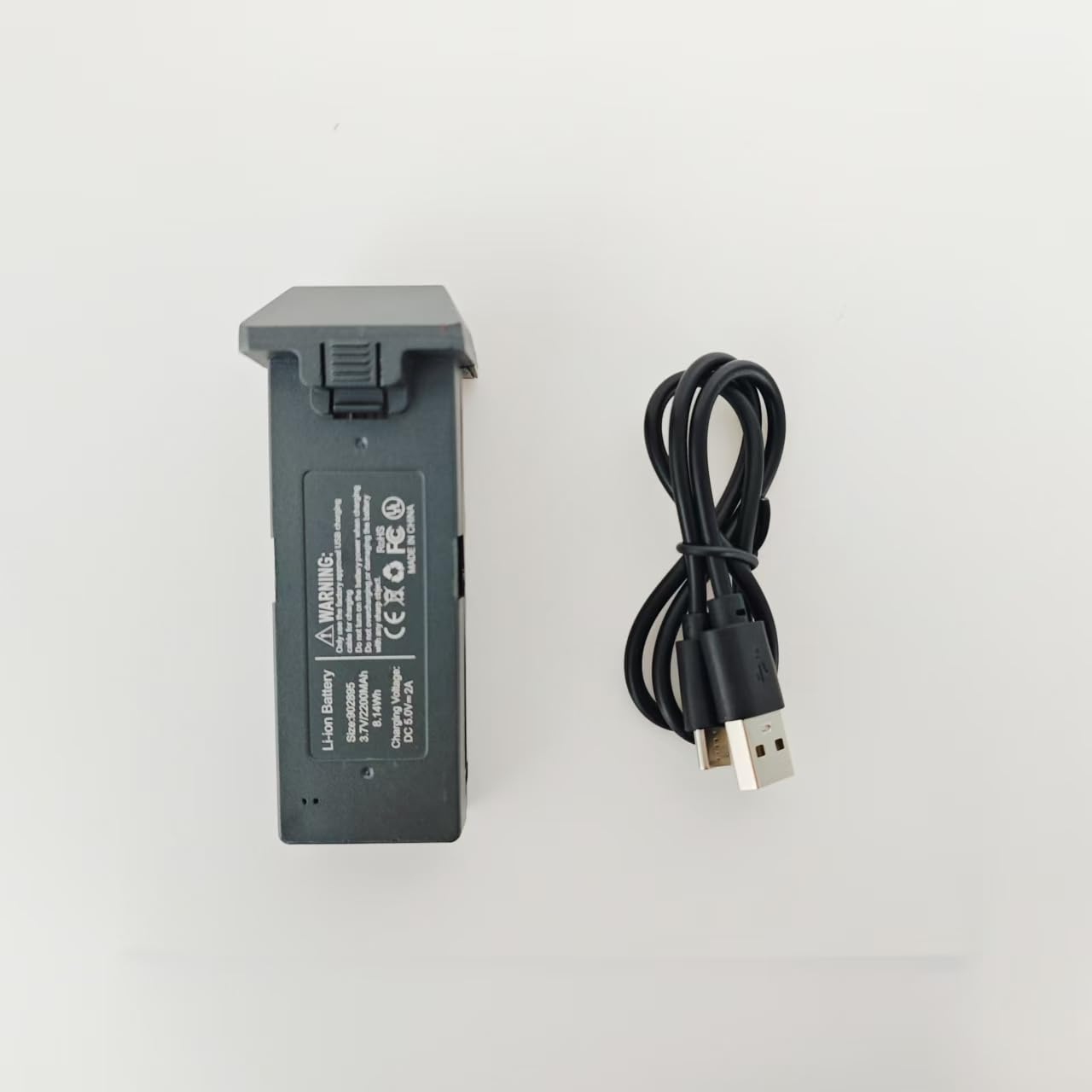
Image 1: KINGULL G9 Drone Rechargeable Battery
Key Features:
- Exclusive Design: Compatible only with the KINGULL G9 drone.
- Intelligent Safety: Features a secondary voltage warning system that initiates an auto-return function on the drone when battery levels are low, ensuring a safer flight experience.
- Extended Flight Time: With a 2200mAh lithium battery capacity, it provides up to 23 minutes of flight time when fully charged.
- Durable Construction: The battery case is made from excellent plastic material, ensuring strength and stability.
Package Contents:
- 1 x KINGULL G9 Intelligent Battery
- 1 x Original USB Charge Cable (Drone not included)
4. Charging the Battery
Follow these steps to charge your KINGULL G9 Drone Rechargeable Battery:
- Connect the small end of the original USB charge cable to the charging port on the battery.
- Connect the larger end of the USB charge cable to a suitable USB power source (e.g., a computer USB port, a USB wall adapter, or a power bank).
- The charging indicator light on the battery (if present) will show the charging status. Refer to the drone's manual or battery's specific indicators for details.
- Ensure the battery is fully charged before its first use and subsequent flights for optimal performance. Charging time may vary depending on the power source.
- Disconnect the battery from the charger once charging is complete.
5. Installation and Removal
Always ensure the KINGULL G9 drone is powered off before installing or removing the battery.
Installation:
- Locate the battery compartment on your KINGULL G9 drone. Refer to your drone's user manual for specific instructions on accessing the compartment.
- Carefully align the battery with the drone's battery slot, ensuring the connectors match.
- Gently push the battery into the compartment until it clicks securely into place. Ensure it is flush and does not obstruct any moving parts.
Removal:
- Ensure the drone is powered off.
- Locate the battery release mechanism (if any) on the drone.
- Press the release mechanism and gently pull the battery out of the compartment. Avoid forcing the battery.
6. Operation
Once the battery is installed and fully charged, you can operate your KINGULL G9 drone.
- Power on your KINGULL G9 drone according to its manual.
- During flight, continuously monitor the drone's battery indicator.
- The intelligent battery's secondary voltage warning system will alert you when the battery level is low. When this warning activates, the drone is designed to initiate an auto-return sequence. Land the drone promptly and safely when this warning occurs to prevent loss of power and potential damage.
- Avoid completely draining the battery during flight, as this can shorten its overall lifespan.
7. Maintenance and Storage
Proper maintenance and storage will help prolong the life of your battery:
- Cleaning: Periodically clean the battery contacts with a dry, soft cloth to ensure good electrical connection.
- Storage Temperature: Store the battery in a cool, dry place, away from direct sunlight, heat sources, and extreme cold. The ideal storage temperature is around 20°C to 25°C (68°F to 77°F).
- Long-Term Storage: If storing the battery for an extended period (more than a week), it is recommended to charge it to approximately 50-60% capacity. Do not store batteries fully charged or fully discharged for long durations.
- Avoid Moisture: Do not expose the battery to water or high humidity.
8. Troubleshooting
If you encounter issues with your KINGULL G9 Drone Rechargeable Battery, refer to the following common problems and solutions:
- Battery not charging:
- Ensure the USB cable is properly connected to both the battery and the power source.
- Verify that the USB power source is functional (e.g., try another USB port or adapter).
- Check the USB charge cable and battery charging port for any visible damage.
- Short flight time:
- Confirm the battery was fully charged before use.
- Battery performance can naturally degrade over time with repeated charge/discharge cycles.
- Operating the drone in extreme cold weather can significantly reduce battery life.
- Drone not powering on with battery:
- Ensure the battery is correctly and securely installed in the drone's compartment.
- Verify the battery is fully charged.
- Check for any visible damage to the battery's connectors or the drone's battery contacts.
If these steps do not resolve the issue, please contact KINGULL customer support.
9. Specifications
| Feature | Specification |
|---|---|
| Brand | KINGULL |
| Model Number | G9 Battery |
| Battery Cell Composition | Lithium Ion |
| Battery Cell Type | Lithium Ion |
| Capacity | 2200mAh |
| Estimated Flight Time | Up to 23 minutes (fully charged) |
| Number of Batteries | 1 (included) |
| Reusability | Rechargeable |
| Battery Weight | 25 Grams |
| Item Dimensions | 1 x 1 x 1 inches |
| Recommended Uses | Drone (KINGULL G9) |
| Manufacturer | KINGULL |
10. Warranty and Support
Warranty information for this product is limited. For detailed warranty terms and conditions, please refer to the official KINGULL website or contact KINGULL customer support directly.
For further assistance, technical support, or inquiries, please visit the KINGULL official website or contact their customer service department through the contact information provided on their website.